directus-extension-theme-settings
Version:
Harmonize Tailwind CSS color settings. Choose font pairings, spacing, shadows, colors and more. See README for how to use with shadcn and Nuxt UI.
297 lines (238 loc) • 13.3 kB
Markdown
# Theme Settings Interface Directus Extension: Visually Configure Your Frontend Theme Colors, Fonts, and More
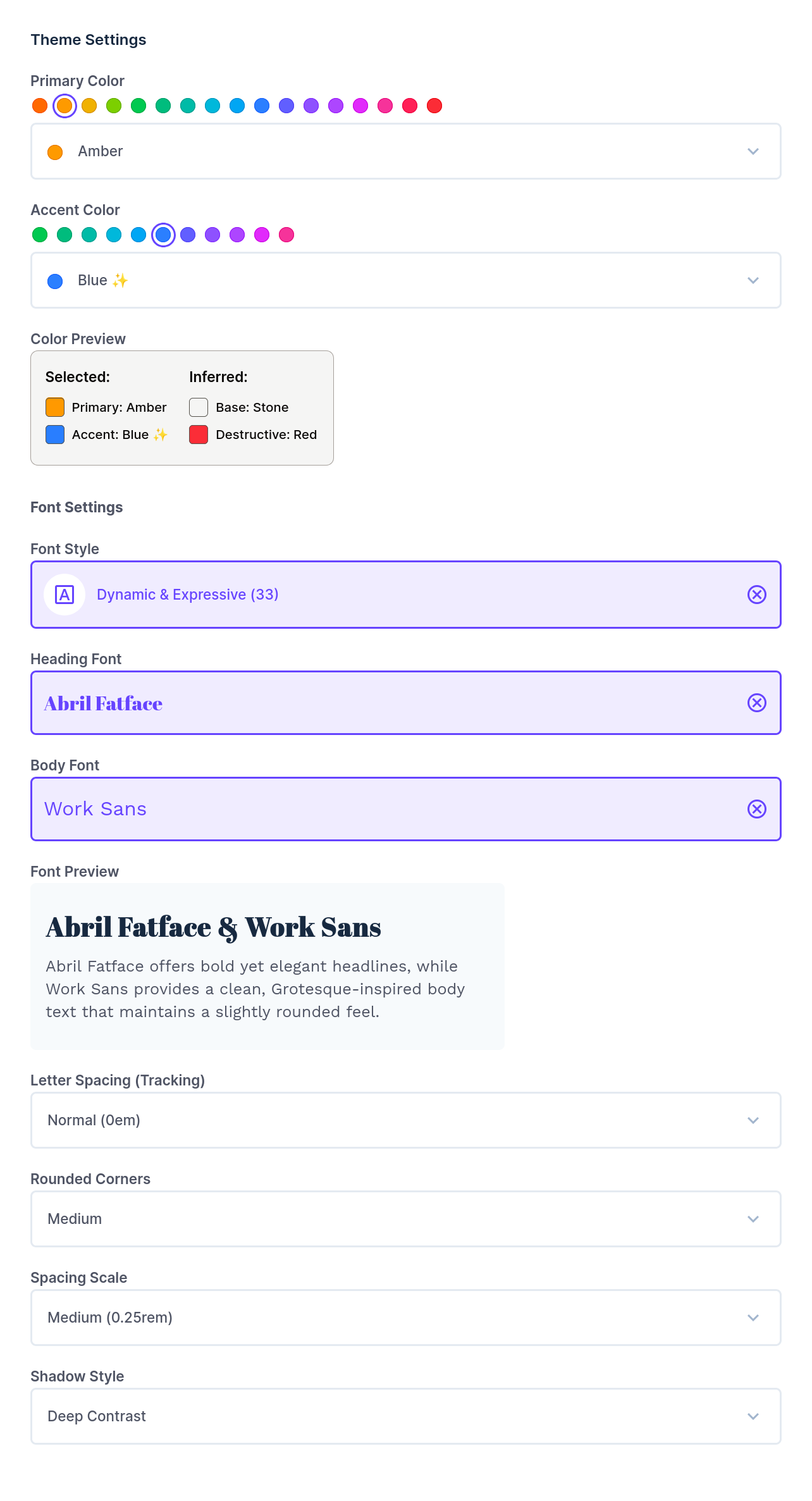
Interface for choosing harmonized primary & accent colors, font pairings, shadows, rounded corners and more.
Integration examples for Nuxt with **shadcn-vue** and **Nuxt UI** below.
## ✨ Features
This extension provides a user-friendly interface within Directus to configure your frontend's theme:
- **Color Theme Picker**: Select accent and primary colors to define your project's color palette. Uses TailwindCSS v4 color shades. Recommends best color pairings for beautiful color harmony.
- **Font Pair Picker**: Choose from a curated list of 150+ font pairings for headings and body text.
- **Rounded Corner Radius Picker**: Define the default border radius for UI elements.
- **Spacing Picker**: Set the base spacing unit, affecting margins, padding, and layout.
- **Letter Spacing (Tracking) Picker**: Adjust the letter spacing for text elements.
- **Shadow Picker**: Select from predefined shadow styles for depth and emphasis.
## ⚙️ Installation
1. Navigate to the **App Marketplace** in your Directus project.
2. Search for "**Theme Settings**" extension.
3. Click "Install".
Alternatively, you can install this extension manually by downloading the latest release and placing it in your Directus project's `extensions/` directory.
## 🚀 Usage
Once installed, you can add the "Theme Settings" interface to a JSON field in any of your collections.
1. Create a new field in your desired collection (e.g., a "Global Settings" collection). I like to call it `theme_settings`.
2. Set the field type to **JSON**.
3. Under "Interface", select "**Theme Settings**".
The extension will store its output as a JSON object in this field, which includes:
- Selected values for colors, fonts, radius, spacing, tracking, and shadows.
- On save, the `cssText` value is generated and saved inside the JSON object of `theme_settings` field (or the field name you chose).
**Example `cssText`** generated CSS -> [`theme-generated-example.css`](https://github.com/amerkay/directus-extension-theme-settings/blob/main/docs/theme-generated-example.css).
## 🎨 Using the generated CSS in your Nuxt 3 (or 4) project
> Currently, I am including only Vue 3 / Nuxt 3 integration examples for shadcn and nuxt/ui. Please contribute other framework or UI lib examples like Next.js, SvelteKit, etc. Thank you 🤩
Now, let's automate copying the generated CSS into your Nuxt 3 ([compatibilityVersion: 4](https://nuxt.com/docs/getting-started/upgrade#opting-in-to-nuxt-4)) project.
To do so, **copy the server plugin [`fetch-theme-css.ts`](https://github.com/amerkay/directus-extension-theme-settings/blob/main/docs/fetch-theme-css.ts) to your `server/plugins/` folder**. This will write the CSS generated to `app/assets/css/theme-generated.css`.
Don't forget to define `DIRECTUS_URL` and `DIRECTUS_SERVER_TOKEN` in your `.env` file:
```env
DIRECTUS_URL=http://your-directus-instance.com
DIRECTUS_SERVER_TOKEN=your_directus_server_token
```
> To get the `DIRECTUS_SERVER_TOKEN`, create a new `frontend-bot` user in Directus with the proper permissions to read the `theme_settings` field. Then, generate a server token for this user in the Directus admin panel.
### Using the generated CSS with **shadcn-vue**
1. To use the generated CSS with shadcn-vue, [make sure it's installed and configured](https://www.shadcn-vue.com/docs/installation/nuxt.html) along with TailwindCSS v4.
2. Add the file [`theme-shadcn.css`](https://github.com/amerkay/directus-extension-theme-settings/blob/main/docs/theme-shadcn.css) to your `app/assets/css/theme-shadcn.css`, which imports `theme-generated.css` and maps the CSS variables to shadcn-vue's theme variables.
3. Import `theme-shadcn.css` from your `tailwind.css` file and add the `` directive:
```css
"tailwindcss";
"./theme-shadcn.css";
/* shadcn theme. See https://www.shadcn-vue.com/docs/theming.html */
inline {
--color-background: hsl(var(--background));
--color-foreground: hsl(var(--foreground));
--color-card: hsl(var(--card));
--color-card-foreground: hsl(var(--card-foreground));
--color-popover: hsl(var(--popover));
--color-popover-foreground: hsl(var(--popover-foreground));
--color-primary: hsl(var(--primary));
--color-primary-foreground: hsl(var(--primary-foreground));
--color-secondary: hsl(var(--secondary));
--color-secondary-foreground: hsl(var(--secondary-foreground));
--color-muted: hsl(var(--muted));
--color-muted-foreground: hsl(var(--muted-foreground));
--color-accent: hsl(var(--accent));
--color-accent-foreground: hsl(var(--accent-foreground));
--color-destructive: hsl(var(--destructive));
--color-destructive-foreground: hsl(var(--theme-destructive-foreground));
--color-border: hsl(var(--border));
--color-input: hsl(var(--input));
--color-ring: hsl(var(--ring));
--color-chart-1: hsl(var(--chart-1));
--color-chart-2: hsl(var(--chart-2));
--color-chart-3: hsl(var(--chart-3));
--color-chart-4: hsl(var(--chart-4));
--color-chart-5: hsl(var(--chart-5));
--color-sidebar: hsl(var(--sidebar));
--color-sidebar-foreground: hsl(var(--sidebar-foreground));
--color-sidebar-primary: hsl(var(--sidebar-primary));
--color-sidebar-primary-foreground: hsl(var(--sidebar-primary-foreground));
--color-sidebar-accent: hsl(var(--sidebar-accent));
--color-sidebar-accent-foreground: hsl(var(--sidebar-accent-foreground));
--color-sidebar-border: hsl(var(--sidebar-border));
--color-sidebar-ring: hsl(var(--sidebar-ring));
/* ---- Additional directus-extension-theme-settings variables ---- */
/* Border Radius */
--radius-sm: calc(var(--theme-radius, 0.25rem) - 4px);
--radius-md: calc(var(--theme-radius, 0.25rem) - 2px);
--radius-lg: var(--theme-radius, 0.25rem);
--radius-xl: calc(var(--theme-radius, 0.25rem) + 4px);
/* Fonts */
--font-serif: var(--theme-font-family-heading), ui-serif, Georgia, Cambria,
"Times New Roman", Times, serif;
--font-heading: var(--font-serif);
--font-sans: var(--theme-font-family-body), ui-sans-serif, system-ui,
sans-serif, "Apple Color Emoji", "Segoe UI Emoji", "Segoe UI Symbol",
"Noto Color Emoji";
--font-body: var(--font-sans);
/* Shadow */
--shadow-2xs: var(--theme-shadow-2xs);
--shadow-xs: var(--theme-shadow-xs);
--shadow-sm: var(--theme-shadow-sm);
--shadow: var(--theme-shadow);
--shadow-md: var(--theme-shadow-md);
--shadow-lg: var(--theme-shadow-lg);
--shadow-xl: var(--theme-shadow-xl);
--shadow-2xl: var(--theme-shadow-2xl);
/* Letter Spacing (Tracking) */
--tracking-tighter: calc(var(--theme-tracking) - 0.05em);
--tracking-tight: calc(var(--theme-tracking) - 0.025em);
--tracking-normal: var(--theme-tracking);
--tracking-wide: calc(var(--theme-tracking) + 0.025em);
--tracking-wider: calc(var(--theme-tracking) + 0.05em);
--tracking-widest: calc(var(--theme-tracking) + 0.1em);
}
/* Apply spacing. See https://tailwindcss.com/docs/padding */
:root {
--spacing: var(--theme-spacing, 0.25rem);
}
/* Apply letter-spacing (tracking) */
base {
body {
letter-spacing: var(--tracking-normal);
}
}
```
### Using the generated CSS with **Nuxt UI**
1. Make sure you set up [`fetch-theme-css.ts`](https://github.com/amerkay/directus-extension-theme-settings/blob/main/docs/fetch-theme-css.ts) in your project to generate the CSS file.
2. Configure Nuxt UI + TailwindCSS v4. See [Nuxt UI documentation](https://ui.nuxt.com/getting-started/installation/nuxt) for installation and set up.
3. Add the custom theme settings to your `tailwind.css` file:
```css
"tailwindcss";
"@nuxt/ui";
"./theme-generated.css";
/* Define selected colors from directus-extension-theme-settings */
static inline {
--color-theme-primary: hsl(var(--theme-primary-500));
--color-theme-primary-50: hsl(var(--theme-primary-50));
--color-theme-primary-100: hsl(var(--theme-primary-100));
--color-theme-primary-200: hsl(var(--theme-primary-200));
--color-theme-primary-300: hsl(var(--theme-primary-300));
--color-theme-primary-400: hsl(var(--theme-primary-400));
--color-theme-primary-500: hsl(var(--theme-primary-500));
--color-theme-primary-600: hsl(var(--theme-primary-600));
--color-theme-primary-700: hsl(var(--theme-primary-700));
--color-theme-primary-800: hsl(var(--theme-primary-800));
--color-theme-primary-900: hsl(var(--theme-primary-900));
--color-theme-primary-950: hsl(var(--theme-primary-950));
--color-theme-primary-text: hsl(var(--theme-primary-text));
--color-theme-accent: hsl(var(--theme-accent-500));
--color-theme-accent-50: hsl(var(--theme-accent-50));
--color-theme-accent-100: hsl(var(--theme-accent-100));
--color-theme-accent-200: hsl(var(--theme-accent-200));
--color-theme-accent-300: hsl(var(--theme-accent-300));
--color-theme-accent-400: hsl(var(--theme-accent-400));
--color-theme-accent-500: hsl(var(--theme-accent-500));
--color-theme-accent-600: hsl(var(--theme-accent-600));
--color-theme-accent-700: hsl(var(--theme-accent-700));
--color-theme-accent-800: hsl(var(--theme-accent-800));
--color-theme-accent-900: hsl(var(--theme-accent-900));
--color-theme-accent-950: hsl(var(--theme-accent-950));
--color-theme-accent-text: hsl(var(--theme-accent-text));
--color-theme-destructive: hsl(var(--theme-destructive-500));
--color-theme-destructive-50: hsl(var(--theme-destructive-50));
--color-theme-destructive-100: hsl(var(--theme-destructive-100));
--color-theme-destructive-200: hsl(var(--theme-destructive-200));
--color-theme-destructive-300: hsl(var(--theme-destructive-300));
--color-theme-destructive-400: hsl(var(--theme-destructive-400));
--color-theme-destructive-500: hsl(var(--theme-destructive-500));
--color-theme-destructive-600: hsl(var(--theme-destructive-600));
--color-theme-destructive-700: hsl(var(--theme-destructive-700));
--color-theme-destructive-800: hsl(var(--theme-destructive-800));
--color-theme-destructive-900: hsl(var(--theme-destructive-900));
--color-theme-destructive-950: hsl(var(--theme-destructive-950));
--color-theme-destructive-text: hsl(var(--theme-destructive-text));
--color-theme-base: hsl(var(--theme-base-500));
--color-theme-base-50: hsl(var(--theme-base-50));
--color-theme-base-100: hsl(var(--theme-base-100));
--color-theme-base-200: hsl(var(--theme-base-200));
--color-theme-base-300: hsl(var(--theme-base-300));
--color-theme-base-400: hsl(var(--theme-base-400));
--color-theme-base-500: hsl(var(--theme-base-500));
--color-theme-base-600: hsl(var(--theme-base-600));
--color-theme-base-700: hsl(var(--theme-base-700));
--color-theme-base-800: hsl(var(--theme-base-800));
--color-theme-base-900: hsl(var(--theme-base-900));
--color-theme-base-950: hsl(var(--theme-base-950));
--color-theme-base-text: hsl(var(--theme-base-text));
/* ---- Additional directus-extension-theme-settings variables ---- */
/* Fonts */
--font-serif: var(--theme-font-family-heading), ui-serif, Georgia, Cambria,
"Times New Roman", Times, serif;
--font-heading: var(--font-serif);
--font-sans: var(--theme-font-family-body), ui-sans-serif, system-ui,
sans-serif, "Apple Color Emoji", "Segoe UI Emoji", "Segoe UI Symbol",
"Noto Color Emoji";
--font-body: var(--font-sans);
/* Shadow */
--shadow-2xs: var(--theme-shadow-2xs);
--shadow-xs: var(--theme-shadow-xs);
--shadow-sm: var(--theme-shadow-sm);
--shadow: var(--theme-shadow);
--shadow-md: var(--theme-shadow-md);
--shadow-lg: var(--theme-shadow-lg);
--shadow-xl: var(--theme-shadow-xl);
--shadow-2xl: var(--theme-shadow-2xl);
/* Letter Spacing (Tracking) */
--tracking-tighter: calc(var(--theme-tracking) - 0.05em);
--tracking-tight: calc(var(--theme-tracking) - 0.025em);
--tracking-normal: var(--theme-tracking);
--tracking-wide: calc(var(--theme-tracking) + 0.025em);
--tracking-wider: calc(var(--theme-tracking) + 0.05em);
--tracking-widest: calc(var(--theme-tracking) + 0.1em);
}
:root {
/* Apply radius. See https://ui.nuxt.com/getting-started/theme#radius */
--ui-radius: var(--theme-radius, 0.25rem);
/* Apply spacing. See https://tailwindcss.com/docs/padding */
--spacing: var(--theme-spacing1, 0.25rem);
}
/* Apply letter-spacing (tracking) */
base {
body {
letter-spacing: var(--tracking-normal);
}
}
```
4. Finally, update your `app.config.ts` file to use the new colors:
```ts
export default defineAppConfig({
ui: {
colors: {
primary: "theme-primary",
secondary: "theme-accent",
neutral: "theme-base",
error: "theme-destructive",
},
},
});
```
## 🤩 Contributing
Contributions are welcome! Please feel free to submit a pull request or open an issue for bugs, feature requests, or improvements.
I would appreciate help adding more integration examples for other frameworks like Next.js, SvelteKit, as well as other UI libraries.
## 📄 License
This extension is licensed under the [MIT License](LICENSE).