directus-extension-inframe
Version:
Display dashboards, reports and external sites in iframes, directly in your Directus panel. Install, configure and centralize everything in one place!
146 lines (96 loc) • 6.61 kB
Markdown
# 🚀 inFrame: The Ultimate Module for External Content Integration in Directus
[](https://www.npmjs.com/package/directus-extension-inframe)
[](https://github.com/devix-tecnologia/directus-extension-inframe/blob/main/LICENSE)
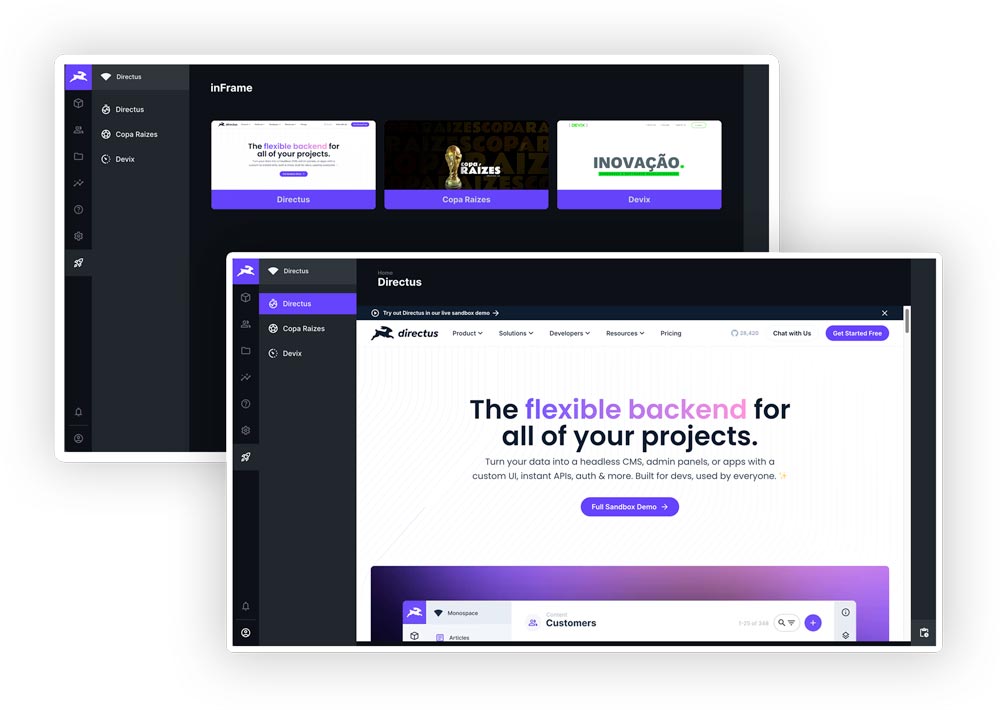
## 💡 Stop Switching Tabs. Start Integrating.
**inFrame** is the _plug-and-play_ solution that transforms your Directus admin panel into a centralized information
hub. Integrate BI dashboards, real-time reports, external tools, and any content via `iframe` directly into your
Headless CMS.
> **Boost Productivity:** Get instant access to critical data and third-party tools without ever leaving Directus.
## 🎯 Why inFrame is Essential for Your Directus Project
| Key Benefit | Description |
| :-------------------------------- | :---------------------------------------------------------------------------------------------------- |
| **📊 BI & Dashboard Integration** | Connect Power BI, Tableau, Metabase, Grafana, or any Business Intelligence tool. |
| **🔗 Tool Centralization** | Organize external links and systems into a single, easily accessible module for your entire team. |
| **⚡ Zero-Config Installation** | The extension automatically creates all necessary collections and fields. Install and use in seconds! |
| **🔄 Navigation Persistence** | The module automatically saves and restores your last view, even after closing the browser. |
| **🌍 Multilingual Support** | Ready for global projects, with automatic translations for multiple languages. |
## ✨ Exclusive Feature: Dynamic URL Variables
Take integration to the next level. inFrame allows you to inject user data and the current Directus context directly
into your iframe's URL. Perfect for authentication and report personalization.
### Available Variables
| Variable | Description | Usage Example |
| :------------ | :---------------------------------------------------------- | :---------------------------------------------- |
| `$token` | Directus access token (JWT). **(Use with extreme caution)** | `https://app.site.com/report?auth=$token` |
| `$user_id` | ID of the logged-in user. | `https://metabase.com/dash?user_id=$user_id` |
| `$user_email` | Email of the logged-in user. | `https://analytics.com/view?viewer=$user_email` |
| `$user_role` | Key of the user's role. | `https://app.site.com/access?role=$user_role` |
| `$timestamp` | Current timestamp (ISO 8601). | `https://app.site.com/log?time=$timestamp` |
| `$locale` | User's language preference (e.g., `en-US`). | `https://app.site.com/lang?locale=$locale` |
### ⚠️ Security: Responsible Use of `$token`
Using the `$token` exposes the Directus access token in the URL, which can be a security risk. **We strongly recommend
using `$user_id` or `$user_email` whenever possible.**
> [!WARNING] **Use `$token` ONLY with sites you fully trust and control.** The token can leak in server logs, browser
> history, and `Referer` headers. The extension will block the use of `$token` in URLs that do not use HTTPS.
## 🛠️ Installation: Click & Go (Zero Config)
The inFrame module is designed for immediate use. Choose the installation method that suits your setup:
### 1. Directus Marketplace (Recommended)
The easiest way to install is directly through the Directus Admin App:
1. Navigate to **Settings** -> **Extensions**.
2. Find **"inFrame Module"** in the Marketplace.
3. Click **"Install"**.
4. Restart your Directus server (if self-hosted).
5. Done! The **"Reports"** module will appear in your sidebar.
### 2. Manual Installation (NPM/PNPM)
For self-hosted environments or custom setups, you can install via your package manager:
```bash
# Using NPM
npm install directus-extension-inframe
# Using PNPM
pnpm add directus-extension-inframe
```
**Automatic Setup:** The extension automatically creates all necessary collections, fields, and relations upon
installation:
- ✅ `inframe` Collection to manage your content.
- ✅ Translation Collections (`languages`, `inframe_translations`).
- ✅ All required fields and relations configured.
## 📖 How to Use
1. **Access the Module:** Click on **"Reports"** in the sidebar.
2. **Create a New Item:** Click "Create new" and fill in:
- **URL:** The link to the iframe content.
- **Status:** Published, Draft, or Archived.
- **Icon:** Choose a Material Design icon for the item.
3. **Save:** The content will be displayed in the iframe, ready for interaction.
## ⚙️ Advanced Configuration (Docker)
If you are using Docker, you may need to configure the Content Security Policy (CSP) to allow loading iframes from
external domains.
```yaml
environment:
# Add trusted domains to the frame-src directive
CONTENT_SECURITY_POLICY_DIRECTIVES__FRAME_SRC: "'self' https://your-bi-domain.com https://another-tool.com"
```
> [!CAUTION] Avoid using `'*'` in production. List only trusted domains.
## 🌍 Compatibility
Tested and compatible with:
- **Directus 9.x**: 9.22.4, 9.23.1, 9.24.0
- **Directus 10.x**: 10.8.3
- **Directus 11.x**: 11.13.1 and newer versions
## 🤝 Contributing
Contributions are welcome! See our [Contributing Guide](CONTRIBUTING.md) for details on how to set up the development
environment, run tests, and submit Pull Requests.
## 📝 License
This project is licensed under the MIT License - see the [LICENSE](LICENSE) file for details.
## 👥 Authors
- **Sidarta Veloso** - [GitHub](https://github.com/sidartaveloso) |
[LinkedIn](https://www.linkedin.com/in/sidartaveloso)
- **Fernando Gatti** - [GitHub](https://github.com/gattifernando) |
[LinkedIn](https://www.linkedin.com/in/gattifernando/)
## 🏢 Organization
[Devix Tecnologia Ltda.](https://github.com/devix-tecnologia)