directus-extension-flow-manager
Version:
This is a custom module for managing Flow
120 lines (112 loc) • 6.39 kB
Markdown
# directus-extension-flow-manager
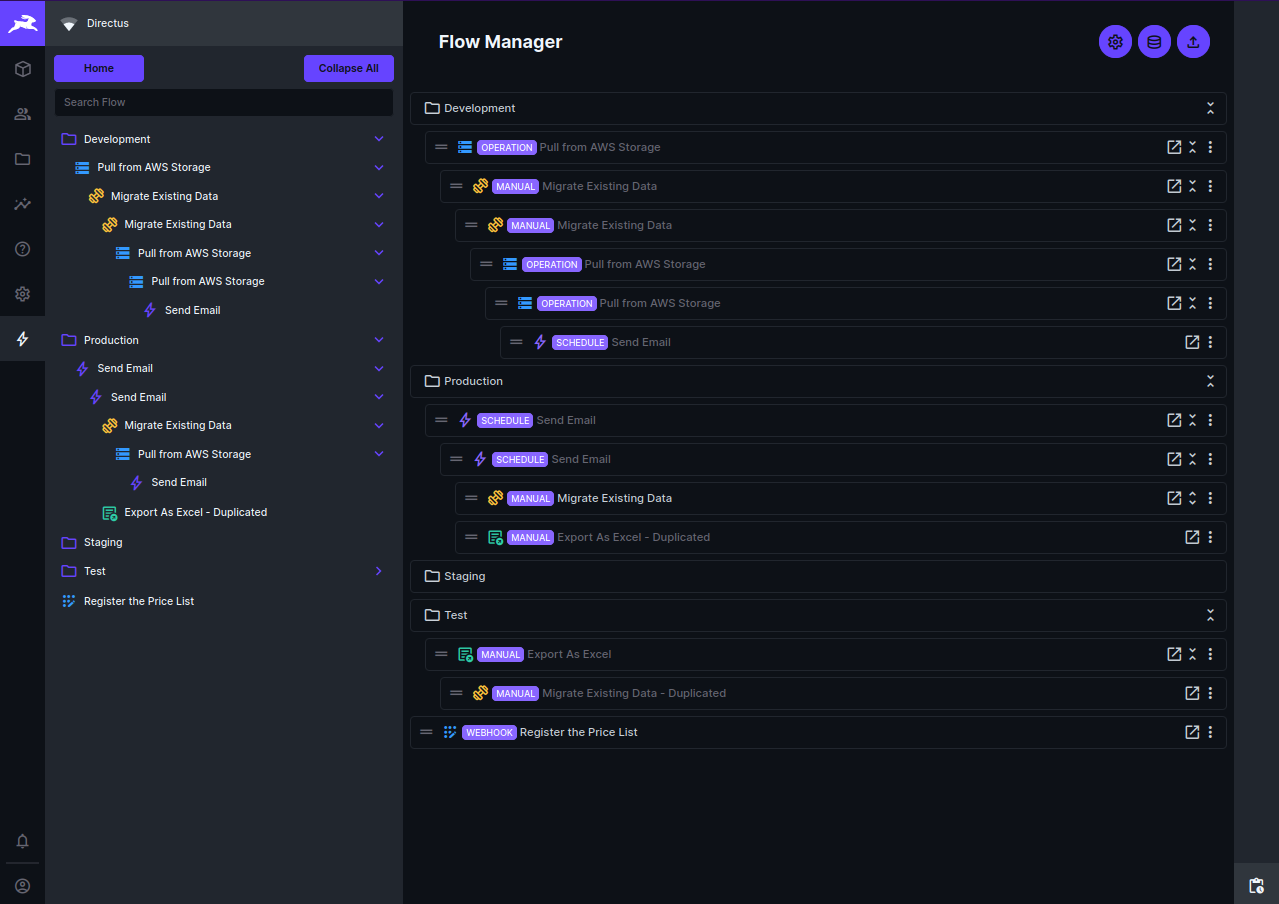
This directus module extension allows you to manage your flow content from directus.
You can install it via ``npm install directus-extension-flow-manager``
Roadmap:
- [x] Duplicate flow
- [x] Export and import flow
- [x] Add flow validation when Restore
- [x] Feature for keeping original flow id when restore
- [x] Add flow grouping
- [x] Add feature to import directly to another directus instance
- [x] Add feature for search flow on navigation
- [x] Fix deep child flow logic when drag and drop
- [x] Add table view option with search, filter, header reorder, data sorting, and header resize features
- [x] Add feature to run Manual flow with the ability to pass the payload
- [x] Add Total Runs, Last Run Time and Last Updated Time on flow row
- [x] Add ability to bulk delete, duplicate, export, and restore flow
- [x] Now we can customize the folder icon and color
- [ ] Pagination on table view
- [ ] Move the category to a collection for better UX and data structure
- [x] Run webhook flow ability
- [x] Manage another instance flows
Screenshoots
Changelogs:
- 1.0.0: (13 July 2023)
* Initial release
- 1.1.0: (21 July 2023)
* Add Backup and Restore feature
* Allow user to click the flow row and bring to flow detail page
- 1.1.1: (02 August 2023)
* Add flow validation on restore
- 1.2.1: (14 September 2023)
* Add feature for keeping original flow id when restore
* Add New flow name textfield on restore confirmation dialog
- 1.2.2: (22 September 2023)
* Add flow grouping
- 1.2.3: (13 November 2023)
* Add feature to import directly to another directus instance
You need to install the `directus-extension-flow-manager-endpoint` to use this feature
- 1.3.0: (17 March 2024)
* Add feature for search flow on navigation
You can search flow by name and your search text will be highlighted and automatically expanded the category
Note: Current expanded category will be stored on local storage
* Fix deep child flow logic when drag and drop
In this version you can unlimitedly drag and drop your flow to another flow or category
* Add trigger type on flow row
You can see the trigger type on the flow row
- `MANUAL` : Flow that can be triggered manually
- `OPERATION` : Flow that can be triggered by another flow
- `SCHEDULE` : Flow that can be triggered by schedule
- `ACTION` : Flow that can be triggered by Event hook
- `WEBHOOK` : Flow that can be triggered by Webhook
* Add button to go to the directus flow detail page
You can click the flow row and it will bring you to the directus flow detail page
* Add option to delete the flow
You can delete the flow by clicking the delete button on the flow row option or the navigation context menu
- 1.4.0 (25 May 2024)
* Add table view option with search, filter, header reorder, data sorting, and header resize features
* Add feature to run Manual flow with the ability to pass the payload
* Add Total Runs, Last Run Time and Last Updated Time on flow row
* Add ability to bulk delete, duplicate, export, and restore flow
* Now we can customize the folder icon and color
* Add feature to move to the current opened category from navigation context menu
* Fix on MySQL because of the default value of the category
- 1.4.1 (26 May 2024)
* Fix the version parsing from installed by the npm method
* Fix the new field creation
- 1.4.2 (15 June 2024)
* Fix the run flow without require selection
* Fix flow hook to use knex directly to avoid the side effect of the directus flowManager.reload()
* Optimize the import of lodash
- 1.4.3 (25 June 2024)
* Add feature to pull flows from another directus instance to the current instance
- 1.4.4 (28 July 2024)
* Add admin access checker on the flow manager module registration
- 1.4.5 (07 August 2024)
* Add feature to run webhook flow
* Add feature to manage another instance flows (duplicate, backup, restore, categorize, table view, run, and delete)
* Add checking for the flow manager field onload
- 1.4.6 (13 August 2024)
* Fix module pre-register checking for directus 11
* Fix run flow webhook wrong method
- 1.4.7 (25 August 2024)
* Fix URL parsing and validation on Credentials. Now you can use the full URL with the protocol and it will be validated and parsed correctly
- 1.4.8 (09 September 2024)
* Fix URL Parsing when the URL using custom domain pointing to the directus instance
* Fix the z-index of container right causing the filter on all page not working
- 1.4.9 (22 November 2024)
* Add feature for batch Activate and Deactivate flow
- 1.4.10 (01 December 2024)
* Fix duplicate and restore flow with unused operations
- 1.4.11 (30 September 2025)
* Fix directus policy checker for newer directus version
* Add directus version label
- 1.4.12 (5 November 2025)
* Add ability to get the last error of a flow
* Fix the flow run counter
* Fix the logic when run flow w/o confirmation dialog
- 1.4.13 (15 November 2025)
* Fix flow run counter limited for 100 [#23](https://github.com/baguse/directus-extension-flow-manager/issues/23)
* Fix the flow run error message exceeded length [#24](https://github.com/baguse/directus-extension-flow-manager/issues/24)
- 1.4.14 (23 November 2025)
* Fix issue when different fields are exists but Configure button was not shown [#25](https://github.com/baguse/directus-extension-flow-manager/issues/25)
- 1.5.0 (25 February 2026)
* Feature Request to allow push to cloud as an update instead of a new creation [#27](https://github.com/baguse/directus-extension-flow-manager/issues/27)
* Add dashboard feature: You can get the success or failed detail on each flow and also you can inspect the logs
- 1.5.2 (26 February 2026)
* Fix failed push to cloud because there is `user_created` field
Contributing:
If you want to contribute kindly to create a PR and if you want to request a feature or report of a bug kindly create the Issue
##### Buy me a coffee
<a href="https://buymeacoffee.com/andreantobs"><img src="https://raw.githubusercontent.com/baguse/directus-extension-flow-manager/6edf42d9a46f11c84f4caef2dbef25de22085172/images/buyme-coffee.png" width="200" /></a>