diff-so-fancy
Version:
Good-lookin' diffs with diff-highlight and more
131 lines (83 loc) • 5.03 kB
Markdown
# diff-so-fancy [](https://circleci.com/gh/so-fancy/diff-so-fancy) [](https://travis-ci.org/so-fancy/diff-so-fancy) [](https://ci.appveyor.com/project/stevemao/diff-so-fancy/branch/master)
`diff-so-fancy` strives to make your diffs **human** readable instead of machine readable. This helps improve code quality and helps you spot defects faster.
## Screenshot
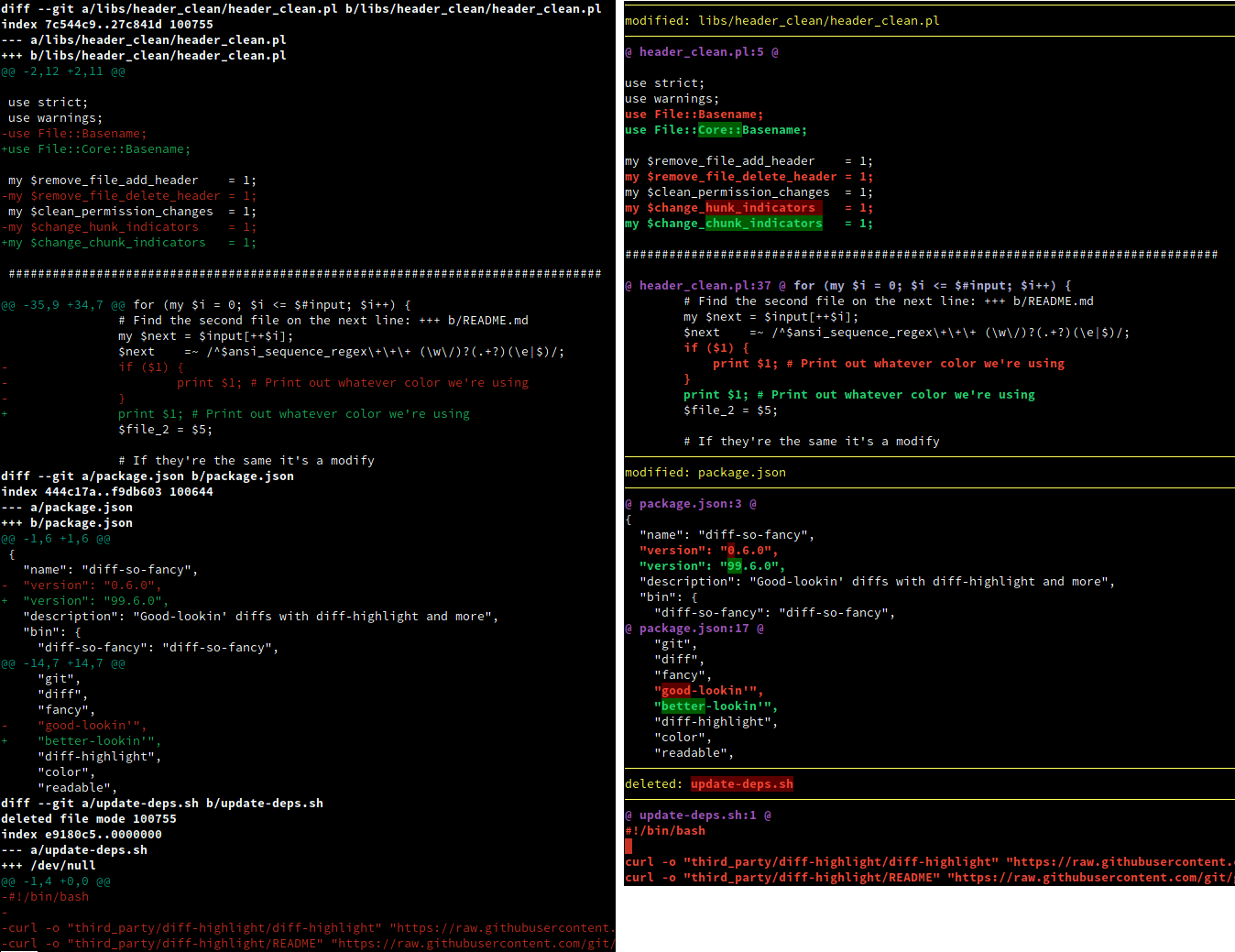
Vanilla `git diff` vs `git` and `diff-so-fancy`
## Install
Installation is as simple as cloning this repo and then putting the `diff-so-fancy` script in to your `$PATH`. The `lib/` directory will need to be kept relative to the core script.
`diff-so-fancy` is also available from the [NPM registry](https://www.npmjs.com/package/diff-so-fancy), [brew](https://formulae.brew.sh/formula/diff-so-fancy), and as a package on [Nix](https://github.com/NixOS/nixpkgs/blob/master/pkgs/applications/version-management/git-and-tools/diff-so-fancy/default.nix), in the [Arch community repo](https://archlinux.org/packages/community/any/diff-so-fancy/), and [ppa:aos for Debian/Ubuntu Linux](https://github.com/aos/dsf-debian).
Issues relating to packaging ('installation does not work', 'version is out of date', etc.) should be directed to those packages' own repositories/issue trackers where applicable.
**Note:** Windows users may need to install [MinGW](https://sourceforge.net/projects/mingw/files/) or the [Windows subsystem for Linux](https://docs.microsoft.com/en-us/windows/wsl/install-win10).
## Usage
### With git
Configure git to use `diff-so-fancy` for all diff output:
```shell
git config --global core.pager "diff-so-fancy | less --tabs=4 -RFX"
git config --global interactive.diffFilter "diff-so-fancy --patch"
```
### Improved colors for the highlighted bits
The default Git colors are not optimal. The colors used for the screenshot above were:
```shell
git config --global color.ui true
git config --global color.diff-highlight.oldNormal "red bold"
git config --global color.diff-highlight.oldHighlight "red bold 52"
git config --global color.diff-highlight.newNormal "green bold"
git config --global color.diff-highlight.newHighlight "green bold 22"
git config --global color.diff.meta "11"
git config --global color.diff.frag "magenta bold"
git config --global color.diff.func "146 bold"
git config --global color.diff.commit "yellow bold"
git config --global color.diff.old "red bold"
git config --global color.diff.new "green bold"
git config --global color.diff.whitespace "red reverse"
```
### With diff
Use `-u` with `diff` for unified output, and pipe the output to `diff-so-fancy`:
```shell
diff -u file_a file_b | diff-so-fancy
```
## Options
### markEmptyLines
Should the first block of an empty line be colored. (Default: true)
```shell
git config --bool --global diff-so-fancy.markEmptyLines false
```
### changeHunkIndicators
Simplify git header chunks to a more human readable format. (Default: true)
```shell
git config --bool --global diff-so-fancy.changeHunkIndicators false
```
### stripLeadingSymbols
Should the pesky `+` or `-` at line-start be removed. (Default: true)
```shell
git config --bool --global diff-so-fancy.stripLeadingSymbols false
```
### useUnicodeRuler
By default, the separator for the file header uses Unicode line-drawing characters. If this is causing output errors on your terminal, set this to `false` to use ASCII characters instead. (Default: true)
```shell
git config --bool --global diff-so-fancy.useUnicodeRuler false
```
### rulerWidth
By default, the separator for the file header spans the full width of the terminal. Use this setting to set the width of the file header manually.
```shell
git config --global diff-so-fancy.rulerWidth 47 # git log's commit header width
```
## The diff-so-fancy team
| Person | Role |
| --------------------- | ---------------- |
| @scottchiefbaker | Project lead |
| @OJFord | Bug triage |
| @GenieTim | Travis OSX fixes |
| @AOS | Debian packager |
| @Stevemao/@Paul Irish | NPM release team |
## Contributing
Pull requests are quite welcome, and should target the [`next` branch](https://github.com/so-fancy/diff-so-fancy/tree/next). We are also looking for any feedback or ideas on how to make `diff-so-fancy` even *fancier*.
### Other documentation
* [Pro-tips on advanced usage](pro-tips.md)
* [Reporting Bugs](reporting-bugs.md)
* [Hacking and Testing](hacking-and-testing.md)
* [History](history.md)
## Alternatives
* https://github.com/dandavison/delta
## License
MIT