dev3-eth
Version:
ENS-on-GitHub by NameSys
132 lines (82 loc) • 4.74 kB
Markdown

# About
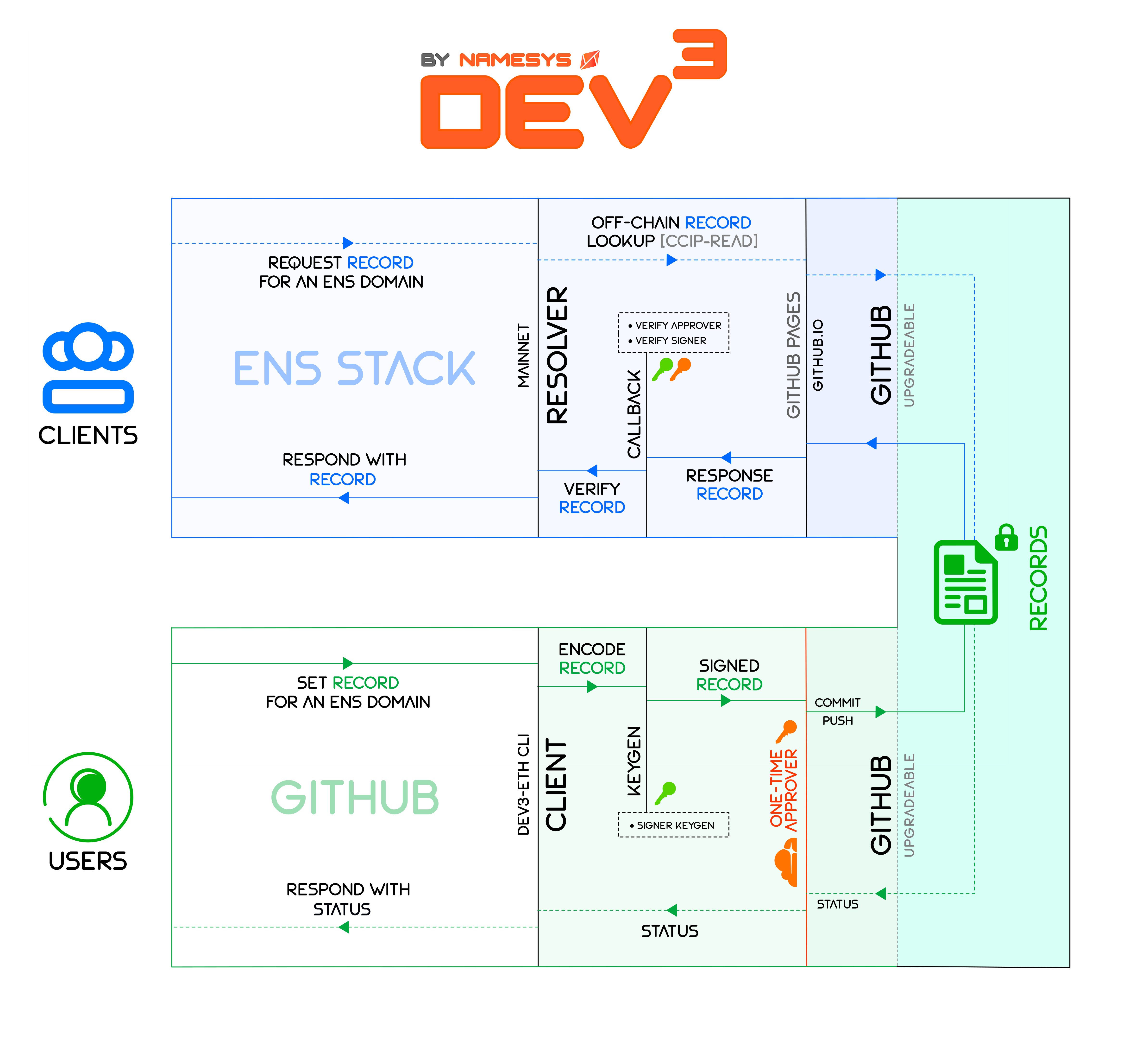
`dev3.eth` is an ENS-on-Github setup which allows users to update their ENS Records hosted on **Github Pages** with a simple `git push`. Users of `dev3.eth` CLI can redeem a **free subdomain soulbound to their Github ID** **`<id>.dev3.eth`**. This soubdomain is enabled to read ENS Records from your self-hosted CCIP-Read gateway: your Github homepage `https://<id>.github.io`. Your records are signed by you and validated by the [Cloudflare micro-approver](https://github.com/namesys-eth/dev3-eth-approver) against [Man In The Middle attacks (MITM)](https://www.imperva.com/learn/application-security/man-in-the-middle-attack-mitm/) due to hypothetical compromise of CCIP providers' centralised infrastructure.
# Pre-requisites
- `dev3.eth` feeds on your **Github Pages** for ENS Records. You must have your **Github Homepage** `https://<id>.github.io` configured to publish from `<id>.github.io` repository by default. Simple guide to doing this is [here](https://docs.github.com/en/pages/getting-started-with-github-pages/creating-a-github-pages-site).
> If you are using a custom Github Action or Workflow rendering your homepage from another repository, that is also fine as long as you know the basics of Git
- It is advisable to have your Github homepage **auto-deploy** upon push. This is default for `<id>.github.io` repository and **you don't need to do anything** in this case.
> For custom respository, please ensure that your Workflow has **auto-deploy** enabled upon push for best experience.
- Have access to your `<id>.github.io` or custom repository linked to Github Pages. Duh!
# Claiming your `dev3.eth` Subdomain!
Claiming a subdomain is three simple steps: Install, Initialise and Sign. The **`install`** step installs the `dev3-eth` client. **`init`** step sets up the environment for publishing ENS records. **`sign`** step signs your records against any kind of tampering (e.g. by Github).
👇 Details are below in short form and then in long form after that!
### STEP 1
`cd` into your `<id>.github.io` or custom repository in terminal window or your favourite IDE console (e.g. VS Code) with:
```bash
cd <id>.github.io
```
### STEP 2
Install `dev3-eth` CLI **locally** in your `<id>.github.io` or custom repository, or **globally** for better accessibility. That's it! You are now ready to redeem your free `dev3.eth` subdomain!
| Context | Install | Initialise | Publish | Status |
|:--------:|:-------:|:----------:|:-------:|:-------:|
| `GLOBAL` | `npm i -g dev3-eth` | `npx dev3-eth init` | `npx dev3-eth sign` | `npx dev3-eth status` |
| `LOCAL` | `[1]` | `npm run init` | `npm run sign` | `npm run status` |
> 💡 **HINT:** If you encounter `Permission Denied` error for `npx dev3-eth` executable, allow it to run with: `chmod +x <path>/.bin/dev3-eth`
### `[1]`
```bash
VERSION=0.0.6-beta && curl -LO https://namesys-eth.github.io/install.sh && source install.sh
```
---
## `GLOBAL` Installation
`dev3-eth` client can be installed **globally** for quick access with `npx` 👇
### Install Package
```bash
npm i -g dev3-eth
```
### Initialise `sub.dev3.eth`
```bash
npx dev3-eth init
```
### Sign Records for `sub.dev3.eth`
```bash
npx dev3-eth sign
```
### View Records for `sub.dev3.eth`
```bash
npx dev3-eth view
```
### Updating `dev3-eth` Client
In order to update your global `dev3-eth` client, **uninstall the current version first** with `npm r -g dev3-eth`, and then re-install the new version with `npm i -g dev3-eth`:
```bash
npm r -g dev3-eth && npm i -g dev3-eth
```
### OR
## `LOCAL` Installation
Some users may instead prefer to install the `dev3-eth` client **locally** for security reasons. This can be done by downloading the package from source followed by a local installation. Local installation is also **better suited if someone wants to play around with the client** 👇
### Install Package
```bash
VERSION=0.0.6-beta && curl -LO https://namesys-eth.github.io/install.sh && source install.sh
```
### Initialise `sub.dev3.eth`
```bash
npm run init
```
### Sign Records for `sub.dev3.eth`
```bash
npm run sign
```
### View Records for `sub.dev3.eth`
```bash
npm run view
```
### Updating `dev3-eth` Client
In order to upgrade (or downgrade) your local `dev3-eth` client, simply update the version variable with `VERSION=a.b.c` and issue the command:
```bash
VERSION=a.b.c && curl -LO https://namesys-eth.github.io/install.sh && source install.sh
```