detect-ios-address-bar
Version:
Detect iOS (>= v15) Safari's UI Overlay of the address bar on iPhones to modify your web app's UI if needed
55 lines (32 loc) • 2.56 kB
Markdown
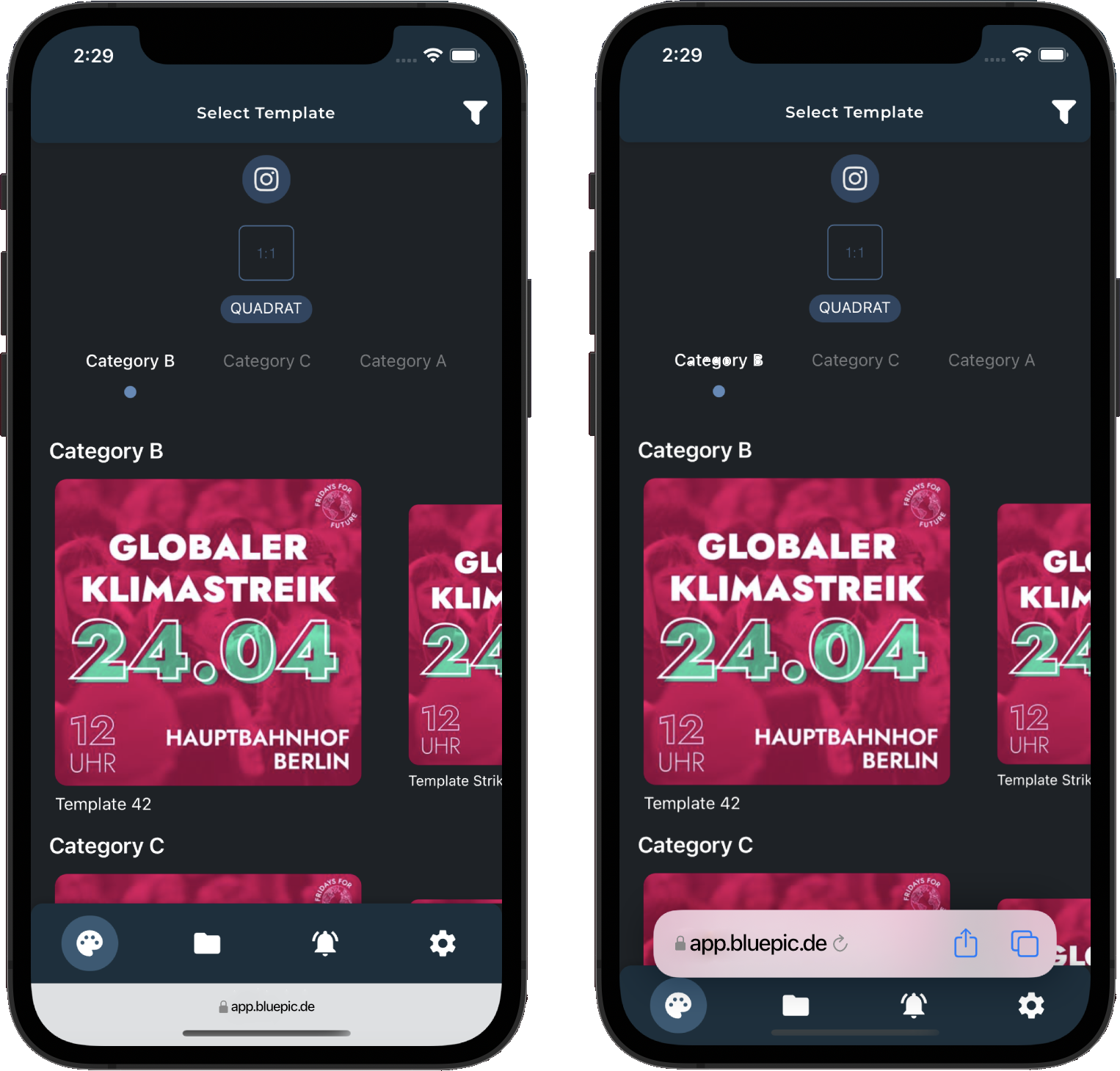
With iOS 15, Apple updated *Mobile Safari* to show the address bar either as a small area on the bottom or, if Safari recognizes some *navigation related user input*, as an overlay over the whole web page. This becomes a problem when web app's using a mobile layout that uses the bottom of your screen as a tab bar for example. That's because a *navigation related user input* is not just triggered by clicking on the small address bar area on the bottom (which seems to be a real navigation intention) but also when the user scrolls up.
## Installation
```bash
npm install detect-ios-address-bar
```
## Usage
```javascript
import SafariAddressBarDetector from 'detect-ios-address-bar'
// Initialize instance
const safariAddressBar = new SafariAddressBarDetector();
// Listening for update events
safariAddressBar.on('update', mode => {
console.log(mode); // 'collapsed' or 'overlayed' or null if device has
});
// Get mode immediately
console.log(safariAddressBar.mode); // 'collapsed' or 'overlayed' or null
```
If the device is not a targeted device (Mobile Safari >= iOS 15 on iPhone or iPod Touch), the `mode` will be `null`
### Destroy
Because the instance creates some global events listeners and intervals, you may like to destroy them in case of not using the instance any more.
```javascript
safariAddressBar.destroy();
```
Currently (September of 2021) there are two modes we want to recognize on iPhones (and theoretically the iPod Touch 7th) running Mobile Safari on iOS >= 15:
- `collapsed`: When the address bar is this small hint area on the bottom
- `overlayed`: When the address overlays the bottom of the screen while the web page viewport lies under the address bar
Sadly, there is **one** major bug: If the user scrolls down within the `<body>` of the page (global scroll) and the maximum scroll position is reached closely to *20px*, there is no way to recognize the address bar mode anymore. This seems to be not a real problem because most apps that are offering fixed UI elements on the bottom of the screen, such as a tab bar, do not have a global scroll because they are offering an app layout. But if you're running into this issue, the best solution would be to create 20-40px space to the bottom of the page, so there is nothing that could be overlayed when the user scrolls down to the bottom of the page.