dependency-cruiser
Version:
Validate and visualize dependencies. With your rules. JavaScript, TypeScript, CoffeeScript. ES6, CommonJS, AMD.
200 lines (153 loc) • 7.55 kB
Markdown
# Dependency cruiser 
_Validate and visualise dependencies. With your rules._ JavaScript. TypeScript. CoffeeScript. ES6, CommonJS, AMD.
## What's this do?
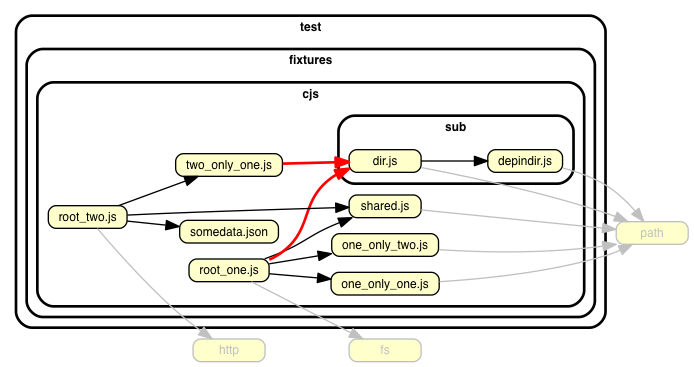
This runs through the dependencies in any JavaScript, TypeScript, LiveScript or CoffeeScript project and ...
- ... **validates** them against (your own) [rules](./doc/rules-reference.md)
- ... **reports** violated rules
- in text (for your builds)
- in graphics (for your eyeballs)
As a side effect it can generate dependency graphs in various output formats including [**cool visualizations**](./doc/real-world-samples.md)
you can stick on the wall to impress your grandma.
## How do I use it?
### Install it ...
```shell
npm install --save-dev dependency-cruiser
# or
yarn add -D dependency-cruiser
pnpm add -D dependency-cruiser
```
### ... and generate a config
```shell
npx depcruise --init
```
This will look around in your environment a bit, ask you some questions and create
a `.dependency-cruiser.js` configuration file attuned to your project[^1][^2].
[^1]:
We're using `npx` in the example scripts for convenience. When you use the
commands in a script in `package.json` it's not necessary to prefix them with
`npx`.
[^2]:
If you don't want to use `npx`, but instead `pnpx` (from the `pnpm`
package manager) or `yarn` - please refer to that tool's documentation.
Particularly `pnpx` has semantics that differ from `npx` quite significantly
and that you want to be aware of before using it. In the mean time: `npx`
_should_ work even when you installed the dependency with a package manager
different from `npm`.
### Show stuff to your grandma
To create a graph of the dependencies in your src folder, you'd run dependency
cruiser with output type `dot` and run _GraphViz dot_[^3] on the result. In
a one liner:
```shell
npx depcruise src --include-only "^src" --output-type dot | dot -T svg > dependency-graph.svg
```
> <details>
> <summary>dependency-cruiser v12 and older: add --config option</summary>
>
> While not necessary from dependency-cruiser v13 and later, in v12 and older
> you'll have to pass the --config option to make it find the .dependency-cruiser.js
> configuration file:
>
> ```shell
> npx depcruise src --include-only "^src" --config --output-type dot | dot -T svg > dependency-graph.svg
> ```
</details>
- You can read more about what you can do with `--include-only` and other command line
options in the [command line interface](./doc/cli.md) documentation.
- _[Real world samples](./doc/real-world-samples.md)_
contains dependency cruises of some of the most used projects on npm.
- If your grandma is more into formats like `mermaid`, `json`, `csv`, `html` or plain text
we've [got her covered](./doc/cli.md#--output-type-specify-the-output-format)
as well.
[^3]:
This assumes the GraphViz `dot` command is available - on most linux and
comparable systems this will be. In case it's not, see
[GraphViz' download page](https://www.graphviz.org/download/) for instructions
on how to get it on your machine.
### Validate things
#### Declare some rules
When you ran `depcruise --init` above, the command also added some rules
to `.dependency-cruiser.js` that make sense in most projects, like detecting
**circular dependencies**, dependencies **missing** in package.json, **orphans**,
and production code relying on dev- or optionalDependencies.
Start adding your own rules by tweaking that file.
Sample rule:
```json
{
"forbidden": [
{
"name": "not-to-test",
"comment": "don't allow dependencies from outside the test folder to test",
"severity": "error",
"from": { "pathNot": "^test" },
"to": { "path": "^test" }
}
]
}
```
- To read more about writing rules check the
[writing rules](./doc/rules-tutorial.md) tutorial
or the [rules reference](./doc/rules-reference.md)
#### Report them
```sh
npx depcruise src
```
> <details>
> <summary>dependency-cruiser v12 and older: add --config option</summary>
>
> While not necessary from dependency-cruiser v13, in v12 and older you'll have
> to pass the --config option to make it find the .dependency-cruiser.js
> configuration file:
>
> ```shell
> npx depcruise --config .dependency-cruiser.js src
> ```
</details>
This will validate against your rules and shows any violations in an eslint-like format:

There's more ways to report validations; in a graph (like the one on top of this
readme) or in an self-containing `html` file.
- Read more about the err, dot, csv and html reporters in the
[command line interface](./doc/cli.md)
documentation.
- dependency-cruiser uses itself to check on itself in its own build process;
see the `depcruise` script in the
[package.json](https://github.com/sverweij/dependency-cruiser/blob/main/package.json#L76)
## I want to know more!
You've come to the right place :-) :
- Usage
- [Command line reference](./doc/cli.md)
- [Writing rules](./doc/rules-tutorial.md)
- [Rules reference](./doc/rules-reference.md)
- [Options reference](./doc/options-reference.md)
- [FAQ](./doc/faq.md)
- Hacking on dependency-cruiser
- [API](./doc/api.md)
- [Output format](./doc/output-format.md)
- [Adding other output formats](./doc/faq.md#q-how-do-i-add-a-new-output-format)
- [Adding support for other alt-js languages](./doc/faq.md#q-how-do-i-add-support-for-my-favorite-alt-js-language)
- Other things
- [Road map](https://github.com/sverweij/dependency-cruiser/projects/1)
- [Contact](./doc/faq.md#contact)
- [Real world show cases](./doc/real-world-samples.md)
- [TypeScript, CoffeeScript and LiveScript support](./doc/faq.md#features)
- [Support for .jsx, .tsx, .csx/ .cjsx, .vue and .svelte](./doc/faq.md#q-im-developing-in-react-and-use-jsx-tsx-csx-cjsx-how-do-i-get-that-to-work)
- [Webpack alias/ modules support](./doc/faq.md#q-does-this-work-with-webpack-configs-eg-alias-and-modules)
## License
[MIT](LICENSE)
## Thanks
- [Marijn Haverbeke](http://marijnhaverbeke.nl) and other people who
collaborated on [acorn](https://github.com/ternjs/acorn) -
the excellent JavaScript parser dependency-cruiser uses to infer
dependencies.
- [Katerina Limpitsouni](https://twitter.com/ninaLimpi) of [unDraw](https://undraw.co/)
for the ollie in dependency-cruiser's
[social media image](https://repository-images.githubusercontent.com/74299372/239ed080-370b-11ea-8fe7-140cf7b90a33).
- All members of the open source community who have been kind enough to raise issues,
ask questions and make pull requests to get dependency-cruiser to be a better
tool.
## Build status
[](https://github.com/sverweij/dependency-cruiser/actions/workflows/ci.yml)
[](https://gitlab.com/sverweij/dependency-cruiser/builds)
[](https://npmjs.com/package/dependency-cruiser)
Made with :metal: in Holland.