dependency-cruiser
Version:
Validate and visualize dependencies. With your rules. JavaScript, TypeScript, CoffeeScript. ES6, CommonJS, AMD.
116 lines (93 loc) • 5.62 kB
Markdown
# Dependency cruiser 
_Validate and visualize dependencies. With your rules._ JavaScript. TypeScript. CoffeeScript. ES6, CommonJS, AMD.
## What's this do?
- Run through the dependencies in any JavaScript, TypeScript or CoffeeScript project and ...
- ... **validate** them against a set of (your own) rules
- ... **report** violated rules
- in text (for in your builds)
- in graphics (for on your eyeballs)
As a nice side effect it can generate [**cool dependency graphs**](https://github.com/sverweij/dependency-cruiser/blob/master/doc/real-world-samples.md)
you can stick on the wall to impress your grandma.
## How do I use it?
### Install it
Dependency cruiser works most comfortably when you install it globally.
```
npm install --global dependency-cruiser
```
### Show stuff
To create a graph of the dependencies in your src folder, you'd run dependency
cruiser with output type `dot` and run _GraphViz dot_ on the result. In
a one liner:
```shell
dependency-cruise --exclude "^node_modules" --output-type dot src | dot -T svg > dependencygraph.svg
```
The `--exclude "^node_modules"` makes sure dependency-cruiser does not scan
paths starting with *node_modules*.
- You can read more about what you can do with `--exclude` and other command line
options in the
[command line interface](https://github.com/sverweij/dependency-cruiser/blob/master/doc/cli.md)
documentation.
- _[Real world samples](https://github.com/sverweij/dependency-cruiser/blob/master/doc/real-world-samples.md)_
contains dependency cruises of some of the most used projects on npm.
### Validate stuff
#### Declare some rules
To have dependency-cruiser report on dependencies going _into_ the test folder
(which is totally weird, right?) create a rules file (e.g. `my-rules.json`)
and put this in there:
```json
{
"forbidden": [{
"name": "not-to-test",
"comment": "don't allow dependencies from outside the test folder to test",
"severity": "error",
"from": { "pathNot": "^test" },
"to": { "path": "^test" }
}]
}
```
- To read more about writing rules check the
[writing rules](https://github.com/sverweij/dependency-cruiser/blob/master/doc/rules.md)
section.
- There is practical rules configuration to get you started
[here](https://github.com/sverweij/dependency-cruiser/blob/master/doc/rules.starter.json)
#### Report them
Pass the `--validate` parameter, to the command line followed by the rules
file.
Most output-types will show violations of your rules in one way or another.
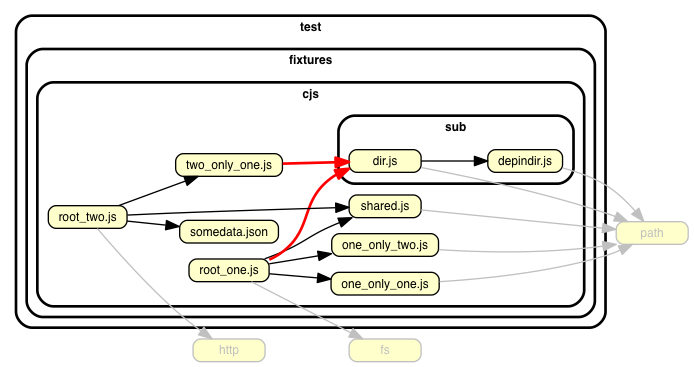
The `dot` reporter, for instance, will color edges representing violated
dependencies in a signaling color (red for errors, orange for warnings) - the
picture on top of this README is a sample of that.
The `err` reporter only emits (text) output when there's something wrong.
This is useful when you want to check the rules in your build process:
```sh
dependency-cruise --validate my-rules.json --output-type err src
```

- Read more about the err, dot, but also the csv and html reporters in the
[command line interface](https://github.com/sverweij/dependency-cruiser/blob/master/doc/cli.md)
documentation.
- dependency-cruiser uses itself to check on itself in its own build process;
see the `dependency-cruise` target in the
[Makefile](https://github.com/sverweij/dependency-cruiser/blob/master/Makefile#L95)
## I want to know more!
You've come to the right place :-) :
- [Command line reference](https://github.com/sverweij/dependency-cruiser/blob/master/doc/cli.md)
- [Writing rules](https://github.com/sverweij/dependency-cruiser/blob/master/doc/rules.md)
- [Real world show cases](https://github.com/sverweij/dependency-cruiser/blob/master/doc/real-world-samples.md)
- [Output format](./doc/output-format.md)
- [Road map](https://github.com/sverweij/dependency-cruiser/projects/1)
## License
[MIT](LICENSE)
## Thanks
- [Marijn Haverbeke](http://marijnhaverbeke.nl) and other people who
colaborated on [acorn](https://github.com/ternjs/acorn) -
the excelent javascript parser dependency-cruiser uses to infer
dependencies.
[](https://gitlab.com/sverweij/dependency-cruiser/builds)
[](https://gitlab.com/sverweij/dependency-cruiser/builds)
[](https://www.bithound.io/github/sverweij/dependency-cruiser)
[](https://www.bithound.io/github/sverweij/dependency-cruiser/master/dependencies/npm)
[](https://www.bithound.io/github/sverweij/dependency-cruiser/master/dependencies/npm)
[](https://npmjs.com/package/dependency-cruiser)
[](https://npmjs.com/package/dependency-cruiser)