del-repos
Version:
A command-line tool for bulk deleting GitHub or Gitee repositories
226 lines (154 loc) • 7.29 kB
Markdown
<h1 align="center">del-repos</h1>
<p align="center">
<a href="./README.md">English</a> | <a href="./README.zh.md">中文</a>
</p>
<p align="center">
<img src="https://img.shields.io/npm/v/del-repos?style=flat-square&logo=npm" alt="npm version">
<img src="https://img.shields.io/npm/dt/del-repos?style=flat-square&logo=npm" alt="npm downloads">
<img src="https://img.shields.io/github/license/yaolifeng0629/del-repos?style=flat-square" alt="license">
<img src="https://img.shields.io/node/v/del-repos?style=flat-square&logo=node.js" alt="node version">
</p>
<p align="center"><img src="screen.gif" width="90%"/></p>
## ⚡ Introduction
`del-repos` is a powerful command-line tool for batch deleting GitHub or Gitee repositories with an intuitive interactive interface.
## 🛠️ Features
- 🌐 **Multi-platform Support**: Works with both `GitHub` and `Gitee` platforms
- 🔍 **Smart Search**: Advanced search functionality to quickly find repositories
- ✅ **Batch Selection**: Select multiple repositories with an interactive checkbox interface
- 🔐 **Token Management**: Secure token storage and automatic token validation
- 🎯 **Repository Filtering**: Choose between personal repositories or all accessible repositories
- 💾 **Configuration Persistence**: Save tokens for future use
- 🎨 **Rich UI**: Beautiful colored output with progress indicators and spinners
- ⚠️ **Safety First**: Multiple confirmation steps to prevent accidental deletions
- 📊 **Detailed Feedback**: Comprehensive error handling and operation summaries
## 🚀 Installation
### Prerequisites
- `Node.js` v14.0.0 or higher installed on your computer
- You can download and install Node.js from the [official website](https://nodejs.org/)
### Installation Steps
Install the package globally using npm or pnpm:
```bash
# Using npm
npm install del-repos -g
# Using pnpm
pnpm install del-repos -g
# Using yarn
yarn global add del-repos
```
## 📋 Command Line Options
| Option | Description |
| ----------------- | --------------------------------------------- |
| `-v`, `--version` | Display the current version |
| `-h`, `--help` | Show help information |
| `-t <type>` | Repository type filter (`o`: owner, `a`: all) |
### Repository Type Filter Examples
```bash
# Get only repositories you own
del-repos -t o
# Get all accessible repositories (default)
# (includes collaborator and organization repositories)
del-repos
# or
del-repos -t a
```
## 🌟 Usage
### Quick Start
Simply run the command to start the interactive deletion process:
```bash
del-repos
```
### Step-by-Step Process
1. **🚀 Platform Selection**
- Choose between `GitHub` or `Gitee` platform
- The tool provides a clean, interactive selection interface
2. **🔑 Token Authentication**
- Enter your personal access token for the selected platform
- The tool automatically opens the token generation page in your browser
- **Required permissions:**
- **GitHub**: `delete_repo`, `project`, `repo`
- **Gitee**: Repository deletion permissions
- Option to save token securely for future use
3. **📦 Repository Discovery**
- The tool fetches your repository list with a progress spinner
- Displays the total number of repositories found
- Supports filtering by repository type (owner vs. all accessible)
4. **🔍 Smart Repository Selection**
- **Search functionality**: Type to filter repositories in real-time
- **Batch selection**: Use spacebar to select/deselect repositories
- **Numbered list**: Easy navigation with numbered repository list
- **Visual feedback**: Clear indication of selected repositories
5. **⚠️ Safety Confirmation**
- **Danger zone warning**: Clear indication of the destructive nature
- **Repository review**: List of all repositories to be deleted
- **Final confirmation**: Explicit confirmation required before deletion
6. **🗑️ Deletion Process**
- Real-time progress updates with spinners
- Detailed error handling and reporting
- Success summary upon completion
## ⚠️ Important Considerations
### 🚨 Safety Warnings
- **⚠️ IRREVERSIBLE ACTION**: Deleted repositories **CANNOT** be restored
- **🔍 Double-check**: Always verify the repositories you're about to delete
- **🔐 Token Security**: Keep your access tokens secure and never share them
- **📝 Backup**: Consider backing up important repositories before deletion
### 🔑 Token Requirements
#### GitHub Token Permissions
- `delete_repo` - Required for repository deletion
- `project` - Access to project boards
- `repo` - Full repository access
#### Gitee Token Permissions
- Repository deletion permissions must be enabled
### 🛠️ Troubleshooting
If you encounter issues, please check:
- ✅ Your internet connection is stable
- ✅ Your token has the required permissions
- ✅ The platform API is accessible
- ✅ You have the necessary repository access rights
For additional help or to report bugs, please [submit an issue](https://github.com/yaolifeng0629/del-repos/issues).
## 🙌 Contributing
We welcome all contributions and suggestions! If you want to contribute to `del-repos`, here's how:
### Development Setup
1. **Clone the repository:**
```bash
git clone https://github.com/yaolifeng0629/del-repos.git
cd del-repos
```
2. **Install dependencies:**
```bash
npm install
# or
pnpm install
```
3. **Development and testing:**
```bash
npm run dev
# or
pnpm dev
```
4. **Build the project:**
```bash
npm run build
```
### How to Contribute
- 🐛 **Report bugs** by [creating an issue](https://github.com/yaolifeng0629/del-repos/issues)
- 💡 **Suggest features** through issue discussions
- 🔧 **Submit pull requests** for bug fixes or new features
- 📖 **Improve documentation** to help other users
- ⭐ **Star the repository** if you find it useful
### Development Guidelines
- Follow the existing code style and conventions
- Add tests for new features
- Update documentation when necessary
- Ensure all tests pass before submitting PR
**Thanks to all contributors who have helped make `del-repos` better!** 🎉
## ⭐ Support the Project
If you find this tool helpful, please consider:
- **⭐ Star the repository** on [GitHub](https://github.com/yaolifeng0629/del-repos)
- **📣 Share with others** who might benefit from it
- **🐛 Report issues** to help improve the tool
- **🔧 Contribute** to make it even better
Your support is the driving force for continued development!
## 📊 Star History
[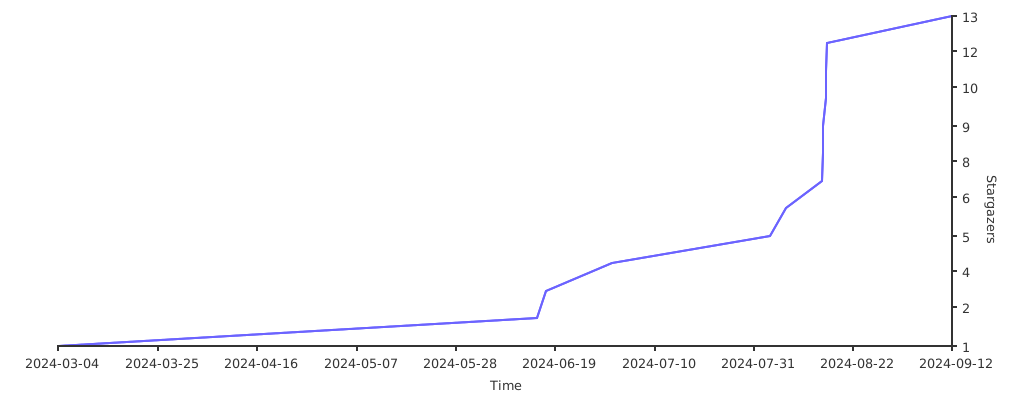](https://starchart.cc/yaolifeng0629/del-repos)
## 📄 License
This project is licensed under the ISC License - see the [LICENSE](LICENSE) file for details.