debug-logger
Version:
A wrapper for visionmedia/debug logger, adding levels and colored output
232 lines (189 loc) • 8.11 kB
Markdown
[](http://badge.fury.io/js/debug-logger)
debug-logger
============
A thin wrapper for visionmedia/debug logger, adding levels and colored output.
## Overview
[visionmedia/debug](https://github.com/visionmedia/debug) is a ubitiquous logging library with 1000+ dependants. Given how widespread it is and the convenience of namespaces it is a great logger for library modules.
`debug-logger` is a convenience wrapper around `debug` that adds level based coloured output. Each instance of `debug-logger` will lazily instantiate several instances of `debug` such as `namespace:info`, `namespace:warn`, `namespace:error`, etc. All these are configurable. `debug-logger` has no dependencies besides `debug`.
`debug-logger` uses the same syntax as [node.js console](https://nodejs.org/api/console.html) so you can use it as drop in replacement.
Check and run [examples/console.parity.js](https://github.com/appscot/debug-logger/blob/master/examples/console.parity.js) for more details.
At AppsCot we use `debug-logger` in [waterline-orientdb](https://github.com/appscot/waterline-orientdb).
## Instalation
```javascript
npm install debug-logger -S
```
## Usage
```javascript
var log = require('debug-logger')('myapp');
log.trace("I'm a trace output");
log.debug("I'm a debug output");
log.log("I'm a log output");
log.info("I'm an info output");
log.warn("I'm a warn output");
log.error("I'm an error output");
```
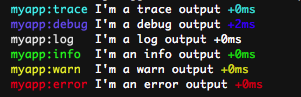
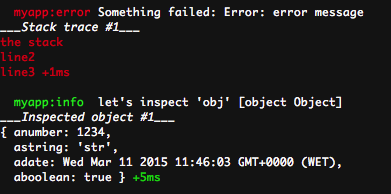
### Inspect error/object
```javascript
var err = new Error('error message');
err.stack = 'the stack\nline2\nline3';
log.error('Something failed:', err);
var obj = {
anumber : 1234,
astring : 'str',
adate : new Date(),
aboolean : true
};
log.info("let's inspect 'obj'", obj);
```
### Original `debug` instances and enabled property
```javascript
log.debug.logger()("the debug instance of debug, using 'myapp:debug' namespace");
var debug = debugLogger.debug('myapp:visionmedia');
debug('Nothing tastes better than the original!');
if (log.debug.enabled()) {
// This only runs if environment variable DEBUG includes "myapp:debug" namespace
log.debug("Debug is enabled");
}
```

### util.inspect options
Full `util.inspect` options available at [nodejs.org](http://nodejs.org/api/util.html#util_util_inspect_object_options).
```javascript
var debugLogger = require('debug-logger');
debugLogger.inspectOptions = {
colors : true
};
log.info('By enabling colors we get this nice colored example:', {
anumber : 1234,
astring : 'str',
adate : new Date(),
aboolean : true
});
```

### Customize available log levels
```javascript
debugLogger.levels.error.color = debugLogger.colors.magenta;
debugLogger.levels.error.prefix = 'ERROR ';
var customColorLog = debugLogger('myapp');
customColorLog.error("I'm a 'magenta' error output");
```

### Add log levels
```javascript
debugLogger.levels.silly = {
color : debugLogger.colors.magenta,
prefix : 'SILLY ',
namespaceSuffix : ':silly'
};
var sillyLog = debugLogger('myapp');
sillyLog.silly("I'm a silly output");
```

### Multiple arguments / util.format style
```javascript
log.log("Multiple", "arguments", "including", "objects:", { obj: 'obj'}, "makes life easier");
log.warn("util.format style string: %s, number: %d and json: %j.", "foo", 13, { obj: 'json'});
```

### Measure code execution time
```javascript
log.time('100-elements');
for (var i = 0; i < 100; i++) {
;
}
log.timeEnd('100-elements');
log.time('setTimeout');
setTimeout(function(){
var diff = log.timeEnd('setTimeout', 'debug');
log.trace('log.timeEnd returns diff so it can be reused:', diff);
}, 262);
```

### Inspect object
```javascript
log.dir({ foo: { bar: 1 } });
log.dir({ foo: { bar: 1 } }, { depth: 0 }, 'warn');
```

### Assert condition
```javascript
log.assert(1 == 0);
// More elaborate example
var log = require('..').config({
levels: {
fatal: {
color : 5, //magenta
prefix : '',
namespaceSuffix : ':fatal',
level : 6
}
}
})('myapp');
log.assert(1 == 0, 'testing %s %d', 'log.assert', 666, 'fatal');
```
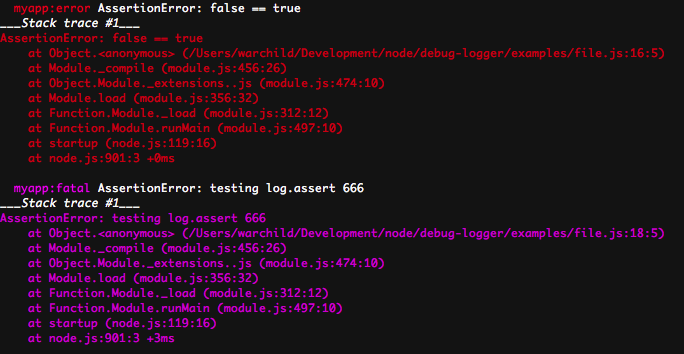
### stderr vs stdout
By default trace, debug, log and info output to stdout while warn and error output to stderr.
This is configurable, [example](https://github.com/appscot/debug-logger/blob/master/examples/stdout_stderr.js):
```javascript
var log = require('debug')('myapp');
log.trace("goes to stdout!");
log.debug("goes to stdout!");
log.log("goes to stdout!");
log.info("goes to stdout!");
log.warn("goes to stderr");
log.error("goes to stderr");
// outputting only to stdout
var stdout = require('debug').config({ levels: { warn: { fd: 1 }, error: { fd: 1 } } })('stdoutapp');
stdout.warn("goes to stdout!");
stdout.error("goes to stdout!");
```
### Filter by log level (instead of namespace)
```sh
export DEBUG_LEVEL=info
```
Only info level and above logs will be outputted.
More examples in the [examples folder](https://github.com/appscot/debug-logger/blob/master/examples).
## Reference
### Instance Methods
Assuming log is an instance of debug-logger (`var log = require('debug-logger')('myapp');`).
#### `log.trace([data][, ...])`
#### `log.debug([data][, ...])`
#### `log.log([data][, ...])`
#### `log.info([data][, ...])`
#### `log.warn([data][, ...])`
#### `log.error([data][, ...])`
Prints the data prepended by log level. If the terminal supports colors, each level will have a specific color. If an Error is provided, the toString() and call stack will be outputted. If an Object is provided the toString() and util.inspect() will be outputted. Example:
```
myapp:debug I'm a debug output +0ms
myapp:info I'm an info output +1ms
```
This function can take multiple arguments in a printf()-like way, if formatting elements are not found in the first string then util.inspect is used on each argument.
#### `log([message][, ...])`
Outputs the message using the root/default `debug` instance, without the level suffix. Example:
```
myapp I'm a root/default debug instance output +0ms
```
#### `log[level].logger()`
Returns the default `debug` instance used by `level`.
#### `log[level].enabled()`
Boolean indicating if `level`'s logger is enabled.
#### `log.time(label)`
Mark a time.
#### `log.timeEnd(label[, level])`
Finish timer, record output. `level` will determine the logger used to output the result (defaults to 'log').
Return duration in ms.
#### `log.dir(obj[, options][, level])`
Uses util.inspect on obj and prints resulting string to the appropriate logger. This function bypasses any custom inspect() function on obj. An optional [options object](https://nodejs.org/api/console.html#console_console_dir_obj_options) may be passed that alters certain aspects of the formatted string.
`level` will determine the logger used to output the result (defaults to 'log').
#### `log.assert(value[, message][, ...][, level])`
Similar to [console.assert()](https://nodejs.org/api/console.html#console_console_assert_value_message).
Additionally it outputs the error using the appropriate logger set by `level` (defaults to 'error').
### Module
#### `.config(obj)`
Configures debug-logger. Returns `debug-logger` to allow chaining operations.
#### `.debug`
Returns visionmedia/debug module.