dbscan_gps
Version:
A node.js package for clustering GPS coordinates by using DBSCAN algorithm
204 lines (176 loc) • 7.76 kB
Markdown
# dbscan_gps #
A node.js packpage for clustering GPS coordinates by using DBSCAN algorithm.
## Background ##
DBSCAN (https://en.wikipedia.org/wiki/DBSCAN), per its name suggested, is a density-based clustering algorithm. This module is developped specifically to cluster points with GPS coordinates (in decimal degree format for now) by using the algorithm. You can also modify the module to leverage your own distance function.
Through work, I have also used K-mean, G-means(described in https://github.com/haifengl/smile/), Hierarchical-clustering algorithms. I found that for small dataset of GPS coordinates, they do not work very well.
## Pros and Cons ##
### Pros ###
DBSCAN is a very simple yet effective algorithm to cluster data. You can see in the source code the implementation is less than 250 lines. It is also very versatile in clustering different types of data (assuming you can provide custom distance function).
### Cons ###
The algorithm has a worst complexity of O(n^2) and an average of O(nlogn) complexity. This means if you have a large set of data, the algorithm could become slow. Another con is the fact that you have to specify the minimal number of points in a cluster as well as the epsilon (radius).
## Example ##
```javascript
var dataset = [[37.38049441, -122.04046815],
[37.38049441, -122.04046815],
[37.38049441, -122.04046815],
[37.79859258, -122.42328555],
[37.80167405, -122.43965453],
[37.78532559, -122.40361793],
[37.78229027, -122.40579998],
[37.7982797, -122.43723815],
[37.42121791, -122.2151668],
[37.42121791, -122.2151668],
[37.32949423, -121.90143483],
[37.80125018, -122.42455065],
[37.33392574, -122.00670057],
[39.50234395, -119.86786681],
[37.78155398, -122.39547014],
[37.78155398, -122.39547014],
[31.19726586, 35.36302658],
[31.477502, 35.386898],
[37.7840328, -122.43300302],
[37.79598335, -122.40626251],
[37.79827759, -122.42747273],
[37.79828489, -122.44717598],
[37.78393, -122.433003],
[37.78393, -122.433003],
[37.80009745, -122.439658],
[37.79647682, -122.42203823],
[37.82472266, -122.45186823],
[37.77660911, -122.38905006],
[37.61576117, -122.38790989],
[36.11603686, -115.17426968],
[36.118691, -115.17585],
[36.118691, -115.17585],
[36.0836502, -115.14985085],
[37.61576117, -122.38790989],
[37.800006, -122.4378754],
[37.778665, -122.41774077],
[37.78789485, -122.40747929],
[37.792861, -122.392363],
[37.78393, -122.433003],
[37.75029014, -122.20294476],
[37.7978607, -122.4286596],
[37.79379, -122.393],
[37.826832, -122.491052],
[40.64902844, -73.78194377],
[37.80023, -122.4395],
[37.77059339, -122.43182761],
[37.77059339, -122.43182761],
[37.76025, -122.41215],
[37.76023, -122.41199],
[37.76614415, -122.42939294],
[37.76617776, -122.42937449],
[37.7661208, -122.42946594],
[37.99517, -122.46531],
[37.78919, -122.40089],
[37.76613125, -122.42941954],
[37.80867078, -122.43037428],
[39.52104, -119.8131],
[37.76493, -122.42233],
[37.79402, -122.39907],
[37.79399, -122.39909],
[37.75108, -122.20049],
[37.75635584, -122.41927966],
[37.76632708, -122.42945496],
[37.76613789, -122.42936044],
[37.77492013, -122.43762416],
[37.7801, -122.39021],
[33.94437, -118.40094],
[34.06674903, -118.44984965],
[34.06664, -118.44845],
[34.06681667, -118.44984147],
[34.06819306, -118.44247907],
[34.06820579, -118.44248629],
[34.06817425, -118.44253283],
[37.80568636, -122.45048073],
[39.50265928, -119.86663568],
[37.77438431, -122.42749737],
[37.76612013, -122.42920292],
[34.07283094, -118.4683974],
[38.95660367, -77.4482698],
[38.92988722, -77.20645691],
[37.80898321, -122.43169989],
[37.80859133, -122.43139564],
[37.80855077, -122.43133356],
[30.26290915, -97.73613041],
[37.52729797, -122.25178528],
[37.76648093, -122.42950282],
[37.71226741, -122.21261144],
[37.7796211, -122.3912277],
[37.61865062, -122.38100052],
[39.50759943, -119.86416337],
[37.80066578, -122.45820697],
[37.7976913, -122.4329605],
[37.61865062, -122.38100052],
[19.9258027, -155.88752502],
[37.80782478, -122.43127054],
[37.78448656, -122.40315955],
[34.0221, -118.481],
[38.64914252, -121.51816104],
[40.7142, -74.0064],
[37.793869, -122.3948593],
[39.50253933, -119.86668932],
[37.99457903, -122.46467818],
[37.87281873, -122.45648861],
[37.2567848, -122.03411448],
[37.79917, -122.44133],
[38.02983, -78.4855],
[37.98267, -78.45517],
[38.8895, -77.01067],
[37.78492, -122.41883],
[37.77986, -122.48336],
[37.78, -122.48333],
[37.79633, -122.39383],
[39.52524, -119.81432],
[39.51017, -119.805],
[37.80053, -122.43791],
[37.80064372, -122.43795387],
[37.78097, -122.40264],
[37.775, -122.418]]
var Clustering = require('dbscan_gps');
var clustering = new Clustering(dataset, 100, "mi", 2);
clustering.fit(function(e, clusters){
if(e)
{
throw e;
}
for(var i=0;i<clusters.length;i++)
{
console.log("cluster: ", i, " || ", clusters[i]);
for(var j=0;j<clusters[i].length;j++)
{
console.log(dataset[clusters[i][j]]);
}
}
})
```
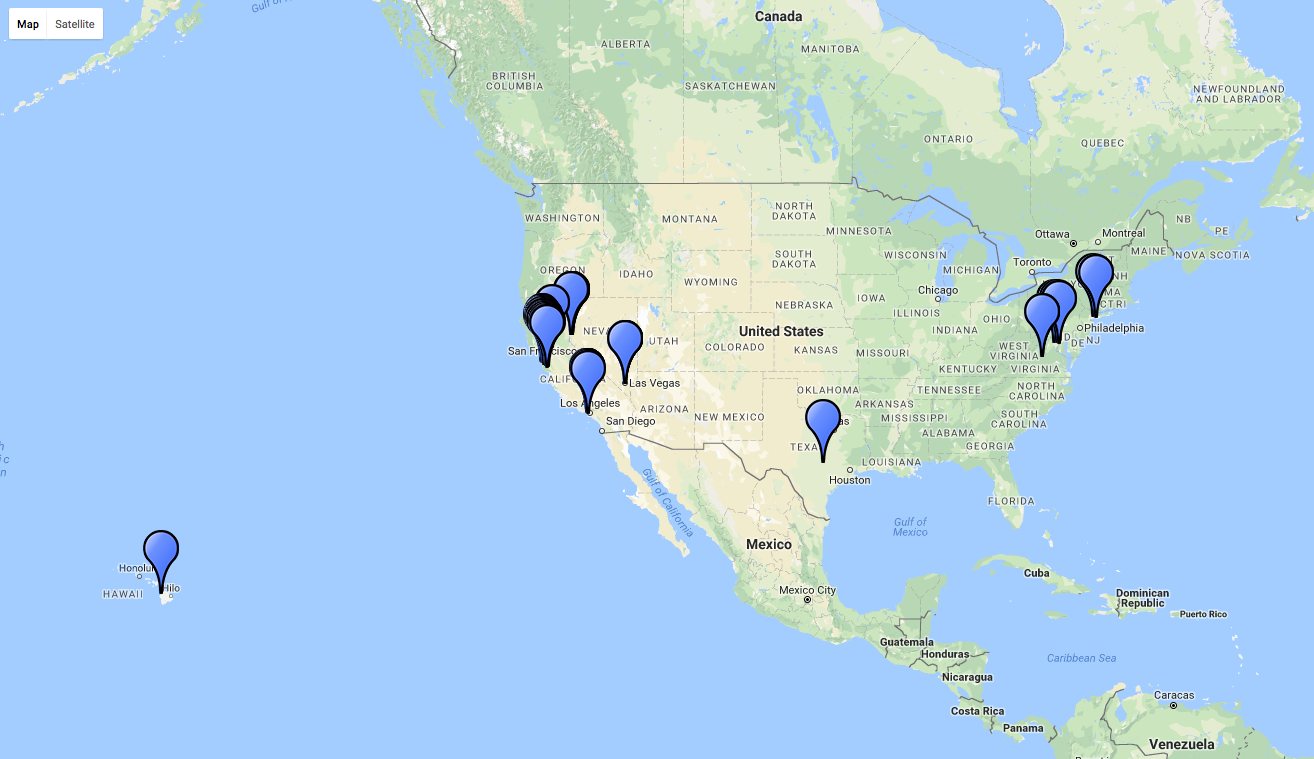
### The points used in the example displayed on a map: ###
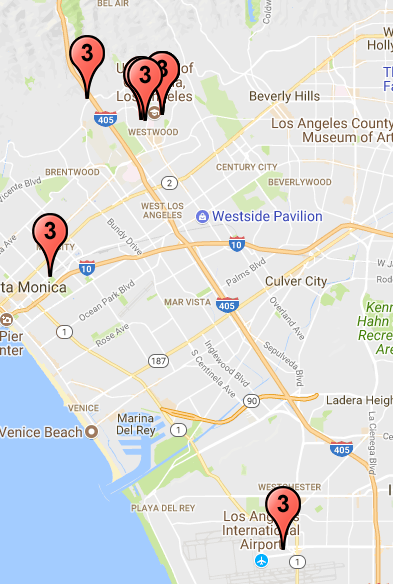
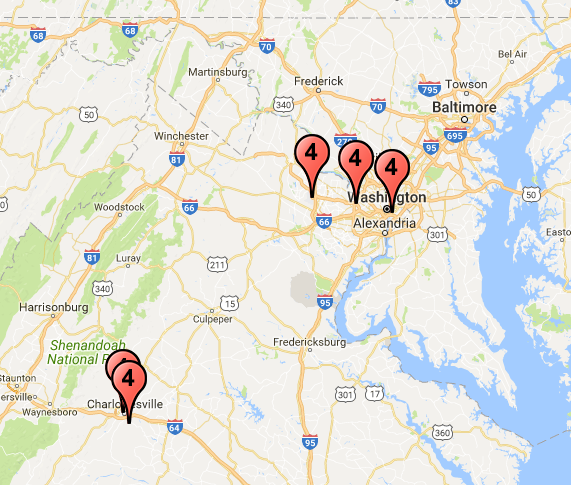
### After clustering ###
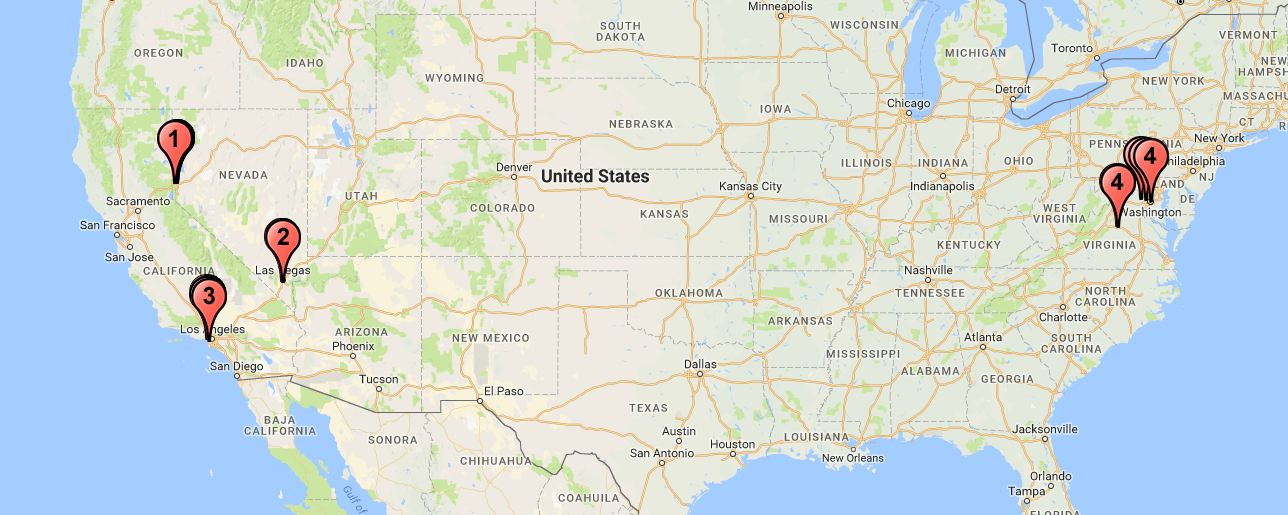
In total, there are **4 clusters** predicted
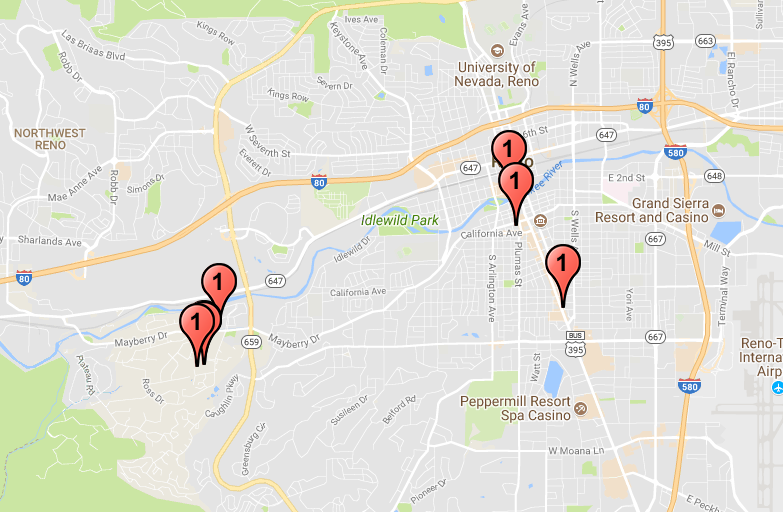
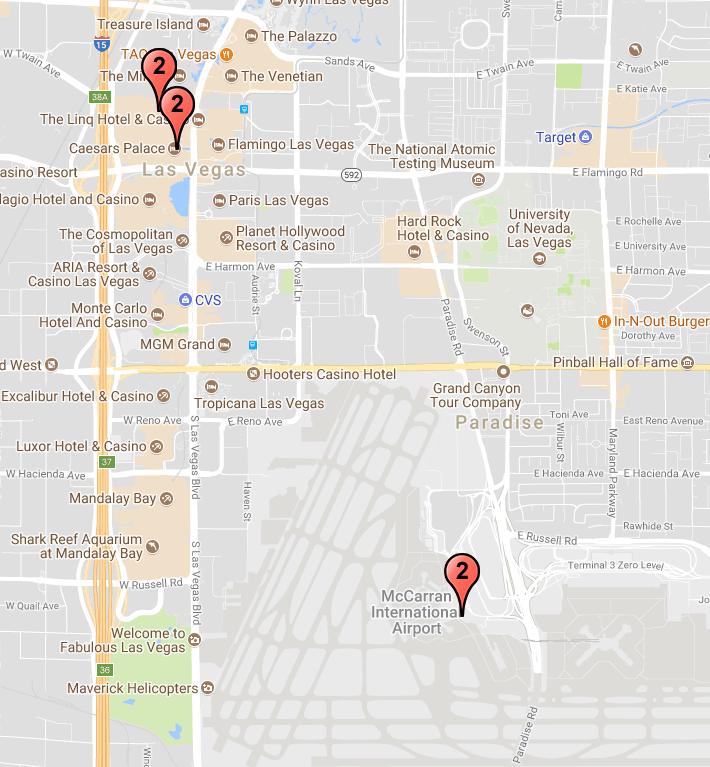
### About the example ###
These points are extracted from an individual's Facebook check-ins. Some of the points are discarded as **noise** points. For example, the one in Hawaii or the few ones in Africa.
```javascript
var clustering = new Clustering(dataset, 100, "mi", 2);
```
In this particular example, we are interested in limiting the radius to 100 Miles radius (you can also use "km" to specify that you are interested in kilometers) and 2 minimal points to form a cluster.
## API ##
var clustering = new Clustering(dataset, eps, eps_unit, minpts);
@param {array} dataset: an array of points, each point is shaped as [lat, lon]; **The lat and lon must be in Decimal Degrees (DD) format**
@param {integer} eps: epsilon, the radius of the cluster
@param {string} eps_unit: in either kilometers "km" or miles "mi"
@param {integer} minPts: the minimal number of points in a cluster
clustering.fit(function(e, clusters){
}
@callback {function} callback: (error, clusters):
error is an error description in string type,
clusters is an array of clusters; each cluster is another array of points with index coorresponding to the index in the input dataset
## Future Improvement ##
1. Add parameter to allow custom distance function
2. Add support for other formats of GPS coordinates such as Degrees and decimal minutes (DMM) and Degrees, minutes, and seconds (DMS)