data-synchronizer
Version:
A versatile library for transferring data across multi-page applications or single page applications.
231 lines (179 loc) • 5.7 kB
Markdown
# data-synchronizer
A versatile library for transferring data across multi-page applications or single page applications.
# Features
- Supports both LocalStorage and BroadcastChannel engines.
- Allows for the creation of multiple channels for data transfer.
- Provides a simple API for sending and receiving messages.
- Automatically handles message serialization and deserialization.
- Supports TypeScript.
# Usage
- Receive Client
|api|describe|
|:---:|:---:|
|onMessage|Receive data|
- Send Client
|api|describe|
|:---:|:---:|
|sendMessage|Send data|
|onSendMessageError|Receive data transmission error|
|close|Stop receiving data|
# Requirements
ES5 & Browser
# Installation
Using npm:
```bash
npm install data-synchronizer --save
```
Using yarn:
```bash
yarn add data-synchronizer
```
Using pnpm:
```bash
pnpm install data-synchronizer --save
```
# Functional Example
Here's an example with two pages: list and details.
```typescript
// list.vue
import { ref } from 'vue';
import { useDataSynchronizer } from 'data-synchronizer';
const channel = 'cancelLike';
type ListItem = {
id: number;
title: string;
like: number;
}
// Example: the list contains 100 items
const list = ref<ListItem[]>([
{ id: 0, title: 'learning javascript', like: 2 },
// ...
{ id: 99, title: 'learning javascript', like: 9 },
]);
const { onMessage, onSendMessageError, close } = useDataSynchronizer({
// engine: 'LocalStorage' | 'BroadcastChannel' // optional
});
onSendMessageError(channel, (event: DOMException | MessageEvent) => {
console.error(event);
});
onMessage(channel, (params: ListItem) => {
const target = list.value.find(item => item.id === params.id);
if (target) target.like = params.like;
// The like count of the target will decrease by 1.
});
close(); // Calling close will stop receiving data.
```
```typescript
// details.vue
import { useDataSynchronizer } from 'data-synchronizer';
const channel = 'cancelLike'; // The channel must match the previous one.
const { sendMessage } = useDataSynchronizer({
// engine: 'LocalStorage' | 'BroadcastChannel' // optional
});
type ListItem = {
id: number;
title: string;
like: number;
}
const cancelLike = (item: ListItem) => {
item.like--;
sendMessage(channel, item);
};
```
# Class-based Example
```typescript
import { ref } from 'vue';
import { DataSynchronizer } from 'data-synchronizer';
const channel = 'cancelLike';
type ListItem = {
id: number;
title: string;
like: number;
}
// Example: the list contains 100 items
const list = ref<ListItem[]>([
{ id: 0, title: 'learning javascript', like: 2 },
// ...
{ id: 99, title: 'learning javascript', like: 9 },
]);
const instance = new DataSynchronizer({
// engine: 'LocalStorage' | 'BroadcastChannel' // optional
});
instance.onSendMessageError(channel, (event: DOMException | MessageEvent) => {
console.error(event);
});
instance.onMessage(channel, (params: ListItem) => {
const target = list.value.find(item => item.id === params.id);
if (target) target.like = params.like;
// The like count of the target will decrease by 1.
});
instance.close(); // Calling close will stop receiving data.
```
```typescript
// details.vue
import { DataSynchronizer } from 'data-synchronizer';
const channel = 'cancelLike'; // The channel must match the previous one.
const instance = new DataSynchronizer({
// engine: 'LocalStorage' | 'BroadcastChannel' // optional
});
type ListItem = {
id: number;
title: string;
like: number;
}
const cancelLike = (item: ListItem) => {
item.like--;
instance.sendMessage(channel, item);
};
```
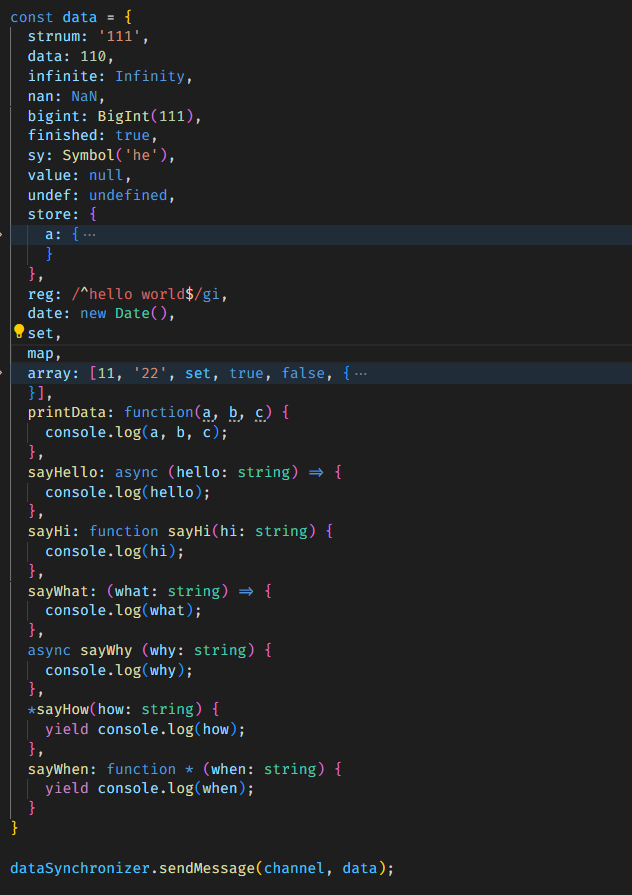
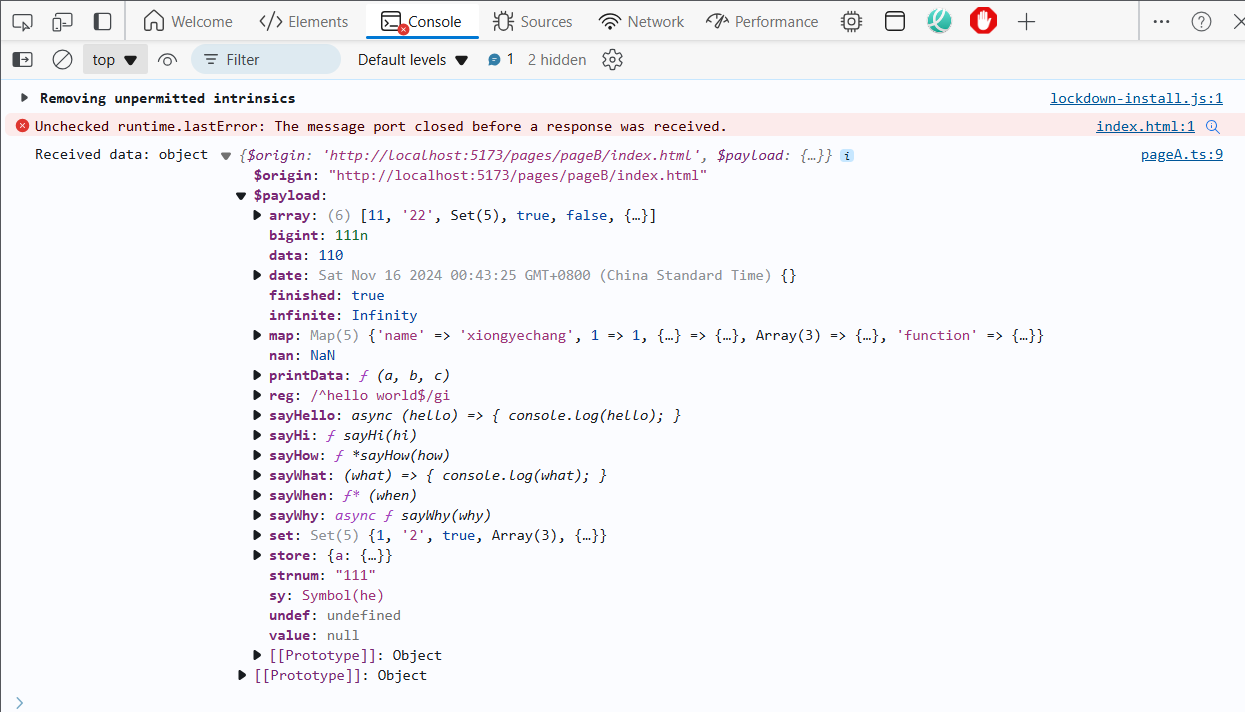
# Supported Data Types
The library supports the following data types:
- String
- Number
- BigInt
- Boolean
- Symbol
- Null
- Undefined
- Object
- Array
- Date
- RegExp
- Function (anonymous function + named function + arrow function + async function + generator function)
- Map
- Set
# Example
# Types
DataSynchronizer
```typescript
type Engine = 'LocalStorage' | 'BroadcastChannel';
export type ChannelKey = string | string[];
type Options = {
engine?: Engine; // Default: 'BroadcastChannel'
};
export type OnCallback = (args: any) => void;
export type OnSendMessageErrorCallback = (error: MessageEvent | DOMException) => void;
export type OnMessageMethod = (channel: ChannelKey, callback: OnCallback) => void;
export type SendMessageMethod = <T>(channel: ChannelKey, data: T, target?: SendTarget) => void;
export type OnSendMessageErrorMethod = (channel: ChannelKey, callback: OnSendMessageErrorCallback) => void;
export type CloseMethod = (channel: ChannelKey) => void;
export type SendTarget = RegExp | string | undefined;
export type EngineOptions = {
engine: Engine;
support: boolean;
onMessage: OnMessageMethod;
sendMessage: SendMessageMethod;
onSendMessageError: OnSendMessageErrorMethod;
close: CloseMethod;
};
type DataSynchronizer = (options: Options) => EngineOptions;
```
# Future Enhancements
[1] Targeted Receivers
Currently, the library broadcasts data, meaning that all pages with the same origin receive the data. This may not always be ideal. [Completed]
[2] Server-side Data Transfer
At present, the library only supports data transfer within the same browser. In the future, I plan to explore cross-browser data transfer!
[3] Plugins or Middleware
[4] Custom Engines