cypress-xporter
Version:
CLI tool to sync Cypress test results with Jira, TestRail, and Confluence.
253 lines (189 loc) • 8.99 kB
Markdown
# 🚀 Cypress Xporter
[](https://www.cypress.io/)
[](https://www.atlassian.com/software/jira)
[](https://www.atlassian.com/software/confluence)
[](https://www.testrail.com/)
**Cypress Xporter** is a CLI tool that syncs your Cypress test results with **Jira**, **TestRail**, and **Confluence**. It automates the process of merging test reports, creating bug tickets, updating test plans, and documenting test summaries — all from your terminal.
---
## 📑 Table of Contents
- [✨ Features](#-features)
- [📦 Installation](#-installation)
- [⚙️ Environment Setup](#-environment-setup)
- [🚀 Usage](#-usage)
- [📘 Example CLI Commands](#-example-cli-commands)
- [🔧 CI/CD Integration](#-cicd-integration)
- [GitHub Actions](#github-actions)
- [Jenkins](#jenkins)
- [🔐 Token & ID Setup Help](#-token--id-setup-help)
- [📷 Screenshots](#-screenshots)
- [🛠️ Version](#-version)
- [📄 License](#-license)
---
## ✨ Features
- ✅ Automatically creates Jira bugs for failed tests
- ✅ Logs test results in TestRail test runs
- ✅ Publishes Cypress test dashboards to Confluence pages
- ✅ Merges all `mochawesome*.json` reports automatically
- ✅ Supports flexible CLI flags (`--jira`, `--testrail`, `--confluence`)
---
## 📦 Installation
### Dependency:
- ✅ `"NODE": "^22.12.0"`
- ✅ `"npm": "^11.0.0"`
- ✅ `"cypress": "12.x.x,13.x.x, and 14.x.x" OR higher`
- ✅ `"axios": "^1.8.4"`
- ✅ `"dotenv": "^16.4.7"`
- ✅ `"fast-glob": "^3.3.3"`
- ✅ `"chalk": "^4.1.2"`
- ✅ `"form-data": "^4.0.0"`
- ✅ `"minimist": "^1.2.8"`
### Global installation:
```bash
npm install cypress-xporter
or
npm install cypress-xporter --save-dev
```
---
## ⚙️ Environment Setup
Create a `.env` file in your project root:
```env
# JIRA
JIRA_BASE_URL=https://your-domain.atlassian.net
JIRA_EMAIL=your-email@example.com
JIRA_API_TOKEN=your-jira-api-token
JIRA_PROJECT_KEY=PROJECTKEY
# TESTRAIL
TESTRAIL_DOMAIN=https://yourcompany.testrail.io
TESTRAIL_USERNAME=testrail@example.com
(opt) TESTRAIL_API_KEY=your-testrail-api-key
TESTRAIL_PASSWORD=your-testrail-password
TESTRAIL_PROJECT_ID=ProjectID
# CONFLUENCE
CONFLUENCE_BASE_URL=https://your-domain.atlassian.net
CONFLUENCE_USERNAME=your-email@example.com
CONFLUENCE_API_TOKEN=your-confluence-token
CONFLUENCE_SPACE_KEY=SPACEKEY
CONFLUENCE_PARENT_PAGE_ID=Folder |OR| PageID
```
---
## 🚀 Usage
> **ℹ️ Note:**
> When writing your Cypress tests, you can include the TestRail ProjectID or Test Case ID in the test name using the following format:
> ### Handle ProjectID dynamically
> ```javascript
> describe( '[P<ID>][S<ID>] Multi Project and Handle ProjectID dynamically', () =>
> {
> it( '<Test Name> [C<ID>]', () =>
> {
> // Your test code here
> } );
> } );
> ```
> To Dynamically handle ProjectID replace `[P<ID>]` `[S<ID>]`with the corresponding TestRail ProjectID and SuiteId This helps Cypress Xporter map the test results to the correct TestRail test cases.
> Replace `<Test Name>` with the name of your test and `[C<ID>]` with the corresponding TestRail Case ID. This helps Cypress Xporter map the test results to the correct TestRail test cases.
> ### Handle ProjectID from .ENV
> ```javascript
> describe( 'Make sure .env has the projectID', () =>
> {
> it( '<Test Name> [C<ID>]', () =>
> {
> // Your test code here
> } );
> } );
> ```
> Replace `<Test Name>` with the name of your test and `[C<ID>]` with the corresponding TestRail Case ID. This helps Cypress Xporter map the test results to the correct TestRail test cases.
### After running Cypress tests (with Mochawesome reporter):
```bash
npx cypress-xporter --jira --testrail --confluence
```
Cypress Xporter will:
1. Search for all `mochawesome*.json` reports across the project
2. Merge them into a single report
3. Create Jira tickets for failed tests (if `--jira` is passed)
4. Log results to TestRail (if `--testrail` is passed)
5. Generate a dashboard and upload to Confluence (if `--confluence` is passed)
> **Note:**
> To successfully publish dashboards to Confluence, ensure that the **Confluence HTML Macro** is enabled in your Confluence instance. Without this macro, embedded HTML dashboards may not render correctly on your Confluence pages.
---
## 📘 Example CLI Commands
```bash
# Run everything
npx cypress-xporter --jira --testrail --confluence
# Only push to Jira and TestRail
npx cypress-xporter --jira --testrail
# Only push to Confluence
npx cypress-xporter --confluence
```
Or via npm script (defined in root `package.json`):
```bash
npm run run-all-tools
npm run run-jira-testrail
npm run run-testrail
```
---
## 🔧 CI/CD Integration
### GitHub Actions
```yaml
- name: Run Cypress Tests
run: npm run cy:run
- name: Report with Cypress Xporter
run: npx cypress-xporter --jira --testrail --confluence
env:
JIRA_BASE_URL: ${{ secrets.JIRA_BASE_URL }}
JIRA_EMAIL: ${{ secrets.JIRA_EMAIL }}
JIRA_API_TOKEN: ${{ secrets.JIRA_API_TOKEN }}
...
```
### Jenkins
In your pipeline script:
```bash
npm install
npx cypress run
npx cypress-xporter --jira --testrail --confluence
```
---
## 🔐 Token & ID Setup Help
- 🔑 [Get a Jira API token](https://support.atlassian.com/atlassian-account/docs/manage-api-tokens-for-your-atlassian-account/)
- 🔑 [Get a Confluence API token](https://support.atlassian.com/atlassian-account/docs/manage-api-tokens-for-your-atlassian-account/)
- 🔑 [Get a TestRail API key](https://support.testrail.com/hc/en-us/articles/7077039051284-Accessing-the-TestRail-API#h_01J53NS43210J0AN0TV6JPHVYY)
- 📌 **JIRA_PROJECT_KEY** → Can be found in the project settings (e.g., `ABC`)
- 📌 **TESTRAIL_PROJECT_ID** → Use TestRail API or UI to identify
- 📌 **CONFLUENCE_SPACE_KEY** → Space key shown in your space URL (e.g., `TEST`)
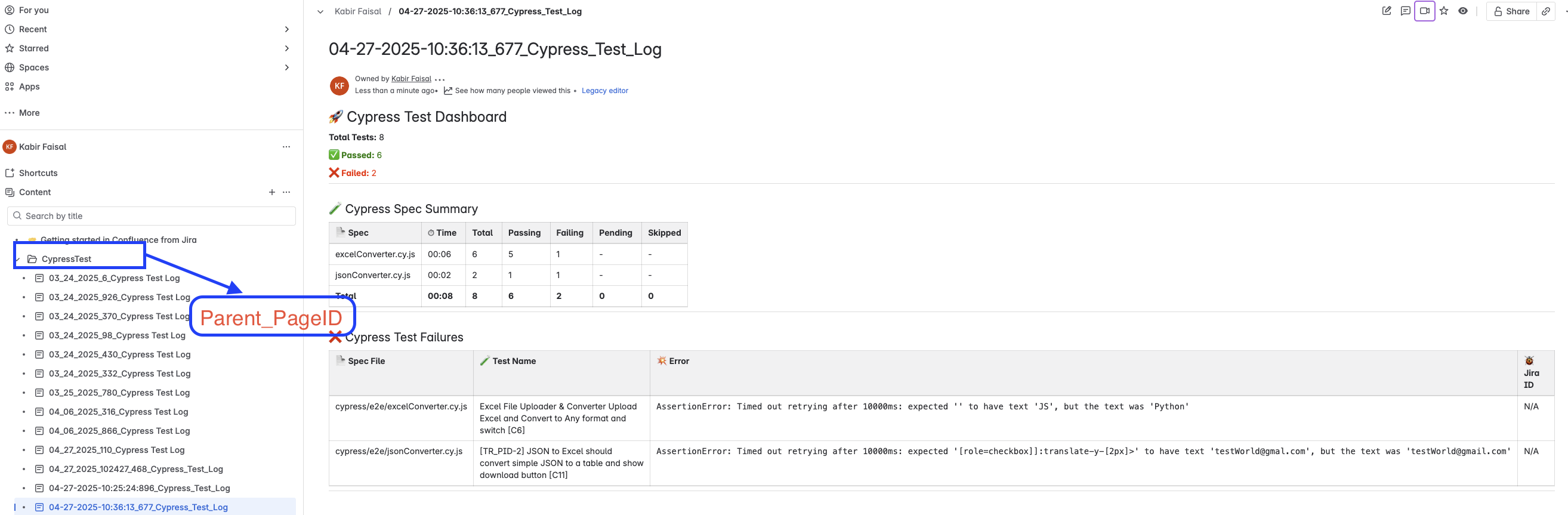
- 📌 **CONFLUENCE_PARENT_PAGE_ID** → ID of the parent page/folder where test logs go (check Confluence URL or API)
---
## 📷 Screenshots
### CLI Execution

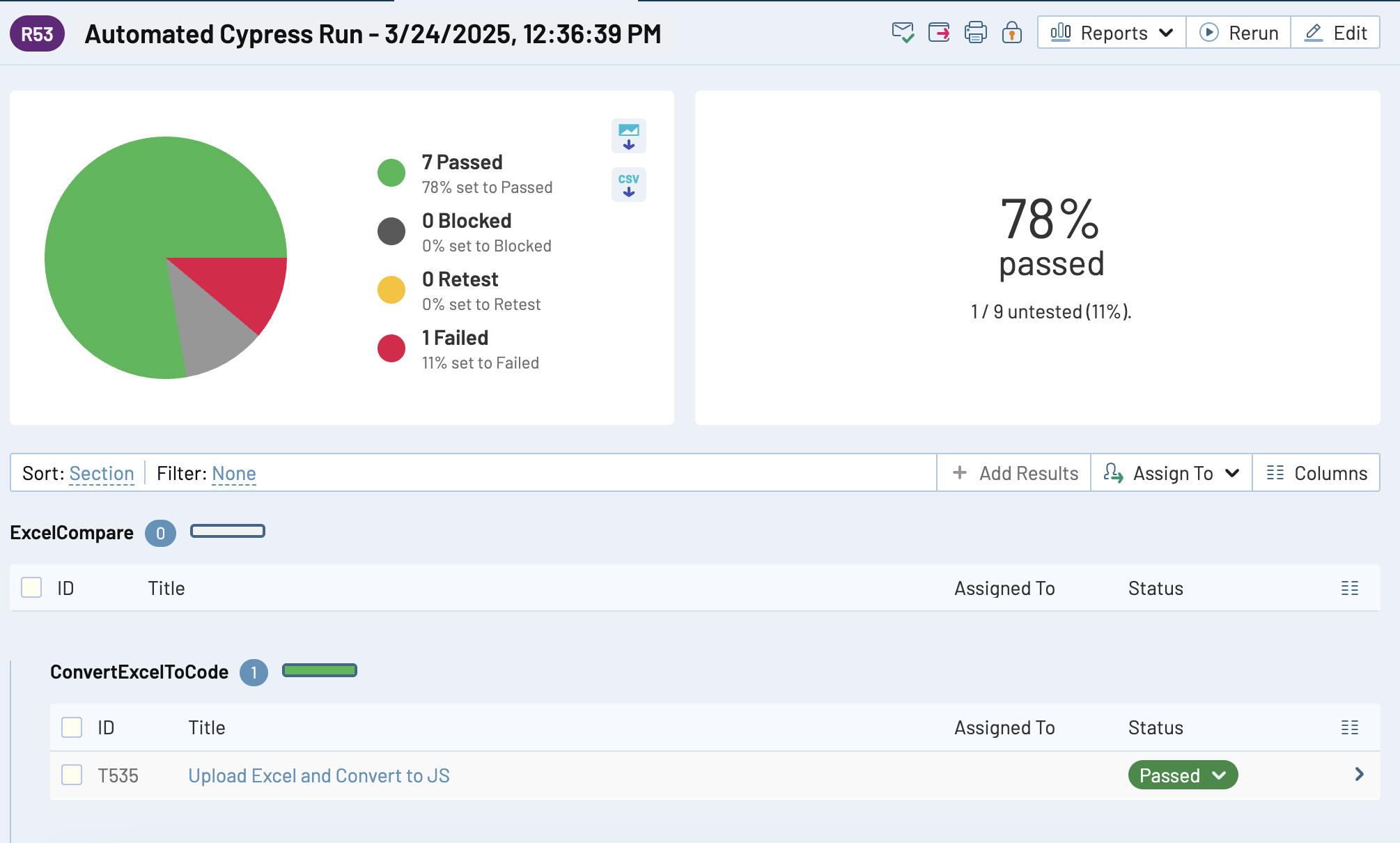
### Test Results Dashboard
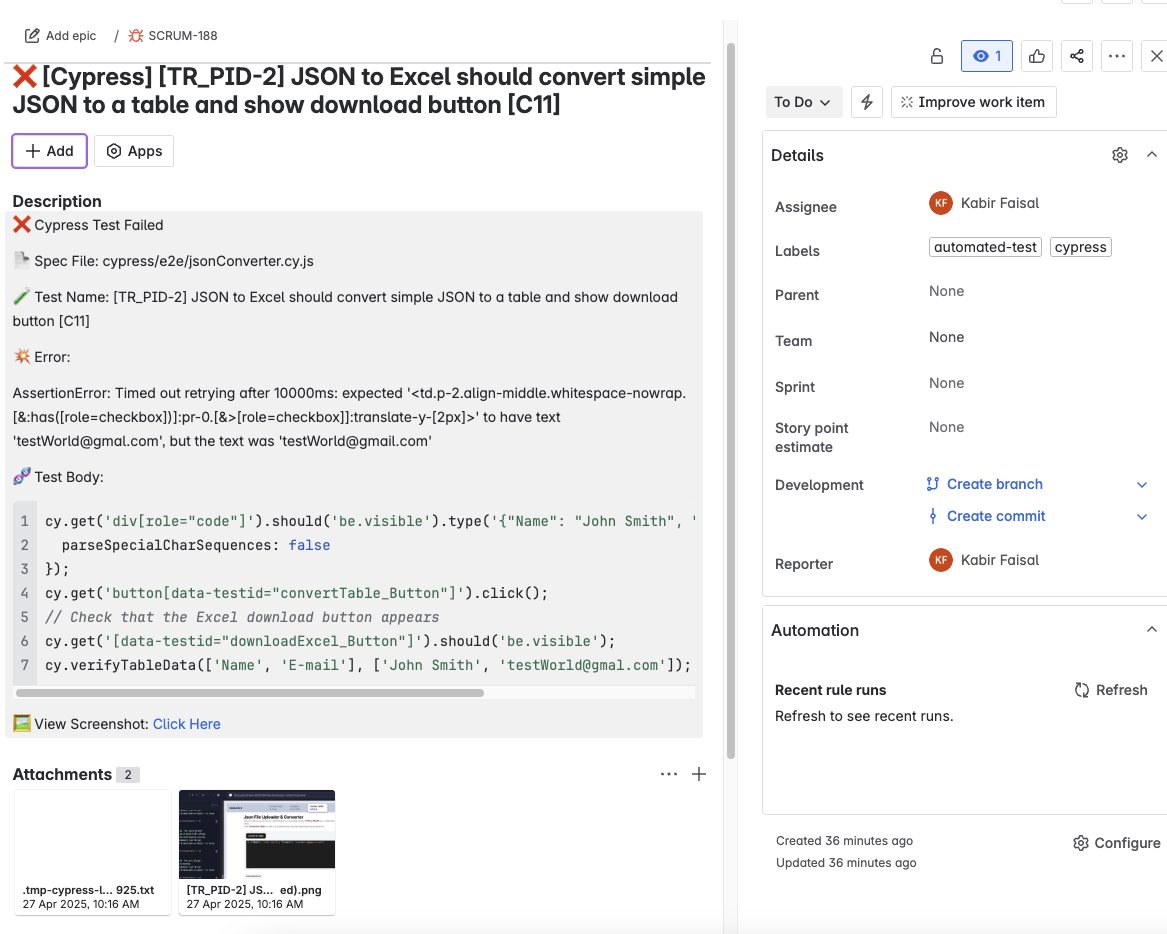
### Jira Bug Ticket Example
### Confluence Test Summary
## 🛠️ Version
### ^2.4.0
1. Parses Cypress mochawesome reports.
2. Extracts ProjectID and Case IDs from test titles.
3. For each unique ProjectID:
- Queries all Suites.
- Finds the matching Suite containing all Case IDs.
4. Creates a TestRail Run with the correct Suite and Case IDs.
5. Posts test results to the newly created Test Run.
6. Automatically closes the Test Run after posting results.
7. Dynamic Run Name Based on File Path
- Now accepts `runName` as a parameter.
- If 2+ folders: **Folder1-Folder2 Automated Run** with `<date>` :: _e.g._ `cypress/e2e/Shopping/Smoke`
- If 1 folder: **Folder1 Automated Run** with `<date>` :: _e.g._ `cypress/e2e/Smoke`
- If none: **Automated Cypress Run - `<date>`**
<br>
| **Before** | **After** |
|----------------------------------------------------|------------------------------------------------------------------|
| ❌ Could only work with static `.env` ProjectID | ✅ Dynamic ProjectID works from `[P2]` |
| ❌ 400 Error: `case_ids` unrecognized if wrong suite used | ✅ Dynamically finds the correct `suite_id` `[S1]` |
| ❌ Poor debug logs when things fail | ✅ Clean, visible logs for ProjectID, SuiteID, CaseIDs |
| ❌ Unscalable for multiple projects | ✅ Now supports multiple Projects and Suites automatically |
| ❌ Needed manual hardcoding | ✅ 100% automatic detection |
| ❌ Manual step needed to close test run | ✅ Automatically closes TestRail run after results are posted |
## 📄 License
MIT © [Kabir Faisal](https://kabirfaisal1.github.io/myReactProtfolio/#/) | [Linkedin](https://www.linkedin.com/in/kabirfaisal89/) |
[Discord](https://discord.gg/MFh6gYZB)