csshtml-module
Version:
Easily compile CSS, HTML, or other files into modules for JavaScript or TypeScript
234 lines (157 loc) • 7.14 kB
Markdown
# Compile CSS and HTML to JavaScript modules
⚡ Easily compile **CSS**, **HTML**, or other files into **ES6 modules** for **JavaScript** or **TypeScript** ⚡
*A simple CLI tool to let you use HTML and CSS files when developing **Web Components**.*
## Install
```
npm install -g csshtml-module
```
* [**JetBrains File Watchers** example](readme-filewatcher.md)
* [**VSCcode** example](readme-vscode.md).
<br>
## Why use this tool
There are currently no well-supported native way to import CSS and HTML to JavaScript. You can fetch these files,
use compilers like Webpack and Rollup, or just put your code inside a JS file. But, you could also just let your
IDE compile it automatically to native JS modules, which this CLI can help you with 😎
<br>
## How it works
Set up your IDE to automatically trigger this CLI on changes made to HTML and CSS.
It can then convert files - like this `button.css` file 👇🏻
```css
button {
background-color: red;
}
```
into native modules in JavaScript or Typescript 👇🏻
```ts
// language=css
export const css: string = `button {
background-color: red;
}`;
```
so you can `import` them wherever you need them 🔥
```ts
import {css} from './button.style.js'
const style = document.createElement('style');
style.innerHTML = css;
```
There are even an option to compile CSS and HTML file to a ready template module for Web
Components 🤘🏻
```js
export const template = document.createElement('template');
template.innerHTML = `
<style>
button{ background-color: firebrick }
</style>
<button>🔥</button>
`;
```
Learn more about this below 👇👇👇
<br>
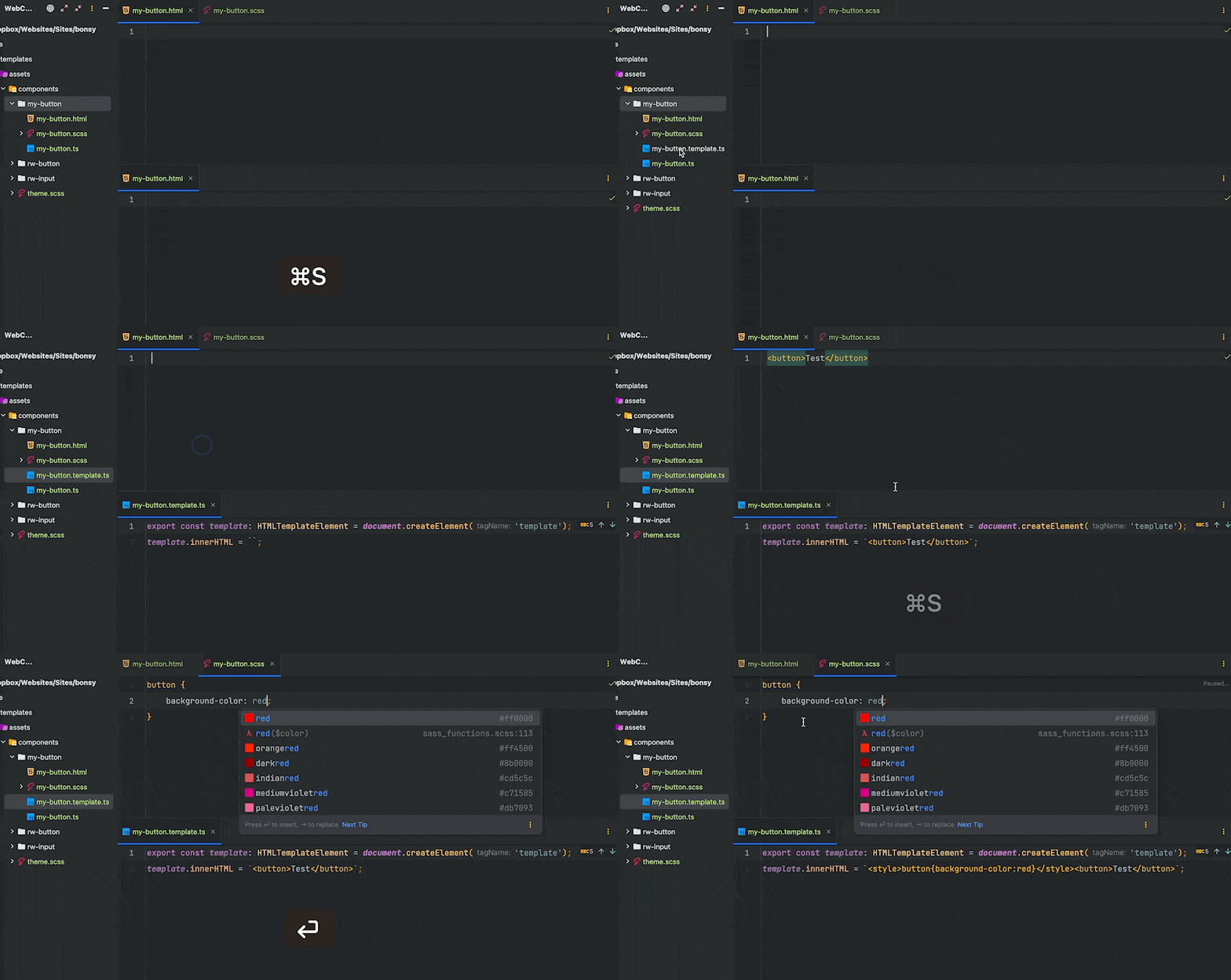
## How your IDE might help you 👌🏻
With an IDE like JetBrains PHPStorm you can set up **File Watchers** to automatically compile
**CSS** and **HTML** to usable JavaScript modules with this CLI.
There should be an option to do this in VS Code as well (maybe you could help?).
### Example on how this might look
* **File Watchers** (FW) in **PHPStorm** detects changes you made in your SCSS file.
* FW then compiles the file to CSS, Autoprefix it for better browser-support and minimize the file for faster loading.
* FW then use this CLI to compile your CSS to ES6 module.
So, you go from a SCSS file to ES6 module in seconds 🏎️💨
If you update your SCSS it will recompile and changes are instant.
➡️ [Details on how to set up JetBrains **File Watchers**](readme-filewatcher.md).<br>
➡️ [Details on how to set up **VSCcode**](readme-vscode.md).
#### Example from PHPStorm
<br>
## Usage
```
Single file compiling:
csshtml-module -i [inputFile] -o [outputFile]
HTML Template file compiling:
csshtml-module --template --css [file] --html [file] -o [template.ts]
Options:
-V, --version output the version number.
-i, --input <file> single file to convert - ignored if --template is set.
-o, --output <file> destination file. Should end with .ts or .js (required).
--template compiles to a HTMLTemplate module.
-d, --delay <int> time, in milliseconds, that the script should wait before compiling.
-n, --name <string> name of the JS constant - ignored if --template is set.
--html <string> html file to use for --template
--css <string> css file to use for --template
-h, --help display help for command
```
<br>
## Convert single file to module
In terminal:
```shell
csshtml-module -i buttons.html -o buttons.html.ts --n ButtonHtml
```
Which will convert your `buttons.html` file 👇🏻
```html
<button type="submit" class="button">Save</button>
```
Into this `buttons.html.ts` file 👇🏻
```ts
// language=html
export const ButtonHtml: string = `<button type="submit" class="button">Save</button>`;
```
Which can be imported as a JS/TS module 👇🏻
```ts
import {ButtonHtml} from './buttons.html.ts'
const template = document.createElement('template');
template.innerHTML = ButtonHtml;
```
#### Options
* It will compile either to JavaScript or TypeScript based on the output extension (`.js` or `.ts`)
* It will add a `\\ language=file-extension` comment to help you IDE understand the content.
* If you want the compiler to wait for other compilers, you can define a `--delay`.
* You are not limited to `HTML` or `CSS` - but the output will be string.
<br>
## Convert to HTML Template module
In terminal:
```shell
csshtml-module --template --css buttons.css --html buttons.html -o buttons.template.js
```
Which will convert your `buttons.html` file 👇🏻
```html
<button>Hello</button>
```
And your `buttons.css` file 👇🏻
```css
button { background-color: red }
```
Into this `buttons.template.js` file 👇🏻
```ts
export const template = document.createElement('template');
template.innerHTML = `<style>button{background-color:red}</style><button>Hello</button>`;
```
Which can be imported as a HTMLTemplate module 👇🏻
```ts
import {template} from './buttons.template.js'
...
this.shadowRoot.appendChild(template.content.cloneNode(true));
```
#### Good to know
* Either CSS or HTML file must exist. If only CSS exist, it will still compile, but then only with a `style` tag.
* When you import the HTMLTemplate, it will be generated once, and not for every instance of your web component - like
it would if you created the template inside the constructor/connectedCallback method.
<br>
---
## Some thoughts on why this CLI tool was created
I wasn't able to find a satisfying solution to keep HTML and CSS as native, and separated, files when developing Web
Components. [I see other people want to keep these files separated as well](https://stackoverflow.com/questions/73935544/organizing-multiple-web-components-with-seperation-of-concerns/75388024#75388024).
I tried fetching, which I had problem accepting. I tried Webpack, but I found it to be slow and had too much
configuration.
I didn't try Rollup - because it didn't make sense in my environment.
There is a promising new feature for [CSS module scripts](https://web.dev/css-module-scripts/), but this isn't
well-supported for Safari (at least for now - in Feburary 2023). And the HTML module script is way too early.
Hopefully we will see this be implemented in browsers soon. Anyway, compiling down to a ready HTMLTemplate module
that combines CSS and HTML does sound like a more performant solution.
With this CLI I can get performant code, compiled from native HTML and CSS files in matter of seconds. All ready to be
used in the same instance.
---
## Suggestions and help is welcomed!
Do you have any thoughts on how to achieve this in a more performant, faster or maybe in a well-supported native
way? Then I would ❤️ to hear from you!
Please help if you can! Found any bugs or irregularities? Or maybe you are using VS Code and have found a way to
automatically compile like I do in PHPStorm, then maybe you could share to help others?
Thanks for checking this out!