cspell
Version:
A Spelling Checker for Code!
438 lines (336 loc) • 15.9 kB
Markdown
# cspell
[](https://travis-ci.org/Jason3S/cspell)
[](https://coveralls.io/github/Jason3S/cspell?branch=master)
A Spell Checker for Code!
`cspell` is a command line tool and library for spell checking code.
## Features
* Spell Checks Code -- Able to spell check code by parsing it into words before checking against the dictionaries.
* Supports CamelCase, snake_case, and compoundwords naming styles.
* Self contained -- does not depend upon OS libraries like Hunspell or aspell. Nor does it depend upon online services.
* Fast -- checks 1000's of lines of code in seconds.
* Programming Language Specific Dictionaries -- Has dedicated support for:
* JavaScript, TypeScript, Python, PHP, C#, C++, LaTex, Go, HTML, CSS, etc.
* Customizable -- supports custom dictionaries and word lists.
* Continuous Integration Support -- Can easily be added as a linter to Travis-CI.
cspell was initially built as the spell checking service for the [spell checker extension](https://marketplace.visualstudio.com/items?itemName=streetsidesoftware.code-spell-checker) for
[Visual Studio Code](https://code.visualstudio.com/).
## Installation
```sh
npm install -g cspell
```
## Usage
Example: recursively spell check all javascript files in `src`
```sh
cspell "src/**/*.js"
```
### Help
```sh
cspell --help
```
### Quick check
```sh
cspell check <filename>
```
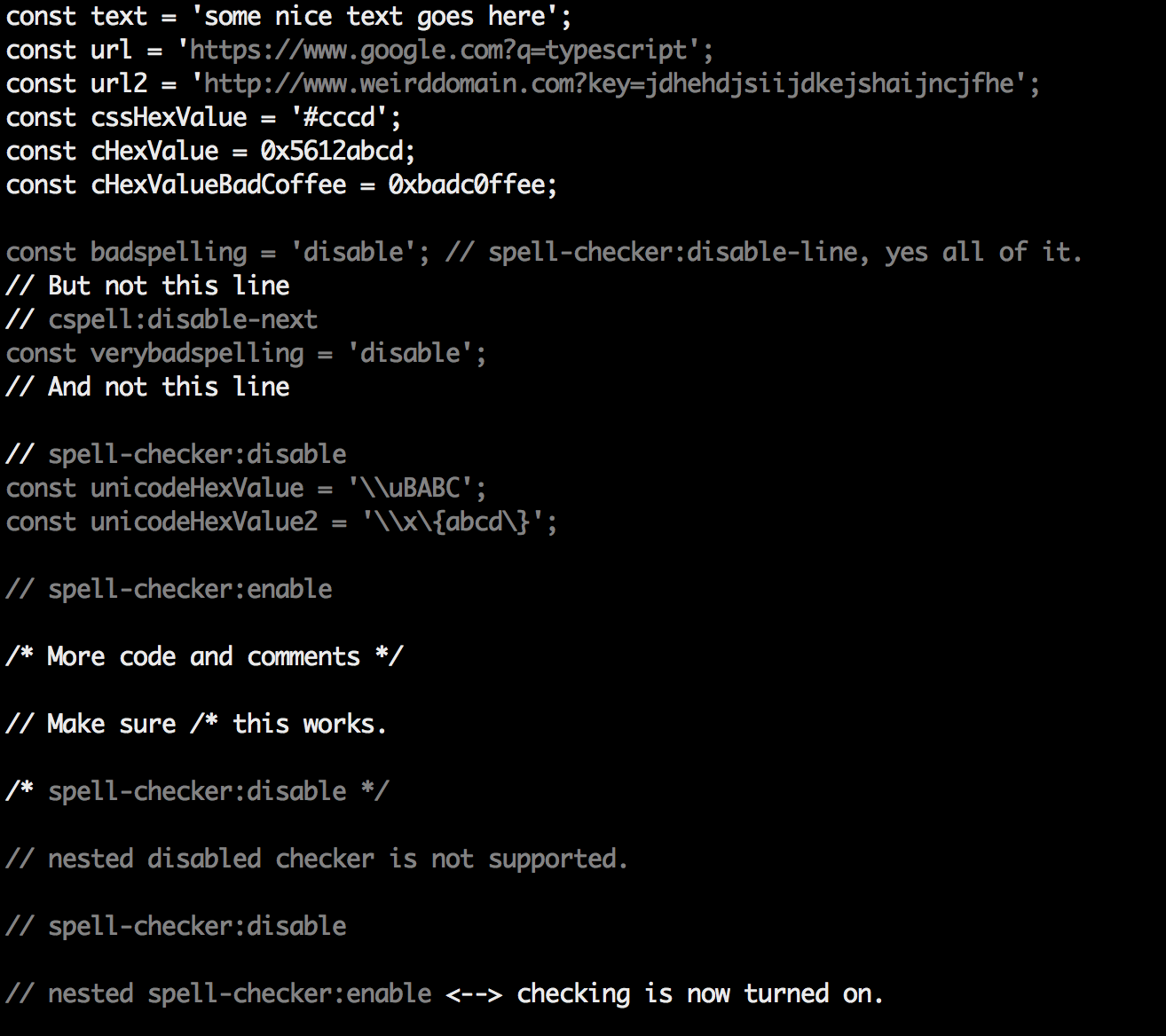
It will produce something like this:
### Tip for use with `less`
To get color in less, use `--color` and `less -r`
```sh
cspell check <filename> --color | less -r
```
## Requirements
cspell needs Node 8 and above.
## How it works
The concept is simple, split camelCase and snake_case words before checking them against a list of known words.
* `camelCase` -> `camel case`
* `HTMLInput` -> `html input`
* `srcCode` -> `src code`
* `snake_case_words` -> `snake case words`
* `camel2snake` -> `camel snake` -- (the 2 is ignored)
* `function parseJson(text: string)` -> `function parse json text string`
### Special cases
* Escape characters like `\n`, `\t` are removed if the word does not match:
* `\narrow` -> `narrow` - because `narrow` is a word
* `\ncode` -> `code` - because `ncode` is not a word.
* `\network` -> `network` - but it might be hiding a spelling error, if `\n` was an escape character.
### Things to note
* This spellchecker is case insensitive. It will not catch errors like `english` which should be `English`.
* The spellchecker uses dictionaries stored locally. It does not send anything outside your machine.
* The words in the dictionaries can and do contain errors.
* There are missing words.
* Only words longer than 3 characters are checked. "jsj" is ok, while "jsja" is not.
* All symbols and punctuation are ignored.
## In Document Settings
It is possible to add spell check settings into your source code.
This is to help with file specific issues that may not be applicable to the entire project.
All settings are prefixed with `cSpell:` or `spell-checker:`.
* `disable` -- turn off the spell checker for a section of code.
* `enable` -- turn the spell checker back on after it has been turned off.
* `ignore` -- specify a list of words to be ignored.
* `words` -- specify a list of words to be considered correct and will appear in the suggestions list.
* `ignoreRegExp` -- Any text matching the regular expression will NOT be checked for spelling.
* `includeRegExp` -- Only text matching the collection of includeRegExp will be checked.
* `enableCompoundWords` / `disableCompoundWords` -- Allow / disallow words like: "stringlength".
### Enable / Disable checking sections of code
It is possible to disable / enable the spell checker by adding comments to your code.
#### Disable Checking
* `/* cSpell:disable */`
* `/* spell-checker: disable */`
* `/* spellchecker: disable */`
* `// cspell:disable-line` -- disables checking for the current line.
* `/* cspell:disable-next-line */` -- disables checking till the end of the next line.
<!--- cSpell:enable -->
#### Enable Checking
* `/* cSpell:enable */`
* `/* spell-checker: enable */`
* `/* spellchecker: enable */`
#### Example
```javascript
// cSpell:disable
const wackyWord = ['zaallano', 'wooorrdd', 'zzooommmmmmmm'];
/* cSpell:enable */
const words = ['zaallano', 'wooorrdd', 'zzooommmmmmmm']; // cspell:disable-line disables this entire line
// To disable the next line, use cspell:disable-next-line
const moreWords = ['ieeees', 'beees', 'treeees'];
// Nesting disable / enable is not Supported
// spell-checker:disable
// It is now disabled.
var liep = 1;
/* cspell:disable */
// It is still disabled
// cSpell:enable
// It is now enabled
const str = "goededag"; // <- will be flagged as an error.
// spell-checker:enable <- doesn't do anything
// cSPELL:DISABLE <-- also works.
// if there isn't an enable, spelling is disabled till the end of the file.
const str = "goedemorgen"; // <- will NOT be flagged as an error.
```
<!--- cSpell:enable -->
### Ignore
*Ignore* allows you the specify a list of words you want to ignore within the document.
```javascript
// cSpell:ignore zaallano, wooorrdd
// cSpell:ignore zzooommmmmmmm
const wackyWord = ['zaallano', 'wooorrdd', 'zzooommmmmmmm'];
```
**Note:** words defined with `ignore` will be ignored for the entire file.
### Words
The *words* list allows you to add words that will be considered correct and will be used as suggestions.
```javascript
// cSpell:words woorxs sweeetbeat
const companyName = 'woorxs sweeetbeat';
```
**Note:** words defined with `words` will be used for the entire file.
### Enable / Disable compound words
In some programing language it is common to glue words together.
```c
// cSpell:enableCompoundWords
char * errormessage; // Is ok with cSpell:enableCompoundWords
int errornumber; // Is also ok.
```
**Note:** Compound word checking cannot be turned on / off in the same file.
The last setting in the file determines the value for the entire file.
### Excluding and Including Text to be checked.
By default, the entire document is checked for spelling.
`cSpell:disable`/`cSpell:enable` above allows you to block off sections of the document.
`ignoreRegExp` and `includeRegExp` give you the ability to ignore or include patterns of text.
By default the flags `gim` are added if no flags are given.
The spell checker works in the following way:
1. Find all text matching `includeRegExp`
2. Remove any text matching `excludeRegExp`
3. Check the remaining text.
#### Exclude Example
```javascript
// cSpell:ignoreRegExp 0x[0-9a-f]+ -- will ignore c style hex numbers
// cSpell:ignoreRegExp /0x[0-9A-F]+/g -- will ignore upper case c style hex numbers.
// cSpell:ignoreRegExp g{5} h{5} -- will only match ggggg, but not hhhhh or 'ggggg hhhhh'
// cSpell:ignoreRegExp g{5}|h{5} -- will match both ggggg and hhhhh
// cSpell:ignoreRegExp /g{5} h{5}/ -- will match 'ggggg hhhhh'
/* cSpell:ignoreRegExp /n{5}/ -- will NOT work as expected because of the ending comment -> */
/*
cSpell:ignoreRegExp /q{5}/ -- will match qqqqq just fine but NOT QQQQQ
*/
// cSpell:ignoreRegExp /[^\s]{40,}/ -- will ignore long strings with no spaces.
// cSpell:ignoreRegExp Email -- this will ignore email like patterns -- see Predefined RegExp expressions
var encodedImage = 'HR+cPzr7XGAOJNurPL0G8I2kU0UhKcqFssoKvFTR7z0T3VJfK37vS025uKroHfJ9nA6WWbHZ/ASn...';
var email1 = 'emailaddress@myfancynewcompany.com';
var email2 = '<emailaddress@myfancynewcompany.com>';
```
**Note:** ignoreRegExp and includeRegExp are applied to the entire file. They do not start and stop.
#### Include Example
In general you should not need to use `includeRegExp`. But if you are mixing languages then it could come in helpful.
```Python
# cSpell:includeRegExp #.*
# cSpell:includeRegExp ("""|''')[^\1]*\1
# only comments and block strings will be checked for spelling.
def sum_it(self, seq):
"""This is checked for spelling"""
variabele = 0
alinea = 'this is not checked'
for num in seq:
# The local state of 'value' will be retained between iterations
variabele += num
yield variabele
```
## Predefined RegExp expressions
### Exclude patterns
* `Urls`<sup>1</sup> -- Matches urls
* `HexDigits` -- Matches hex digits: `/^x?[0-1a-f]+$/i`
* `HexValues` -- Matches common hex format like #aaa, 0xfeef, \\u0134
* `Base64`<sup>1</sup> -- matches base64 blocks of text longer than 40 characters.
* `Email` -- matches most email addresses.
### Include Patterns
* `Everything`<sup>1</sup> -- By default we match an entire document and remove the excludes.
* `string` -- This matches common string formats like '...', "...", and \`...\`
* `CStyleComment` -- These are C Style comments /* */ and //
* `PhpHereDoc` -- This matches PHPHereDoc strings.
<sup>1.</sup> These patterns are part of the default include/exclude list for every file.
## Customization
*cspell*'s behavior can be controlled through a config file. By default it looks for any of the following files:
* `cspell.json`
* `.cspell.json`
* `cSpell.json`
Or you can specify a path to a config file with the `--config <path>` argument on the command line.
### cSpell.json
#### Example _cSpell.json_ file
```javascript
// cSpell Settings
{
// Version of the setting file. Always 0.1
"version": "0.1",
// language - current active spelling language
"language": "en",
// words - list of words to be always considered correct
"words": [
"mkdirp",
"tsmerge",
"githubusercontent",
"streetsidesoftware",
"vsmarketplacebadge",
"visualstudio"
],
// flagWords - list of words to be always considered incorrect
// This is useful for offensive words and common spelling errors.
// For example "hte" should be "the"
"flagWords": [
"hte"
]
}
```
### cspell.json sections
* `version` - currently always 0.1
* `language` - this specifies the language local to use in choosing the general dictionary.
For example: `"language": "en-GB"` tells cspell to use British English instead of US English.
* `words` - a list of words to be considered correct.
* `flagWords` - a list of words to be allways considered incorrect
* `ignoreWords` - a list of words to be ignored (even if they are in the flagWords).
* `ignorePaths` - a list of globs to specify which files are to be ignored.
**Example**
```json
"ignorePaths": ["node_modules/**"]
```
will cause cspell to ignore anything in the `node_modules` directory.
* `maxNumberOfProblems` - defaults to ***100*** per file.
* `minWordLength` - defaults to ***4*** - the minimum length of a word before it is checked.
* `allowCompoundWords` - defaults to ***false***; set to **true** to allow compound words by default.
* `dictionaries` - list of the names of the dictionaries to use. See [Dictionaries](#Dictionaries) below.
* `dictionaryDefinitions` - this list defines any custom dictionaries to use. This is how you can include other langauges like Spanish.
**Example**
```javascript
"language": "en",
// Dictionaries "spanish", "ruby", and "corp-term" will always be checked.
// Including "spanish" in the list of dictionaries means both Spanish and English
// words will be considered correct.
"dictionaries": ["spanish", "ruby", "corp-terms", "fonts"],
// Define each dictionary. Relative paths are relative to the config file.
"dictionaryDefinitions": [
{ "name": "spanish", "path": "./spanish-words.txt"},
{ "name": "ruby", "path": "./ruby.txt"},
{ "name": "company-terms", "path": "./corp-terms.txt"}
],
```
* `ignoreRegExpList` - list of patterns to be ignored
* `includeRegExpList` - *(Advanced)* limits the text checked to be only that matching the expressions in the list.
* `patterns` - this allows you to define named patterns to be used with
`ignoreRegExpList` and `includeRegExpList`.
* `languageSettings` - this allow for per programming language configuration settings. See [LanguageSettings](#LanguageSettings)
## Dictionaries
The spell checker includes a set of default dictionaries.
### General Dictionaries
* **en_US** - Derived from Hunspell US English words.
* **en-gb** - Derived from Hunspell GB English words.
* **companies** - List of well known companies
* **softwareTerms** - Software Terms and concepts like "coroutine", "debounce", "tree", etc.
* **misc** - Terms that do not belong in the other dictionaries.
### Programming Language Dictionaries
* **typescript** - keywords for Typescript and Javascript
* **node** - terms related to using nodejs.
* **php** - *php* keywords and library methods
* **go** - *go* keywords and library methods
* **python** - *python* keywords
* **powershell** - *powershell* keywords
* **html** - *html* related keywords
* **css** - *css*, *less*, and *scss* related keywords
* **cpp** - *C++* related keywords
* **csharp** - *C#* related keywords
* **latex** - LaTex related words
### Miscellaneous Dictionaries
* **fonts** - long list of fonts - to assist with *css*
* **filetypes** - list of file typescript
* **npm** - list of top 500+ package names on npm.
## LanguageSettings
The Language Settings allow configuration to be based upon the programming langauge and/or the local.
There are two selector fields `local` and `languageId`.
* `languageId` defines which programming languages to match against.
A value of `"python,javascript"` will match against *python* and *javascript* files. To match against ALL programming languages,
use `"*"`.
* `local` defines which spoken langauges to match against. A value of `"en-GB,nl"` will match against British English or Dutch.
A value of `"*"` will match all spoken languages.
* Most configuration values allowed in a `cspell.json` file can be define or redefine within the `languageSettings`.
```javascript
"languageSettings": [
{
// VSCode languageId. i.e. typescript, java, go, cpp, javascript, markdown, latex
// * will match against any file type.
"languageId": "c,cpp",
// Language local. i.e. en-US, de-AT, or ru. * will match all locals.
// Multiple locals can be specified like: "en, en-US" to match both English and English US.
"local": "*",
// To exclude patterns, add them to "ignoreRegExpList"
"ignoreRegExpList": [
"/#include.*/"
],
// List of dictionaries to enable by name in `dictionaryDefinitions`
"dictionaries": ["cpp"],
// Dictionary definitions can also be supplied here. They are only used iff "languageId" and "local" match.
"dictionaryDefinitions": []
}
]
```
## Overrides
Overrides are useful for forcing configuration on a per file basis.
Example:
```javascript
"overrides": [
// Force `*.hrr` and `*.crr` files to be treated as `cpp` files:
{
"filename": "**/{*.hrr,*.crr}",
"languageId": "cpp"
},
// Force `*.txt` to use the Dutch dictionary (Dutch dictionary needs to be installed separately):
{
"language": "nl",
"filename": "**/dutch/**/*.txt"
}
]
```
<!---
These are at the bottom because the VSCode Marketplace leaves a bit space at the top
cSpell:ignore jsja goededag alek wheerd behaviour tsmerge QQQQQ ncode
cSpell:enableCompoundWords
cSpell:includeRegExp Everything
cSpell:ignore hte variabele alinea
cSpell:ignore mkdirp githubusercontent streetsidesoftware vsmarketplacebadge visualstudio
cSpell:words Verdana
-->