create-node-spark
Version:
CLI tool to scaffold a Node.js backend
539 lines (370 loc) • 16.3 kB
Markdown
<div align="center">
# 🚀 create-node-spark
### The fastest way to scaffold production-ready Node.js backends
**Zero configuration • TypeScript ready • Multiple databases • Developer-friendly**
**https://talhabilal-dev.github.io/create-node-spark.github.io/**
[](https://www.npmjs.com/package/create-node-spark)
[](https://www.npmjs.com/package/create-node-spark)
[](LICENSE)
[](https://github.com/talhabilal-dev/create-node-spark)
[Quick Start](#-quick-start) • [Features](#-features) • [Documentation](#-documentation) • [Contributing](#-contributing)
</div>
---
## 🎉 Exciting News: Phase 2 Development Has Begun
> **We're thrilled to announce that Phase 2 development is now underway!** Phase 1 has been successfully completed with all core features implemented. Phase 2 brings exciting new capabilities including **PostgreSQL + Prisma integration**, **Fastify framework support**, and **enhanced project customization**. Stay tuned for groundbreaking updates!
---
## ✨ What is create-node-spark?
**create-node-spark** is a powerful, developer-focused CLI tool that eliminates the tedious setup process for Node.js backend projects. Inspired by industry leaders like Create React App and Vite, it provides instant scaffolding for production-ready REST APIs with modern best practices built-in.
Whether you're a **beginner seeking guidance** or a **seasoned developer avoiding repetitive setup**, create-node-spark gets you coding in seconds, not hours.
### 🎯 Perfect For
- 🚀 **Rapid prototyping** and MVP development
- 👨💻 **Solo developers** and small teams
- 🏢 **Enterprise teams** needing consistent project structure
- 📚 **Learning projects** with industry-standard setup
- 🔄 **API-first development** workflows
## 🚀 Quick Start
Get up and running in under 30 seconds:
```bash
# Using npx (recommended - always latest version)
npx create-node-spark@latest
# Or install globally
npm install -g create-node-spark
create-node-spark
```
**That's it!** Follow the interactive prompts and you'll have a fully configured backend ready for development.
## ✨ Features
<table>
<tr>
<td width="50%">
### 🛠️ **Core Capabilities**
- **Language Choice**: JavaScript or TypeScript
- **Package Manager**: npm or pnpm support
- **Modern ES Modules**: No CommonJS legacy
- **Framework Ready**: Express.js & Fastify pre-configured
- **Database Integration**: MongoDB, MySQL & PostgreSQL support
- **Modern ORM**: Prisma integration for PostgreSQL
- **File Uploads**: Optional Multer configuration
</td>
<td width="50%">
### 🔧 **Developer Experience**
- **Smart ESLint**: Balanced rules for productivity
- **Prettier Integration**: Consistent code formatting
- **Environment Setup**: `.env` configuration ready
- **Organized Structure**: Professional folder layout
- **Zero Dependencies**: Lightweight and fast
- **Directory Safety**: Prevents accidental overwrites
</td>
</tr>
</table>
## 📦 Installation Methods
<details>
<summary><strong>📱 Method 1: NPX (Recommended)</strong></summary>
```bash
npx create-node-spark@latest
```
✅ Always uses the latest version
✅ No global installation required
✅ Perfect for one-time usage
</details>
<details>
<summary><strong>🌍 Method 2: Global Installation</strong></summary>
```bash
npm install -g create-node-spark
create-node-spark
```
✅ Available from anywhere
✅ Faster subsequent usage
✅ Ideal for frequent use
</details>
<details>
<summary><strong>🔧 Method 3: Development Setup</strong></summary>
```bash
git clone https://github.com/talhabilal-dev/create-node-spark.git
cd create-node-spark
npm install
npm link
```
✅ Full source code access
✅ Contributing ready
✅ Latest development features
</details>
## 🎮 Interactive Setup Process

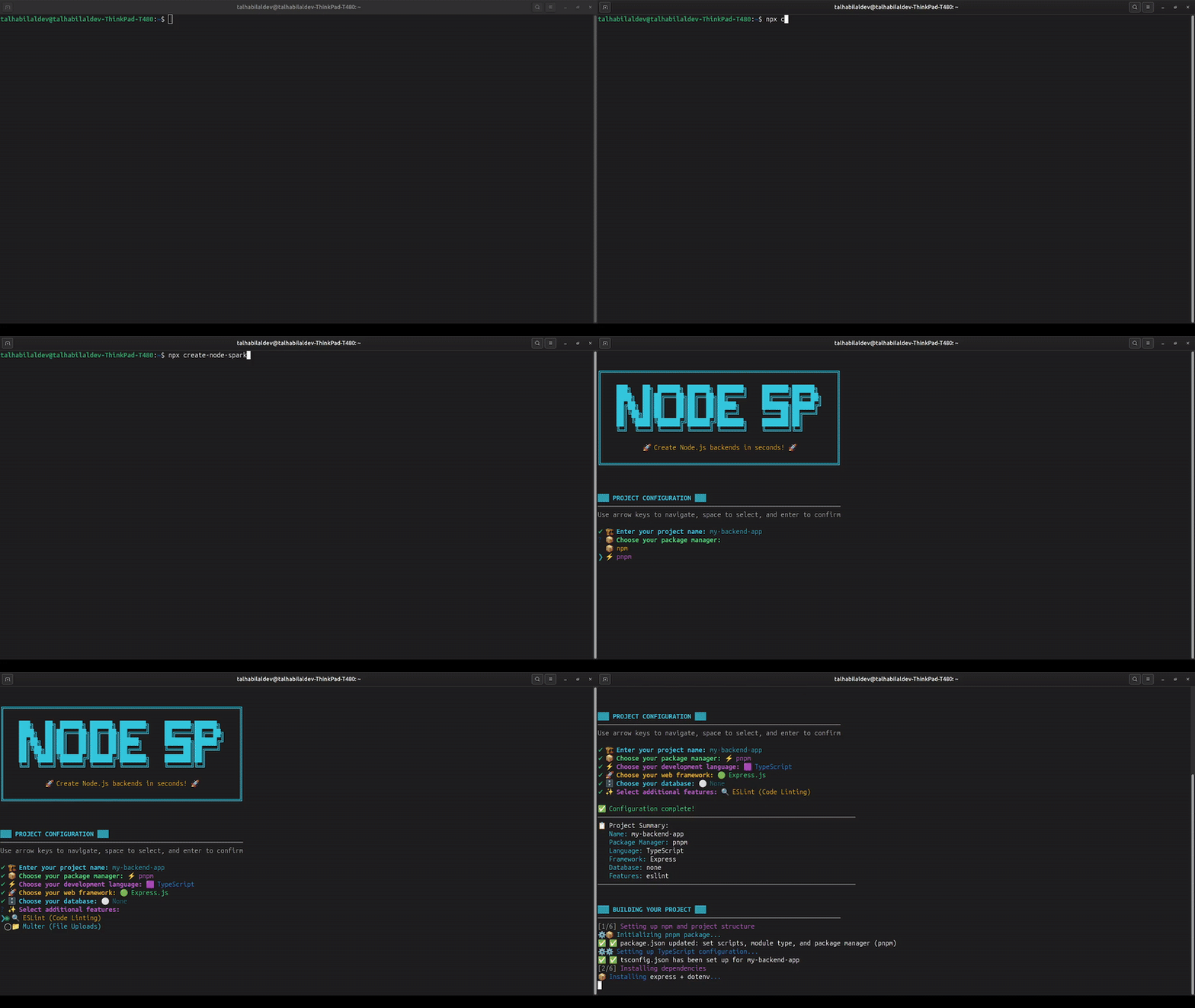
The CLI guides you through a seamless setup process:
1. **📝 Project Name**: Choose your project identifier
2. **📦 Package Manager**: Select npm or pnpm
3. **💻 Language**: JavaScript or TypeScript
4. **🚀 Framework**: Express.js, Fastify, or vanilla Node.js
5. **🗄️ Database**: MongoDB, MySQL, PostgreSQL, or none
6. **⚙️ Features**: ESLint, Multer, and more
## 📁 Generated Project Structure
# 🛠️ Introduction
> ⚡ Spark your Node.js backend, skip the boilerplate.

**create-node-spark** is a powerful CLI (Command Line Interface) tool designed to scaffold production-ready Node.js backend projects with ease. Inspired by tools like Create Next App and Vite, this tool removes the boilerplate pain by generating a clean, structured, and configurable Node.js project — so you can focus on building features, not setting up folders and configs.
Whether you’re a beginner wanting a head start or a seasoned developer tired of setting up the same repetitive structure, create-node-spark helps you spark your next backend project in seconds.
# ❓ What is Create-Node-Spark?
create-node-spark is a flexible scaffolding tool built specifically for Node.js backend projects, focusing on REST API development.
Here’s what it sets up for you under the hood:
- ✅ Choose between JavaScript or TypeScript at scaffold time
- ✅ Uses modern ESM (ECMAScript Modules) — no old CommonJS clutter
- ✅ Built on Express.js & Fastify, popular and battle-tested Node.js frameworks
- ✅ Pre-configured for MongoDB integration with Mongoose
- ✅ Pre-configured for MySQL integration with Knex.js and mysql2
- ✅ Pre-configured for PostgreSQL integration with Prisma ORM
- ✅ Sets up environment variables (.env) out of the box
- ✅ Includes an optional Multer setup to handle file uploads
- ✅ Includes an optional ESLint setup to keep your codebase clean and consistent
- ✅ Depends only on Inquirer (for CLI prompts) — keeping external dependencies light and minimal
## 📁 Generated Project Structure
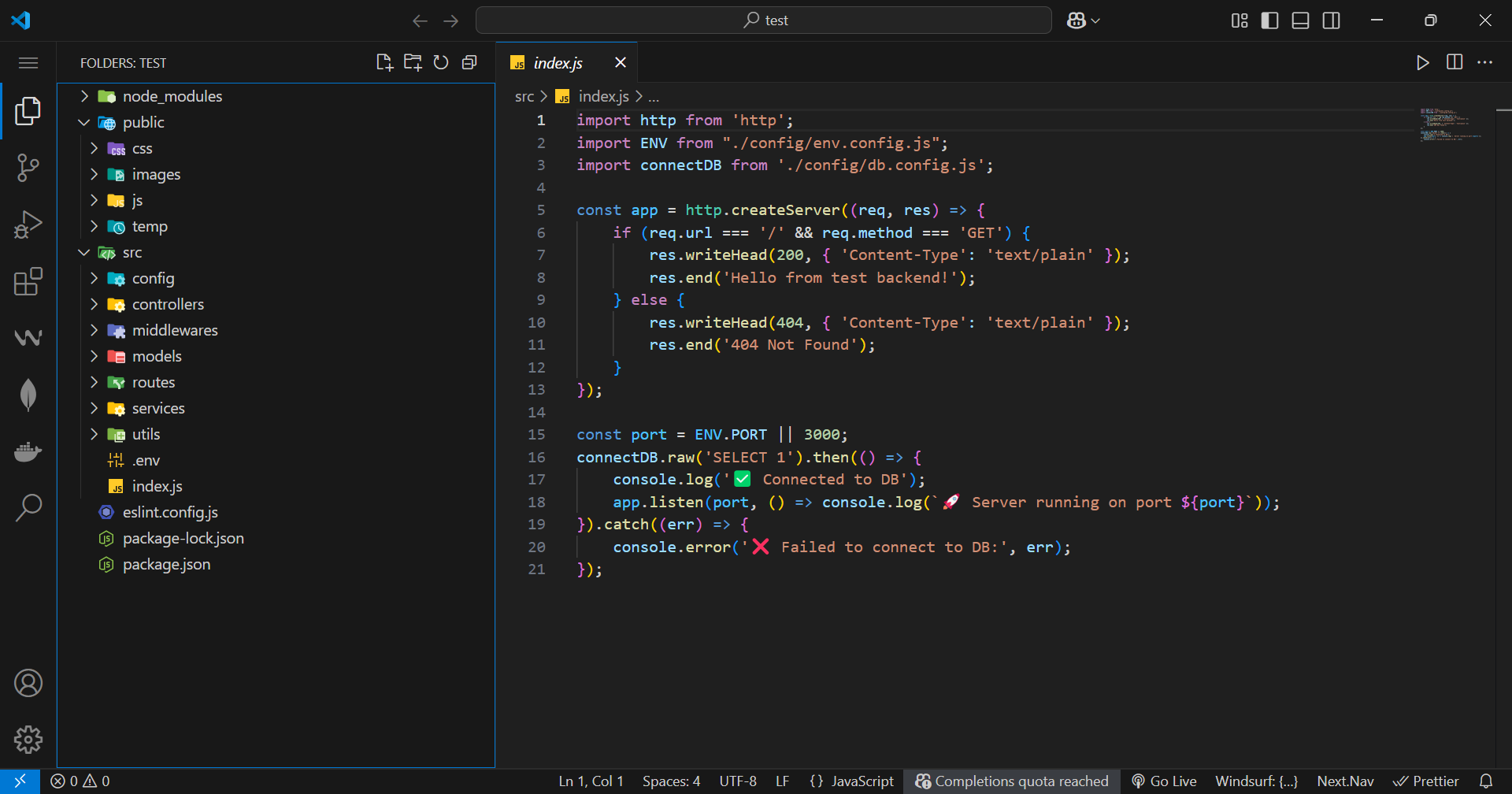
Every project follows a professional, scalable structure:
```
my-awesome-api/
├── 📁 public/ # Static assets
│ ├── css/ # Stylesheets
│ ├── js/ # Client-side scripts
│ ├── images/ # Image assets
│ └── temp/ # Temporary files
├── 📁 src/ # Source code
│ ├── config/ # Configuration files
│ ├── controllers/ # Route handlers & business logic
│ ├── middlewares/ # Custom middleware functions
│ ├── models/ # Database models (Mongoose/Knex)
│ ├── routes/ # API route definitions
│ ├── services/ # Business logic services
│ ├── utils/ # Utility functions
│ └── index.js/.ts # Application entry point
├── 📄 package.json # Dependencies & scripts
├── 📄 .env # Environment variables
├── 📄 .eslintrc.js # Code quality rules (if enabled)
├── 📄 .prettierrc # Code formatting (if enabled)
└── 📄 README.md # Project documentation
```
## 🗄️ Database Integration Options
<table>
<tr>
<td width="50%">
### 🍃 **MongoDB + Mongoose**
- Pre-configured connection setup
- Schema models ready to use
- Async/await best practices
- Error handling included
</td>
<td width="50%">
### � **PostgreSQL + Prisma**
- Modern ORM with type safety
- Auto-generated client and types
- Migration support ready
- Advanced querying capabilities
</td>
<td width="50%">
### �🐬 **MySQL + Knex.js**
- Query builder configured
- Migration support ready
- Connection pooling setup
- SQL best practices included
</td>
</tr>
</table>
## 🛣️ Development Roadmap
<div align="center">
### ✅ **Phase 1 - COMPLETED**
*Foundation & Core Features*
</div>
- ✅ **Multi-language Support**: JavaScript & TypeScript
- ✅ **Package Manager Choice**: npm & pnpm
- ✅ **Framework Integration**: Express.js & Fastify
- ✅ **Database Support**: MongoDB, MySQL & PostgreSQL
- ✅ **Developer Tools**: ESLint & Prettier
- ✅ **File Handling**: Multer integration
- ✅ **Modern Standards**: ESM modules
- ✅ **Environment Setup**: Automatic .env configuration
<div align="center">
### 🚧 **Phase 2 - IN PROGRESS**
*Advanced Features & Expansion*
</div>
- ✅ **PostgreSQL Integration**: Prisma ORM support
- ✅ **Fastify Framework**: High-performance alternative
- 🔄 **Enhanced Customization**: Granular folder structure control
- 🔄 **Template System**: Pre-built project templates
- 🔄 **Testing Setup**: Automated test configuration
<div align="center">
### 🔮 **Phase 3 - PLANNED**
*Enterprise & Advanced Features*
</div>
- 📋 **GraphQL Support**: Complete GraphQL API scaffolding
- 🐳 **Docker Integration**: Containerization out-of-the-box
- 🔄 **CI/CD Templates**: GitHub Actions & deployment configs
- 🔌 **Plugin System**: Extensible architecture
- 🏗️ **Project Templates**: Industry-specific starter templates
## 🚀 Why Choose create-node-spark?
<table>
<tr>
<td width="33%">
### ⚡ **Speed**
Get from idea to coding in under 30 seconds. No more hours spent on project setup.
</td>
<td width="33%">
### 🎯 **Focused**
Built specifically for Node.js backend development with modern best practices.
</td>
<td width="33%">
### 🔧 **Flexible**
Choose your stack: TypeScript/JavaScript, npm/pnpm, MongoDB/MySQL.
</td>
</tr>
<tr>
<td width="33%">
### 📦 **Lightweight**
Minimal dependencies keep your projects fast and maintainable.
</td>
<td width="33%">
### 🏗️ **Production-Ready**
Professional folder structure and configurations from day one.
</td>
<td width="33%">
### 🌱 **Future-Proof**
Regular updates and new features based on community feedback.
</td>
</tr>
</table>
## 📖 Documentation
### Quick Examples
<details>
<summary><strong>🚀 Create a TypeScript API with MongoDB</strong></summary>
```bash
npx create-node-spark@latest
# Select: TypeScript → Express → MongoDB → ESLint
cd my-api
npm run dev
```
Your API is now running with TypeScript, MongoDB connection, and ESLint configured!
</details>
<details>
<summary><strong>🐘 Create a PostgreSQL API with Prisma</strong></summary>
```bash
npx create-node-spark@latest
# Select: TypeScript → Express/Fastify → PostgreSQL → ESLint
cd my-api
npm run dev
```
Get a modern API with PostgreSQL, Prisma ORM, and full type safety!
</details>
<details>
<summary><strong>⚡ Create a Fastify API with TypeScript</strong></summary>
```bash
npx create-node-spark@latest my-fast-api --lang ts --framework fastify --db postgresql --yes
cd my-fast-api
npm run dev
```
Experience blazing-fast performance with Fastify and TypeScript!
</details>
<details>
<summary><strong>⚡ Create a JavaScript API with MySQL</strong></summary>
```bash
npx create-node-spark@latest
# Select: JavaScript → Express → MySQL → Skip ESLint
cd my-api
npm start
```
Perfect for rapid prototyping with MySQL database integration!
</details>
<details>
<summary><strong>🛠️ Create a minimal Node.js server</strong></summary>
```bash
npx create-node-spark@latest
# Select: JavaScript → None → No Database → Skip all features
cd my-server
npm start
```
Clean Node.js HTTP server ready for custom implementation!
</details>
### Available Scripts
Every generated project includes these npm scripts:
```bash
npm start # Start the production server
npm run dev # Start development server with auto-reload
npm run build # Build TypeScript to JavaScript (TS projects)
npm run lint # Check code quality with ESLint
npm run lint:fix # Auto-fix ESLint issues
npm run format # Format code with Prettier
```
## 🤝 Contributing
We welcome contributions from developers of all skill levels! Here's how you can help make create-node-spark even better:
### 🎯 **Ways to Contribute**
- 🐛 **Bug Reports**: Found an issue? Let us know!
- ✨ **Feature Requests**: Have ideas? We'd love to hear them!
- 📝 **Documentation**: Help improve our guides and examples
- 💻 **Code Contributions**: Submit PRs for new features or fixes
- 🧪 **Testing**: Help us test new features and report feedback
### 🚀 **Quick Contribution Setup**
```bash
# 1. Fork & clone the repository
git clone https://github.com/talhabilal-dev/create-node-spark.git
cd create-node-spark
# 2. Install dependencies
npm install
# 3. Create a feature branch
git checkout -b feature/amazing-feature
# 4. Make your changes and test
npm run build
npm start
# 5. Submit a pull request
git add .
git commit -m "Add amazing feature"
git push origin feature/amazing-feature
```
### 💡 **Contribution Guidelines**
- ✅ Follow the existing code style and structure
- ✅ Write clear, descriptive commit messages
- ✅ Test your changes thoroughly
- ✅ Update documentation if needed
- ✅ Be respectful and collaborative
## 🌟 Community & Support
<div align="center">
**Join our growing community of developers!**
[](https://github.com/talhabilal-dev/create-node-spark/issues)
[](https://github.com/talhabilal-dev/create-node-spark/discussions)
📧 **Email**: [contact@talhabilal.dev](mailto:contact@talhabilal.dev)
🐛 **Issues**: [GitHub Issues](https://github.com/talhabilal-dev/create-node-spark/issues)
💬 **Discussions**: [GitHub Discussions](https://github.com/talhabilal-dev/create-node-spark/discussions)
</div>
### 📊 **Project Stats**
<div align="center">


</div>
## 🙏 Acknowledgments
This project is built with love and powered by these amazing technologies:
<table>
<tr>
<td align="center" width="20%">
<img src="https://nodejs.org/static/images/logo.svg" alt="Node.js" width="50"><br>
<strong>Node.js</strong><br>
<em>Runtime Engine</em>
</td>
<td align="center" width="20%">
<img src="https://raw.githubusercontent.com/github/explore/80688e429a7d4ef2fca1e82350fe8e3517d3494d/topics/typescript/typescript.png" alt="TypeScript" width="50"><br>
<strong>TypeScript</strong><br>
<em>Type Safety</em>
</td>
<td align="center" width="20%">
<img src="https://raw.githubusercontent.com/github/explore/80688e429a7d4ef2fca1e82350fe8e3517d3494d/topics/mongodb/mongodb.png" alt="MongoDB" width="50"><br>
<strong>MongoDB</strong><br>
<em>Database</em>
</td>
<td align="center" width="20%">
<img src="https://raw.githubusercontent.com/github/explore/80688e429a7d4ef2fca1e82350fe8e3517d3494d/topics/mysql/mysql.png" alt="MySQL" width="50"><br>
<strong>MySQL</strong><br>
<em>Database</em>
</td>
<td align="center" width="20%">
<img src="https://raw.githubusercontent.com/github/explore/80688e429a7d4ef2fca1e82350fe8e3517d3494d/topics/postgresql/postgresql.png" alt="PostgreSQL" width="50"><br>
<strong>PostgreSQL</strong><br>
<em>Database</em>
</td>
</tr>
</table>