countries-map
Version:
World countries datamaps component for Angular
239 lines (179 loc) • 7.1 kB
Markdown
# countries-map
> World countries datamaps component for Angular.
[](https://badge.fury.io/js/countries-map)
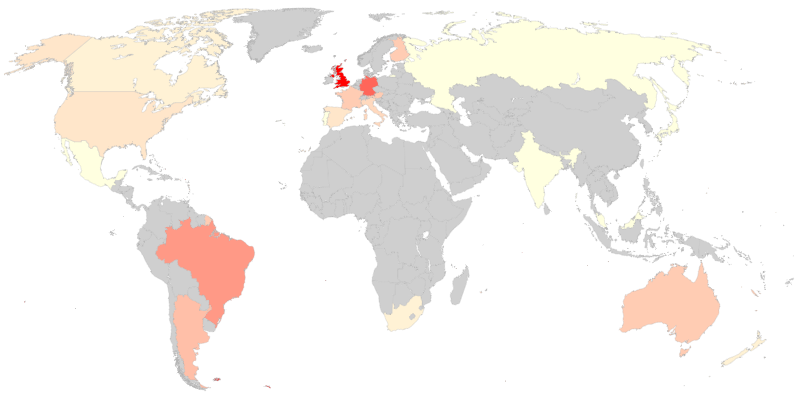
## This package does not depend on 3rd parties' maps
Version v4 of this package **does NOT depend on Google GeoCharts** but uses its own embedded map.
If you want to use v3 (which depends on Google GeoCharts), please check [ReadMe v3](https://github.com/jagomf/countries-map/blob/v3/README.md).
## Table of contents
* [Install](#install)
* [Usage](#usage)
* [Attributes](#attributes)
* [Events](#events)
* [Styles](#styles)
* [Projects](#projects)
* [License](#license)
## Install
```bash
npm install --save countries-map
```
## Usage
Import `CountriesMapModule` in your `app.module.ts`:
```ts
import { CountriesMapModule } from 'countries-map';
@NgModule({
...
imports: [
...
CountriesMapModule,
],
})
export class AppModule { }
```
In your templates, use the `<countries-map>` component like this:
```html
<countries-map [data]="mapData"/>
```
and in the corresponding `.ts` file:
```ts
import { CountriesData } from 'countries-map';
...
public mapData: CountriesData = {
'ES': { 'value': 416 },
'GB': { 'value': 94 },
'FR': { 'value': 255 }
};
```
### Typing
Typing the data input with [`CountriesData`](#interface-countriesdata) is not mandatory but it is highly recommendable because it will help you correctly define the object to pass to `<countries-map>`'s `[data]` attribute.
## Attributes
Element `<countries-map>` accepts the following attributes/inputs:
Attribute | Type | Default | Description
--- | --- | --- | ---
`data` | `CountriesData` | Required | Describes list of countries and their value and extra data (if any). See below description for interface [`CountriesData`](#interface-countriesdata).
`countryLabel` | `string` | `'Country'` | Caption label for country name.
`valueLabel` | `string` | `'Value'` | Caption label for country's value.
`showCaption` | `boolean` | `true` | Shows/hides caption.
`captionBelow` | `boolean` | `true` | Places caption below or above the map.
`minValue` | `number` | Optional | If stated, sets the base to be used as lowest value expected in the color scale (values below `minValue` will have same color).
`maxValue` | `number` | Optional | If stated, sets the base to be used as highest value expected in the color scale (values above `maxValue` will have same color).
`minColor` | `string` | `'white'` | Hex or named color representing the lowest value.
`maxColor` | `string` | `'red'` | Hex or named color representing the highest value.
`noDataColor` | `string` | `'#CFCFCF'` | Hex or named color for countries not included in data list.
`exceptionColor` | `string` | `'#FFEE58'` | Hex or named color for countries with value `null` or `undefined`.
`backgroundColor` | `string` | `'white'` | Hex or named color of the map background.
### Interface `CountriesData`
This interface is a convenience for describing the object to be passed to `data` attribute.
The list should look like this:
```ts
mapData: CountriesData = {
'ES': { 'value': 416 },
'GB': { 'value': 94, 'extra': { 'foo': 'bar' } },
'FR': { 'value': 255, 'extra': { 'baz': 41 } }
};
```
Actual implementation:
```ts
interface CountriesData {
[countryCode: string]: CountryData;
}
interface CountryData {
value: number;
extra?: CountryExtraData;
}
interface CountryExtraData {
[key: string]: number |string;
}
```
## Events
Element `<countries-map>` accepts callbacks for the following events:
### chartReady
The `chartReady` event is fired when a chart is completely loaded.
Bind the `chartReady` event in the `countries-map` component like this:
```html
<countries-map [data]="mapData" (chartReady)="ready()"/>
```
Your `ready()` function receives no parameters. You can use it like:
```ts
public ready() {
// your logic
}
```
### chartError
The `chartError` event is fired if there are some errors with a chart.
Bind the `chartError` event in the `countries-map` component, like this:
```html
<countries-map [data]="mapData" (chartError)="error($event)"/>
```
Your `error()` function is passed an event which interface looks like this:
```ts
interface ChartErrorEvent {
id: string | CharErrorCode;
message: string;
detailedMessage: string;
options: Object;
}
```
You can import the `ChartErrorEvent` interface and `CharErrorCode` enum in your `.ts` file:
```ts
import { ChartErrorEvent, CharErrorCode } from 'countries-map';
```
and then use it like:
```ts
public error(event: ChartErrorEvent) {
if (event.id === CharErrorCode.loading) {
// error was produced during loading
}
// your logic
}
```
See more details about [returned values for error event][google-charts-error-event].
### chartSelect
The `chartSelect` event is fired when a chart is selected/clicked.
Bind the `chartSelect` event in the `countries-map` component, like this:
```html
<countries-map [data]="mapData" (chartSelect)="select($event)"/>
```
Your `select()` function is passed an event whose interface looks like this:
```ts
interface ChartSelectEvent {
selected: boolean;
value: number | null;
country: string;
extra?: CountryExtraData;
}
```
You can import the `ChartSelectEvent` interface in your `.ts` file:
```ts
import { ChartSelectEvent } from 'countries-map';
```
and then use it like:
```ts
public select(event: ChartSelectEvent) {
// your logic
}
```
## Styles
You can apply styles to most of the countries-map caption area (if you decide to show it) and map container so that you can integrate your countries-map in your site's look&feel.
These are the classes you can apply styles to, hierarchically displayed, and associated to their wrappers:
* `cm-map-content`: world map
* `cm-caption-container`: full caption area
* `cm-simple-caption`: main caption section (`countryLabel`/`valueLabel` area)
* `cm-country-label`: `countryLabel` keyword or country name (whichever is shown)
* `cm-defaut-label`: `countryLabel` keyword
* `cm-country-name`: country name
* `cm-value-label`: `valueLabel` keyword or value label, plus actual value
* `cm-value-text`: `valueLabel` keyword or value label (whichever is shown)
* `cm-value-content`: actual value for the current country
* `cm-extended-caption`: area for the extra items
* `cm-extended-item`: each of the single extra items (made of key and value)
* `cm-extended-label`: key of the single extra item
* `cm-extended-value`: value of the single extra item
## Countries
Current valid country codes are widely-recognized sovereign nations plus some other autonomous realms. Check the currently valid list at [`@jagomf/countrieslist`](https://github.com/jagomf/countrieslist).
## Projects
Highlighted projects currently using countries-map:
* [Deflaggr](https://deflaggr.com): Collect world flags
Contact us if you want to get highlighted.
## License
[MIT](https://github.com/jagomf/countries-map/blob/master/LICENSE)