cordova-plugin-foxitpdf
Version:
cordova pdf preview plugin with Foxit Pdf sdk
124 lines (84 loc) • 4.61 kB
Markdown
<!--
# license: Licensed to the Apache Software Foundation (ASF) under one
# or more contributor license agreements. See the NOTICE file
# distributed with this work for additional information
# regarding copyright ownership. The ASF licenses this file
# to you under the Apache License, Version 2.0 (the
# "License"); you may not use this file except in compliance
# with the License. You may obtain a copy of the License at
#
# http://www.apache.org/licenses/LICENSE-2.0
#
# Unless required by applicable law or agreed to in writing,
# software distributed under the License is distributed on an
# "AS IS" BASIS, WITHOUT WARRANTIES OR CONDITIONS OF ANY
# KIND, either express or implied. See the License for the
# specific language governing permissions and limitations
# under the License.
-->
# How to use this demo
- [iOS](#ios)
- [Android](#android)
## iOS
### Open /demo/demoApp, Execute these commands
###
```bash
cordova platform add ios (to add test platform)
cordova plugin add cordova-plugin-foxitpdf
cordova plugin add cordova-plugin-file
```
### Unzip Foxit PDF SDK for iOS and copy libs folder into the component ios folder. (The latest version is 9.0.0 )
### Open demoApp/platforms/ios/demoApp.xcworkspace
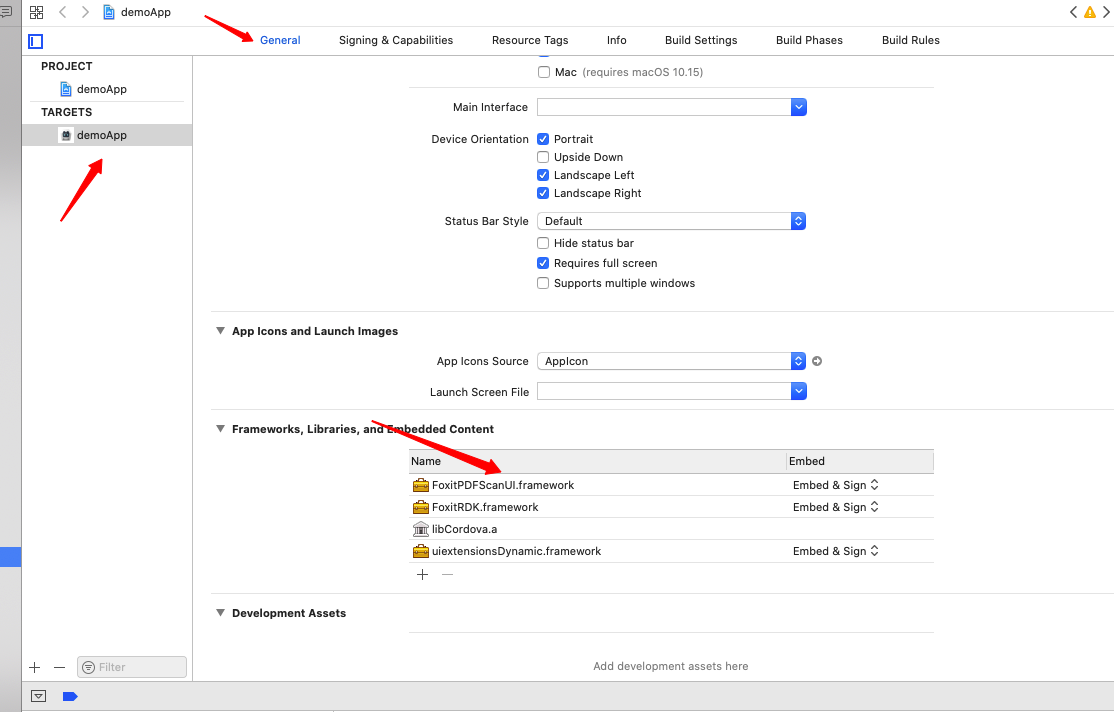
1. Target -> General ->Embedded Binaries, Add dynamic framework "FoxitRDK.framework" 、 "uiextensionsDynamic.framework" and "FoxitPDFScanUI.framework" to framework folder and also to Xcode’s Embedded Binaries
2. Target -> General -> Linked Frameworks and Libraries -> + -> WebKit.framework
3. Target -> Build Settings -> Validate Workspace -> YES (Xcode 12+)
### Put pdf file to document folder


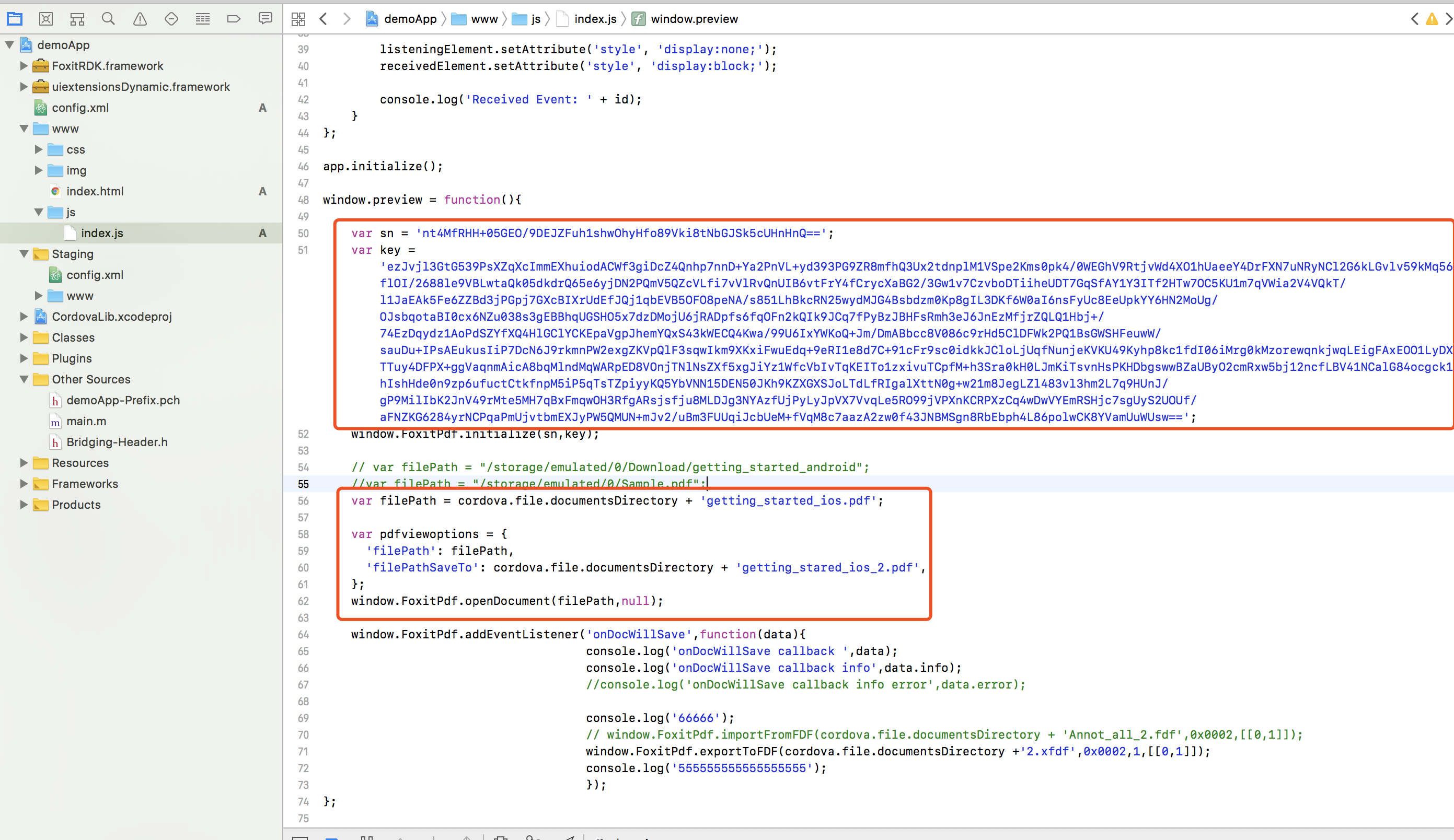
### Change filepath and sn/key in index.js
### Execute command
```bash
cordova prepare
```
### Xcode run , click cordova app ’s preview button .
Congratulations! You can preview this pdf file now.

***
## Android
### Step1: Open /demo/demoApp, Execute these commands
####
```bash
cordova platform add android
cordova plugin add cordova-plugin-foxitpdf
```
if you use Foxit PDF SDK version greater than or equal to 6.4, you can add this plugin:
```bash
cordova plugin add cordova-plugin-file
```
### Step2: Migrate to AndroidX, Add the following configuration to xxx/platforms/android/gradle.propertie:
```xml
android.useAndroidX=true
android.enableJetifier=true
```
### Step3: Unzip `foxitpdfsdk_(version_no)_android.zip` and copy libs folder into the component android folder.
You can download foxitpdfsdk_(version_no)_android.zip from https://developers.foxitsoftware.com/pdf-sdk/android/ (The latest version is 8.4.0)
### Step4: Put the pdf file on your phone.
Let's take the file in the root directory of the mobile phone as an example.

Preview the file list on the phone:

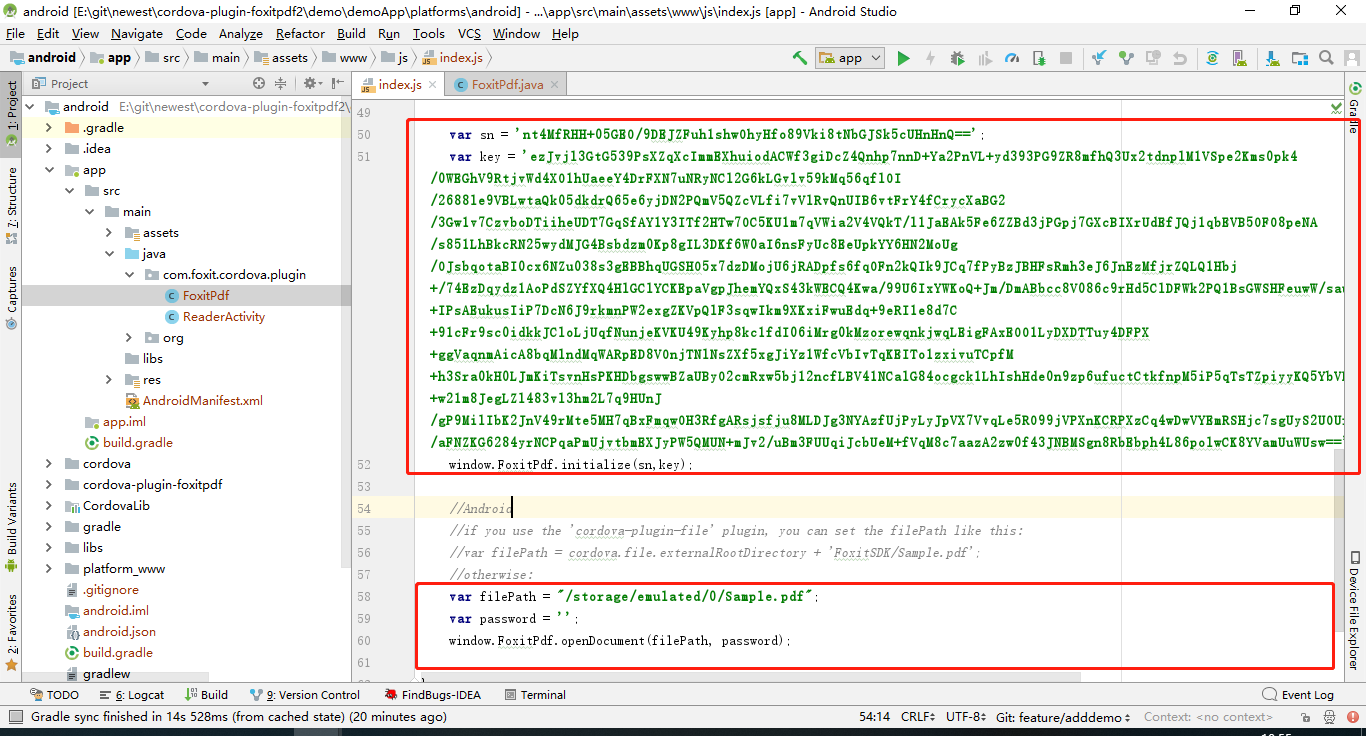
### Step5: Change `filepath` and `sn/key` in index.js.
__Note__: index.js contains the sample code of ios and android, but the code of anroid has been commented out, you need to release the relevant code of android, and comment out ios.
### Step6: Run the app
#### Run by command
```bash
cd /demo/demoApp/platforms/android
cordova run android
```
#### Run by Android Studio
Congratulations! You can preview this pdf file now.