controlled-rising-skyline
Version:
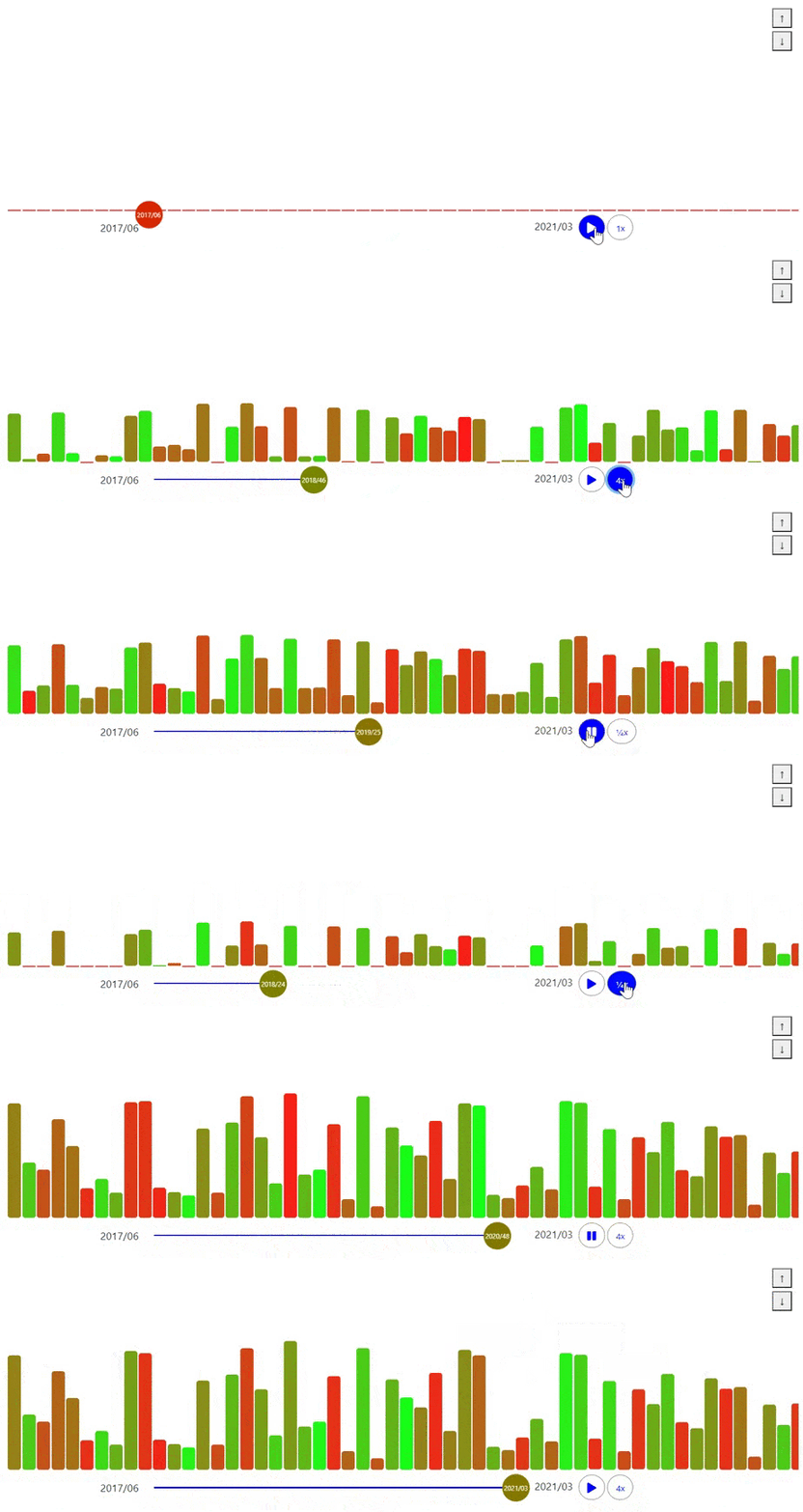
This library provides a rising skyline chart with an horizontal control panel control. This widget is linked to a dynamic history of buildings. An animation displays the rising of the skyline.
110 lines (81 loc) • 5.99 kB
Markdown
# The controlled rising Skyline chart
This library provides a rising skyline chart with an horizontal control panel control. This widget is linked to a dynamic history of buildings.
An animation displays the rising of the skyline.

[](https://opensource.org/licenses/MIT)
This chart has been created for the project [Fitzhì](http://www.fitzhi.com).
In Fitzhì, the goal is to display the history of a rising applications portfolio, confronted to the turn-over risk on these applications.
On the top right corner of the skyline, two buttons, with one up and one down arrays, allow the end-user to zoom-in, or zoom-out the view.
A panel control is associated with the skyline. With this panel, you will be able to :
* Pause, and restart the animation.
* Accelerate or decelate the animation
* Move the cursor, along the timeline.
This library requires these peer dependencies :
* @angular/materia
* @fortawesome/fontawesome-free
* bootstrap
* jquery@
* rising-skyline
## Installing this library in your project ?
The most simple command `npm install controlled-rising-skyline@latest` will install this latest release
To import the module inside your application, just add the module **ControlledRisingSkylineModule** in your `app.module.ts`.
location :
> import {ControlledRisingSkyline} from 'controlled-rising-skyline';
Install (if necessary) the fonts and the bootstrap styles in your project
> @import '@fortawesome/fontawesome-free/css/all.css';
> @import "bootstrap/dist/css/bootstrap.css";
For testing purpose, the service `ControlledRisingSkylineService` provides a random generator for testing purpose.
Its name is `randomSkylineHistory(skyline$: BehaviorSubject<Building[]>)`
## Using this library in your application ?
To include this component into a container, you just have to declare this section into your HTML template.
```
<controlled-rising-skyline
[height] = "'370px'"
[width] = "'1200px'"
[margin] = "'10px'"
[risingSkylineHistory$] = risingSkylineHistory$
[speed] = 30
[startingColor] = "'#28a745'"
[endingColor] = "'#8B0000'"
[sliderColor] = "'#0000FF'"
[backgroundColor] = "'whiteSmoke'">
</controlled-rising-skyline>
```
The parameters are :
Parameter | Decorator | Comment
------------ | ------------- | -------------
**height** | INPUT | The height of the component, with its unit of measure, hosting the skyline (_such as '100px'_).
**width** | INPUT | The width of the component, with its unit of measure, hosting the skyline (_such as '100px'_).
**margin** | INPUT | The margin around the container.
**risingSkylineHistory$** | INPUT | An observable which emits an unordered array of episodes of the skyline rising. This list will be ordered by default **by id**. Each episode is associated to a week in a year and contains an array of buildings, of different heights. The **Building** object is described below.
**speed** | INPUT | _(Optional) The speed of the animation in ms. Default value is **30** ms per step_
**startingColor** | INPUT | _(Optional) The starting color in the index-range. (Each building has a property named **index**, and this index determines the color). Default color is **red**_
**endingColor** | INPUT | _(Optional) The ending color in the index-range. (Each building has a property named **index**, and this index determines the color). Default color is **green**_
**displayVerticalTitle** | INPUT | _boolean_ Should the vertical title on top of each building be drawn ? Or not ? Default value is _false_.
**buildingMinimumHeightVerticalTitle** | INPUT | Display the vertical title when the height of buildings reaches this value.
**font** | INPUT | This setting is used by the vertical title. This is Shorthand property for setting **'font-style'**, **'font-variant'**, **'font-weight'**, **'font-size'**, **'line-height'**, and **'font-family'**. _"italic 2em "Open Sans", sans-serif'" is a possible example_.
**onClickBuilding** | OUTPUT | The component will emit an event containing a **BuildingSelected** object, each time the user is clicking on a building.
**onEnterBuilding** | OUTPUT | The component will emit an event containing a **BuildingSelected** object, each time the user is entering in a building.
**onLeaveBuilding** | OUTPUT | The component will emit an event containing a **BuildingSelected** object, each time the user is leaving a building.
**sliderColor** | INPUT | _(Optional) The color of the slider. Default color is **violet**_
**skylineBackgroundColor** | INPUT | _(Optional) The background color of the skyline container. Default color is **transparent**_
**controlBackgroundColor** | INPUT | _(Optional) The background color of the control panel. Default color is **lightGrey**_
## What is a building ?
In this component, the skyline is an array of buildings.
So a building is a piece of the skyline.
Property | type | Comment
------------ | ------------- | -------------
**id** | number | the identifier
**width** | number | the width of the building
**height** | number | the height of the building
**year** | number | the year of the building corresponding to this state of building
**week** | number | the week of the building corresponding to this state of building
**index** | number | the index of the building in the range of colors. Index range is from 0 to 100.
**title** | string | the title of the building
## What is a selected building ?
This component is emetting this object during mouse interaction.
Property | type | Comment
------------ | ------------- | -------------
**building** | Building | the building under the mouse pointer
**event** | MouseEvent | the underlying mouse event