console-feed-modern
Version:
A React component that displays console logs from the current page, an iframe or transported across a server
182 lines (126 loc) • 5.01 kB
Markdown
[](https://www.npmjs.com/package/console-feed)
<!-- [](https://circleci.com/gh/gzuidhof/console-feed) -->
[](https://www.npmjs.com/package/console-feed)
[](https://codesandbox.io/s/rl7pk9w2ym)
A React component that displays console logs from the current page, an iframe or transported across a server.
**This fork, intended for use in [Starboard Notebook](https://github.com/gzuidhof/starboard-notebook) updates the dependencies and removes ES3 transpilation.**
- [CodeSandbox.io](https://codesandbox.io)
- [Framer](https://www.framer.com)
- [Plunker](https://plnkr.co)
- [P5.js Editor](https://editor.p5js.org)
- [Builder.io](https://builder.io)
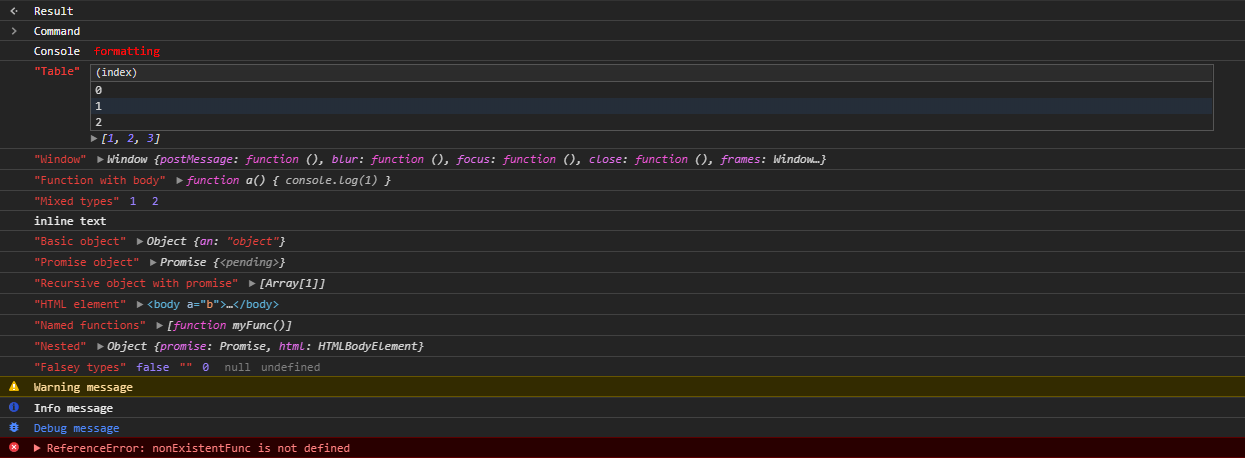
- **Console formatting** - [style and give your logs color](https://stackoverflow.com/questions/22155879/how-do-i-create-formatted-javascript-console-log-messages), and makes links clickable
- **DOM nodes** - easily inspect & expand HTML elements, with syntax highlighting
- **`console.table`** - view your logs in a table format
- **Other console methods**:
- `console.time` - view the time in milliseconds it takes to complete events
- `console.assert` - assert that a statement is truthy
- `console.count` - count how many times something occurs
- **Inbuilt JSON serialization** - Objects, Functions & DOM elements can be encoded / decoded to and from JSON
```sh
yarn add console-feed
npm install console-feed
```
[](https://codesandbox.io/s/rl7pk9w2ym)
```js
import React from 'react'
import { Hook, Console, Decode } from 'console-feed'
class App extends React.Component {
state = {
logs: []
}
componentDidMount() {
Hook(window.console, log => {
this.setState(({ logs }) => ({ logs: [...logs, Decode(log)] }))
})
console.log(`Hello world!`)
}
render() {
return (
<div style={{ backgroundColor: '#242424' }}>
<Console logs={this.state.logs} variant="dark" />
</div>
)
}
}
```
OR with hooks:
```js
import React, { useState, useEffect } from 'react'
import { Console, Hook, Unhook } from 'console-feed'
const LogsContainer = () => {
const [logs, setLogs] = useState([])
// run once!
useEffect(() => {
Hook(window.console, log => setLogs(currLogs => [...currLogs, log]), false)
return () => Unhook(window.console)
}, [])
return <Console logs={logs} variant="dark" />
}
export { LogsContainer }
```
An array consisting of Log objects. Required
Filter the logs, only displaying messages of certain methods.
Sets the font color for the component. Default - `light`
Defines the custom styles to use on the component - see [`Styles.d.ts`](https://github.com/samdenty99/console-feed/blob/master/src/definitions/Styles.d.ts)
A string value to filter logs
If you want to use a custom log filter function, you can provide your own implementation
Each log has a method assigned to it. The method is used to determine the style of the message and for the `filter` prop.
```ts
type Methods =
| 'log'
| 'warn'
| 'error'
| 'info'
| 'debug'
| 'command'
| 'result'
```
A log object consists of the following:
```ts
type Logs = Log[]
interface Log {
// The log method
method: Methods
// The arguments passed to console API
data: any[]
}
```
By default when you use the `Hook()` API, logs are serialized so that they will safely work with `JSON.stringify`. In order to restore a log back to format compatible with the `<Console />` component, you need to call the `Decode()` method.
If the `Hook` function and the `<Console />` component are on the same origin, you can disable serialization to increase performance.
```js
Hook(
window.console,
log => {
this.setState(({ logs }) => ({ logs: [...logs, log] }))
},
false
)
```
---
To run `console-feed` locally, simply run:
```bash
yarn
yarn start
yarn test:watch
```
Head over to `http://localhost:3000` in your browser, and you'll see the demo page come up. After you make changes you'll need to reload, but the jest tests will automatically restart.