configuru
Version:
Manage the configuration of your Nodejs application with multiple environments and custom preferences, utilizing Configuru in CI and development as well!
39 lines (28 loc) • 2.48 kB
Markdown
- Always **use flat structure** in JSON files (create logical hierarchy in your app when building config with loader)
- For config keys, **use `CAPITALIZED_WITH_UNDERSCORES` case**, as is conventional for env variables
- **Keep all variables used by loader in you default config**, add to VCS. Store default values or placeholders. It will be a perfect starting point for custom configs.
- Keep your configuration interface **minimal**. If you don't need to configure parameter for different environments, use constant parameter without loader.
- Even though you can use plain `JSON` for config values, **prefer `JSONc`** and add comments to your variables.
- **Keep your `.env.jsonc` well structured and well documented**. Setting up the configuration should not require thorough prior knowledge of the implementation.
### When to use placeholder, when default value?
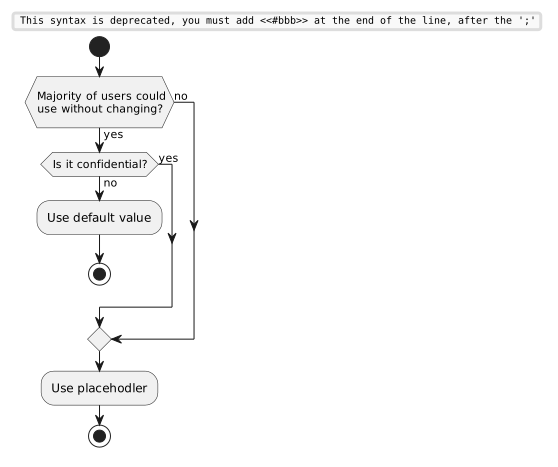
Examples:
- Setting default of `SQL_PORT` to `5432` is a good idea if you are using PostgreSQL. Similarly for MySQL, a reasonable default value would be `3306`
- Default `3000` for your HTTP server might be reasonable, if it is a convention of your developer team and/or its is wired e.g. in your Dockerfile anyway. Developers can still change it collides with any local running processes.
- Using credentials to your testing infrastructure as a default is wrong, even though it would make setup for developers easier in some scenarios. It would be confidential info in your repo history.
### Recommended structure for `.env.jsonc`
```jsonc
{
// Server
"SERVER_PORT": 3000,
// Development
"LOGGER_PRETTY": false, // colorful formatted logs
"DEV_ERRORS": false, // if true, return error details, including stack trace (affects only response, full details are always logged)
// Logging
"LOGGER_DEFAULT_LEVEL": "debug" // silent, fatal, error, warn, info, debug, trace
}
```
1. If you find your configuration file harder to navigate through, use sections seperated by a newline with a comment
2. If name is not self-explanatory, use brief comment to explain how is the value interpreted
3. Do not include tautological comments (`"SERVER_PORT": 3000, // server port`)