configcat-js
Version:
ConfigCat is a configuration as a service that lets you manage your features and configurations without actually deploying new code.
132 lines (101 loc) • 7.17 kB
Markdown
https://configcat.com
ConfigCat SDK for JavaScript provides easy integration for your application to ConfigCat.
Manage features and change your software configuration using <a href="https://configcat.com" target="_blank">ConfigCat feature flags</a>
, without the need to re-deploy code. A <a href="https://app.configcat.com" target="_blank">10 minute trainable Dashboard</a>
allows even non-technical team members to manage features directly. Deploy anytime, release when confident.
Target a specific group of users first with new ideas. Supports A/B/n testing and soft launching.
ConfigCat is a <a href="https://configcat.com" target="_blank">hosted feature flag service</a>. Manage feature toggles across frontend, backend, mobile, desktop apps. <a href="https://configcat.com" target="_blank">Alternative to LaunchDarkly</a>. Management app + feature flag SDKs.
[](https://github.com/configcat/js-sdk/actions/workflows/js-ci.yml)
[](https://codecov.io/gh/configcat/js-sdk)
[](https://snyk.io/test/github/configcat/js-sdk?targetFile=package.json)
[](https://sonarcloud.io/dashboard?id=configcat_js-sdk)
[](https://bundlephobia.com/result?p=configcat-js)

[](https://www.jsdelivr.com/package/npm/configcat-js)
[](https://nodei.co/npm/configcat-js/)
*via NPM [package](https://npmjs.com/package/configcat-js):*
```PowerShell
npm i configcat-js
```
```js
import * as configcat from "configcat-js";
```
*via CDN:*
```html
<script type="text/javascript" src="https://cdn.jsdelivr.net/npm/configcat-js@latest/dist/configcat.min.js"></script>
```
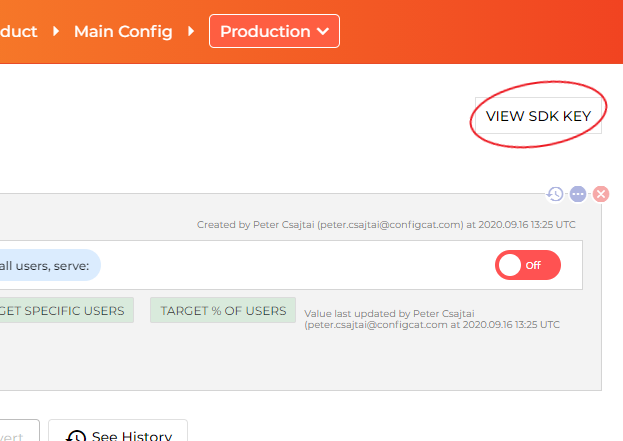
```js
const configCatClient = configcat.getClient("#YOUR-SDK-KEY#");
```
> You can acquire singleton client instances for your SDK keys using the `getClient("<sdkKey>")` factory function.
(However, please keep in mind that subsequent calls to `getClient()` with the *same SDK Key* return a *shared* client instance, which was set up by the first call.)
The async/await way:
```js
const value = await configCatClient.getValueAsync('isMyAwesomeFeatureEnabled', false);
if (value) {
do_the_new_thing();
} else {
do_the_old_thing();
}
```
or the Promise way:
```js
configCatClient.getValueAsync('isMyAwesomeFeatureEnabled', false)
.then((value) => {
if (value) {
do_the_new_thing();
} else {
do_the_old_thing();
}
});
```
Using this feature, you will be able to get different setting values for different users in your application by passing a `User Object` to `getValue()` or `getValueAsync()`.
Read more about [Targeting here](https://configcat.com/docs/advanced/targeting/).
```js
const userObject = new configcat.User("#USER-IDENTIFIER#");
const value = await configCatClient.getValueAsync('isMyAwesomeFeatureEnabled', false, userObject);
if (value) {
do_the_new_thing();
} else {
do_the_old_thing();
}
```
- [Angular 2+](https://github.com/configcat/js-sdk/tree/master/samples/angular-sample)
- [React](https://github.com/configcat/js-sdk/tree/master/samples/react-sample)
- [Pure HTML + JS](https://github.com/configcat/js-sdk/tree/master/samples/html)
The ConfigCat SDK supports 3 different polling mechanisms to acquire the setting values from ConfigCat. After latest setting values are downloaded, they are stored in the internal cache then all requests are served from there. Read more about Polling Modes and how to use them at [ConfigCat Docs](https://configcat.com/docs/sdk-reference/js/).
The frontend/mobile SDKs are running in your users' browsers/devices. The SDK is downloading a [config.json](https://configcat.com/docs/requests/) file from ConfigCat's CDN servers. The URL path for this config.json file contains your SDK key, so the SDK key and the content of your config.json file (feature flag keys, feature flag values, targeting rules, % rules) can be visible to your users.
This SDK key is read-only, it only allows downloading your config.json file, but nobody can make any changes with it in your ConfigCat account.
Suppose you don't want your SDK key or the content of your config.json file visible to your users. In that case, we recommend you use the SDK only in your backend applications and call a backend endpoint in your frontend/mobile application to evaluate the feature flags for a specific application customer.
Also, we recommend using [sensitive targeting comparators](https://configcat.com/docs/advanced/targeting/#sensitive-text-comparators) in the targeting rules of those feature flags that are used in the frontend/mobile SDKs.
## Browser compatibility
This SDK should be compatible with all modern browsers.
The SDK is [tested](https://github.com/configcat/js-sdk/blob/master/.github/workflows/js-ci.yml) against the following browsers:
- Chrome (stable, latest, beta)
- Chromium (64.0.3282.0, 72.0.3626.0, 80.0.3987.0)
- Firefox (latest, latest-beta, 84.0).
These tests are running on each pull request, before each deploy, and on a daily basis.
You can view a sample run [here](https://github.com/configcat/js-sdk/actions/runs/2420592907).
## Need help?
https://configcat.com/support
## Contributing
Contributions are welcome. For more info please read the [Contribution Guideline](CONTRIBUTING.md).
## About ConfigCat
- [Official ConfigCat SDK's for other platforms](https://github.com/configcat)
- [Documentation](https://configcat.com/docs)
- [Blog](https://blog.configcat.com)
## Troubleshooting
`XMLHttpRequest module not defined/found`:
Since the `configcat-js` SDK needs to download the feature flag and setting values from ConfigCat's servers via a HTTP GET request. The SDK uses `XMLHttpRequest` a built in object in all browsers. This way the package size is smaller instead of using a 3rd party library. The error above can appear in cases when the `configcat-js` SDK is used within a SSR (Server-Side Rendering) Universal application. In these cases we recommend using [configcat-js-ssr](https://github.com/configcat/js-ssr-sdk) or [configcat-node](https://github.com/configcat/node-sdk).