compoze
Version:
music writer
112 lines (77 loc) • 6.08 kB
Markdown
# Editor.md





**Editor.md** is the open source online markdown editor, based on CodeMirror & jQuery & Marked.
### Features
- Support Standard Markdown and GFM(GitHub Flavored Markdown);
- Full-featured: Real-time Preview, Image (cross-domain) upload, Preformatted text/Code blocks/Tables insert, Code fold, Search replace, Read only, Themes, Multi-languages, L18n, HTML entities, Code syntax highlighting...;
- Markdown Extras : Support [ToC (Table of Contents)](https://pandao.github.io/editor.md/examples/toc.html), [Emoji](https://pandao.github.io/editor.md/examples/emoji.html), [Task lists](https://pandao.github.io/editor.md/examples/task-lists.html), [@Links](https://pandao.github.io/editor.md/examples/@links.html)...;
- Compatible with all major browsers (IE8+), compatible Zepto.js and iPad;
- Support identification, interpretation, fliter of the [HTML tags](https://pandao.github.io/editor.md/examples/html-tags-decode.html);
- Support TeX (LaTeX expressions, Based on KaTeX), Flowchart and Sequence Diagram of Markdown extended syntax;
- Support AMD/CMD (Require.js & Sea.js) Module Loader, and Custom/define editor plugins;
[README & Examples (English)](https://pandao.github.io/editor.md/en.html)
--------
**Editor.md** 是一个基于CodeMirror、jQuery 和 Marked 构建的 Markdown 在线编辑器。
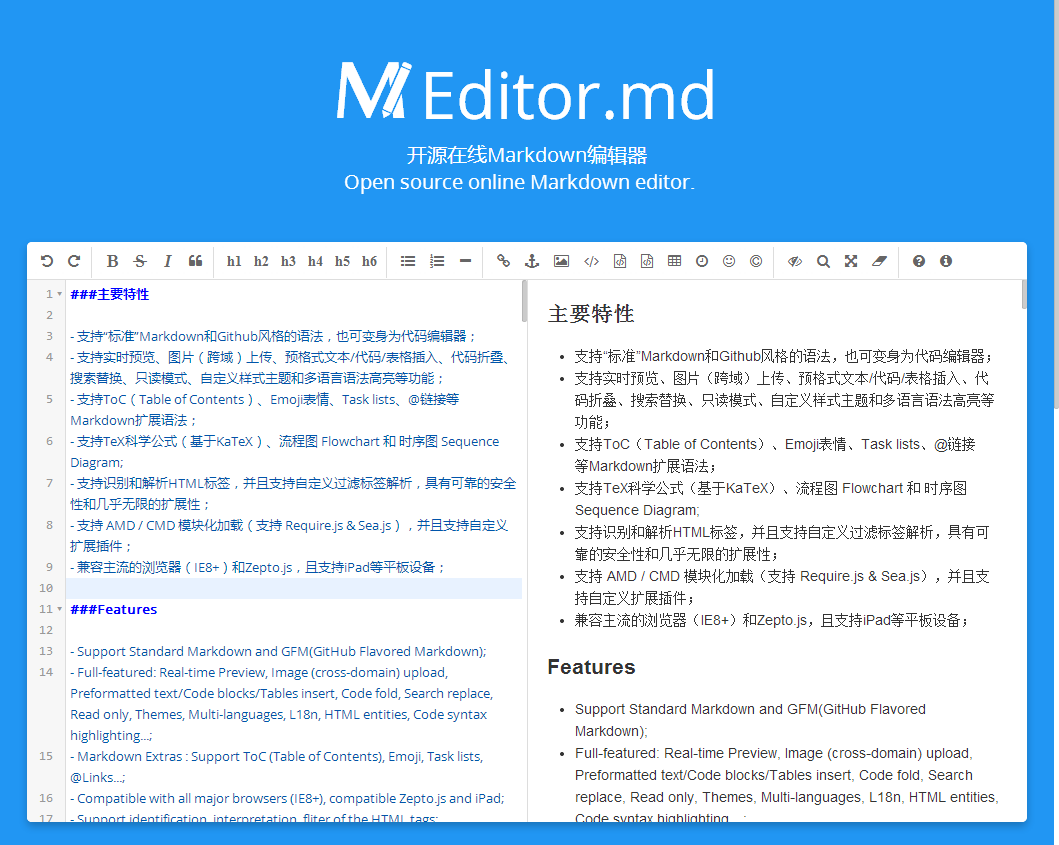
#### 主要特性
- 支持“标准”Markdown和Github风格的语法,也可[变身为代码编辑器](https://pandao.github.io/editor.md/examples/change-mode.html);
- 支持实时预览、图片(跨域)上传、预格式文本/代码/表格插入、代码折叠、搜索替换、只读模式、自定义样式主题和多语言语法高亮等功能;
- 支持[ToC(Table of Contents)](https://pandao.github.io/editor.md/examples/toc.html)、[Emoji表情](https://pandao.github.io/editor.md/examples/emoji.html)、[Task lists](https://pandao.github.io/editor.md/examples/task-lists.html)、[@链接](https://pandao.github.io/editor.md/examples/@links.html)等Markdown扩展语法;
- 支持TeX科学公式(基于[KaTeX](https://pandao.github.io/editor.md/examples/katex.html))、流程图 [Flowchart](https://pandao.github.io/editor.md/examples/flowchart.html) 和 [时序图 Sequence Diagram](https://pandao.github.io/editor.md/examples/sequence-diagram.html);
- 支持[识别和解析HTML标签,并且支持自定义过滤标签解析](https://pandao.github.io/editor.md/examples/html-tags-decode.html),具有可靠的安全性和几乎无限的扩展性;
- 支持 AMD / CMD 模块化加载(支持 [Require.js](https://pandao.github.io/editor.md/examples/use-requirejs.html) & [Sea.js](https://pandao.github.io/editor.md/examples/use-seajs.html)),并且支持[自定义扩展插件](https://pandao.github.io/editor.md/examples/define-plugin.html);
- 兼容主流的浏览器(IE8+)和[Zepto.js](https://pandao.github.io/editor.md/examples/use-zepto.html),且支持iPad等平板设备;
#### 在线演示 (Examples)
[https://pandao.github.io/editor.md/examples/index.html](https://pandao.github.io/editor.md/examples/index.html)
#### 下载和安装 (Download & install)
通过 [Github下载安装](https://github.com/pandao/editor.md/archive/master.zip),或者通过 Bower 安装:
bower install editor.md
#### 使用方法 (Usage)
HTML:
<link rel="stylesheet" href="editormd.min.css" />
<div id="editormd">
<textarea style="display:none;">### Hello world!</textarea>
</div>
> 提示1:如果没有Markdown源内容或者通过Ajax异步加载Markdown源文档等,可以不添加`<textarea>`,会自动添加;
javascript:
<script src="jquery.min.js"></script>
<script src="editormd.min.js"></script>
<script type="text/javascript">
$(function() {
var editor = editormd("editormd", {
path : "../lib/" // codemirror, marked等依赖的库的路径
});
/*
// or
var editor = editormd({
id : "editormd",
path : "../lib/"
});
*/
});
</script>
> Require.js的使用方法:[https://github.com/pandao/editor.md/tree/master/examples/use-requirejs.html](https://github.com/pandao/editor.md/tree/master/examples/use-requirejs.html)
> Sea.js的使用方法:[https://github.com/pandao/editor.md/tree/master/examples/use-seajs.html](https://github.com/pandao/editor.md/tree/master/examples/use-seajs.html)
#### 依赖项目及感谢 (Dependents)
- [CodeMirror](http://codemirror.net/ "CodeMirror")
- [marked](https://github.com/chjj/marked "marked")
- [jQuery](http://jquery.com/ "jQuery")
- [FontAwesome](http://fontawesome.io/ "FontAwesome")
- [github-markdown.css](https://github.com/sindresorhus/github-markdown-css "github-markdown.css")
- [KaTeX](http://khan.github.io/KaTeX/ "KaTeX")
- [prettify.js](http://code.google.com/p/google-code-prettify/ "prettify.js")
- [Rephael.js](http://raphaeljs.com/ "Rephael.js")
- [flowchart.js](http://adrai.github.io/flowchart.js/ "flowchart.js")
- [sequence-diagram.js](http://bramp.github.io/js-sequence-diagrams/ "sequence-diagram.js")
- [Prefixes.scss](https://github.com/pandao/prefixes.scss "Prefixes.scss")
#### Changes
[更新日志 Change logs](https://github.com/pandao/editor.md/blob/master/CHANGE.md)
#### License
The MIT License.
Copyright (c) 2015 Pandao