commit-g
Version:
Generate concise, meaningful Git commit messages with AI assistance powered by Gemini.
182 lines (116 loc) • 4.66 kB
Markdown
# Commit-G 🤖✨
[](https://opensource.org/licenses/MIT)
[](https://www.npmjs.com/package/commit-g)
📘 **[See Docs](https://spyshiv.github.io/commit-g/)** | 📦 **[NPM Package](https://www.npmjs.com/package/commit-g)**
**AI-powered Git commit messages using Google’s Gemini** – Never write a boring commit message again!
[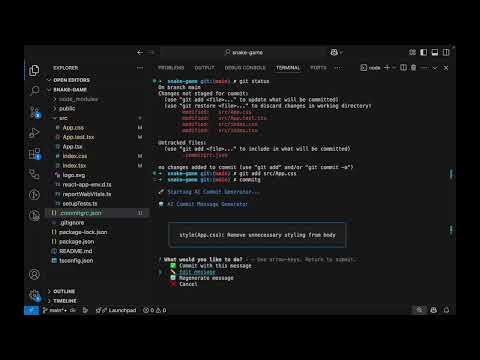](https://www.youtube.com/watch?v=eqUG0y1OedA)
## Features 🌟
- ✨ **Smart Commit Messages** – Generates meaningful messages with Gemini AI
- 🚀 **Conventional Commits** – Follows widely accepted commit message conventions
- 🔍 **Context-Aware** – Analyzes actual code changes to craft relevant messages
- 💡 **Interactive UI** – Choose, edit, or regenerate commit messages seamlessly
- ⚡ **Fast & Efficient** – Commit in seconds with minimal effort
- 🔧 **Highly Configurable** – Adaptable to your project’s workflow
- 🏷️ **Prefix Support** – Automatically prepend JIRA IDs or custom tags
- 🎉 **Emoji Support** – Add expressive emojis to your commit messages
## Installation 📦
Install globally:
```bash
npm install -g commit-g
```
Or as a development dependency:
```bash
npm install --save-dev commit-g
```
## Usage 🛠️
1. Stage your changes:
```bash
git add .
```
2. Run Commit-G:
```bash
commitg
```
3. Follow the interactive prompts to:
- ✅ Accept the suggested message
- ✏️ Edit the message
- 🔄 Regenerate a new suggestion
- ❌ Cancel the commit
## Configuration ⚙️
Commit-G supports flexible configuration methods:
### 1. Environment Variables
```bash
export GEMINI_API_KEY="your_api_key_here"
export GEMINI_MODEL="gemini-1.5-flash"
```
### 2. Configuration File
Create a `.commitgrc.json` in your project root:
```json
{
"apiKey": "your_api_key_here",
"model": "gemini-1.5-flash",
"maxDiffLength": 10000,
"emoji": true
}
```
### 3. Command-Line Arguments
```bash
commitg --api-key your_key --model gemini-1.5-flash --emoji --prefix JIRA-123
```
## Advanced Options 🔧
| Option | Description | Default |
| ------------------- | --------------------------------- | ------------------ |
| `--api-key` | Gemini API key | From env/config |
| `--model` | Gemini model to use | `gemini-1.5-flash` |
| `--emoji` | Enable or disable emojis | `false` |
| `--prefix` | Add a prefix (e.g., `JIRA-123`) | `false` |
| `--max-diff-length` | Max length of git diff to analyze | `10000` |
## FAQ ❓
**Q: How do I obtain a Gemini API key?**
**A:** You can generate a key from [Google AI Studio](https://aistudio.google.com/apikey).
**Q: Is my code sent to Google?**
**A:** Yes, the staged code diff is securely sent to the Gemini API to generate commit messages. Make sure this complies with your organization’s privacy policies.
**Q: Can I use Commit-G in CI/CD pipelines?**
**A:** Absolutely! You can set the `GEMINI_API_KEY` as an environment variable in your CI/CD pipeline configuration. Optionally, configure other parameters using environment variables or CLI flags.
**Q: How do I add a JIRA ID or custom prefix to the commit message?**
**A:** Use the `--prefix` option in the CLI, or configure it in `.commitgrc.json`.
Example CLI usage (recommended):
```bash
commitg --prefix JIRA-123
```
Example in `.commitgrc.json`:
```json
{
"prefix": "JIRA-123"
}
```
**Q: How do I enable or disable emoji in commit messages?**
**A:** Use the `--emoji` flag to enable, or omit it to disable.
Example CLI usage:
```bash
commitg --emoji
```
Or in `.commitgrc.json`:
```json
{
"emoji": true
}
```
**Q: Does it work with monorepos or large diffs?**
**A:** Yes. To manage performance, use the `--max-diff-length` option or configure it in `.commitgrc.json`.
**Q: What if I want to use a different Gemini model?**
**A:** You can specify the desired model via the `--model` flag or in your config file.
## Contributing 🤝
Pull requests are welcome! If you have ideas, feature requests, or improvements, feel free to open an [issue](https://github.com/spyshiv/commit-g/issues/new) or submit a [Pull Request](https://github.com/spyshiv/commit-g/pulls).
## License 📄
MIT License © [Shiv Baran Singh](https://github.com/spyshiv)
🚀 Stop wasting time on commit messages. Let **Commit-G** do the heavy lifting for you!