com.pakrym.jab
Version:
C# Source Generator based dependency injection container implementation.
296 lines (218 loc) • 10.3 kB
Markdown
# Jab Compile Time Dependency Injection
[](https://www.nuget.org/packages/Jab)
Jab provides a [C# Source Generator](https://devblogs.microsoft.com/dotnet/introducing-c-source-generators/) based dependency injection container implementation.
- Fast startup (200x faster than Microsoft.Extensions.DependencyInjection). [Details](#Startup-Time).
- Fast resolution (7x faster than Microsoft.Extensions.DependencyInjection). [Details](#GetService).
- No runtime dependencies.
- AOT and linker friendly, all code is generated during project compilation.
- Clean stack traces: <br> 
- Readable generated code: <br> 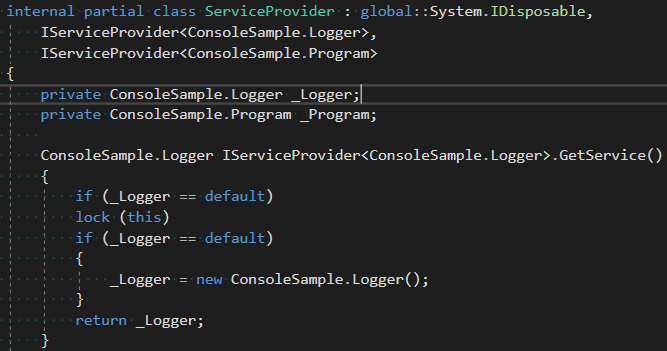
- Registration validation. Container configuration issues become compiler errors: <br> 
- Incremental generation, Modern .NET SDK support, .NET Standard 2.0 support, [Unity support](README.md#Unity-installation)
## Example
Add Jab package reference:
```xml
<ItemGroup>
<PackageReference Include="Jab" Version="0.12.0" PrivateAssets="all" />
</ItemGroup>
```
Define a service and implementation:
``` C#
internal interface IService
{
void M();
}
internal class ServiceImplementation : IService
{
public void M()
{
}
}
```
Define a composition root and register services:
```C#
[ServiceProvider]
[Transient(typeof(IService), typeof(ServiceImplementation))]
internal partial class MyServiceProvider { }
```
Use the service provider:
``` C#
MyServiceProvider c = new MyServiceProvider();
IService service = c.GetService<IService>();
```
## Features
- No runtime dependency, safe to use in libraries
- Transient, Singleton, Scoped service registration
- Named registrations
- Factory registration
- Instance registration
- `IEnumerable` resolution
- `IDisposable` and `IAsyncDisposable` support
- `IServiceProvider` support
The plan is to support the minimum feature set Microsoft.Extensions.DependencyInjection.Abstraction requires but *NOT* the `IServiceCollection`-based registration syntax as it is runtime based.
### Singleton services
Singleton services are created once per container lifetime in a thread-safe manner and cached.
To register a singleton service use the `SingletonAttribute`:
```C#
[ServiceProvider]
[Singleton(typeof(IService), typeof(ServiceImplementation))]
internal partial class MyServiceProvider { }
```
### Singleton Instances
If you want to use an existing object as a service define a property in the container declaration and use the `Instance` property of the `SingletonAttribute` to register the service:
```C#
[ServiceProvider]
[Singleton(typeof(IService), Instance = nameof(MyServiceInstance))]
internal partial class MyServiceProvider {
public IService MyServiceInstance { get;set; }
}
```
Then initialize the property during the container creation:
```C#
MyServiceProvider c = new MyServiceProvider();
c.MyServiceInstance = new ServiceImplementation();
IService service = c.GetService<IService>();
```
### Named services
Use the `Name` property to assign a name to your service registrations and `[FromNamedServices("...")]` attribute to resolve a service using its name.
```C#
[ServiceProvider]
[Singleton(typeof(INotificationService), typeof(EmailNotificationService), Name="email")]
[Singleton(typeof(INotificationService), typeof(SmsNotificationService), Name="sms")]
[Singleton(typeof(Notifier))]
internal partial class MyServiceProvider {}
class Notifier
{
public Notifier(
[FromNamedServices("email")] INotificationService email,
[FromNamedServices("sms")] INotificationService sms)
{}
}
```
NOTE: Jab also recognizes the `[FromKeyedServices]` attribute from `Microsoft.Extensions.DependencyInjection`.
### Factories
Sometimes it's useful to provide a custom way to create a service instance without using the automatic construction selection.
To do this define a method in the container declaration and use the `Factory` property of the `SingletonAttribute` or `TransientAttribute` to register the service:
```C#
[ServiceProvider]
[Transient(typeof(IService), Factory = nameof(MyServiceFactory))]
internal partial class MyServiceProvider {
public IService MyServiceFactory() => new ServiceImplementation();
}
MyServiceProvider c = new MyServiceProvider();
IService service = c.GetService<IService>();
```
When using with `TransientAttribute` the factory method would be invoked for every service resolution.
When used with `SingletonAttribute` it would only be invoked the first time the service is requested.
Similar to constructors, factories support parameter injection:
```
[ServiceProvider]
[Transient(typeof(IService), Factory = nameof(MyServiceFactory))]
[Transient(typeof(SomeOtherService))]
internal partial class MyServiceProvider {
public IService MyServiceFactory(SomeOtherService other) => new ServiceImplementation(other);
}
```
### Scoped Services
Scoped services are created once per service provider scope. To create a scope use the `CreateScope()` method of the service provider.
Service are resolved from the scope using the `GetService<IService>()` call.
```C#
[ServiceProvider]
[Scoped(typeof(IService), typeof(ServiceImplementation))]
internal partial class MyServiceProvider { }
MyServiceProvider c = new MyServiceProvider();
using MyServiceProvider.Scope scope = c.CreateScope();
IService service = scope.GetService<IService>();
```
When the scope is disposed all `IDisposable` and `IAsyncDisposable` services that were resolved from it are disposed as well.
### Generic registration attributes
You can use generic attributes to register services if your project targets a framework compatible with C# 11 or greater. See [C# language versioning](https://learn.microsoft.com/en-us/dotnet/csharp/language-reference/language-versioning#defaults) for more details.
Generic attributes allow declaration to be more compact by avoiding the `typeof` calls:
``` C#
[ServiceProvider]
[Scoped<IService, ServiceImplementation>]
[Import<IMyModule>]
internal partial class MyServiceProvider { }
```
### Modules
Often, a set of service registrations would represent a distinct set of functionality that can be included into arbitrary
service provider. Modules are used to implement registration sharing. To define a module create an interface and mark it with `ServiceProviderModuleAttribute`. Service registrations can be listed in module the same way they are in the service provider.
```C#
[ServiceProviderModule]
[Singleton(typeof(IService), typeof(ServiceImplementation))]
public interface IMyModule
{
}
```
To use the module apply the `Import` attribute to the service provider type:
```C#
[ServiceProvider]
[Import(typeof(IMyModule))]
internal partial class MyServiceProvider
{
}
MyServiceProvider c = new MyServiceProvider();
IService service = c.GetService<IEnumerable<IService>>();
```
Modules can import other modules as well.
**NOTE**: module service and implementation types have to be accessible from the project where service provider is generated.
## Root services
By default, `IEnumerable<...>` service accessors are only generated when requested by other service constructors. If you would like to have a root `IEnumerable<..>` accessor generated use the `RootService` parameter of the `ServiceProvider` attribute. The generator also scans all the `GetService<...>` usages and tries to all collected type arguments as the root service.
``` C#
[ServiceProvider(RootServices = new [] {typeof(IEnumerable<IService>)})]
[Singleton(typeof(IService), typeof(ServiceImplementation))]
[Singleton(typeof(IService), typeof(ServiceImplementation))]
[Singleton(typeof(IService), typeof(ServiceImplementation))]
internal partial class MyServiceProvider
{
}
MyServiceProvider c = new MyServiceProvider();
IService service = c.GetService<IEnumerable<IService>>();
```
## Samples
### Console application
Sample Jab usage in console application can be found in [src/samples/ConsoleSample](src/samples/ConsoleSample)
## Performance
The performance benchmark project is available in [src/Jab.Performance/](src/Jab.Performance/).
### Startup time
The startup time benchmark measures time between application startup and the first service being resolved.
```
| Method | Mean | Error | StdDev | Ratio | RatioSD | Gen 0 | Gen 1 | Gen 2 | Allocated |
|------- |------------:|----------:|----------:|-------:|--------:|-------:|-------:|------:|----------:|
| MEDI | 2,437.88 ns | 14.565 ns | 12.163 ns | 220.91 | 2.72 | 0.6332 | 0.0114 | - | 6632 B |
| Jab | 11.03 ns | 0.158 ns | 0.123 ns | 1.00 | 0.00 | 0.0046 | - | - | 48 B |
```
### GetService
The `GetService` benchmark measures the `provider.GetService<IService>()` call.
```
| Method | Mean | Error | StdDev | Ratio | RatioSD | Gen 0 | Gen 1 | Gen 2 | Allocated |
|------- |----------:|----------:|----------:|------:|--------:|-------:|------:|------:|----------:|
| MEDI | 39.340 ns | 0.2419 ns | 0.2263 ns | 7.01 | 0.09 | 0.0023 | - | - | 24 B |
| Jab | 5.619 ns | 0.0770 ns | 0.0643 ns | 1.00 | 0.00 | 0.0023 | - | - | 24 B |
```
## Unity installation
1. Navigate to the Packages directory of your project.
2. Adjust the [project manifest file](https://docs.unity3d.com/Manual/upm-manifestPrj.html) manifest.json in a text editor.
3. Ensure `https://registry.npmjs.org/` is part of `scopedRegistries`.
4. Ensure `com.pakrym` is part of `scopes`.
5. Add `com.pakrym.jab` to the dependencies, stating the latest version.
A minimal example ends up looking like this:
```
{
"scopedRegistries": [
{
"name": "npmjs",
"url": "https://registry.npmjs.org/",
"scopes": [
"com.pakrym"
]
}
],
"dependencies": {
"com.pakrym.jab": "0.12.0",
...
}
}
```
## Debugging locally
Run `dotnet build /t:CreateLaunchSettings` in the `Jab.Tests` directory would update the `Jab\Properties\launchSettings.json` file to include `csc` invocation that allows F5 debugging of the generator targeting the `Jab.Tests` project.