colipu-ele-table-editor
Version:
基于element-ui的表格编辑组件
389 lines (365 loc) • 10.2 kB
Markdown
# ele-table-editor | 基于 element-ui 的表格编辑组件
[](https://dream2023.github.io/ele-table-editor/)
[](https://www.npmjs.com/package/ele-table-editor)
[](https://npmcharts.com/compare/ele-table-editor?minimal=true)
## 特性
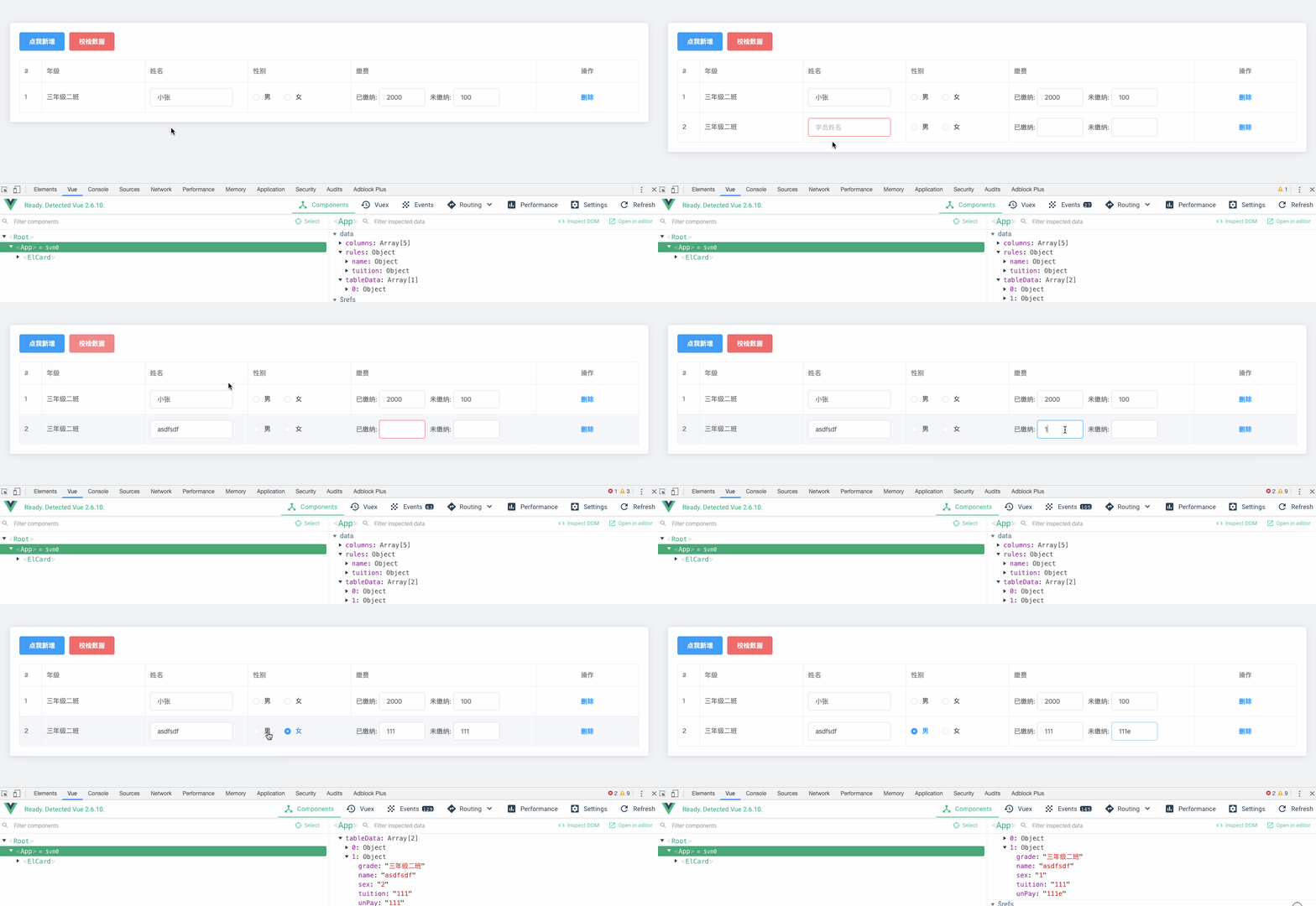
> 通过对 el-table-column 增加一个属性 **content**, 实现了如下特性:
- 数据驱动
- 行内编辑
- 输入校检
- 错误展示
- 数据格式化
- 一键禁用
## 安装
```bash
npm install ele-table-editor --save
```
### 用法
```js
import EleTableEditor from 'ele-table-editor'
export default {
components: {
EleTableEditor
}
}
```
## 示例
```html
<template>
<div style="margin: 50 auto;">
<div style="margin-bottom: 20px;">
<el-button type="danger" ="handleCheck">校检数据</el-button>
</div>
<ele-table-editor
ref="table"
:extraBtns="extraBtns"
:rules="rules"
:columns="columns"
:newColumnValue="newColumnValue"
v-model="tableData"
>
<!-- 支持插槽 -->
<template v-slot:sex="{ data }">
<el-radio-group v-model="data.sex">
<el-radio label="1">男</el-radio>
<el-radio label="2">女</el-radio>
</el-radio-group>
</template>
</ele-table-editor>
</div>
</template>
<script>
import EleTableEditor from 'ele-table-editor'
import { InputNumber } from 'element-ui'
export default {
components: {
EleTableEditor
},
data() {
return {
// 表格数据
tableData: [
{
grade: '三年级二班',
name: '小张',
sex: '男',
tuition: 2000,
unPay: 100,
status: 0,
dream: ''
}
],
newColumnValue: {
grade: '三年级二班',
status: 1
},
// 校检规则
rules: {
name: [{ required: true, message: '姓名必填' }],
tuition: { required: true, message: '已缴纳金额必填' }
},
// 其它按钮
extraBtns: [
{
// text 按钮显示的文本
text: '关联',
// 按钮的属性
attrs: {
type: 'text'
},
style: {
color: '#303133'
},
// click事件
click(scope) {
/* eslint-disable */
console.log(scope)
}
}
],
// 表格列
columns: [
{
// el-table-column 的属性
type: 'index'
},
{
// el-table-column 的属性
prop: 'grade',
label: '年级'
},
{
prop: 'name',
label: '姓名',
// 当有 content 属性时, 可以指定相应的组件
content: {
// type 可以为全局注册的组件名或者组件引用
type: 'el-input',
// attrs 是组件的属性
attrs: {
placeholder: '学员姓名'
},
change(val, row, index) {
console.log(val, row, index)
},
// 此外还有
// style: {}, // 组件的样式
// class: {}, // 组件的class
// on: {}, // 组件的事件
// slots: {}, // 插槽
// scopedSlots: {}, 作用域插槽
}
},
{
prop: 'sex',
label: '性别'
},
{
label: '缴费',
width: 400,
// content 可以为数组
content: [
'已缴纳: ', // 数组可以是 组件 和 普通字符串 混用
{
type: 'el-input',
valueKey: 'tuition', // 当content为数组时, 必须制定组件绑定的 tableData 的 key
style: {
width: '100px',
marginRight: '10px'
}
},
'未缴纳: ',
{
type: 'el-input',
valueKey: 'unPay', // 这里也需要绑定 key
style: {
width: '100px'
}
}
]
},
{
prop: 'dream',
label: '梦想',
content: {
type: 'el-radio-group',
// 对于 el-select, el-checkbox-group, el-radio-group 三个组件
// 可以指定 options 数组进行选项的渲染
options: [
// option 的值可以为对象
// 此处对以上三个组件做了封装, 显示的key为 text, 值key为 value
{ text: '科学家', value: 'scientist' },
{ text: '警察', value: 'policeman' },
// 也可以指定为字符串, 则会转化为 '程序员' => { text: '程序员', value: '程序员' }
'程序员'
]
}
},
{
prop: 'birthplace',
label: '籍贯',
content: {
type: 'el-select',
// 如果 key 不是 text 和 value
// 可以使用 prop 指定 key
options: [
{ name: '北京', id: 'beijing' },
{ name: '上海', id: 'shanghai' },
{ name: '广州', id: 'guangzhou' }
],
// prop 将 text 对应 name, value 对应 id
prop: {
text: 'name',
value: 'id'
}
}
},
{
prop: 'status',
label: '状态',
// 通过 options 将枚举值转为文本
options: {
0: '禁用',
1: '正常',
2: '异常'
}
}
]
}
},
methods: {
// 校检数据
handleCheck() {
this.$refs['table'].validate().catch(({ errors, fields }) => {
console.log(errors, fields)
})
}
}
}
</script>
```
## Props 参数
### 参数概述
```js
props: {
// 表格的属性
tableAttrs: {
type: Object,
default: () => ({ border: true })
},
// 表格事件
tableOn: {
type: Object
},
// 表单数据
value: {
type: Array,
default: () => []
},
// 是否显示删除
isShowDelete: {
type: Boolean,
default: true
},
// 删除按钮属性
deleteBtnAttr: {
type: Object,
default () {
return {
type: 'text'
}
}
},
// 右侧其它按钮
extraBtns: {
type: Array,
default: null
},
// table 列
columns: {
type: Array,
default: () => []
},
// 校检规则
rules: Object,
// 禁用 (对所有input框禁用))
disabled: {
type: Boolean,
default: false
},
// 新增列的值
newColumnValue: {
type: Object,
default: () => ({})
},
// 是否显示新增按钮
isShowAdd: {
type: Boolean,
default: true
},
// 新增按钮文本
addBtnText: {
type: String,
default: '新增'
}
}
```
### columns 参数详解
```js
columns: [
{
// attrs 为 el-table-column 的属性 + content
// el-table-column 的属性具体参考: https://element.eleme.cn/#/zh-CN/component/table#table-column-attributes
prop: 'name', // el-table-column 的 prop 属性
label: '姓名', // el-table-column 的 label 属性
width: 200, // el-table-column 的 width 属性
// ...
// column 的内容, 可省略, 省略时为显示字符串
// column 的类型可以为对象或者对象数组, 例如
content: {
// 渲染的组件, 可以为全局注册的组件名称或者直接组件的引用
type: 'el-select',
valueKey: 'xxx', // 绑定的tableData 的key
// select, checkbox, radio 三个组件特有的属性
// 用于指定选项
options: [ { text: '北京', value: 'beijing' }, { text: '上海', value: 'shanghai'} ]
// 同上, 用于当 options的key不是 text 和 value 时指定key和value
prop: {
text: 'name',
value: 'id'
},
// 组件属性
attrs: {
size: 'medium',
// ...
},
// change 事件
change (val, row, index) {
console.log(val, row, index)
},
// 组件样式
style: {
width: '200px',
// ...
},
// 组件 class
class: 'my-custom-select',
// 组件事件
on: {
change(value) {
console.log(value)
},
// ...
},
// 组件插槽
slots: {
default (h) {
return [
h('el-option', { attrs: { label: '男', value: 1 } }),
h('el-option', { attrs: { label: '女', value: 2 } })
]
}
},
// 作用域插槽
scopedSlots: {
test (h, data) {
// data 为传递过来的参数
return h('div', 'test')
}
}
},
// 此属性, 仅当当未指定 content 时, 用于格式化文本
// status: 1 , options为枚举
options: {
1: '正常',
2: '禁用'
}
]
```
## 插槽
- `default`: 默认插槽 新增按钮的插槽
- `btn`: 右侧按钮插槽
- `prop`: column 中 prop 属性对应的插槽, 例如示例中 `v-slot:sex` 或者 `v-slot:age` 等
## 相关链接
- [element-ui table 组件](https://element.eleme.cn/#/zh-CN/component/table)