codetags
Version:
A simple feature toggle utility
388 lines (279 loc) • 8.86 kB
Markdown
# codetags
> A simple feature toggle utility
## What is `codetags`?
`codetags` is a simple feature toggle utility for javascript/nodejs. Developers could use this library to prepare new features and switch the features by using environment variables.
## How does it work?
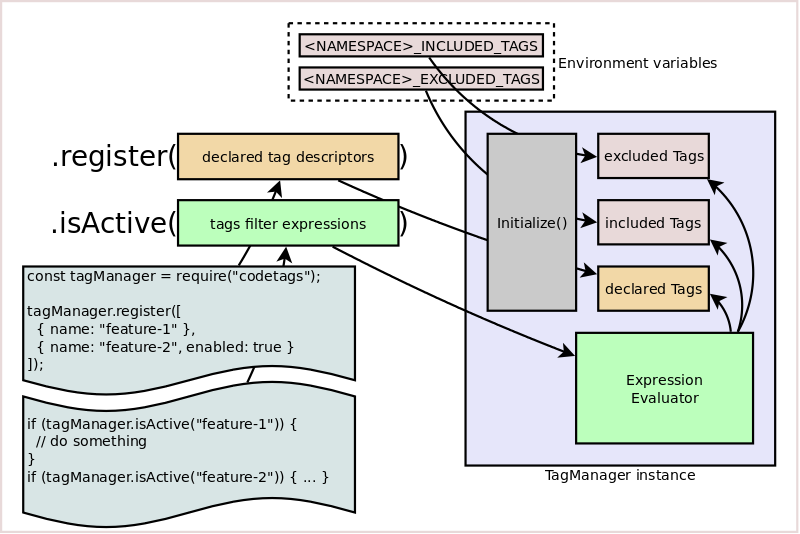
### Retrieving a `codetags` instance
A default `codetags` instance can be retrieved simply by a `require` call:
```shell
const codetags = require('codetags');
```
We can create multiple `codetags's instance` with `newInstance` or `getInstance` methods. Call to both will create a codetags instance, but the `getInstance` creates a new instance only if it has not existed before.
```javascript
const codetags = require('codetags');
const space1 = codetags.getInstance('main', {
namespace: 'maincode'
});
const space2 = codetags.newInstance('test', {
namespace: 'testcode'
});
// ...
const space3 = codetags.getInstance('main', {
namespace: 'maincode'
});
console.log(space3 === space1); // true
const space4 = codetags.newInstance('test', {
namespace: 'testcode'
});
console.log(space4 === space2); // false
```
### Initializing default tags
Default tags can be initialized by `register()` method:
```javascript
codetags_instance.register(an_array_of_tag_descriptors);
```
For example:
```javascript
codetags.register(['a-simple-tag']);
```
similar to:
```javascript
codetags.register([
{
name: 'a-simple-tag',
enabled: true
}
]);
```
More complex example:
```javascript
codetags.register([
'foo',
{
name: 'bar'
},
{
name: 'nil',
enabled: false
}
]);
```
### Wrapping code in a tags filter expression
```javascript
const codetags = require('codetags');
// ...
if (codetags.isActive('foo')) {
// do something
}
if (tryit.isActive(['foo', 'bar'])) {
// do other things
}
```
### Enable/disable tags
Declare environment variables:
```shell
export CODETAGS_INCLUDED_TAGS=nil,foo
export CODETAGS_EXCLUDED_TAGS=bar
```
Start node program:
```shell
node index.js
```
## Methods
### `.initialize(kwargs)`
The `kwargs` composes of following fields:
* `namespace` - a customized namespace.
* `INCLUDED_TAGS` - a customized label for included tags environment variable name (default: `INCLUDED_TAGS`).
* `EXCLUDED_TAGS` - a customized label for excluded tags environment variable name (default: `EXCLUDED_TAGS`).
* `version` - the current package version.
This method returns the `codetags` instance itself.
### `.register(descriptors)`
Method `register()` is used to define the default `declaredTags` collection.
The argument `descriptors` is an array of `descriptor` objects which of each describing a string label together with the range of versions that will be applied.
```javascript
const descriptor1 = {
name: 'tag-1',
plan: {
minBound: '0.1.3',
enabled: true
}
}
const descriptor2 = {
name: 'tag-2',
plan: {
maxBound: '0.2.7',
enabled: false
}
}
const descriptor3 = {
name: 'tag-3',
plan: {
minBound: '0.1.2',
maxBound: '0.2.8',
enabled: false
}
}
const descriptors = [ descriptor1, descriptor2, descriptor3 ];
codetags.register(descriptors);
```
This method returns the `codetags` instance itself.
### `.isActive(tagexps)`
Method `isActive()` evaluates tags filter expressions (named `tagexp`) based on three collections of tags (`declaredTags`, `includedTags`, `excludedTags`) to determine whether it is accepted or denied. An expression of tags is composed by string labels, arrays, hashmaps and conditional operators (`$all`, `$any`, `$not`).
#### `tagexp` is a single string
Syntax:
```javascript
const tagexp = 'tagexp-is-a-string';
if (codetags.isActive(tagexp)) {
// do something
}
```
Function call `codetags.isActive(tagexp)` returns `true` when:
* `excludedTags` does not contain `tagexp-is-a-string`;
* at least one of `includedTags` and `declaredTags` contains `tagexp-is-a-string`.
#### `tagexp` is an array of sub-tagexps
Syntax:
```javascript
const tagexp = [subtagexp_1, subtagexp_2, subtagexp_3];
if (codetags.isActive(tagexp)) {
// do something
}
```
Function call `codetags.isActive(tagexp)` returns `true` if all of sub-tagexp in the array must satisfy the function `codetags.isActive` (i.e. `codetags.isActive(subtagexp_i))` return `true` for any `i` from `1` to `3`).
#### `tagexp` is a conditional expression
Syntax:
```javascript
const tagexp = {
$all: [
{
$not: subtagexp_0,
$any: [ subtagexp_1, subtagexp_2, subtagexp_3 ]
},
{
$any: [ subtagexp_4, subtagexp_5 ]
}
]
};
if (codetags.isActive(tagexp)) {
// do something
}
```
Function call `codetags.isActive(tagexp)` returns `true` if the sub-tagexps are satisfied the following constraints:
* `codetags.isActive(subtagexp_0)` returns `false`;
* one of `codetags.isActive(subtagexp_i)` returns `true` (with `i` from `1` to `3`);
* one of `codetags.isActive(subtagexp_j)` returns `true` (with `j` is `4` or `5`);
#### `arguments` is a sequence of tagexps
Syntax:
```javascript
codetags.isActive(tagexp1, tagexp2, tagexp3);
```
The above function call will return `true` if there is at least one of `tagexp` arguments satisfies the function `codetags.isActive`. It is equivalent to the following expression:
```javascript
codetags.isActive(tagexp1) || codetags.isActive(tagexp2) || codetags.isActive(tagexp3)
```
### `.clearCache()`
Method `clearCache()` clears the cached values of tags filtering result as well as the cached values of environment variables. This method returns the codetags instance itself.
### `.reset()`
Method `reset()` invokes the method `clearCache()` as well as clears the values of `declaredTags` collection that has been defined by `register()` method. This method also returns the `codetags` instance itself.
### `.newInstance(name, opts)`
Method `newInstance()` creates a new instance in each time it is called and assigns `name` to this instance. The `name` value is associated with the latest instance. If you want to retrieve the already created instance, using `getInstance` instead. The arguments can be:
* `name`: a string as name (using in `getInstance()` to retrieve the instance);
* `opts`: an option object that is similar to which in `initialize()`;
This method returns the created instance.
### `.getInstance(name, opts)`
Method `getInstance()` returns the instance associated to `name` or creates a new instance when it has not existed before. Its arguments are the same as the method `newInstance()`.
## Examples
### Default codetags instance
Register feature tags:
```javascript
// file: bootstrap.js
const codetags = require('codetags');
codetags.register([
{
name: 'replace-console-log-with-winston',
enabled: false
},
{
name: 'moving-from-mongodb-to-couchbase',
enabled: true
},
]);
```
Check the state of tags:
```javascript
// file: index.js
require('./bootstrap.js');
const codetags = require('codetags');
// ...
if (codetags.isActive('replace-console-log-with-winston')) {
// be disabled by default
winston.log('debug', 'Hello world from winston');
} else {
console.log('Hello world from console.log');
}
```
Change state of tags with environment variables:
```shell
export CODETAGS_INCLUDED_TAGS=replace-console-log-with-winston
export CODETAGS_EXCLUDED_TAGS=moving-from-mongodb-to-couchbase
node index.js
```
### Multiple instances
Create multiple `codetags` instances:
```javascript
// file: bootstrap.js
const codetags = require('codetags');
// features for trunk branch
const trunk = codetags.newInstance('trunk', {
namespace: 'my_mission'
});
trunk.register([
{
name: 'replace-console-log-with-winston',
enabled: false
},
{
name: 'moving-from-mongodb-to-couchbase',
enabled: true
},
]);
// features for trial branch
const trial = codetags.newInstance('trial', {
namespace: 'my_passion'
});
trial.register(['foo', 'bar']);
```
Make conditional flow:
```javascript
// file: index.js
require('./bootstrap.js');
const codetags = require('codetags');
const trunk = codetags.getInstance('trunk');
const tryit = codetags.getInstance('trial');
// ...
if (trunk.isActive('replace-console-log-with-winston')) {
// be disabled by default
winston.log('debug', 'Hello world from winston');
} else {
console.log('Hello world from console.log');
}
// ...
if (tryit.isActive('foo')) {
// do something here
}
if (tryit.isActive(['foo', 'bar'])) {
// and here
}
if (tryit.isActive('foo', 'bar')) {
// and here
}
```
Change state of tags with environment variables:
```shell
export MY_MISSION_INCLUDED_TAGS=replace-console-log-with-winston
export MY_PASSION_EXCLUDED_TAGS=foo,bar
node index.js
```
## License
MIT
See [LICENSE](LICENSE) to see the full text.