codeceptjs
Version:
Supercharged End 2 End Testing Framework for NodeJS
196 lines (128 loc) • 8.99 kB
Markdown
---
permalink: /reports
title: Reporters
---
# Reporters
CodeceptJS prints test results to the console by default (see [CLI output](#cli-output)). For an HTML report, a pull-request comment, JUnit XML, or a hosted dashboard, use **[Testomat.io Reporter](https://github.com/testomatio/reporter)**.
Testomat.io Reporter is open source. It can send create reports of various types:
- **Local files** — HTML, CSV, and Markdown reports written to disk.
- **CI/CD pipeline reports** — reports added as comments to GitHub, GitLab, or Bitbucket pull requests.
- **Cloud Services** — a hosted dashboard on [app.testomat.io](https://testomat.io) to keep track of results history and get analytics.
You choose the destinations. The reporter collects steps, screenshots, videos, traces, and logs once and sends them everywhere you enabled.
### Install
```sh
npm install @testomatio/reporter --save-dev
```
Enable the reporter plugin and turn on the local reports you want:
```js
// codecept.conf.js
plugins: {
testomatio: {
enabled: true,
require: '@testomatio/reporter/codecept',
html: true,
// markdown: true,
// csv: true,
// reportDir: 'output/report',
},
}
```
> `html`, `markdown`, and `csv` are config switches for local reports. Local reports are stored in filesystem in `output/report` dir by default.
### Local reports and remote destinations
Local reports are turned on with config switches and saved to disk:
| Config switch | File in `reportDir` |
| --- | --- |
| `html: true` | `testomatio-report.html` |
| `markdown: true` | `testomatio-report.md` |
| `csv: true` | `report.csv` |
Remote destinations need an access token. A token is a secret, so pass it through an environment variable or CI secret instead of committing it to the config file:
| Destination | Token variable |
| --- | --- |
| Run result on [app.testomat.io](https://testomat.io) | `TESTOMATIO` |
| Comment on a GitHub Pull Request | `GH_PAT` (`${{ github.token }}` in Actions) |
| Comment on a GitLab Merge Request | `GITLAB_PAT` (token with `api` scope) |
| Comment on a Bitbucket Pull Request | `BITBUCKET_ACCESS_TOKEN` (repo access token) |
One run feeds every destination you enabled. On CI, keep the report switches in the config and pass only the tokens as environment variables:
```yaml
- run: npx codeceptjs run
env:
GH_PAT: ${{ github.token }} # → Print report as PR comment
# TESTOMATIO: ${{ secrets.TESTOMATIO }} # → Send report to testomat.io
- uses: actions/upload-artifact@v4
if: always()
with:
name: codeceptjs-output
path: output/
```
The GitHub destination also needs the job to grant `permissions: pull-requests: write`.
For the full list of options and environment variables, see the [reporter configuration reference](https://github.com/testomatio/reporter/blob/master/docs/configuration.md).
### HTML Report
A local, self-contained HTML file saved to `output/report/testomatio-report.html`. It holds the run summary and, per test, its steps, screenshots, logs, and error. It needs no API key and no service, so it works anywhere — open it locally or attach it to a CI build.

Enable it with `html: true` in `plugins.testomatio` and run `npx codeceptjs run`. To change the file name or folder, see the [HTML pipe docs](https://github.com/testomatio/reporter/blob/master/docs/pipes/html.md).
### CSV Report
A local CSV file saved to `output/report/report.csv`, with one row per test — suite, title, and status. Use it in spreadsheets or data pipelines.
Enable it with `csv: true` in `plugins.testomatio`. See the [CSV pipe docs](https://github.com/testomatio/reporter/blob/master/docs/pipes/csv.md).
### Testomat.io Cloud Report
A remote destination: the run is sent to [app.testomat.io](https://testomat.io), a hosted dashboard with run history, flaky-test detection, parallel-run merging, re-running failed tests, and notifications. Free for small teams.

Set the `TESTOMATIO` environment variable to your project API key and run the tests. Run titles, run groups, shared runs, and publishing options: [Testomat.io pipe docs](https://github.com/testomatio/reporter/blob/master/docs/pipes/testomatio.md).
To view artifacts on the cloud, upload them to S3 storage. Images come from the [`screenshot`](/plugins#screenshot) plugin, videos from the [`screencast`](/plugins#screencast) plugin (or the Playwright helper's `video` and `trace`). Any S3 provider works: AWS S3, Cloudflare R2, Google Cloud Storage (interoperability mode), DigitalOcean Spaces, MinIO.
### GitHub Report
A remote destination: a comment on the Pull Request with run status, pass/fail/skip counts, stack traces of the failures, screenshots, and the slowest tests. Re-running the workflow replaces the previous comment.
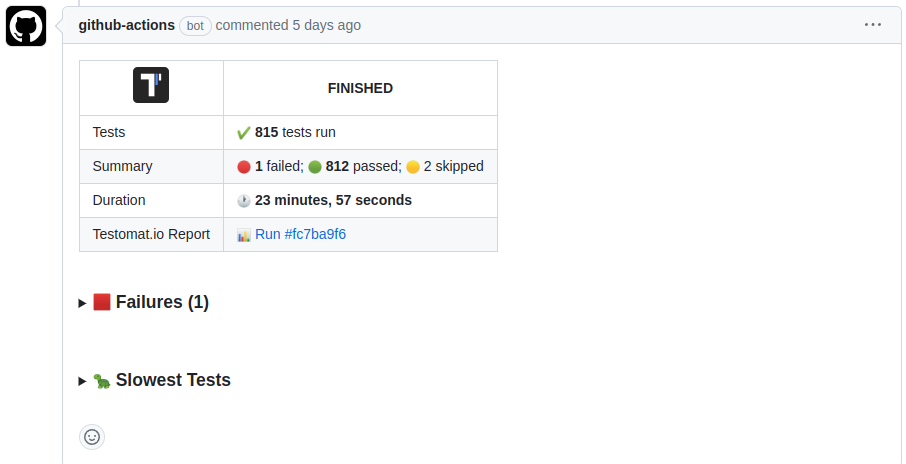
Set `GH_PAT` to a GitHub token (`${{ github.token }}` works in Actions) and grant the job `permissions: pull-requests: write`. More options: [GitHub pipe docs](https://github.com/testomatio/reporter/blob/master/docs/pipes/github.md).
### GitLab Report
A remote destination: a comment on the Merge Request with the same summary. Run it in merge-request pipelines (`$CI_PIPELINE_SOURCE == "merge_request_event"`).
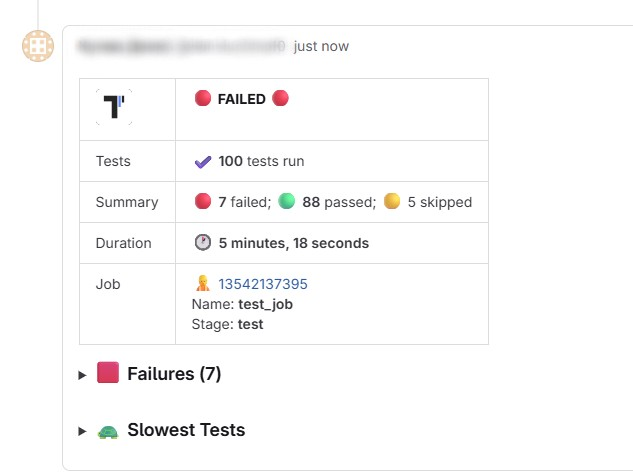
Set `GITLAB_PAT` to a Personal or Project Access Token with `api` scope. More options: [GitLab pipe docs](https://github.com/testomatio/reporter/blob/master/docs/pipes/gitlab.md).
### Bitbucket Report
A remote destination: a comment on the Pull Request with the same summary. Comments are created only in `pull-requests` pipelines.
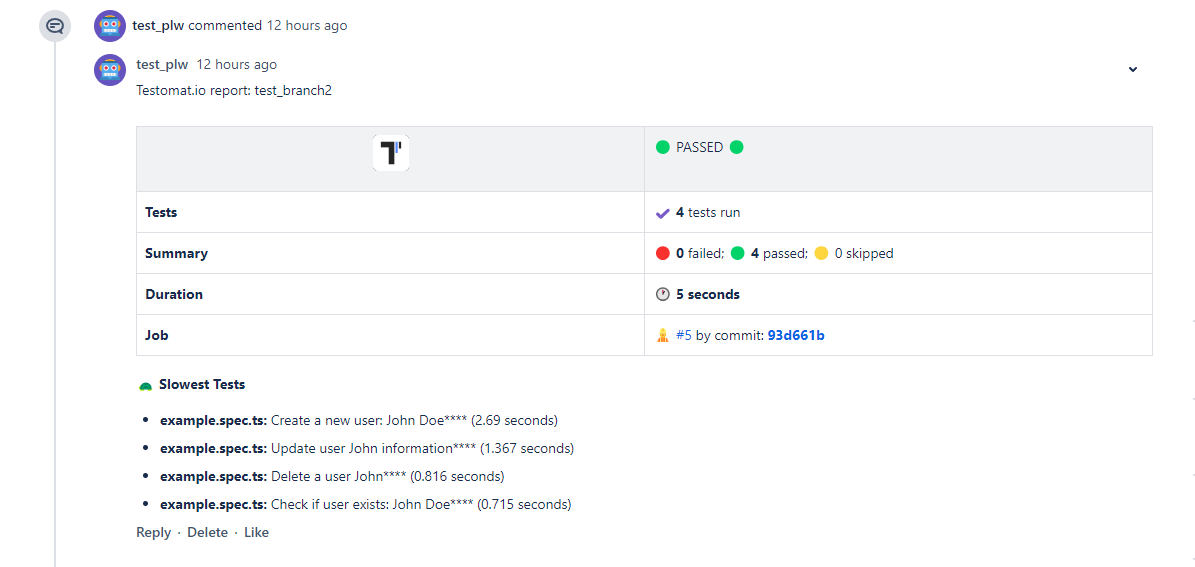
Set `BITBUCKET_ACCESS_TOKEN` to a repository access token with `Pull requests: Write` and `Repository: Read`. More options: [Bitbucket pipe docs](https://github.com/testomatio/reporter/blob/master/docs/pipes/bitbucket.md).
### Markdown Report
A local, self-contained Markdown file saved to `output/report/testomatio-report.md`. It renders in PR comments, CI job summaries, and Slack, and is convenient for AI agents reading test results. It needs no API key.

Enable it with `markdown: true` in `plugins.testomatio`. To change the file name, folder, or title, see the [Markdown pipe docs](https://github.com/testomatio/reporter/blob/master/docs/pipes/markdown.md).
On GitHub Actions, append it to the job summary: `cat output/report/testomatio-report.md >> "$GITHUB_STEP_SUMMARY"`.
## JUnit XML
For CI servers that read JUnit XML (Jenkins, GitLab CI, CircleCI, the GitHub Actions test tab), enable the [`junitReporter`](/plugins#junitreporter) plugin. It writes `output/report.xml` with CodeceptJS steps included — unlike `mocha-junit-reporter`.
```js
plugins: {
junitReporter: { enabled: true },
}
```
Options (`outputName`, `output`, `testGroupName`, `attachMeta`, `attachSteps`, `stepsInFailure`): [plugin docs](/plugins#junitreporter).
## ReportPortal
[ReportPortal](https://reportportal.io) is an open-source self-hosted dashboard for test reports. Publish with the [CodeceptJS Agent for ReportPortal](https://github.com/reportportal/agent-js-codecept/).
## Custom reporter
The [`customReporter`](/plugins#customreporter) plugin hooks into test events:
```js
plugins: {
customReporter: {
enabled: true,
onTestFailed: (test, err) => console.log('FAIL', test.title, err.message),
onResult: result => {
// result.stats, result.tests
},
},
}
```
Hooks: `onHookFinished`, `onTestBefore`, `onTestPassed`, `onTestFailed`, `onTestSkipped`, `onTestFinished`, `onResult`.
For built-in Mocha reporters, use `--reporter`:
```sh
npx codeceptjs run --reporter dot
```
> The bundled `Mochawesome` helper was removed in 4.x. For an HTML report use the [Testomat.io Reporter](https://github.com/testomatio/reporter) HTML pipe (see above); for JUnit XML use the [`junitReporter`](#junit-xml) plugin. Wiring multiple Mocha reporters through `mocha-multi`/`cmr` is not recommended — prefer these instead.
Plugins exist for [TestRail](https://www.npmjs.com/package/codeceptjs-testrail) and [Tesults](https://www.npmjs.com/package/codeceptjs-tesults).
## CLI output
By default CodeceptJS prints test names and failures. Add `--steps` to see each step, `--debug` for runner notices, or `--verbose` for full stack traces and events (use this when reporting bugs).
```sh
npx codeceptjs run --steps
npx codeceptjs run --debug
npx codeceptjs run --verbose
```
`dry-run` lists tests and steps without running them:
```sh
npx codeceptjs dry-run --steps
```