codeceptjs
Version:
Modern Era Acceptance Testing Framework for NodeJS
189 lines (144 loc) • 4.47 kB
Markdown
---
id: translation
title: Translation
---
Test output and the way tests are written can be localized.
This way scenarios can be written in almost native language using UTF support of JavaScript.
If you have non-English team and you work on non-English project consider enabling translation
by setting translation to [one of available languages](https://github.com/Codeception/CodeceptJS/blob/master/translations).
Please refer to translated steps inside translation files and send Pull Requests to add missing.
To get autocompletion for localized method names generate definitions by running
```sh
codeceptjs def
```
## Russian
Add to config:
```json
"translation": "ru-RU"
```
when running with `--steps` option steps output will be translated:
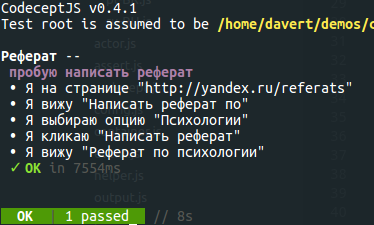
This also enables localized method names for actor object.
This way tests can be written in native language while it is still JavaScript:
```js
Scenario('пробую написать реферат', (Я) => {
Я.на_странице('http://yandex.ru/referats');
Я.вижу("Написать реферат по");
Я.выбираю_опцию('Психологии');
Я.кликаю("Написать реферат");
Я.вижу("Реферат по психологии");
});
```
## Portuguese
To write your tests in portuguese you can enable the portuguese translation in config file like:
```json
"translation": "pt-BR"
```
Now you can write test like this:
```js
Scenario('Efetuar login', (Eu) => {
Eu.estouNaPagina('http://minhaAplicacao.com.br');
Eu.preenchoOCampo("login", "usuario@minhaAplicacao.com.br");
Eu.preenchoOCampo("senha", "123456");
Eu.clico("Entrar");
Eu.vejo("Seja bem vindo usuário!");
});
```
## Italian
Add to config
```json
"translation": "it-IT"
```
Now you can write test like this:
```js
Scenario('Effettuare il Login su GitHub', (io) => {
io.sono_sulla_pagina('https://github.com/login');
io.compilo_il_campo("Username or email address", "giuseppe-santoro");
io.compilo_il_campo("Password", "*********");
io.faccio_click_su("Sign in");
io.vedo("Learn Git and GitHub without any code!");
});
```
## Polish
Add to config
```json
"translation": "pl-PL"
```
Now you can write test like this:
```js
Scenario('Zakładanie konta free trial na stronie głównej GetResponse', (Ja) => {
Ja.jestem_na_stronie('https://getresponse.com');
Ja.wypełniam_pole("Email address", "sjakubowski@getresponse.com");
Ja.wypełniam_pole("Password", "digital-marketing-systems");
Ja.klikam('Sign up');
Ja.czekam(1);
Ja.widzę_w_adresie_url('/account_free_created.html');
});
```
## Chinese
Add to config:
```JSON
"translation": "zh-CN"
```
or
```JSON
"translation": "zh-TW"
```
This way tests can be written in Chinese language while it is still JavaScript:
```JavaScript
Feature('CodeceptJS 演示');
Scenario('成功提交表单', (我) => {
我.在页面('/documentation')
我.填写字段('电邮', 'hello@world.com')
我.填写字段('密码', '123456')
我.勾选选项('激活')
我.勾选选项('男');
我.单击('创建用户')
我.看到('用户名可用')
我.在当前网址中看不到('/documentation')
});
```
or
```JavaScript
Feature('CodeceptJS 演示');
Scenario('成功提交表單', (我) => {
我.在頁面('/documentation')
我.填寫欄位('電郵', 'hello@world.com')
我.填寫欄位('密碼', '123456')
我.勾選選項('活化')
我.勾選選項('男');
我.單擊('建立用戶')
我.看到('用戶名可用')
我.在當前網址中看不到('/documentation')
});
```
## Japanese
Add to config
```json
"translation": "ja-JP"
```
Now you can write test like this:
```js
Scenario('ログインできる', (私は) => {
私は.ページを移動する('/login');
私は.フィールドに入力する("Eメール", "foo@example.com");
私は.フィールドに入力する("パスワード", "p@ssword");
私は.クリックする('ログイン');
私は.待つ(1);
私は.URLに含まれるか確認する('/home');
});
```
## Using your own translation file
Create translation file like this:
```js
module.exports = {
I: '',
actions: {
click: 'Klicken',
wait: 'Wartenn',
}
```
And add the file path to your config
```json
"translation": "./path/to/your/translation.js"
```