code-surfer
Version:
Rad code slides
428 lines (298 loc) • 9.3 kB
Markdown
<div align="center">
<br/>
<a href="https://codesurfer.pomb.us/demo/">
<img alt="demo" src="https://user-images.githubusercontent.com/1911623/66186294-49bacc00-e658-11e9-8d73-e4e6d8df476b.gif" width="600" />
</a>
<br/>
</div>
# Code Surfer
> Help to keep this project alive with your [support](https://opencollective.com/code-surfer) ❤️
Code Surfer adds code highlighting, code zooming, code scrolling, code focusing, code morphing, and fun to [MDX Deck](https://github.com/jxnblk/mdx-deck) slides.
To create a new project run:
```bash
npm init code-surfer-deck my-deck
cd my-deck
npm start
```
## Examples
- [Formidable's GraphQL Workshop](https://advanced-graphql-workshop.netlify.com/) by [Phil Pluckthun](https://twitter.com/_philpl)
- [React Conf 2018 Hooks Demo](https://github.com/pomber/react-conf-2018-hooks-demo)
## How to use Code Surfer
> It may help to know how [MDX Deck](https://github.com/jxnblk/mdx-deck) works first
To use Code Surfer you need to import it and wrap the code you want to show inside `<CodeSurfer>` tags (the **empty lines before and after the codeblock are required**):
````md
import { CodeSurfer } from "code-surfer"
# Deck Title
---
<CodeSurfer>
```js
console.log(1);
console.log(2);
console.log(3);
```
</CodeSurfer>
````
Features:
- [Focus](#focus)
- [Steps](#steps)
- [Title and Subtitle](#title-and-subtitle)
- [Themes](#themes)
- [Custom Styles](#custom-styles)
- [Languages](#languages)
- [Columns](#columns)
- [Import Code](#import-code)
- [Diffs](#diffs)
> Here is a live [deck using all the features](https://codesurfer.pomb.us/full/) (and its [mdx source](https://raw.githubusercontent.com/pomber/code-surfer/code-surfer-v2/sites/docs/decks/full.mdx)) just in case you prefer to read code instead of docs.
## Focus
Add a _focus string_ after the language in the first line of a codeblock to tell Code Sufer what lines and columns you want to focus.
Code Surfer will fade out all the code that isn't focused and, if necessary, zoom it out to fit it in the slide.
````md
<CodeSurfer>
```js 1:2,3[8:10]
console.log(1);
console.log(2);
console.log(3);
```
</CodeSurfer>
````
In the example above `1:2,3[8:10]` means: "focus from the line 1 to line 2 and the columns 8 to 10 from line 3". More examples:
- `5:10` focus lines 5,6,7,8,9 and 10
- `1,3:5,7` focus lines 1,3,4,5 and 7
- `2[5]` focus column 5 in line 2
- `2[5:8]` focus columns 5, 6, 7 and 8 in line 2
- `1,2[1,3:5,7],3` focus line 1, columns 1, 3, 4, 5 and 7 in line 2 and line 3
## Steps
Add more codeblocks to add steps to a Code Surfer slide.
````md
<CodeSurfer>
```js
console.log(1);
console.log(2);
console.log(3);
```
```js 1
console.log(1);
console.log(2);
console.log(3);
```
```js
console.log(1);
console.log(2);
console.log(3);
console.log(4);
console.log(5);
```
</CodeSurfer>
````
You can change the focus and/or the code for different steps and Code Surfer will make the transition between the steps: zooming, scrolling, fading in, fading out, adding and removing lines.
## Title and Subtitle
````md
<CodeSurfer>
```js 1 title="Title" subtitle="Look at the first line"
console.log(1);
console.log(2);
console.log(3);
```
```js 2 title="Title" subtitle="and now the second"
console.log(1);
console.log(2);
console.log(3);
```
</CodeSurfer>
````
## Themes
[](https://codesurfer.pomb.us/themes/)
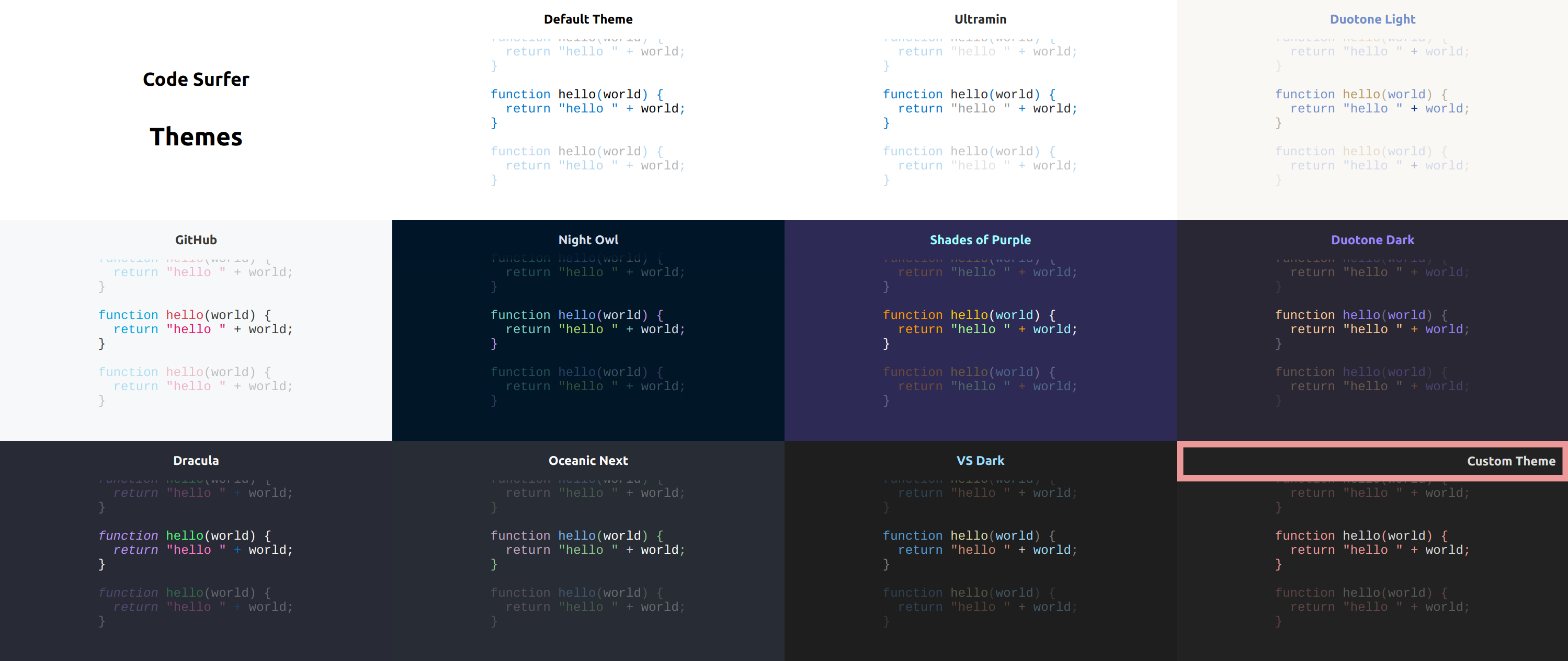
There are many Code Surfer themes available on the [`@code-surfer/themes`](https://github.com/pomber/code-surfer/blob/code-surfer-v2/packs/themes/src/index.ts) package.
You can pass the theme as a prop `<CodeSurfer theme={someTheme}>`:
````md
import { CodeSurfer } from "code-surfer"
import { nightOwl } from "@code-surfer/themes"
<CodeSurfer theme={nightOwl}>
```js
console.log(1);
console.log(2);
console.log(3);
```
</CodeSurfer>
````
Or set the theme for the whole deck as any other [MDX Deck theme](https://github.com/jxnblk/mdx-deck#theming):
````md
import { CodeSurfer } from "code-surfer"
import { nightOwl } from "@code-surfer/themes"
export const theme = nightOwl
<CodeSurfer>
```js
console.log(1);
console.log(2);
console.log(3);
```
</CodeSurfer>
````
> Exporting the theme like this will also change the text and background colors for slides that aren't using Code Surfer. If you want to keep the colors from a different mdx deck theme you can [compose both themes](https://github.com/jxnblk/mdx-deck/blob/master/docs/theming.md#composing-themes) together: `export const themes = [codeSurferTheme, mdxDeckTheme]`
## Custom Styles
You can write your own Code Surfer theme and change the style of the code, title and subtitle:
> Themes use [Theme UI](https://theme-ui.com/) internally
```js
// custom-theme.js
export default {
colors: {
background: "#222",
text: "#ddd",
primary: "#a66"
},
styles: {
CodeSurfer: {
pre: {
color: "text",
backgroundColor: "background"
},
code: {
color: "text",
backgroundColor: "background"
},
tokens: {
"comment cdata doctype": {
fontStyle: "italic"
},
"builtin changed keyword punctuation operator tag deleted string attr-value char number inserted": {
color: "primary"
}
},
title: {
backgroundColor: "background",
color: "text"
},
subtitle: {
color: "#d6deeb",
backgroundColor: "rgba(10,10,10,0.9)"
},
unfocused: {
// only the opacity of unfocused code can be changed
opacity: 0.1
}
}
}
};
```
And use it in your deck like any other theme:
````md
import { CodeSurfer } from "code-surfer"
import customTheme from "./custom-theme"
<CodeSurfer theme={customTheme}>
```js
console.log(1);
console.log(2);
console.log(3);
```
</CodeSurfer>
````
## Languages
Code Surfer uses [Prism](https://prismjs.com/) for parsing different languages, so it supports [all the langauges supported by Prism](https://prismjs.com/#supported-languages).
Most popular languages are supported out of the box, for the rest you need to import them:
````md
import { CodeSurfer } from "code-surfer"
import "prismjs/components/prism-smalltalk"
<CodeSurfer>
```smalltalk
result := a > b
ifTrue:[ 'greater' ]
ifFalse:[ 'less or equal' ]
```
</CodeSurfer>
````
## Columns
If you want to show more than one piece of code at the same time, use `<CodeSurferColumns>`:
````md
import { CodeSurferColumns, Step } from "code-surfer"
<CodeSurferColumns>
<Step subtitle="First Step">
```js
console.log(1);
console.log(2);
```
```js
console.log("a");
console.log("b");
```
</Step>
<Step subtitle="Second Step">
```js 2
console.log(1);
console.log(2);
```
```js 2
console.log("a");
console.log("b");
```
</Step>
</CodeSurferColumns>
````
Each `<Step>` can have its own `title` and `subtitle`.
You can use different themes for each column: `<CodeSurferColumns themes={[nightOwl, ultramin]}>`. And change the relative size of the columns with `<CodeSurferColumns sizes={[1,3]}>`.
Columns aren't only for code, you can use them for any kind of content:
````md
import { CodeSurferColumns, Step } from "code-surfer"
import MyComponent from "./my-component.jsx"
<CodeSurferColumns>
<Step>
```js
console.log(1);
console.log(2);
```
# Some Markdown
</Step>
<Step>
```js 2
console.log(1);
console.log(2);
```
<MyComponent/>
</Step>
</CodeSurferColumns>
````
## Import Code
Instead of writing the code inside codeblocks you can import it from a file:
````md
import { CodeSurfer } from "code-surfer"
<CodeSurfer>
```js 5:10 file=./my-code.js
```
```js file=./my-other-code.js
```
</CodeSurfer>
````
## Diffs
Codeblocks can also be diffs. This is particularly useful when using empty diffs for code that doesn't change:
````md
import { CodeSurfer } from "code-surfer"
<CodeSurfer>
```js
console.log(1);
console.log(2);
console.log(3);
```
```diff 1 subtitle="log 1"
```
```diff 2 subtitle="log 2"
```
```diff 3 subtitle="log 3"
```
</CodeSurfer>
````
## Related
- [MDX Deck](https://github.com/jxnblk/mdx-deck)
- [spectacle-code-slide](https://github.com/jamiebuilds/spectacle-code-slide)
- [Prism](https://github.com/PrismJS/prism)
- [create-code-surfer-deck](https://github.com/pomber/create-code-surfer-deck)
- [Gatsby Waves](https://github.com/pomber/gatsby-waves)
## Support Code Surfer
You can help keep this project alive.
### Sponsors
Support this project by becoming a sponsor. Your logo will show up here with a link to your website. [[Become a sponsor](https://opencollective.com/code-surfer#sponsor)]
<a href="https://opencollective.com/code-surfer/sponsor/0/website" target="_blank"><img src="https://opencollective.com/code-surfer/sponsor/0/avatar.svg"></a>
### Backers
Thank you to all our backers! 🙏 [[Become a backer](https://opencollective.com/code-surfer#backer)]
<a href="https://opencollective.com/code-surfer#backers" target="_blank"><img src="https://opencollective.com/code-surfer/backers.svg?width=890"></a>
### Contributors
This project exists thanks to all the people who contribute.
<img src="https://opencollective.com/code-surfer/contributors.svg?width=890&button=false" />