code-server
Version:
Run VS Code on a remote server.
677 lines (415 loc) • 195 kB
Markdown
# GitHub Copilot Chat in VS Code - Changelog
You can find the latest AI-related updates for GitHub Copilot in VS Code in the weekly [VS Code release notes](https://code.visualstudio.com/updates).
For more frequent updates, check the [Commit log](https://github.com/Microsoft/vscode/commits/main) and [vscode-copilot-chat commit log](https://github.com/microsoft/vscode-copilot-chat/commits/main) on GitHub.
---
# Past updates
## 0.41 (2026-03-25)
GitHub Copilot updates for [VS Code 1.113](https://code.visualstudio.com/updates/v1_113):
- MCP support in Copilot CLI & Claude agents
- Forking sessions in Copilot CLI & Claude agents
- Agent debug logs for Copilot CLI and Claude CLI sessions (Preview)
- Claude session listing powered by SDK APIs
- Nested subagents
- Manage plugin marketplaces
- URL handlers for plugin installation
- Chat Customizations editor (Preview)
- Configurable thinking effort in model picker
- Images preview for chat attachments
## 0.40 (2026-03-18)
GitHub Copilot updates for [VS Code 1.112](https://code.visualstudio.com/updates/v1_112):
- Message steering and queueing in Copilot CLI
- Preview changes before delegating to Copilot CLI
- Clickable file links in Copilot CLI terminal output
- Permissions levels in Copilot CLI
- Troubleshoot agent behavior with /troubleshoot (Preview)
- Export and import agent debug logs (Preview)
- Image and binary file support for agents
- Automatic symbol references on paste in chat
- Customizations discovery in parent repositories
- Sandbox locally running MCP servers (Linux and macOS)
- Improved UI for MCP Elicitation
- Enable or disable plugins and MCP servers
- Automatic plugin updates
## 0.39 (2026-03-09)
GitHub Copilot updates for [VS Code 1.111](https://code.visualstudio.com/updates/v1_111):
- Autopilot and agent permissions
- Agent-scoped hooks (Preview)
- Debug events snapshot
- Chat tip improvements
- AI CLI profile group in terminal dropdown (Experimental)
## 0.38 (2026-03-05)
GitHub Copilot updates from [February 2026](https://code.visualstudio.com/updates/v1_110):
### Agent controls
- **Background agent slash commands** — Chat customization options like prompt files, hooks, and skills are now available in background agent sessions as slash commands. Background agent sessions can also be renamed.
- **Claude agent improvements** — Steering and queuing, session renaming, context window rendering with compaction, new slash commands (`/compact`, `/agents`, `/hooks`), `getDiagnostics` tool, and performance improvements for reading sessions.
- **Agent Debug panel (Preview)** — New panel showing chat events in real time, including system prompts, tool calls, and customization events. Includes a chart view for visual event hierarchy. Open via **Developer: Open Agent Debug Panel** or the gear icon in the Chat view.
- **Auto approve slash commands** — Toggle global auto approve directly from chat input with `/autoApprove` and `/disableAutoApprove` (aliases: `/yolo`, `/disableYolo`).
- **Edit mode hidden by default** — Agent mode now handles everything edit mode can do; edit mode is hidden from the agent picker by default, controlled by the `chat.editMode.hidden` setting. Ask mode is now backed by a custom agent definition.
- **Ask questions tool improvements** — The `askQuestions` tool moved into VS Code core for improved reliability. You can now send steering messages without dismissing pending questions first.
- **Prevent auto-suspend during chat** — VS Code asks the OS not to suspend the machine while a chat request is running.
### Agent extensibility
- **Agent plugins (Experimental)** — Prepackaged bundles of chat customizations (skills, commands, agents, MCP servers, hooks) installable from the Extensions view. Configurable plugin marketplaces and local plugin directories.
- **Agentic browser tools (Experimental)** — Agents can read and interact with the integrated browser using tools like `openBrowserPage`, `readPage`, `screenshotPage`, `clickElement`, `typeInPage`, and `runPlaywrightCode`. Enable by setting `workbench.browser.enableChatTools` to `true`.
- **Create agent customizations from chat** — New `/create-prompt`, `/create-instruction`, `/create-skill`, `/create-agent`, and `/create-hook` slash commands to generate customization files directly from a conversation.
- **Tools for usages and rename** — New `vscode_renameSymbol` tool and updated `usages` tool let agents navigate and refactor code using extension/LSP capabilities with high precision.
### Smarter sessions
- **Session memory for plans** — Plans persist to session memory and stay available across conversation turns, surviving compaction.
- **Explore subagent for codebase search** — The Plan agent delegates codebase research to a dedicated read-only Explore subagent running on fast models. Configurable via the `chat.exploreAgent.defaultModel` setting.
- **Inline chat and chat session integration** — When an agent session already changed a file, inline chat queues new messages into that session instead of making changes in isolation.
### Chat experience
- **Redesigned model picker** — New dropdown with Auto, featured/recently used, and other models sections, plus a search box and rich hover details.
- **Contextual tips (Experimental)** — Tips in the Chat view help discover features tailored to your usage patterns, controlled by the `chat.tips.enabled` setting.
- **Custom thinking phrases** — Customize loading text during reasoning/tool calls via the `chat.agent.thinking.phrases` setting.
- **Collapsible terminal tool calls** — Terminal tool invocations displayed as collapsible sections to reduce visual noise, controlled by the `chat.tools.terminal.simpleCollapsible` setting.
- **OS notifications for chat** — Configure notifications for chat responses and confirmations to appear even when the window is in focus (`always` option).
- **Inline chat hover mode** — New hover-based UI for inline chat (set `inlineChat.renderMode` to `hover`).
- **Inline chat affordance** — Selection-triggered affordance for starting inline chat in the editor or gutter, controlled by the `inlineChat.affordance` setting.
### Code editing
- **Long-distance next edit suggestions** — NES now predicts and suggests edits anywhere in the file, not just near the cursor.
- **NES eagerness** — New eagerness option in the Copilot Status Bar to control suggestion frequency vs. relevance.
---
## 0.37 (2026-02-04)
GitHub Copilot updates from [January 2026](https://code.visualstudio.com/updates/v1_109):
### Chat UX
- **Message steering and queueing (Experimental)** — Send follow-up messages while a request is running: queue messages, steer the agent mid-task, or stop and send a new message. Drag-and-drop reordering for queued messages.
- **Anthropic models now show thinking tokens** — Claude models surface thinking tokens with configurable display styles, interleaved tool calls, auto-expanding failed tool calls, scrollable thinking content, and shimmer animations.
- **Mermaid diagrams in chat responses** — Interactive Mermaid diagrams (flowcharts, sequence diagrams, etc.) rendered directly in chat with pan, zoom, and open-in-editor support.
- **Ask Questions tool (Experimental)** — Agent can ask clarifying questions with single/multi-select options, free text input, and recommended answers highlighted.
- **Plan agent improvements** — Structured 4-phase workflow (Discovery → Alignment → Design → Refinement). Invokable via `/plan` slash command.
- **Context window details** — New indicator in chat input showing token usage breakdown by category.
- **Inline chat UX revamp (Preview)** — New text-selection affordance and contextual rendering for triggering inline chat.
- **Model descriptions in the model picker** — Hover or keyboard focus shows model details at a glance.
- **Terminal command output improvements** — Syntax highlighting for inline Node/Python/Ruby, working directory display, command intent descriptions, output streaming for long-running commands, interactive input in embedded terminals.
- **Delete all hidden terminals** — One-click delete for all hidden chat terminals.
### Agent session management
- **Session type picker** — New picker to choose agent type (local, background, cloud) or hand off ongoing sessions between environments.
- **Agent Sessions view improvements** — Resizable side-by-side sessions, multi-select bulk operations, improved stacked view with filters.
- **Agent status indicator** — Command center indicator showing in-progress, unread, and attention-needed sessions.
- **Parallel subagents** — Subagents can now run in parallel for faster task completion.
- **Search subagent (Experimental)** — Dedicated search subagent with isolated context window for iterative codebase searches.
- **Cloud agent improvements** — Model selection, third-party coding agents (Claude, Codex), custom agents, multi-root workspace support, checkout without GitHub PR extension.
- **Background agent improvements** — Custom agents, image attachments, multi-root workspace support, auto-commit at end of each turn.
- **Agent sessions welcome page (Experimental)** — New startup editor showing recent agent sessions with quick actions and embedded chat.
### Agent customization
- **Agent hooks (Preview)** — Execute custom shell commands at agent lifecycle points (PreToolUse, PostToolUse, SessionStart, Stop, etc.). Compatible with Claude Code and Copilot CLI hook formats.
- **Skills as slash commands** — Agent Skills invokable via `/` in chat alongside prompt files. Controllable via `user-invokable` and `disable-model-invocation` frontmatter.
- **`/init` command** — Generate or update workspace instructions (`copilot-instructions.md`, `AGENTS.md`) based on codebase analysis.
- **Agent Skills generally available** — Enabled by default. Manageable via Commands. Configurable skill locations. Extension authors can distribute skills via `chatSkills` contribution point.
- **Organization-wide instructions** — GitHub organization custom instructions automatically applied to chat sessions.
- **Custom agent file locations** — Configurable directories for agent definitions via `chat.agentFilesLocations`.
- **Control agent invocation** — New frontmatter: `user-invokable`, `disable-model-invocation`, `agents` (limit subagent access).
- **Multiple model support for custom agents** — Specify fallback model lists in frontmatter.
- **Chat customization diagnostics** — New diagnostics view showing all loaded agents, prompts, instructions, and skills with error details.
- **Language Models editor improvements** — Multiple configurations per provider, Azure model configuration, provider group management, keyboard access, `chatLanguageModels.json` config file, model provider configuration UI.
- **Language model configuration** — Default model for plan implementation, default model for inline chat, model parameter for agent handoffs.
- **Agent customization skill (Experimental)** — Built-in skill that teaches the agent how to create custom agents, instructions, prompts, and skills.
### Agent extensibility
- **Claude compatibility** — VS Code reads Claude configuration files directly: `CLAUDE.md` instructions, `.claude/agents`, `.claude/skills`, `.claude/settings.json` hooks.
- **Agent orchestration** — Building blocks for multi-agent workflows using custom agents, subagents, and invocation controls. Community examples: Copilot Orchestra, GitHub Copilot Atlas.
- **Claude Agent (Preview)** — Delegate tasks to Claude Agent SDK using Copilot subscription models. Uses official Anthropic agent harness.
- **Anthropic model improvements** — Messages API with interleaved thinking, tool search tool, context editing (Experimental).
- **MCP Apps support** — MCP servers can display rich, interactive UI in chat responses.
- **Custom registry base URLs for MCP packages** — Support for private/alternative package registries.
### Agent optimizations
- **Copilot Memory (Preview)** — Store and recall context across sessions. Agent auto-saves and retrieves relevant memories.
- **External indexing for non-GitHub workspaces (Preview)** — Remote indexing for semantic code search in non-GitHub repositories.
- **Read files outside workspace** — Agents can read external files/directories with user permission.
- **Performance improvements** — Faster large chat scrolling/persistence, parallel dependent task processing.
### Agent security and trust
- **Terminal sandboxing (Experimental)** — Restrict file system access to workspace folder and network access to trusted domains (macOS/Linux only).
- **Terminal tool lifecycle improvements** — Manual background push, required timeout property, `awaitTerminal` and `killTerminal` tools.
- **Terminal auto-approval expansions** — New safe commands auto-approved: `Set-Location`, `dir`, `od`, `xxd`, `docker`, `npm`/`yarn`/`pnpm` safe sub-commands.
### Code editing (AI-related)
- **Rename suggestions for TypeScript** — Also works when typing over existing declarations.
- **Improved ghost text visibility** — Dotted underline for short inline suggestions (fewer than 3 characters).
- **Copilot extension deprecated** — GitHub Copilot extension fully deprecated; all functionality in GitHub Copilot Chat extension.
### Enterprise
- **Improved GitHub organization policy enforcement** — Policies correctly apply based on preferred Copilot account; enforced during network unavailability at startup.
---
## 0.36 (2026-01-08)
GitHub Copilot updates from [December 2025](https://code.visualstudio.com/updates/v1_108):
### Agents
- **Agent Skills (Experimental)** — New capability to teach the coding agent domain-specific knowledge via skill folders containing `SKILL.md` files. Auto-detected from `.github/skills` (or `.claude/skills/`), loaded on-demand into chat context.
- **Agent Sessions view improvements** — Keyboard access, state-based session grouping, changed files and PR info per session, multi-select archiving, and accessibility improvements.
### Chat
- **Chat picker based on agent sessions** — Quick Pick for chat sessions now mirrors the Agent Sessions view with actions like archive, rename, and delete.
- **Chat title improvements** — Title control now visible regardless of Activity Bar configuration; select the title to jump between sessions.
- **Open empty Chat on restart** — Previous sessions no longer auto-restored on restart; configurable via `chat.restoreLastPanelSession`.
- **Terminal tool auto approve defaults** — New safe commands auto-approved by default (e.g., `git ls-files`, `rg`, `sed`, `Out-String`). Workspace npm scripts auto-approved when in `package.json`. Informational messages when rules deny auto-approval.
- **Session and workspace rules for terminal commands** — Allow dropdown now supports allowing commands for the current session or workspace scope.
- **Terminal tool prevents adding to shell history** — Commands run by the terminal tool excluded from shell history (bash, zsh, pwsh, fish).
- **Streaming chat responses in Accessible View** — Chat responses now stream dynamically in the Accessible View without needing to close and reopen.
- **MCP server output excluded from Accessible View** — Reduces noise by excluding MCP server output from the Accessible View.
---
## 0.35 (2025-12-10)
GitHub Copilot updates from [November 2025](https://code.visualstudio.com/updates/v1_107):
### Agents
- **Agent sessions integrated into Chat view** — Unified experience for managing agent sessions directly in the Chat view (compact, side-by-side, or stacked layouts). Sessions show status, progress, and file change stats. Supports search, filtering, and archiving.
- **Local agents remain active when closed** — Local agent sessions continue running in the background when closed, enabling long-running and parallel tasks.
- **Continue tasks in background or cloud agents** — Hand off local chat sessions to background or cloud agents via a new "Continue in" option. Context is passed along automatically.
- **Isolate background agents with Git worktrees** — Background agents can run in dedicated Git worktrees to avoid file conflicts when running multiple agents simultaneously.
- **Adding context to background agents** — Attach selections, problems, symbols, search results, git commits, and more as context to background agent prompts.
- **Share custom agents across your GitHub organization (Experimental)** — Define custom agents at the organization level for shared use across teams.
- **Custom agents with background agents (Experimental)** — Use custom agents defined in `.github/agents` with background agents.
- **Agent tooling reorganization** — Renamed tool references for better compatibility with GitHub custom agents across VS Code and GitHub environments.
- **Run agents as subagents (Experimental)** — Custom agents can be used as subagents for delegating subtasks within a chat session, each with its own context window.
- **Reuse Claude skills (Experimental)** — VS Code can discover and use Claude Code skills from `~/.claude/skills/` and workspace `.claude/skills/` folders.
### Chat
- **Inline chat UX** — Inline chat optimized for single-file code changes; non-code tasks automatically upgrade to the Chat view.
- **Language Models editor** — Centralized editor to view, search, filter, and manage language model visibility and providers. Supports adding models from installed providers.
- **URL and domain auto approval** — Two-step approval for fetch tool URLs: approve the domain, then review fetched content before use (prompt injection protection). Integrates with Trusted Domains.
- **More robust fetch tool** — `#fetch` now handles dynamic/JavaScript-rendered web content (SPAs, Jira, etc.).
- **Text search tool can search ignored files** — `#textSearch` can now search files/folders excluded by `.gitignore`, `files.exclude`, or `search.exclude`.
- **Rich terminal output in chat** — Terminal output renders in a full `xterm.js` terminal inside chat with preserved output history and ANSI color support.
- **Allow all terminal commands in this session** — New option to auto-approve all terminal commands for the current session.
- **Keyboard shortcuts for chat terminal actions** — Dedicated keybindings to focus or toggle the most recent chat terminal.
- **Keyboard shortcuts for custom agents** — Each custom agent gets a unique command in the Command Palette for keybinding.
- **Azure model provider: Entra ID default auth** — Azure BYOK models now default to Entra ID authentication.
- **Anthropic models: Extended thinking support** — Configurable thinking budget for Anthropic models (default: 4,000 tokens). Supports interleaved thinking via BYOK.
- **Chat view appearance improvements** — New chat title control, optional welcome banner, and restore previous session on reopen.
- **Diffs for edits to sensitive files** — Proposed changes to sensitive files (e.g., `settings.json`) now shown as diffs for easier review.
- **Collapsible reasoning and tools output (Experimental)** — Successive tool calls collapsed by default with AI-generated summaries to reduce visual noise.
### Code editing (AI-related)
- **Rename suggestions for TypeScript** — AI predicts symbol renames and suggests related renames across the file.
- **New model for next edit suggestions** — Improved model with better acceptance/dismissal performance.
- **Preview next edit suggestions outside the viewport** — Suggestions outside the viewport show a preview at the cursor position.
- **Copilot extensions unification** — Inline suggestions fully served from Copilot Chat extension; GitHub Copilot extension disabled by default. Full deprecation planned for January 2026.
### MCP
- **Support for latest MCP specification (2025-11-25)** — Adds URL mode elicitation, tasks for long-running tool calls, and enhanced enum choices.
- **GitHub MCP Server provided by Copilot Chat (Preview)** — Built-in GitHub MCP server with automatic authentication, configurable toolsets, and read-only mode.
### Enterprise
- **Control auto approval for agent tools** — New setting to define which tools are eligible for auto-approval; enforceable via enterprise policy.
- **Disable agents by policy** — Agent picker communicates when agents are unavailable due to enterprise policy.
- **GitHub Enterprise policies in Codespaces** — Enterprise/org policies (e.g., MCP registry) now apply in GitHub Codespaces.
---
## 0.33 (2025-11-12)
GitHub Copilot updates from [October 2025](https://code.visualstudio.com/updates/v1_106):
### Agents
- **Agent Sessions view** — Centralized view for managing all active chat sessions (local and cloud), including Copilot coding agent, Copilot CLI, and OpenAI Codex. Supports search and a consolidated single-view mode.
- **Plan agent** — New agent that breaks down complex tasks into step-by-step implementation plans before writing code. Supports clarifying questions and iterative refinement. Can be customized per team.
- **Cloud agents** — Copilot coding agent integration moved from GitHub PR extension into Copilot Chat extension. Deeper integration with GitHub Mission Control for seamless transitions.
- **CLI agents** — Initial integration with Copilot CLI, allowing new/resumed CLI agent sessions in chat editors or integrated terminal.
- **Agent delegation** — Improved cloud delegation from chat panel and CLI (via `/delegate` command).
- **Chat modes renamed to custom agents** — `.chatmode.md` → `.agents.md` files in `.github/agents`. New metadata properties: `target`, `name`, `argument-hint`, `handoffs`.
### Chat
- **Embeddings-based tool selection** — Improved tool filtering for users with 100+ tools; faster and more accurate tool selection.
- **Tool approvals and trust** — Post-approval for external data (prompt injection protection), trust all tools from a server/extension at once, updated tool approval management.
- **Terminal tool improvements** — Tree-sitter-based parser for better subcommand detection, file write/redirection detection, shell-specific prompts, PowerShell `&&` rewriting, attach terminal commands as chat context, inline terminal output in chat, hidden chat terminal discovery.
- **Save conversation as prompt** — `/savePrompt` command to save chat conversations as reusable `.prompt` files.
- **Edit welcome prompts** — Right-click prompts in Chat welcome view to edit the underlying prompt file.
- **Auto-open edited files disabled by default** — Agent no longer auto-opens edited files (configurable).
- **Reasoning (Experimental)** — Thinking tokens now supported in GPT-5-Codex, GPT-5, GPT-5 mini, and Gemini 2.5 Pro. New display styles and collapsible tool calls in thinking UI.
- **Inline chat v2 (Preview)** — Modernized single-prompt, single-file inline chat for code changes only.
- **Chat view UX improvements** — New chat dropdown, reorganized tools/MCP server actions, copy math source support.
### Code editing (AI-related)
- **Inline suggestions open-sourced** — Merged into vscode-copilot-chat repo; Copilot and Copilot Chat extensions consolidating into one. GitHub Copilot extension to be deprecated by early 2026.
- **Snooze inline suggestions** — Pause suggestions directly from the gutter icon with a configurable duration.
### MCP
- **Organization MCP registry** — Custom MCP registry via GitHub org policies to control which MCP servers can be installed/started.
- **Install MCP servers to workspace** — Add MCP servers to `.vscode/mcp.json` for team sharing.
- **Client ID Metadata Document auth** — New OAuth flow for remote MCP servers (more secure than DCR).
- **WWW-Authenticate scope step up** — Dynamic scope escalation for remote MCP servers (least-privilege principle).
### Language-specific AI features
- **Python: Copilot Hover Summaries as docstring** — Insert AI-generated summaries directly as docstrings.
- **Python: Localized Copilot Hover Summaries** — Respects VS Code display language.
### Preview
- **Language Models editor** — Centralized editor for viewing, searching, filtering, and managing model visibility in the chat model picker. Add models from installed providers (Insiders only).
---
## 0.32 (2025-10-09)
GitHub Copilot updates from [September 2025](https://code.visualstudio.com/updates/v1_105):
### Chat
#### Fully qualified tool names
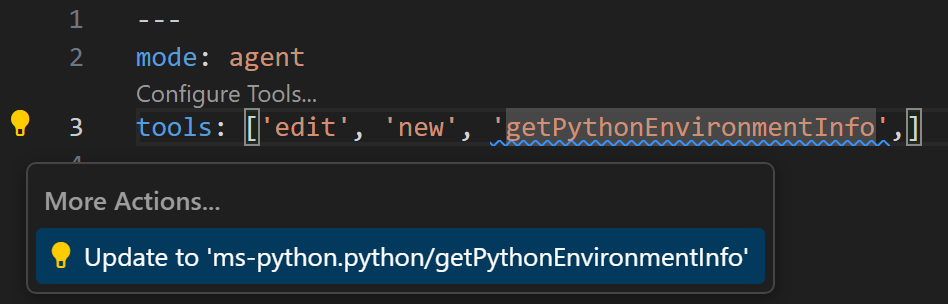
Prompt files and custom chat modes enable you to specify which tools can be used. To avoid naming conflicts between built-in tools and tools provided by MCP servers or extensions, we now support fully qualified tool names for prompt files and chat modes. This also helps with discovering missing extensions or MCP servers.
Tool names are now qualified by the MCP server, extension, or tool set they are part of. For example, instead of `codebase`, you would use `search/codebase` or `list_issues` would be `github/github-mcp-server/list_issues`.
You can still use the previous notation, however a code actions helps migrating to the new names.
#### Improved edit tools for bring-your-own-key models
**Setting**: `github.copilot.chat.customOAIModels`
To make working with custom models better integrated with VS Code built-in tools, we improved the set of edit tools given to [Bring Your Own Key (BYOK)](https://code.visualstudio.com/docs/copilot/customization/language-models#_bring-your-own-language-model-key) custom models. In addition, we enhanced our default tools and added a 'learning' mechanism to select the optimal tool set for custom models.
If you're [using OpenAI-compatible models](https://code.visualstudio.com/docs/copilot/customization/language-models#_use-an-openaicompatible-model), you can also explicitly configure the list of edit tools with the `github.copilot.chat.customOAIModels` setting.
#### Chat user experience improvements
##### OS notifications for chat responses
**Setting**: `chat.notifyWindowOnResponseReceived`
In VS Code 1.103, we introduced OS notifications for chat sessions that required a user confirmation when the VS Code window was not focused. In this release, we are expanding this functionality to show an OS badge and notification toast when a chat response is received. The notification includes a preview of the response, and selecting it brings focus to the chat input.
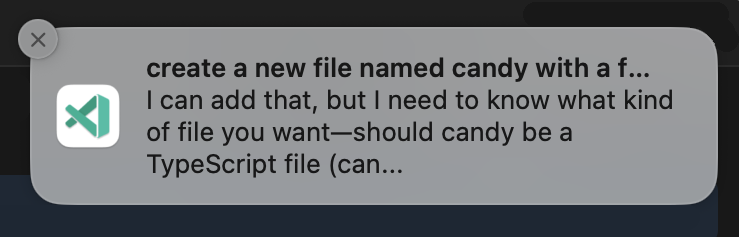
You can control the notification behavior with the `chat.notifyWindowOnResponseReceived` setting.
##### Chain of thought (Experimental)
**Setting**: `chat.agent.thinkingStyle`
Chain of thought shows the model’s reasoning as it responds, which can be great for debugging or understanding suggestions the model provides. With the introduction of GPT-5-Codex, thinking tokens are now shown in chat as expandable sections in the response.
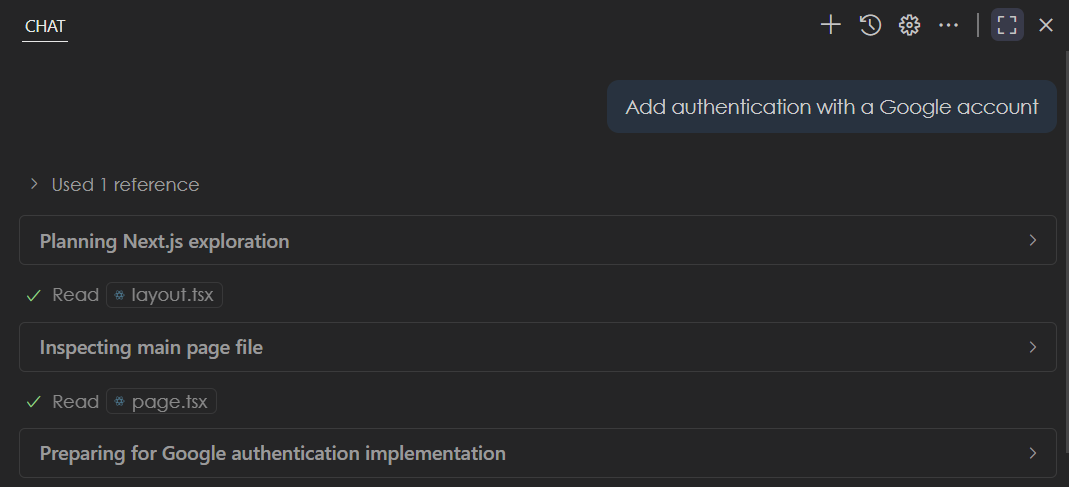
You can configure how to display or hide chain of thought with the `chat.agent.thinkingStyle` setting. Thinking tokens will soon be available in more models as well!
##### Show recent chat sessions (Experimental)
**Setting**: `chat.emptyState.history.enabled`
Last milestone, we introduced [prompt file suggestions](https://code.visualstudio.com/updates/v1_104#_configure-prompt-file-suggestions-experimental) to help you get started when creating a new chat session (<kbd>Ctrl+L</kbd> or <kbd>Cmd+L</kbd> on macOS). In this release, we are building on that by showing your recent local chat conversations. This helps you quickly pick up where you left off or revisit past conversations.
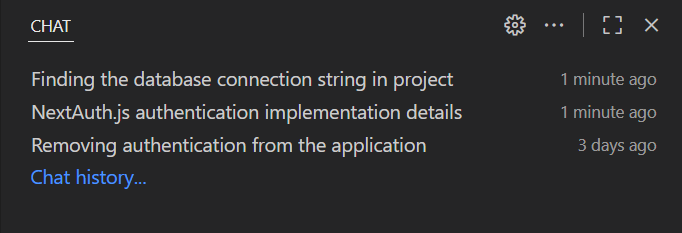
By default, this functionality is off, but you can enable it with the `chat.emptyState.history.enabled` setting.
##### Keep or undo changes during an agent loop
Previously, when an agent was still processing your chat request, you could not keep or undo file edits until the agent finished. Now, you can keep or undo changes to files while an edit loop is happening. This enables you to have more control, especially for long-running tasks.
##### Keyboard shortcuts for navigating user chat messages
To quickly navigate through your previous chat prompts in the chat session, we added keyboard shortcuts for navigating up and down through your chat messages:
* Navigate previous: <kbd>Ctrl+Alt+Up</kbd> or <kbd>Cmd+Option+Up</kbd> on macOS
* Navigate next: <kbd>Ctrl+Alt+Down</kbd> or <kbd>Cmd+Option+Down</kbd> on macOS
#### Agent sessions
This milestone, we made several improvements to the Chat Sessions view and the experience of delegating tasks to remote coding agents:
##### Chat Sessions view enhancements
**Setting**: `chat.agentSessionsViewLocation`
The [Chat Sessions view](https://code.visualstudio.com/docs/copilot/copilot-coding-agent#_manage-sessions-with-dedicated-chat-editor-experimental) provides a centralized location for managing both local chat conversations and remote coding agent sessions. This view enables you to work with multiple AI sessions simultaneously, track their progress, and manage long-running tasks efficiently.
In this release, we made several UI refinements and performance improvements to enhance the Chat Sessions experience.
* The Chat Sessions view continues to support features like Status Bar tracking for monitoring multiple coding agents, context menus for session management, and rich descriptions to provide detailed context for each session.
* Quickly initiate a new session by using the "+" button in the view header.
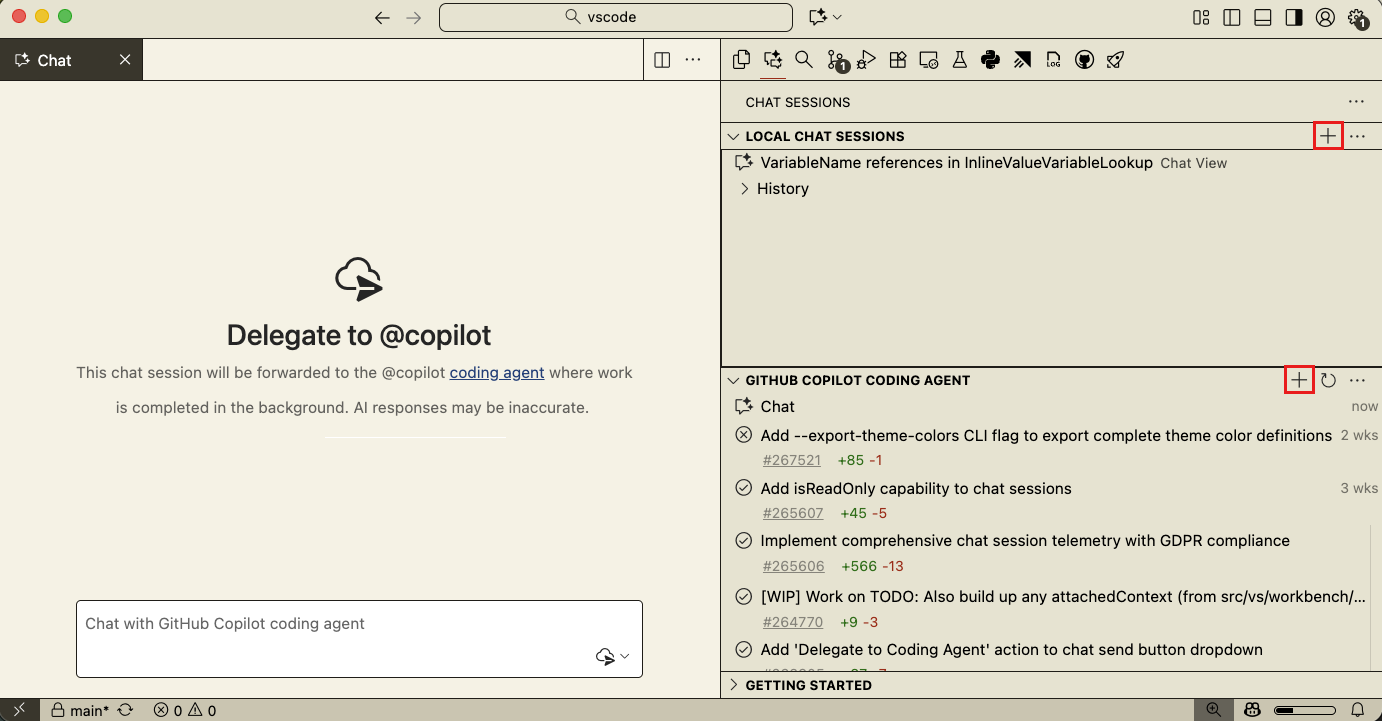
#### Delegating to remote coding agents
A typical scenario for working with remote coding agents is to first discuss and plan a task in a local chat session, where you have access to the full context of your codebase, and then delegate the implementation work to a remote coding agent. The remote agent can then work on the task in the background and create a pull request with the solution.
If you're working in a repository that has [Copilot coding agent enabled](https://aka.ms/coding-agent-docs), the **Delegate to coding agent** button in the Chat view now appears by default.
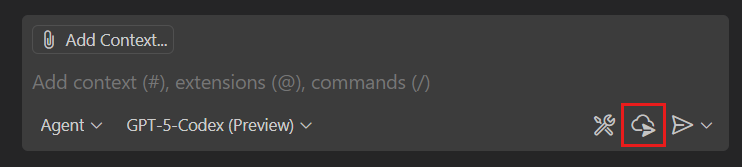
When you use the delegate action, all the context from your chat conversation, including file references, are forwarded to the coding agent. If your conversation exceeds the coding agent's context window, VS Code automatically summarizes and condenses the information to fit the window.
#### Terminal commands
##### Autoreply to prompts (Experimental)
**Setting**: `chat.tools.terminal.autoReplyToPrompts`
We introduced an opt-in setting, `chat.tools.terminal.autoReplyToPrompts`, which enables the agent to respond to prompts for input in the terminal automatically, like `Confirm? y/n`.
##### Free form input request detection
When the terminal requires free-form input, we now display a confirmation prompt. This lets you stay focused on your current work and only shift attention when input is needed.
#### Model availability
This milestone, we added support for the following models in chat. The available models depend on your Copilot plan and configuration.
* **GPT-5-Codex**, OpenAI’s GPT-5 model, optimized for agentic coding.
* **Claude Sonnet 4.5**, Anthropic’s most advanced model for coding and real-world agents.
You can choose between different models with the model picker in chat. Learn more about [language models in VS Code](https://code.visualstudio.com/docs/copilot/customization/language-models).
### MCP
#### MCP marketplace (Preview)
**Setting**: `chat.mcp.gallery.enabled`
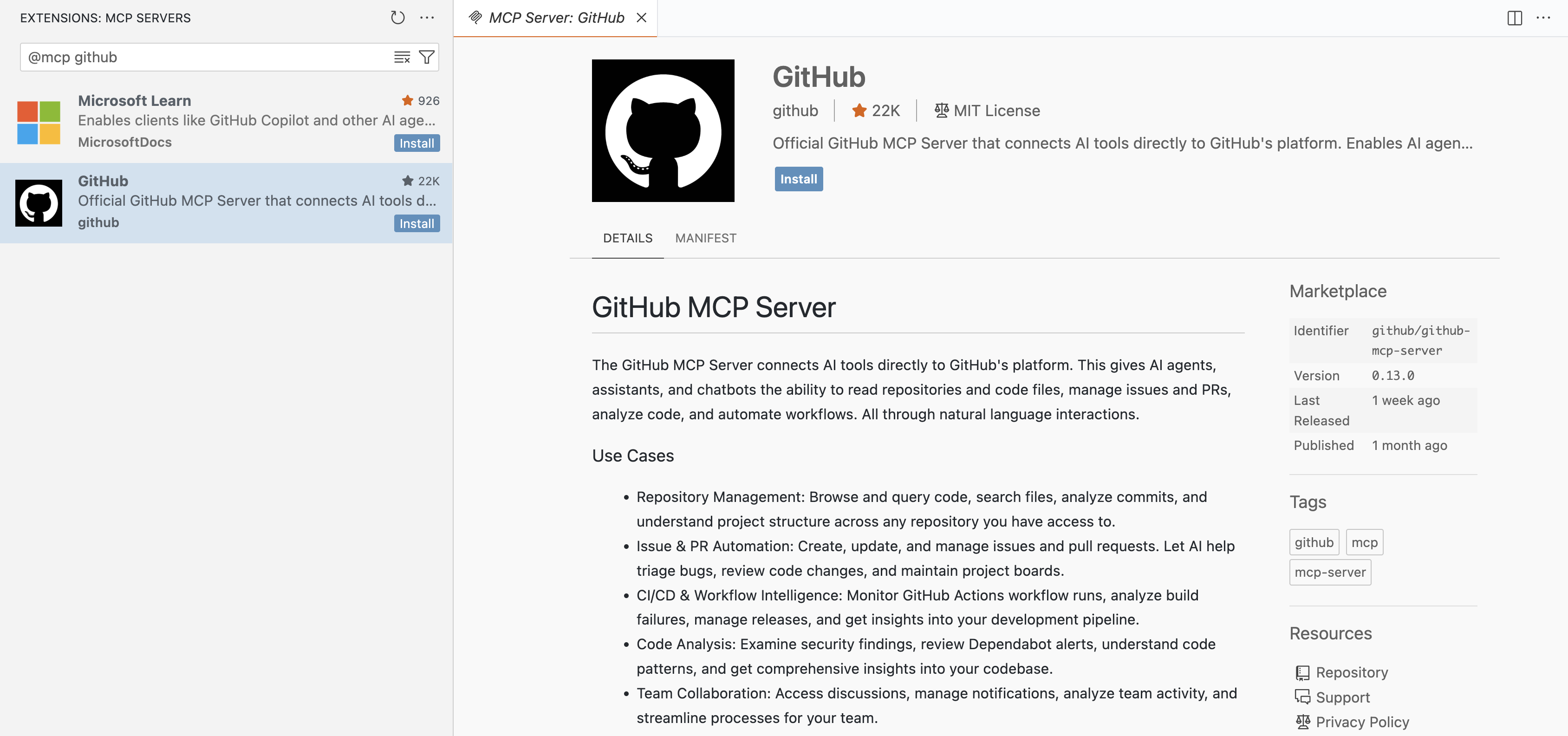
VS Code now includes a built-in MCP marketplace that enables users to browse and install MCP servers directly from the Extensions view. This is powered by the [GitHub MCP registry](https://github.com/mcp) and provides a seamless experience for discovering and managing MCP servers directly within the editor.
> **Note**: This feature is currently in preview. Not all features are available yet and the experience might still have some rough edges.
The MCP marketplace is disabled by default. When no MCP servers are installed, you see a welcome view in the Extensions view that provides easy access to enable the marketplace. You can also enable the MCP marketplace manually using the setting `chat.mcp.gallery.enabled`.
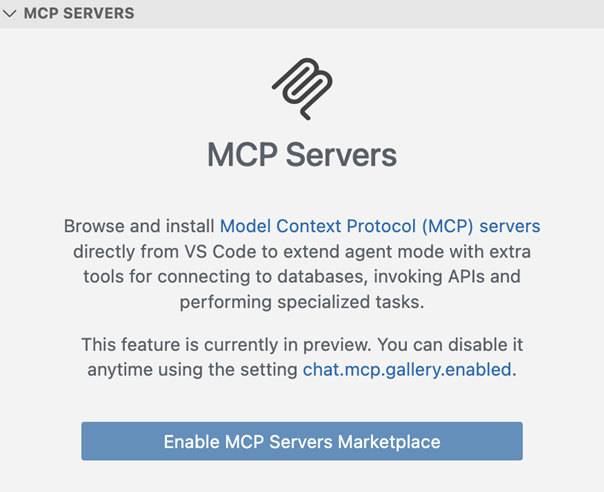
To browse the MCP servers from the Extensions view:
* Use the `@mcp` filter in the Extensions view search box
* Select **MCP Servers** from the filter dropdown in the Extensions view
* Search for specific MCP servers by name
#### Autostart MCP servers
**Setting**: `chat.mcp.autostart`
In this release, new or outdated MCP servers are now started automatically when you send a chat message. VS Code also avoids triggering interactions such as dialogs when autostarting a server, and instead adds an indicator in chat to let you know that a server needs attention.
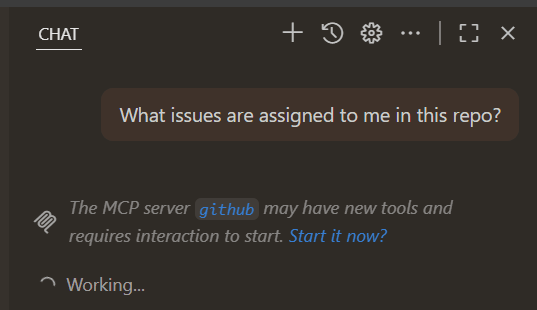
With MCP autostart on by default, we no longer eagerly activate extensions and instead only activate MCP-providing extensions when the first chat message is sent.
For extension developers, we also added support for the `when` clause on the `mcpServerDefinitionProviders` contribution point, so you can avoid activation when it's not relevant.
#### Improved representation of MCP resources returned from tools
Previously, our implementation of tool results that contain resources left it up to the model to retrieve those resources, without clear instructions on how to do so. In this version of VS Code, by default, we include a preview of the resource content and add instructions to retrieve the complete contents. This should lead to better model performance when using such tools.
#### MCP specification updates
This milestone, we adopted the following updates to the MCP specification:
* [SEP-973](https://github.com/modelcontextprotocol/modelcontextprotocol/pull/955), which lets MCP servers specify `icons` to associate with their data. This can be used to give a custom icon to servers, resources, and tools.
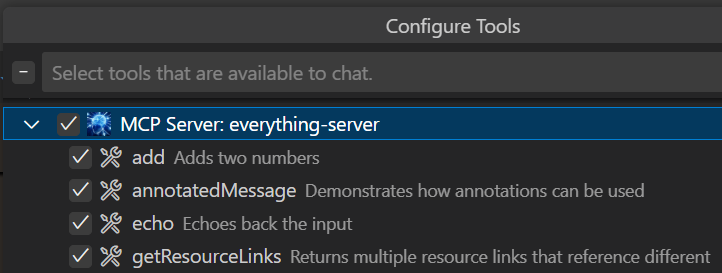
HTTP MCP servers must provide icons from the same authority that the MCP server itself is listening on, while stdio servers are allowed to reference `file:///` URIs on disk.
* [SEP-1034](https://github.com/modelcontextprotocol/modelcontextprotocol/pull/1035), which lets MCP servers provide `default` values when using elicitation.
### Accessibility
#### Chat improvements
**Setting**: `accessibility.verboseChatProgressUpdates`
A new setting, `accessibility.verboseChatProgressUpdates`, enables more detailed announcements for screen reader users about chat activity.
From the chat input, users can focus the last focused chat response item with <kbd>Ctrl+Shift+Up</kbd>.
### Source Control
#### Resolve merge conflicts with AI
When opening a file with git merge conflict markers, you are now able to resolve merge conflicts with AI. We added a new action in the lower right hand corner of the editor. Selecting this new action opens the Chat view and starts an agentic flow with the merge base and changes from each branch as context.
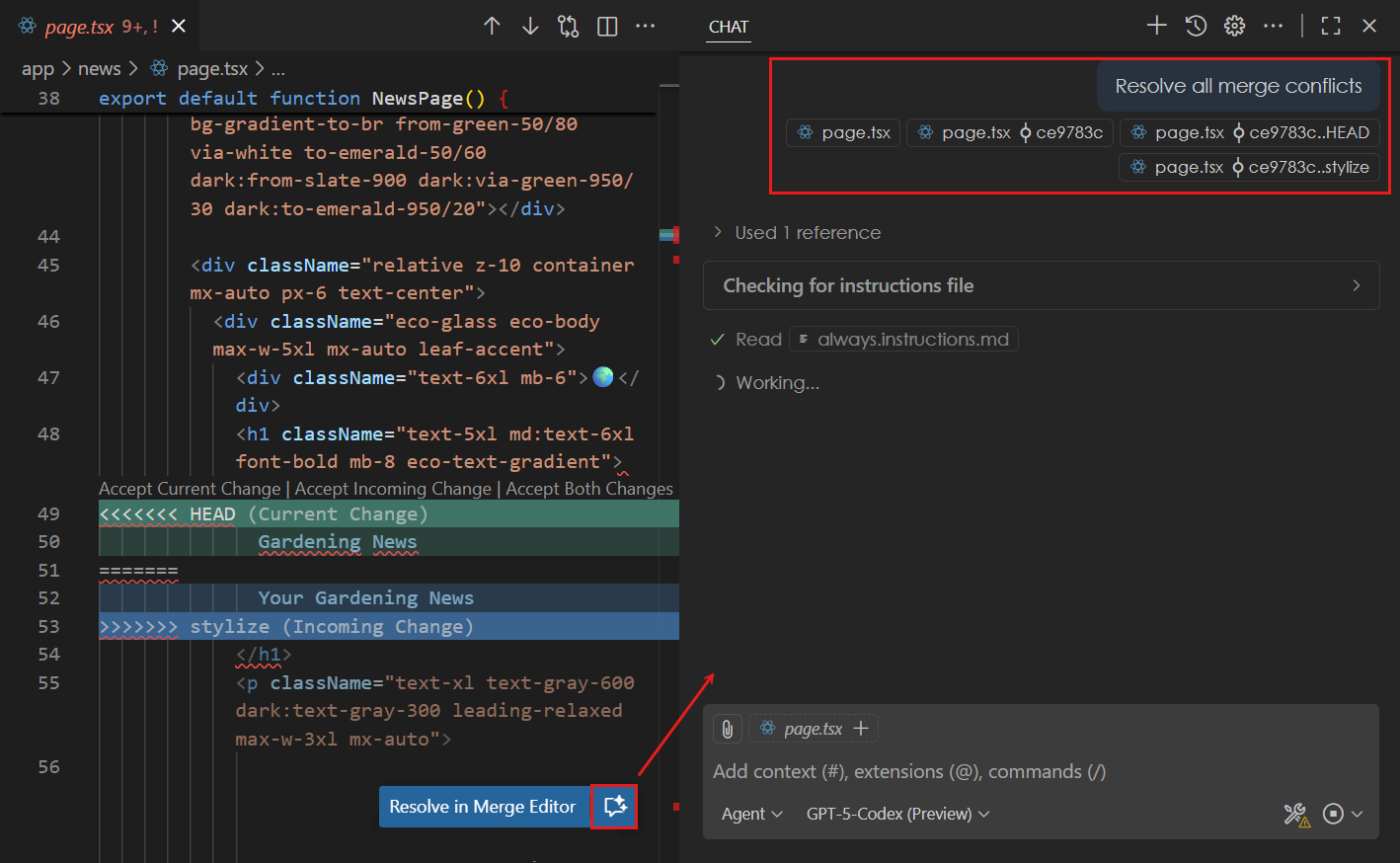
You can review the proposed merge conflict resolution in the editor and follow up with additional context if needed. You can customize the merge conflict resolution by using an `AGENTS.md` file.
#### Add history item change to chat context
A couple of milestones ago, we added the capability to view the files in each history item shown in the Source Control Graph view. You can now add a file from a history item as context to a chat request. This can be useful when you want to provide the contents of a specific version of a file as context to your chat prompt.
To add a file from a history item to chat, select a history item to view the list of files, right-click on a particular file, and then select **Add to Chat** from the context menu.
### Testing
#### Run tests with code coverage
If you have a testing extension installed for your code, the `runTests` tool in chat enables the agent to run tests in your codebase by using the [VS Code testing integration](https://code.visualstudio.com/docs/debugtest/testing) rather than running them from the command line.
In this release, the `runTests` tool now also reports test code coverage to the agent. This enables the agent to generate and verify tests that cover the entirety of your code.
---
## 0.31 (2025-09-11)
GitHub Copilot updates from [August 2025](https://code.visualstudio.com/updates/v1_104):
### Chat
#### Auto model selection (Preview)
This iteration, we're introducing auto model selection in chat. When you choose the **Auto** model in the model picker, VS Code automatically selects a model to ensure that you get the optimal performance and avoid rate limits.
Auto model selection is currently in preview and we are rolling it out to all GitHub Copilot users in VS Code in the following weeks, starting with the individual Copilot plans.
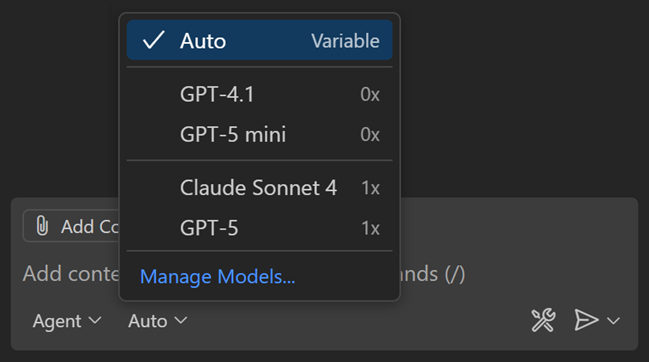
Auto will choose between Claude Sonnet 4, GPT-5, GPT-5 mini, and GPT-4.1 and Gemini Pro 2.5, unless your organization has disabled access to these models. When using auto model selection, VS Code uses a variable model multiplier, based on the selected model. If you are a paid user, auto will apply a 10% request discount.
You can view the selected model and the model multiplier by hovering over the response in the Chat view.
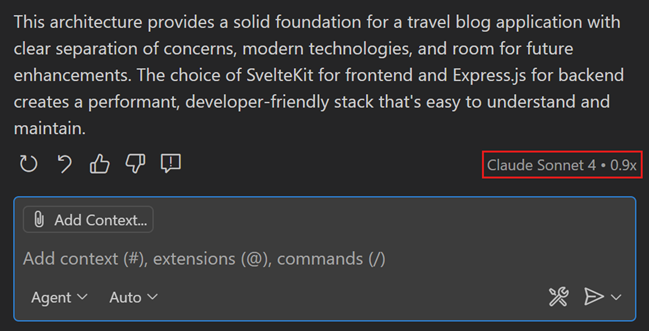
Learn more about [auto model selection in VS Code](https://code.visualstudio.com/docs/copilot/customization/language-models).
#### Confirm edits to sensitive files
**Setting**: `chat.tools.edits.autoApprove`
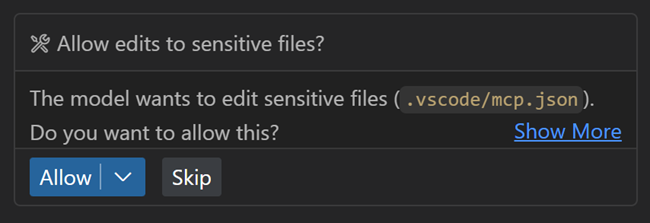
In agent mode, the agent can autonomously make edits to files in your workspace. This might include accidentally or maliciously modifying or deleting important files such as configuration files, which could cause immediate negative side-effects on your machine. Learn more about [security considerations when using AI-powered development tools](https://code.visualstudio.com/docs/copilot/security).
In this release, the agent now explicitly asks for user confirmation before making edits to certain files. This provides an additional layer of safety when using agent mode. With the `chat.tools.edits.autoApprove` setting, you can configure file patterns to indicate which files require confirmation.
Common system folders, dotfiles, and files outside your workspace will require confirmation by default.
#### Support for AGENTS.md files (Experimental)
**Setting**: `chat.useAgentsMdFile`
An `AGENTS.md` file lets you provide context and instructions to the agent. Starting from this release, when you have an `AGENTS.md` file in your workspace root(s), it is automatically picked up as context for chat requests. This can be useful for teams that use multiple AI agents.
Support for `AGENTS.md` files is enabled by default and can be controlled with the `chat.useAgentsMdFile` setting. See <https://agents.md/> for more information about `AGENTS.md` files.
Learn more about [customizing chat in VS Code](https://code.visualstudio.com/docs/copilot/customization/overview) to your practices and team workflows.
#### Improved changed files experience
This iteration, the changed files list has been reworked with several quality-of-life features. These changes should improve your experience when working in agent mode!
* The list of changed files is now collapsed by default to give more space to the chat conversation. While collapsed, you can still see the files changed count and the lines added or removed.
* When you keep or accept a suggested change, the file is removed from the files changed list.
* When you stage or commit a file using the Source Control view, this automatically accepts the proposed file changes.
* Changes _per file_ (lines added or removed) are now shown for each item in the list.
<video src="https://code.visualstudio.com/assets/updates/1_104/changed-files-list.mp4" title="Video uncollapsing the changed files list and accepting file entries to remove them from the list." autoplay loop controls muted></video>
#### Use custom chat modes in prompt files
Prompt files are Markdown files in which you write reusable chat prompts. To run a prompt file, type `/` followed by the prompt file name in the chat input field, or use the Play button when you have the prompt file open in the editor.
You can specify which chat mode should be used for running the prompt file. Previously, you could only use built-in chat modes like `agent`, `edit`, or `ask` in your prompt files. Now, you can also reference custom chat modes in your prompt files.
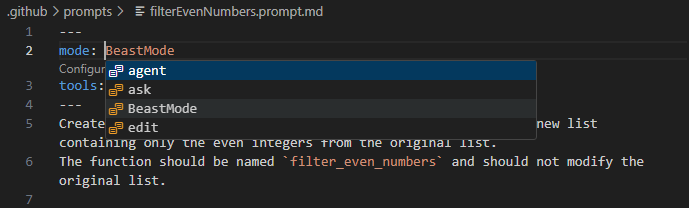
Learn more about [customizing chat in VS Code](https://code.visualstudio.com/docs/copilot/customization/overview) with prompt files, chat modes, and custom instructions.
#### Configure prompt file suggestions (Experimental)
**Setting**: `chat.promptFilesRecommendations`
Teams often create custom prompt files to standardize AI workflows, but these prompts can be hard to discover when users need them most. You can now configure which prompt files appear as suggestions in the Chat welcome view based on contextual conditions.
The new `chat.promptFilesRecommendations` setting supports both simple boolean values and when-clause expressions for context-aware suggestions.
```jsonc
{
"chat.promptFilesRecommendations": {
"plan": true, // Always suggest
"a11y-audit": "resourceExtname == .html", // Only for HTML files
"document": "resourceLangId == markdown", // Only for Markdown files
"debug": false // Never suggest
}
}
```
This helps teams surface the right AI workflows at the right time, making custom prompts more discoverable and relevant to your workspace and file type.
#### Select tools in tool sets
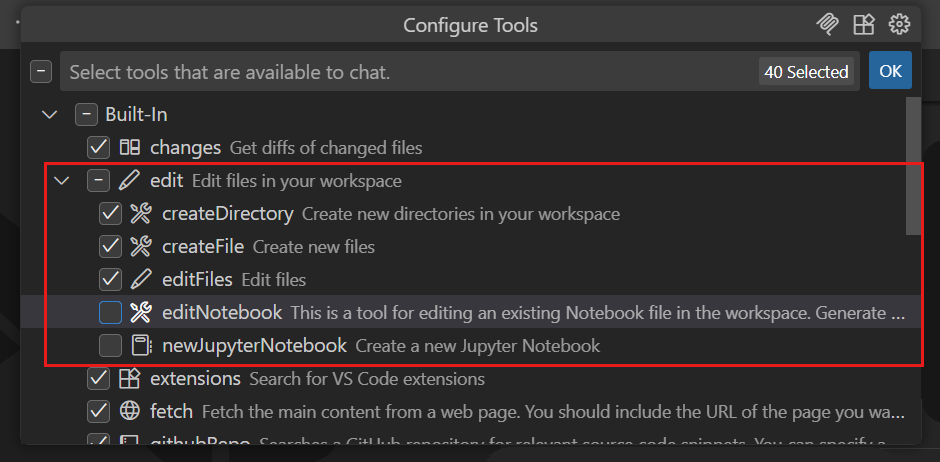
[Tool sets](https://code.visualstudio.com/docs/copilot/chat/chat-agent-mode#_define-tool-sets) are a convenient way to group related tools together and VS Code has several built-in tool sets like `edit` or `search`.
The tools picker now shows which tools are part of each tool set and you can individually enable or disable each tool. You can access the tools picker via the `Configure Tools...` button in the Chat view.
#### Configure font used in chat
**Settings**: `chat.fontFamily`, `chat.fontSize`
VS Code lets you choose which font to use across the editor, however the Chat view lacked that configurability. We have now added two new settings for configuring the font family (`chat.fontFamily`) and font size (`chat.fontSize`) of chat messages.
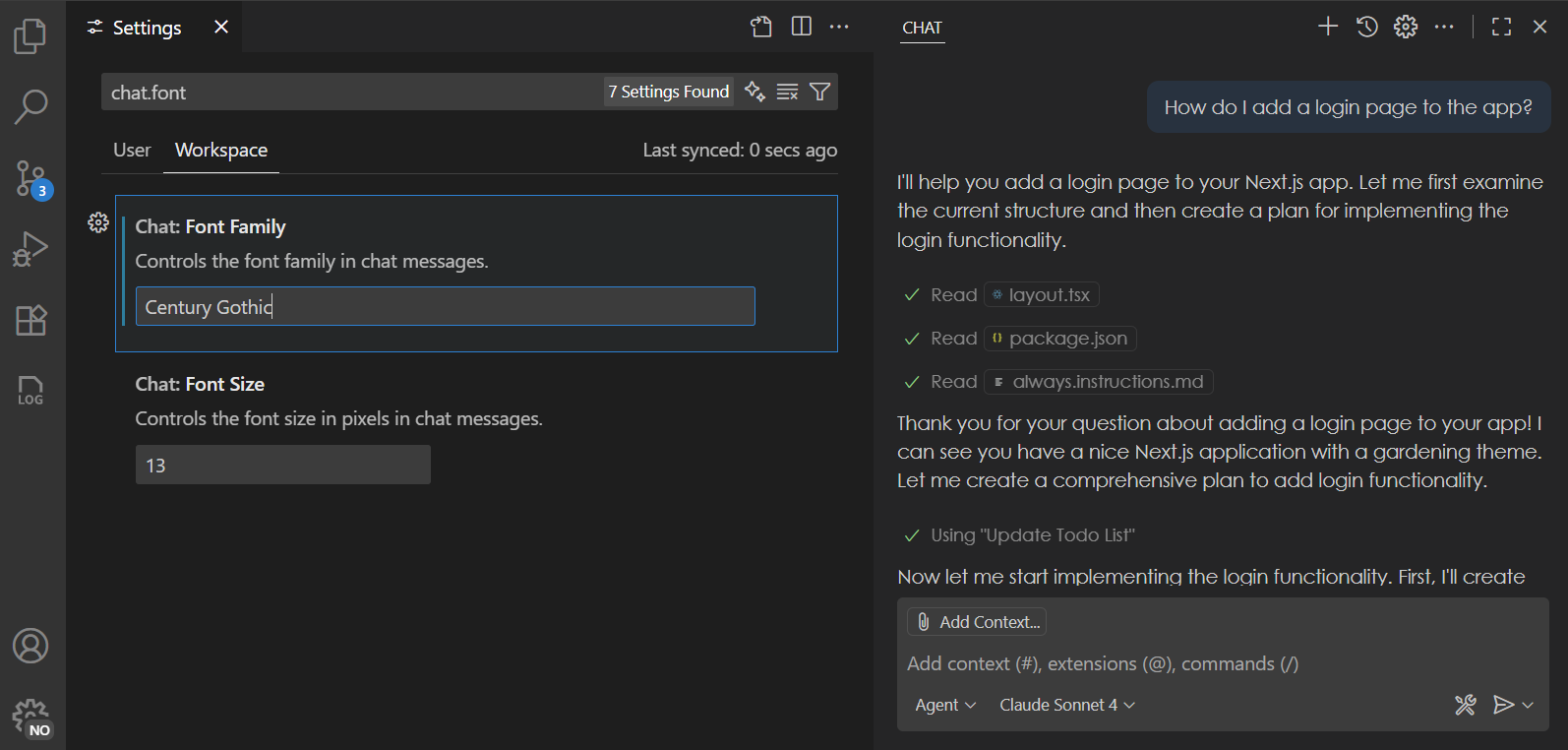
> **Note**: content for lists currently does not yet honor these settings, but this is something that we are working on fixing in the upcoming releases.
#### Collaborate with coding agents (Experimental)
With coding agents, you delegate tasks to AI agents to be worked on in the background. You can have multiple such agents work in parallel. We're continuing to evolve the chat sessions experience to help you collaborate more effectively with coding agents.
##### Chat Sessions view
**Setting**: `chat.agentSessionsViewLocation`
The Chat Sessions view provides a single, unified view for managing both local and contributed chat sessions. We've significantly enhanced the Chat Sessions view where you can now perform all key operations, making it easier to iterate and finalize your coding tasks.
* **Status Bar tracking**: Monitor progress across multiple coding agents directly from the Status Bar.
* **Multi-session support**: Launch and manage multiple chat sessions from the same view.
* **Expanded context menus**: Access more actions to interact with your coding agents efficiently.
* **Rich descriptions**: With rich description enabled, each list entry now includes detailed context to help you quickly find relevant information.
##### GitHub coding agent integration
We've improved the integration of [GitHub coding agents](https://code.visualstudio.com/docs/copilot/copilot-coding-agent) with chat sessions to deliver a smoother, more intuitive experience.
* **Chat editor actions**: Easily view or apply code changes, and check out pull requests directly from the chat editor.
* **Seamless transitions**: Move from local chats to GitHub agent tasks with improved continuity.
* **Better session rendering**: Various improvements on cards and tools rendering for better visual clarity.
* **Performance boosts**: Faster session loading for a more responsive experience.
<video src="https://code.visualstudio.com/assets/updates/1_104/chat-sessions-view.mp4" title="Video showing Chat Sessions view and integration with GitHub coding agents." autoplay loop controls muted></video>
##### Delegate to coding agent
We continued to expand on ways to delegate local tasks in VS Code to a Copilot coding agent:
* Fix todos with coding agent:
Comments starting with `TODO` now show a Code Action to quickly initiate a coding agent session.
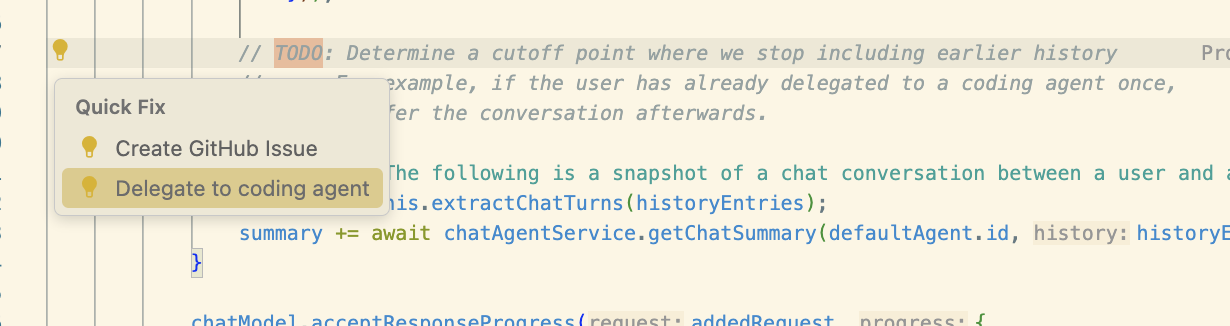
* Delegate from chat (`githubPullRequests.codingAgent.uiIntegration`):
Additional context, including file references, are now forwarded to GitHub coding agent when you perform the **Delegate to coding agent** action in chat. This enables you to precisely plan out a task before handing it off to coding agent to complete it. A new chat editor is opened with the coding agent's progress shown in real-time.
<video src="https://code.visualstudio.com/assets/updates/1_104/delegate-to-coding-agent.mp4" title="Delegating a task from sidebar chat to coding agent" autoplay loop controls muted></video>
_Theme: [Sharp Solarized](https://marketplace.visualstudio.com/items?itemName=joshspicer.sharp-solarized) (preview on [vscode.dev](https://vscode.dev/editor/theme/joshspicer.sharp-solarized))_
#### Social sign in with Google
The option to sign in or sign up to GitHub Copilot with a Google account is now generally available and rolling out to all users in VS Code.
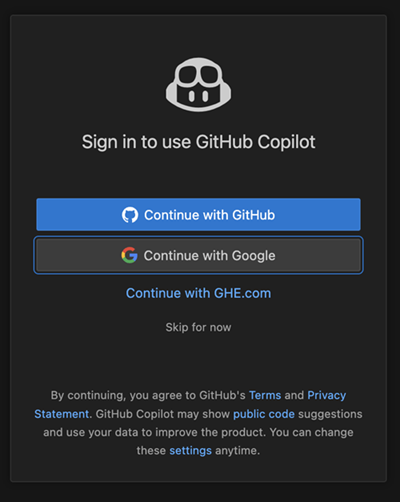
You can find more information about this in the [announcement GitHub blog post](https://github.blog/changelog/2025-07-15-social-login-with-google-is-now-generally-available).
#### Terminal auto approve
**Setting**: `chat.tools.terminal.enableAutoApprove`
Automatically approving terminal commands can greatly streamline agent interactions, but it also comes with [security risks](https://code.visualstudio.com/docs/copilot/security). This release introduces several improvements to terminal auto approve to enhance both usability and security.
* You can now enable or disable terminal auto approve with the `chat.tools.terminal.enableAutoApprove` setting. This setting can also be set by organizations via [device management](https://code.visualstudio.com/docs/setup/enterprise#_centrally-manage-vs-code-settings).
* Before terminal auto approve is actually enabled, you need to explicitly opt in via a dropdown in the Chat view.
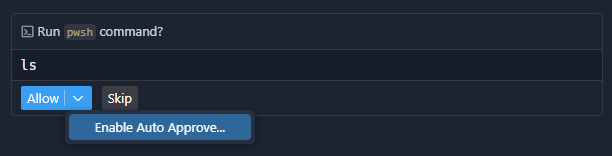
* From the Chat view, you can conveniently add auto-approve rules for the command being run, or open the configuration setting:
![Screenshot that shows the three standard options are prese