cm-angular-dual-listbox
Version:
Dual List Box for Angular
120 lines (89 loc) • 5.84 kB
Markdown
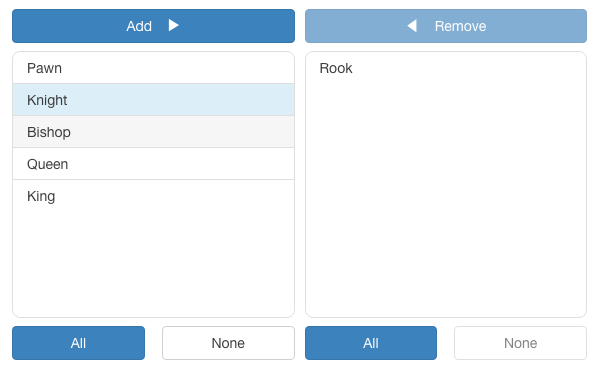
The **angular-dual-listbox** is an Angular component that provides two lists controls side-by-side that allows items in one list to be selected and moved to the other list via drag-and-drop and/or a button-based interface.
The component supports multiple select options from the list, programatic setting of list sources, and layout with direction and button formatting.
- [Version](
- [Usage](
- [Inputs](
- [Outputs](
- [Final Usage](
| Angular | angular-dual-listbox |
| ------- | -------------------- |
| `17` | `4.0.0` |
| `16` | `3.0.0` |
| `15` | `2.1.1` |
| `14` | `1.0.0` |
```
$ npm i cm-angular-dual-listbox
```
```js
import { NgModule } from "@angular/core";
import { BrowserModule } from "@angular/platform-browser";
import { CmAngularDualListboxComponent } from "cm-angular-dual-listbox";
import { AppRoutingModule } from "./app-routing.module";
import { AppComponent } from "./app.component";
@NgModule({
declarations: [AppComponent],
imports: [BrowserModule, AppRoutingModule, CmAngularDualListboxComponent],
providers: [],
bootstrap: [AppComponent],
})
export class AppModule {}
```
```html
<dual-listbox [source]="source" [(destination)]="confirmed"></dual-listbox>
```
```js
export class AppComponent {
employeeImage = "assets/employee.png";
source: any[] = [
{ id: 1, name: "one" },
{ id: 2, name: "two" },
{ id: 3, name: "three" },
{ id: 4, name: "four" },
{ id: 5, name: "five" },
{ id: 6, name: "six" },
];
confirmed: any[] = [];
format = {
add: "Add",
remove: "Remove",
all: "All",
none: "None",
direction: CmAngularDualListboxComponent.LTR,
draggable: true,
};
}
```
| Name | Description |
| ------------- | ---------------------------------------------------------------------------------------------------------------------------------------------------------------------------------------------------------------------------------------------------- |
| `key` | The unique identifier field of each object in the `source` and `destination` arrays, default is `_id`. (Note: with a source of an array of strings, each string is its own id.) |
| `display` | The field of each object for displaying the object each the lists, default is `_name`. Or, a function that returns a string that can be used for displaying an object. (Note: with a source of an array of strings, each string is its own display.) |
| `height` | The height of the lists, default is `100px`. |
| `format` | A format object, default is `{ add: 'Add', remove: 'Remove', all: 'All', none: 'None', direction: 'left-to-right', draggable: true, locale: undefined }` |
| `filter` | A boolean whether or not to display a filter for the lists, default is `false`. |
| `sort` | A boolean whether or not to keep the lists sorted, default is `false`. |
| `compare` | A compare function to be used for sorting the lists. Note if sort is not set and compare is set, then sort will be set `true`. |
| `source` | The source array of objects or strings for the list. (This is the universal, master list of all possible objects.) |
| `destination` | The destination array of objects or strings selected from the source. Note, the `destination` array can have prexisting elements. |
| `disabled` | The dual-list is disabled, default is `false`. |
| Name | Description |
| ------------------- | ------------------------------------------------------ |
| `destinationChange` | An event triggered when the destination array changes. |
```html
<dual-listbox [sort]="true" [source]="source" key="id" display="name" [filter]="true" [(destination)]="confirmed" height="300px" [format]="format" [disabled]="false"></dual-listbox>
```
MIT
- Maram Chandrasekhar Reddy [@chandumaram](https://github.com/chandumaram)