clingon
Version:
Multipurpose generator CLI based on local config and templates
120 lines (86 loc) • 4.07 kB
Markdown
# Presets
> Read the updated version of this doc on: [clingon.dev/docs/presets](https://www.clingon.dev/docs/presets)
In version `0.8.0` the presets feature was added, to save your prompt responses locally, and then quickly use a ready-made set to create your resources.
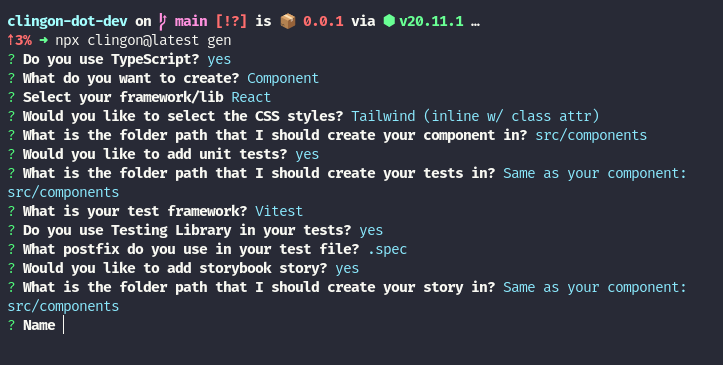
The feature works as follows: When starting the tool, it will scan the directory where it was run, looking for a folder called `.clingon` and within it another called `presets`, this is the path where the presets are saved `.clingon/presets`. If it doesn't exist, the tool will create the directories, and after answering the questions it will ask if you want to save the answers, and when you answer yes it will finally ask you for the name of the preset (use simple names that indicate what it means, this name will be used later in the listing).
When using presets, it will retrieve all the answers, and will only ask you for the name of the resource, so the last name filled in will not be used, but a new name, keeping only the configuration.
## Preview
### Interface
The preset is saved in a JSON file that follows the following interface (snippet below), making it possible to create snippets by manually combining the different values for the object's keys.
This interface reflects the possible options you get when answering CLI questions in guided mode.
```ts
interface Answers {
framework: 'react' | 'vue'
cssFramework:
| 'css_modules'
| 'tailwind_inline'
| 'tailwind_file'
| 'css_vanilla'
| 'scss'
| 'no_style'
testFramework: 'jest' | 'vitest'
version: '2' | '3' | null
resourcePath: string
testPath: string
storyPath: string
testPostfix: 'test' | 'spec'
storyPostfix: 'stories'
type:
| 'function'
| 'page'
| 'component'
| 'type'
| 'model'
| 'enum'
| 'test'
| 'spec'
| 'cypress_spec'
| 'storybook_story'
typescript: boolean
withStory: boolean
withTest: boolean
withTestingLibrary: boolean
folderWrapper: boolean
}
```
### With no saved presets
- Flow without preset (no local preset's found)
- After response prompts, ask to save as preset
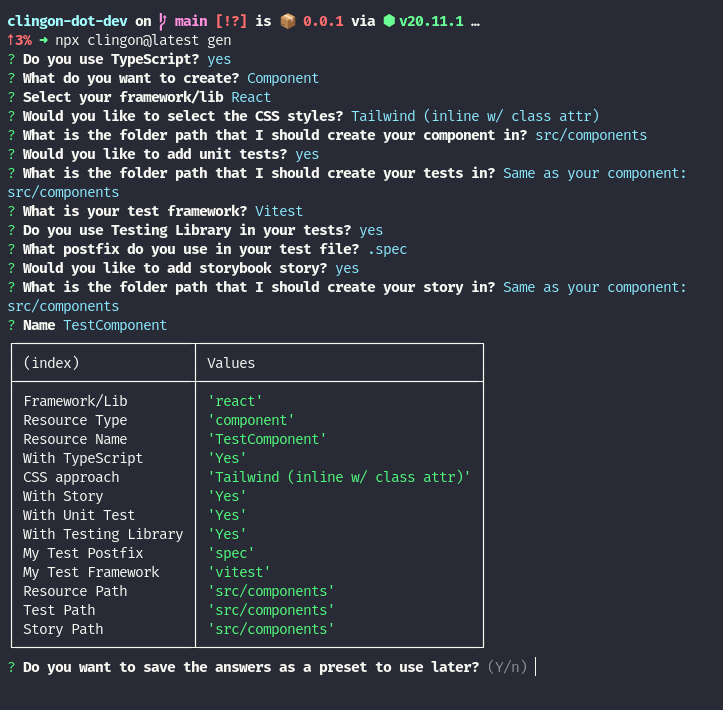
- Prompt to save responses as preset

- Preset saved, console's path, can open file with (CMD | CTRL) + Click

### With local presets on `.clingon/presets`
- Initial flow when start CLI, asking to use saved presets

- After select a preset, ask to enter the Resource Name

- After enter name, confirm creation with preset preview

- Folder with presets and preset json content

### Create your own preset
To create your own preset files, you need to follow the interface above, filling in a JSON file, with the name of the preset. See below:
1. Create a `.clingon` folder, then a `preset` folder inside.
2. Create a file with preset name, like `react-with-tests.json`
3. Add a valid json based on preset interface:
```json showLineNumbers filename="react-with-tests.json"
{
"type": "component",
"framework": "react",
"cssFramework": "css_vanilla",
"testFramework": "vitest",
"resourcePath": "src/components",
"testPath": "src/components",
"storyPath": null,
"version": null,
"testPostfix": "spec",
"storyPostfix": "stories",
"typescript": true,
"withStory": false,
"withTest": true,
"withTestingLibrary": true,
"folderWrapper": true
}
```