client-cert-login-component
Version:
Web component for client certificate authentication and registration form.
77 lines (52 loc) • 2.88 kB
Markdown
[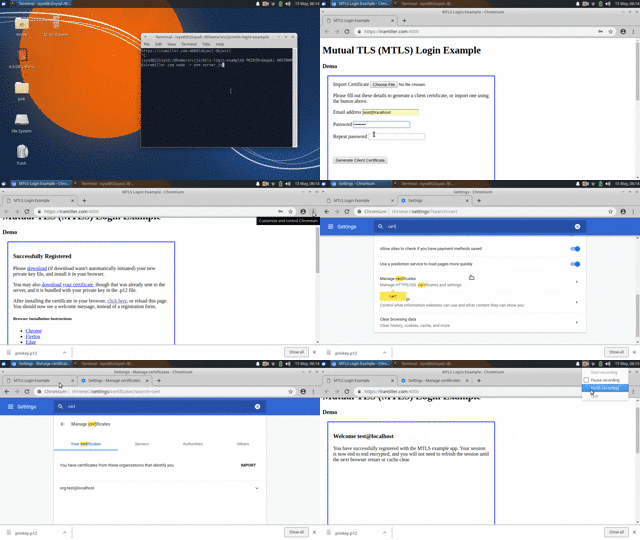](https://www.youtube.com/embed/GVVUmgh5GsU)
Another [online demo](https://www.webcomponents.org/element/client-cert-login-component/demo/demo/index.html) is available on webcomponents.org.
This web component lets users register with an existing client TLS certificate, or generate one in their browser, using [forge](https://github.com/digitalbazaar/forge). Once registered, the native browser certificate selection dialogue handles "login".
This component requires [forge](https://github.com/digitalbazaar/forge) and optionally [webcomponents](https://github.com/webcomponents/webcomponentsjs) polyfill to be present.
<!--
```
<custom-element-demo>
<template>
<script src="bower_components/forge/dist/forge.min.js"></script>
<script src="component.js"></script>
<next-code-block></next-code-block>
</template>
</custom-element-demo>
```
-->
```html
<!--
Will display a modal form prompting user to import or generate a key.
Upon key generation/import, the key is sent to this.register().
-->
<create-client-login></create-client-login>
<!--
Would display only customizable this.showAuthenticated() response
Use this to mark the user as "logged in", to suppress the modal.
<create-client-login cn="currentUser"></create-client-login>
-->
```
The server needs to be configured to prompt for the client certificate, and renegotiate sessions. The [client-certificate-auth](https://github.com/isysd-mirror/client-certificate-auth) middleware will make this much easier. For an full example, see the demo server.
It is recommended to install this package directly from git. If you want to use the npm version of forge, then also run `npm i`.
```
git clone https://github.com/isysd-mirror/client-cert-login-component.git
cd client-cert-login-component
npm i
```
Run `npm start`.
Server runs on [localhost port 4000](https://localhost:4000), and will authenticate users with certificates in the `CLIENT_CERT_DIR`.
This example server has very basic configuration via environment variables.
| Variable | Default |
|----------|---------|
| PKIDIR | ./pki |
| CLIENT_CERT_DIR | ./clients |
The example works best with a server TLS certificate that is trusted by the browser, or the browser may not display the client certificate selection. Either use a real SSL cert signed by a normal CA, or first install the server cert in your browser for the demo session.
For chrome you can also set `chrome://flags/#allow-insecure-localhost` for the test environment.
This app Copyright [Ira Miller](https://iramiller.com), available under the [MIT license](/LICENSE).