clasp-types
Version:
A d.ts generator for clasp projects
279 lines (202 loc) • 9.8 kB
Markdown
[BkperApp]: https://github.com/bkper/bkper-app
[API Extractor]: https://api-extractor.com/
[grant]: https://github.com/grant/google-apps-script-dts
[motemen]: https://github.com/motemen/dts-google-apps-script
[mtgto]: https://github.com/mtgto/dts-google-apps-script-advanced
[Add-on for Google Sheets]: https://workspace.google.com/marketplace/app/bkper/360398463400s
[HTML Service]: https://developers.google.com/apps-script/guides/html/communication
[Libraries]: https://developers.google.com/apps-script/guides/libraries
[library]: https://developers.google.com/apps-script/guides/libraries
[Client-side API]: https://developers.google.com/apps-script/guides/html/reference/run
[clasp]: https://github.com/google/clasp
[TypeScript]: https://github.com/google/clasp/blob/master/docs/typescript.md
[inline-source-cli]: https://www.npmjs.com/package/inline-source-cli
[glob-exec]: https://www.npmjs.com/package/glob-exec
[DefinitelyTyped]: http://definitelytyped.org/
[example]: https://www.npmjs.com/package/@bkper/bkper-app-types
# clasp-types
[](https://www.npmjs.com/package/clasp-types)
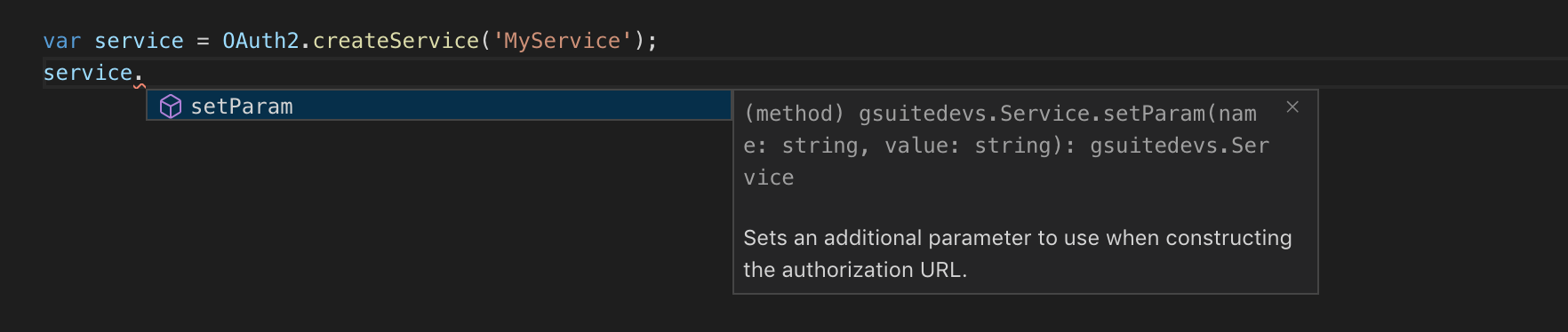
A [TypeScript] definitions generator for [clasp] projects to get **autocomplete** and **type checking** for your Google Apps Script Object Oriented [Libraries] and [Client-side API].
*Library:*
*Client-side API:*
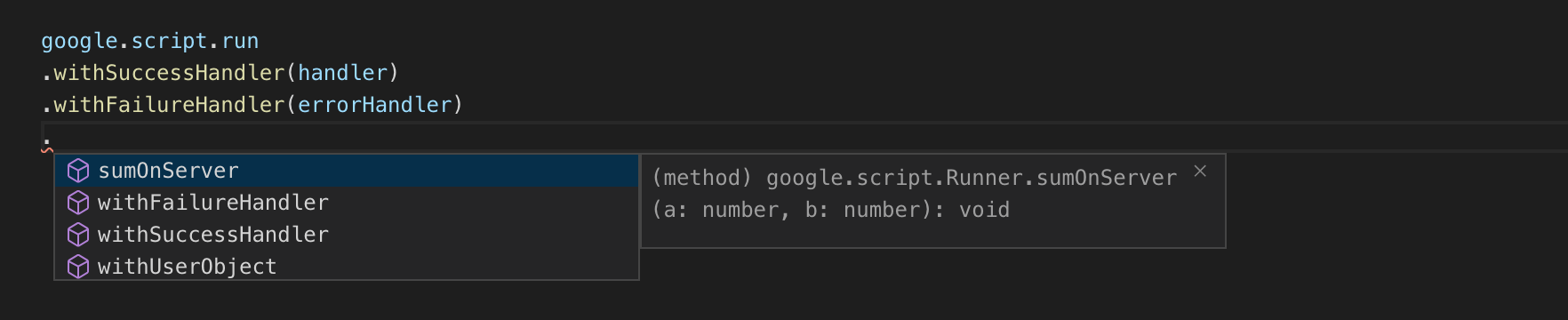
It works like the [API Extractor], reading the ```@public``` comment annotations on any global function, class, interface or enum you want to expose, and generating d.ts files consistently.
## Features
- **d.ts rollup:** Generate a single ```d.ts``` from all your ```.ts``` files, wrapping global functions into Library interface.
- **Clean library API:** Expose only functions and methods through ```@public``` annotation, building a cleanner interface and avoiding usage of elements not intended to be exposed.
- **Publish ready:** Generate a npm package, with clear setup instructions, ready to be published.
- **Client-side API** For Add-ons and Web Apps, generate types for your global functions exposed with ```@public```, in a single ```d.ts``` file on *@types* folder, to get autocomplete for the server API on client.
Here is an [example] of library types built and published with clasp-types.
> Note: clasp-types is intended for generating d.ts from Apps Script code already written in TypeScript. For generating built-in and advanced Apps Script services see https://github.com/grant/google-apps-script-dts
## Install
```
npm i -S clasp-types
```
or
```
yarn add --dev clasp-types
```
## Command
```
clasp-types
```
Optional params:
```sh
--src <folder> # default: ./src - Source folder
--out <folder> # default: ./dist - Output folder
--client # default: false - Generate client side API types
--root <folder> # default: ./ - Project root folder
```
## Library setup
### 1) Add your library *namespace* and *name* to the ```.clasp.json```:
```json
{
"scriptId": "1B7FSrk5Zi6L1rSxxTDgDEUsPzlukDsi4KGuTMorsTQHhGBzBkMun4iDF",
"rootDir": "./src",
"library": {
"namespace": "gsuitedevs",
"name": "OAuth2"
}
}
```
### 2) Add ```@public``` comment annotation to the code you want to expose
```ts
/**
* Create a service
*
* @public
*/
function createService(serviceName: string) {
return new Service(serviceName);
}
/**
* The OAuth service
*
* @public
*/
class Service {
name: string;
params_: any;
constructor(name: string) {
this.name = name;;
}
public getName() {
return this.name;
}
/**
* Sets an additional parameter to use when constructing the authorization URL.
*/
public setParam(name: string, value: string): Service {
this.params_[name] = value;
return this;
};
}
```
### 3) Run ```clasp-types``` to generate a **npm package** with index.d.ts like:
```ts
declare namespace gsuitedevs {
/**
* The main entry point to interact with OAuth2
*
* Script ID: **1B7FSrk5Zi6L1rSxxTDgDEUsPzlukDsi4KGuTMorsTQHhGBzBkMun4iDF**
*/
export interface OAuth2 {
/**
* Create a service
*/
createService(serviceName: string): Service;
}
/**
* The OAuth service
*/
export interface Service {
getName(): string;
/**
* Sets an additional parameter to use when constructing the authorization URL.
*/
setParam(name: string, value: string): Service;
}
}
declare var OAuth2: gsuitedevs.OAuth2;
```
> *Notes:*
> - On classes annotaded with ```@public```, methods inside then should also be marked as ```public``` in order to be exposed. **Private** or **protected** methods will **not** be exposed.
> - Interfaces and Enumerations with ```@public``` annotation will have all members exposed by default.
A **npm ready to publish package** is generated in the output folder, with some setup instructions on **README.md**, so you can easily share your library types. Here is an [example].
> *Suggestion:* You may add a [dist-tag](https://docs.npmjs.com/cli/dist-tag) to your types package distribution with the same [version](https://developers.google.com/apps-script/guides/versions) of the script, say, ```v23```, so users can link the types version with script version, and use ones that matches.
### Dependencies
If your package expose a transitive dependency on **params** or **return** types, such as GoogleAppsScript.HTML.HtmlOutput from @types/google-apps-script, add it to **"dependencies"** section of your package.json, instead of "devDependencies":
```json
"dependencies": {
"@types/google-apps-script": "^0.0.59"
}
```
So, clasp-types will correctly setup the reference on index.d.ts:
```ts
/// <reference types="google-apps-script" />
```
And on the resulted package.json:
```json
"dependencies": {
"@types/google-apps-script": "*"
},
```
## Client-side API setup
### 1) Add ```@public``` comment annotation to the code you want to expose to client
```ts
/**
* Execute a sum on server side, from client side
*
* @public
*/
function sumOnServer(a: number, b: number): number {
return a + b;
}
```
### 2) Run ```clasp-types --client``` to generate a index.d.ts like:
```ts
declare namespace google {
namespace script {
export interface Runner {
withSuccessHandler(handler: Function): Runner;
withFailureHandler(handler: (error: Error) => void): Runner;
withUserObject(object: any): Runner;
sumOnServer(a: number, b: number): void //number;
...
}
export var run: Runner;
}
...
}
```
### TypeScript on Client-side
To develop with [TypeScript] on client side, you should work with separated ```ts``` files and inline the corresponding ```js```, as well as all ```css``` in the same page, in order to the resulting html template be processed by the [HTML Service].
To perform the inlining a great tool is the [inline-source-cli], so you can add a ```inline``` tag to your ```js``` and ```css``` references:
```html
<head>
...
<link inline href="page-style.css" rel="stylesheet">
</head>
<body>
...
<script inline src="page-activity.js"></script>
<script inline src="page-view.js"></script>
</body>
```
And then use a tool such as [glob-exec] to inline all your sources in one single script line:
```sh
glob-exec --foreach './build/**/*.html' -- 'cat {{file}} | inline-source --root build > dist/{{file.name}}{{file.ext}}'
```
## Background
The clasp-types was originally created as a foundation for the [BkperApp] library and the Bkper [Add-on for Google Sheets], with inspirations on the [API Extractor], [DefinitelyTyped] and previous work from [grant], [motemen] and [mtgto] - thank you guys :-)
[Libraries] are a great way to share code between scripts, but, once published and others start using it, it requires some level of care like any other public API, so, applying some [API Extractor] concepts and principles help to keep the quality of the Library and avoid accidental breaks.
[DefinitelyTyped] is an amazing initiative and works really well for publishing types for thirdy-party libraries written in js, as well as for the Google Apps Script built-in and advanced services, although, as its recommended in the [official declaration publishing documentation](https://www.typescriptlang.org/docs/handbook/declaration-files/publishing.html), for libraries written in TypeScript, build its own npm package is favored, and give some advantages:
- Instant publishing
- Release automation
- [Dist-tag](https://docs.npmjs.com/cli/dist-tag) for mapping script versions
The down side is that it requires one aditional aditional types configuration step, so, clasp-types automatically generate a package ready to publish, with instructions on README for scoped packages to setup the ```typeRoots``` and non scoped packages to setup the ```types```.
## Help welcome
- Identify edge cases for params and return types
- Generate ```d.ts``` fom a well documented ```js``` library, so it can also work for libraries such as [OAuth2](https://github.com/gsuitedevs/apps-script-oauth2)
- Generate client ```ts``` ([like this](https://github.com/google/apis-client-generator)) and ```d.ts``` from [openapi](https://swagger.io/specification/) and [API Discovery](https://developers.google.com/discovery/) specs, for [Advanced Services](https://developers.google.com/apps-script/guides/services/advanced) like libraries