ckeditor4-angular
Version:
Official CKEditor 4 component for Angular.
134 lines (80 loc) • 5.31 kB
Markdown
# CKEditor 4 WYSIWYG editor Angular component [](https://twitter.com/intent/tweet?text=Check%20out%20CKEditor%204%20Angular%20integration&url=https%3A%2F%2Fwww.npmjs.com%2Fpackage%2Fckeditor4-angular)
[](https://www.npmjs.com/package/ckeditor4-angular)
[](https://github.com/ckeditor/ckeditor4-angular)
[](https://app.travis-ci.com/ckeditor/ckeditor4-angular)
[](http://eepurl.com/c3zRPr)
[](https://twitter.com/ckeditor)
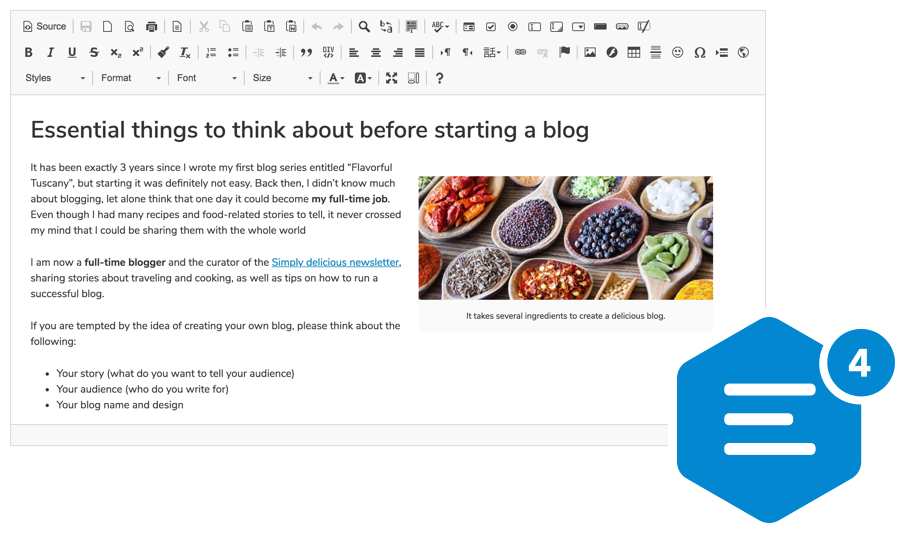
Official [CKEditor 4](https://ckeditor.com/ckeditor-4/) WYSIWYG editor component for Angular.
We are looking forward to your feedback! You can report any issues, ideas or feature requests on the [integration issues page](https://github.com/ckeditor/ckeditor4-angular/issues/new).
## Usage
In order to create an editor instance in Angular, install the `ckeditor4-angular` npm package as a dependency of your project:
```bash
npm install --save ckeditor4-angular
```
After installing, import `CKEditorModule` to your application:
```js
import { CKEditorModule } from 'ckeditor4-angular';
@NgModule( {
imports: [
...
CKEditorModule,
...
],
…
} )
```
You can now use the `<ckeditor>` tag in the component template to include the rich text editor:
```html
<ckeditor data="<p>Hello, world!</p>"></ckeditor>
```
The `data` attribute used in the example above is responsible for setting the editor’s data.
## Documentation and examples
See the [CKEditor 4 Angular Integration](https://ckeditor.com/docs/ckeditor4/latest/guide/dev_angular.html) article and [Angular examples](https://ckeditor.com/docs/ckeditor4/latest/examples/angular.html) in the [CKEditor 4 documentation](https://ckeditor.com/docs/ckeditor4/latest/).
## Browser support
The CKEditor 4 Angular component works with all the [supported browsers](https://ckeditor.com/docs/ckeditor4/latest/guide/dev_browsers.html#officially-supported-browsers) except for Internet Explorer 8-10.
## Supported Angular versions
The integration can be used together with Angular at version 5.0.0 and higher. It is an implication of Angular metadata produced for this package by the Angular builder. Note that the `package.json` used in the main repository isn't published on NPM (the production one is present in `src/ckeditor/package.json`), so there are only a few peer dependencies:
* `@angular/core` >= 5.0.0
* `@angular/common` >= 5.0.0
* `@angular/forms` >= 5.0.0
required by this package.
## Contributing
Here is how you can contribute to the development of the component. Any feedback and help will be most appreciated!
### Reporting issues and feature requests
All issues and feature requests should be reported in the [issues section](https://github.com/ckeditor/ckeditor4-angular/issues/new) of the official GitHub repository for the CKEditor 4 Angular integration.
### Development
Clone the [CKEditor 4 Angular integration repository](https://github.com/ckeditor/ckeditor4-angular).
Once you have cloned it, install dependencies by running:
```bash
npm install
```
#### The structure of the repository
This repository contains the following code:
* `./src/ckeditor` contains the CKEditor component,
* `./src/app` is a demo application using the component.
#### Development server
Run `ng serve` to start the development server. Navigate to `http://localhost:4200/`. The app will automatically reload if you change any of the source files.
#### Building samples
Run `ng build` to build the samples. The build artifacts will be stored in the `samples/` directory.
#### Running unit tests
Run `npm test` to execute unit tests via [Karma](https://karma-runner.github.io).
There are two options available to alternate the testing process:
* `url` / `u` - pass custom URL to Karma, for example custom CKEditor 4 build.
* `watch` / `w` - tell Karma to watch for changes.
For example:
```
npm run test -- -u http://localhost:5000/ckeditor.js -w
```
#### Running end-to-end tests
Run `ng e2e` to execute the end-to-end tests via [Protractor](https://www.protractortest.org/).
#### Publishing
To build and publish the package, run `npm run publish`.
You can also manually build the package with `npm run build-package` which will be stored in `dist/`. Then you can publish it with `npm publish dist/`.
## License
Copyright (c) 2003-2022, CKSource Holding sp. z o.o. All rights reserved.
Licensed under the terms of any of the following licenses at your choice:
* [GNU General Public License Version 2 or later](http://www.gnu.org/licenses/gpl.html),
* [GNU Lesser General Public License Version 2.1 or later](http://www.gnu.org/licenses/lgpl.html),
* [Mozilla Public License Version 1.1 or later (the "MPL")](http://www.mozilla.org/MPL/MPL-1.1.html).
For full details about the license, please check the `LICENSE.md` file.