citysdk
Version:
Convenience functions for working with Census APIs: Statistics, Cartographic GeoJSON, lat/lng -> FIPS, and other niceties.
720 lines (574 loc) • 27.7 kB
Markdown
> # Breaking Change (November 2022)
>
> ### Due to free Dynos - which were used to proxy CORS requests - being deprecated by Heroku, pre `2.3` versions of CitySDK will cease to work client-side.
>
> ### Additionally, the migration to AWS has forced us to migrate core config files which cause breaks in server-side code in the near future
>
> ### Please update to the latest version of CitySDK (`2.3`) to fix
# CitySDK v2
#### Thank You's due to some very generous Clojurians:
- @thheller (author of the [`shadow-cljs`] build tool)
- @cgrand (author of the [`xforms`] library)
- The Clojure community at large
[`shadow-cljs`]: https://github.com/thheller/shadow-cljs
[`xforms`]: https://github.com/cgrand/xforms
## Installation
```
npm install citysdk
```
## V 2.3 Changes
Starting with v2.3.0, CitySDK ships as an ESM export
Migration:
```js
// 2.2.x or below
const census = require('citysdk')
// 2.3.x or above
import census from 'citysdk'
```
## The `citysdk` Function
CitySDK exports a single function, which takes two arguments:
- The first is an options object with a set of key/value pair parameters (See ["Parameters"] below)
- The second is a conventional (error, response) node-style callback, which will be called upon
completion of the `census` function and applied to the response
["parameters"]: #parameters
## Parameters
Brief overview of each argument parameter that can be passed into CitySDK
| Parameter | Type | Description | [Geocodes] | [Stats] | [GeoJSON] | [GeoJSON with Stats] |
| --------------- | ----------- | ------------------------------------------------------------------ | :--------: | :-----: | :-------: | :------------------: |
| `vintage` | `int`/`str` | The reference year (typically release year) of the data | ✔ | ✔ | ✔ | ✔ |
| `geoHierarchy` | `object` | The geographic scope and hierarchical path to the data | ✔ | ✔ | ✔ | ✔ |
| `sourcePath` | `array` | Refers to the [Census product] of interest | | ✔ | | ✔ |
| `values` | `array` | For statistics, `values` request counts/estimates via variable IDs | | ✔ | | ✔ |
| `geoResolution` | `str` | [Resolution] of GeoJSON (`"20m"`, `"5m"`, and `"500k"` available) | | | ✔ | ✔ |
| `predicates` | `object` | Used as a filter available on some `values` | | ✔`*` | | ✔`*` |
| `statsKey` | `str` | You may request a key for Census' statistics API [here] | | ✔`**` | | ✔`**` |
[geocodes]: #census-geocoding
[stats]: #getting-statistics
[geojson]: #cartographic-geojson
[geojson with stats]: #geojson-with-stats
[census product]: https://www.census.gov/data/developers/data-sets.html
[here]: https://api.census.gov/data/key_signup.html
[resolution]: #cartographic-geojson
`*` : optional `**` : optional for < 500 requests daily
# Geocoding (latitude/longitude -> FIPS code)
With the exception of "microdata" statistics (not yet
available via Census' API), all Census data is aggregated to
geographic areas of different sizes. As such, all of Census'
API's require a set of/unique geographic identifier(s) to
return any data (AKA: [FIPS][geoids]). Given that these
identifiers are not common knowledge, the CitySDK provides a
way for the user to identify their geographic scope of
interest using a geographic coordinate (`lat` + `lng`).
Under the hood, this functionality calls the [TigerWeb Web
Mapping Service] with the `lat` & `lng` provided and pipes
the resulting FIPS codes into your options argument with the
appropriate [GEOIDs] for identifying your geographic area of
interest.
For a list of geographies currently available for geocoding
with this feature, see the [Geographies Available by
Vintage] section below.
There are two ways to scope your geography using this functionality:
1. Request a single geographic area
2. Request all of a descendant geography-type of a coordinate-specified geographic area
[tigerweb web mapping service]: https://tigerweb.geo.census.gov/tigerwebmain/TIGERweb_wms.html
[fips]: https://www.census.gov/geo/reference/geoidentifiers.html
[geoids]: https://www.census.gov/geo/reference/geoidentifiers.html
#### Example: Request a single geographic area by coordinate
RETURN TYPE: `JSON`
You may pass a `{"lat" : <float>, "lng" : <float>}` object as the first and _only_ value for the
`geoHierarchy` key:
```js
import census from 'citysdk'
census(
{
vintage: 2015, // required
geoHierarchy: {
// required
county: {
lat: 28.2639,
lng: -80.7214,
},
},
},
(err, res) => console.log(res)
)
// result -> {"vintage":"2015","geoHierarchy":{"state":"12","county":"009"}}
```
Notice how the function prepends an additional geographic
component (`"state" : "12"`) to the options object. In order
to fully qualify the geographic area (GEOID) associated with
the county, the state is needed. In this example the fully
qualified GEOID would be `12009` with the first two digits
(`12`) qualifying the state and `009` qualifying the county
within that state. This appropriate geographic hierarchy
creation is handled by the function for you.
#### Example: Request all of a descendant geography-type within a coordinate-specified geographic area
RETURN TYPE: `JSON`
```js
import census from 'citysdk'
census(
{
vintage: '2015', // required
geoHierarchy: {
// required
state: {
lat: 28.2639,
lng: -80.7214,
},
county: '*', // <- syntax = "<descendant>" : "*"
},
},
(err, res) => console.log(res)
)
// result -> {"vintage":"2015","geoHierarchy":{"state":"12","county":"*"}}
```
All Census-defined geographic areas are composed of Census
"Blocks". Some of these composed areas - themselves -
compose into higher-order areas. These nested relationships
between certain geographic areas allows the Census data user
to request all [descendants] of a particular type.
## 👀 Caveats
1. **Internally, the CitySDK converts the `geoHierarchy`
object to an ordered set**, so this part of your request
object must be in descending hierarchical order from
parent -> descendant. E.g. - in the above - an object
that contained `{"county" : "*", "state" : {"lat" <lat> "lng" <lng>}}` will not work.
2. In this example, we added a second geographic level to
our `geoHierarchy` object (`"county" : "*"`). It is
important to use the `"*"` expression signifying that you
want _all_ of the specified level of [descendants] within
the geography for which you supply a coordinate. No other
expression will work.
3. For some wildcard (`"*"`) geographies, the Census API can
accept a skipped or "leapfrogged" wildcard. For example:
```js
geoHierarchy: {
state: "01",
tract: "*"
}
```
However, the fully qualified geographic id requires an
intermediary scope (in the above case `county`). You can
tell when an intermediary scope has been skipped by checking
the payload of the stats request who's URL is logged by
CitySDK.
Another indicator that you might be hitting this issue is if you get back an empty `features` list in your GeoJSON:
```js
{ type: 'FeatureCollection', features: [ ] }
```
The solution to this problem is to add the skipped scope as a `null` property, e.g.:
```js
geoHierarchy: {
state: "01",
county: null, // <- leapfrog fix
tract: "*"
}
```
[descendants]: https://www2.census.gov/geo/pdfs/reference/geodiagram.pdf
# Statistics
This parameter set will call the Census Statistics API and
reformat the results with a couple highly requested
features:
- Census statistics are returned as a standard JSON object
rather than the csv-like format of the "raw" API
- Statistical values are translated into properly typed
numbers (Integers and Floats instead of strings), whereas
all values are returned as strings via the "raw" API
- Annotation values (e.g., error codes) that are returned
(e.g., [American Community Survey error codes]) in places
where data would be expected are returned as strings
(rather than numbers) to make differentiating them from
values a simple type check.
There are two ways to request Census statistics using
`citysdk`:
1. Calling for `values` of estimates and other statistical
values (required)
2. Apply a filter by using `predicates` (optional)
For both of these options, a `sourcePath` needs to be
supplied. This is the fully qualified path to the product.
For more information about how to find the `sourcePath` to
your product of interest, go to the [Developers' Microsite]
and - in any of the examples of making a call - take the
path between `<vintage>/` and the `?get`. For example, for
[American Community Survey 1-year] you'll the first example
(2017) shows:
[american community survey error codes]: https://www.census.gov/data/developers/data-sets/acs-1year/notes-on-acs-estimate-and-annotation-values.html
[american community survey 1-year]: https://www.census.gov/data/developers/data-sets/acs-1year.html
```
https://api.census.gov/data/2017/acs/acs1?get=NAME,group(B01001)&for=us:1
└─┬─┘└───┬────┘
vintage sourcePath
```
The corresponding `sourcePath` for this endpoint is `["acs", "acs1"]`
#### Example: get `"values"` by ID:
RETURN TYPE: `JSON`
```js
census(
{
vintage: 2015, // required
geoHierarchy: {
// required
county: {
lat: 28.2639,
lng: -80.7214,
},
},
sourcePath: ['cbp'], // required
values: ['ESTAB'], // required
},
(err, res) => console.log(res)
)
// result -> [{"ESTAB":13648,"state":"12","county":"009"}]
```
Here, we added the parameters for `sourcePath` (the path to
the survey and/or source of the statistics) and `values`
(the identifiers of the statistics we're interested in). By
including these parameters within your argument object, you
trigger the `census` function to get statistics. This
"deploy on parameter set" strategy is how the `census`
function determines your intent.
---
### 🤔 Help for Discovering Census data
You're probably thinking: "How am I supposed to know what
codes to use inside those parameters?" - or - "Where did
that `"cbp"` & `"ESTAB"` stuff come from?" The data sets
covered by the CitySDK are vast. As such, this is the
steepest part of the learning curve. But, don't worry, there
are a number of different resources available to assist you
in your quest:
1. The Census [Developers' Microsite] <- START HERE
2. The [Census Discovery Tool].
3. Census Slack and Gitter developer [communities].
4. Data [Experts]
[developers' microsite]: https://www.census.gov/developers/
[census discovery tool]: https://api.census.gov/data.html
[communities]: #community
[experts]: #dedicated-data-experts
---
#### Example: get `"values"` by ID (with key):
RETURN TYPE: `JSON`
```js
census(
{
vintage: 2015, // required
geoHierarchy: {
// required
county: {
lat: 28.2639,
lng: -80.7214,
},
},
sourcePath: ['cbp'], // required
values: ['ESTAB'], // required
statsKey: '<your key here>', // required for > 500 calls per day
},
(err, res) => console.log(res)
)
// result -> [{"ESTAB":13648,"state":"12","county":"009"}]
```
#### Example: Filter results by `predicates`:
RETURN TYPE: `JSON`
##### `predicates`
Predicates are used to create a sub-selection of statistical
values based on a given range or categorical qualifyer.
```js
census(
{
vintage: '2017',
geoHierarchy: {
state: '51',
county: '*',
},
sourcePath: ['acs', 'acs1'],
values: ['NAME'],
predicates: {
B01001_001E: '0:100000', // number range separated by `:`
},
statsKey: '<your key here>',
},
(err, res) => console.log(res)
)
/* result:
[
{
"NAME":"Augusta County, Virginia",
"B01001_001E" : 75144,
"state":"51",
"county":"015"
},
{
"NAME":"Bedford County, Virginia",
"B01001_001E" : 77974,
"state":"51",
"county":"019"
},
...
]
*/
```
## Timeseries data (Statistics Only)
If you'd like to use "timeseries" data, you may do so for
statistics only. Mapping timeseries data is currently
unsupported. Note that many timeseries products rely heavily
on the `"predicates"` option:
#### Example: get `'timeseries"` data:
RETURN TYPE: `JSON`
```js
census(
{
vintage: 'timeseries', // required
geoHierarchy: {
// required
us: '*',
},
sourcePath: ['asm', 'industry'], // required
values: ['EMP', 'NAICS_TTL', 'GEO_TTL'],
predicates: { time: '2016', NAICS: '31-33' },
},
(err, res) => console.log(res)
)
/* result:
[{"EMP": 11112764,
"NAICS_TTL": "Manufacturing",
"GEO_TTL": "United States",
"time": "2016",
"NAICS": "31-33",
"us":"1"}]
*/
```
For some sources (e.g., the American Community Survey), most
of the `values` can also be used as `predicates`, but are
optional. In others, (e.g., International Trade),
`predicates` are a key part of the statistical query. In
either case, at least one value within `values` must be
supplied.
# Cartographic GeoJSON
You can also use the CitySDK to retrieve Cartographic
Boundary files, which have been translated into GeoJSON. The
only additional parameter you'll need to know is a simple
declaration of `geoResolution` of which there are three
options:
| Resolution | Map Scale | Benefits | Costs |
| ---------- | ------------ | ------------------------------------------------------ | -------------------------------------- |
| [500k] | 1:500,000 | **Greatest variety of summary levels** & Most detailed | largest file sizes |
| [5m] | 1:5,000,000 | Balance between size and detectable area size | lowest variety of available area types |
| [20m] | 1:20,000,000 | Smallest file sizes | lowest level of detail |
[500k]: https://github.com/uscensusbureau/citysdk/tree/master/v2/GeoJSON/500k
[5m]: https://github.com/uscensusbureau/citysdk/tree/master/v2/GeoJSON/5m
[20m]: https://github.com/uscensusbureau/citysdk/tree/master/v2/GeoJSON/20m
---
See the full available Cartographic GeoJSON in the [Geographies Available by Vintage] section
---
[geographies available by vintage]: #geographies-available-by-vintage
#### Example: Saving the file locally in Node.js using [`fs`]
RETURN TYPE: `JSON STRING`
```js
const fs = require('fs')
census(
{
vintage: 2017,
geoHierarchy: {
'metropolitan statistical area/micropolitan statistical area': '*',
},
geoResolution: '500k', // required
},
(err, res) => {
fs.writeFile('./directory/filename.json', JSON.stringify(res), () => console.log('done'))
}
)
```
[`fs`]: https://nodejs.org/api/fs.html
This would convert the returned geojson to a string, which allows it to be saved via Node.js'
fileSystem API.
### Notable Example:
```js
census(
{
vintage: '2017',
geoHierarchy: {
state: '51',
county: '*',
},
geoResolution: '500k', // required
},
(err, res) => console.log(res)
)
```
It's important to note that - when querying for these
GeoJSON files - you may retrieve a larger area than your
request argument specifies. The reason for this is that the
files are (currently) stored at two geographic levels:
National and by State. Thus, the query above will attempt to
resolve, at the state level, all counties, but because
counties are stored at the national level in vintage 2017,
all the counties in the US will be returned by this query.
If you wish to get back _only_ those geographies you
specify, you may do so by using the last and perhaps most
useful feature included in the v2.0 release: Getting GeoJSON
with statistics _included_ within the `"FeatureCollection"`
`properties` object!
# GeoJSON _Merged with_ Statistics
RETURN TYPE: `JSON`
There are a number of reasons you might want to merge your
statistics into their GeoJSON/geographic boundaries, all of
which are relevant when seeking to map Census data:
1. Creating [choropleth] maps of statistics (e.g., using `values`)
2. Mapping only those geographies that meet a certain set of criteria
3. Showing a user their current Census geographic context
(i.e., leveraging the Geocoding capabilities of CitySDK)
[choropleth]: https://en.wikipedia.org/wiki/Choropleth_map
### Dynamic Use Example
A more dynamic example of using stats merged with GeoJSON on the fly with `citysdk` can be found
here:
[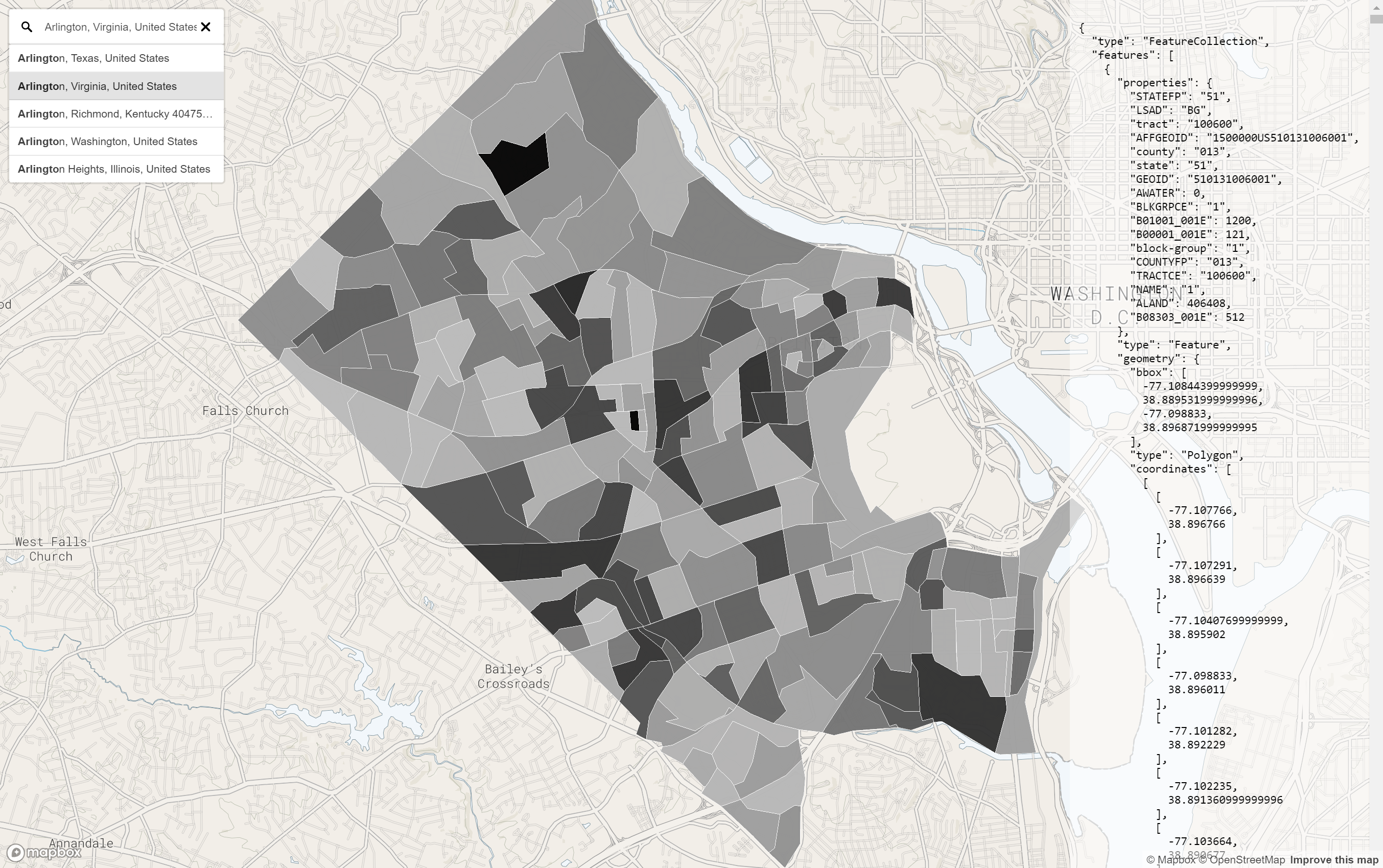](https://uscensusbureau.github.io/citysdk/assets/examples/mapbox/with-mapbox-gl_geocoding_hover/index.html)
Type in a county name and see the unweighted sample count of the population (ACS) for all the Block
Groups within that County.
Use Chrome for best results (mapbox-gl geocoder caveat)
[source code](https://github.com/uscensusbureau/citysdk/tree/master/examples/mapbox/with-mapbox-gl_geocoding)
## All Counties
```js
census({
vintage: '2017',
geoHierarchy: {
county: '*',
},
sourcePath: ['acs', 'acs5'],
values: ['B19083_001E'], // GINI index
statsKey: '<your key here>',
geoResolution: '500k',
})
```
In this example, we use `citysdk` to create the payload and
then save it via Nodes [`fs.writeFileSync`] and then serve
it via a [Mapbox-GL] map.
[`fs.writefilesync`]: https://nodejs.org/api/fs.html#fs_fs_writefilesync_file_data_options
[mapbox-gl]: https://www.mapbox.com/mapbox-gl-js/api/
[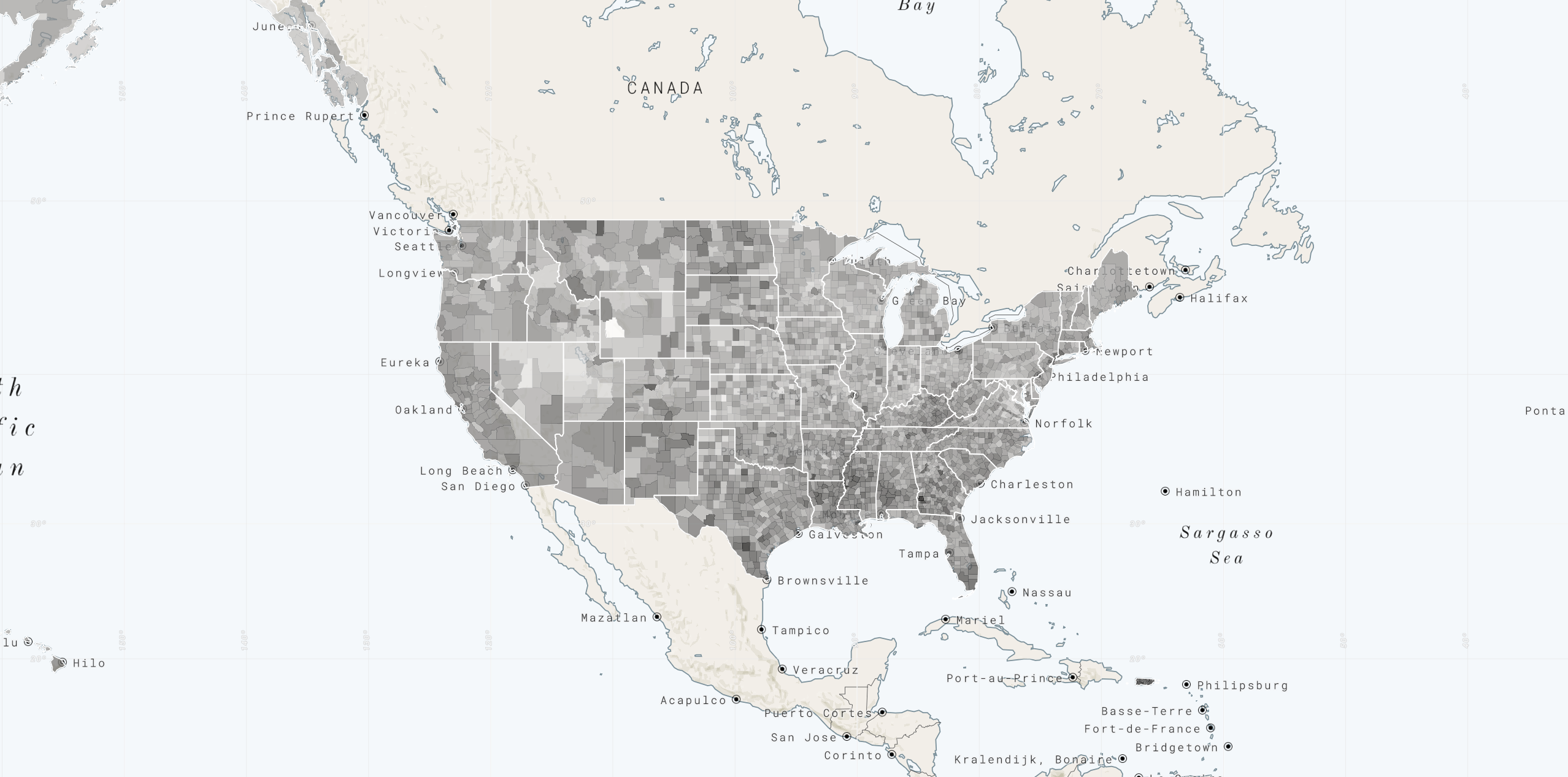](https://uscensusbureau.github.io/citysdk/assets/examples/mapbox/counties_static/index.html)
[source code](https://github.com/uscensusbureau/citysdk/tree/master/examples/mapbox/counties_static)
### Notable Example:
### All ZCTAs (zip code tabulation areas in the US)
```js
census({
vintage: '2017',
geoHierarchy: {
'zip-code-tabulation-area': '*',
},
sourcePath: ['acs', 'acs5'],
values: ['B19083_001E'], // GINI index
statsKey: '<your key here>',
geoResolution: '500k',
})
```
This is a very large request, in fact, one of the largest
you could possibly make in a single `citysdk` function call.
It is so large, in fact that it currently only works on Node
and only if you increase your `node --max-old-space-size=4096`. With large merges (such as all
counties or zctas), it is recommended not to try to use
`citysdk` dynamically, but - rather - to munge your data
before hand with `citysdk` and then serve it statically to
your mapping library, as was done here:
[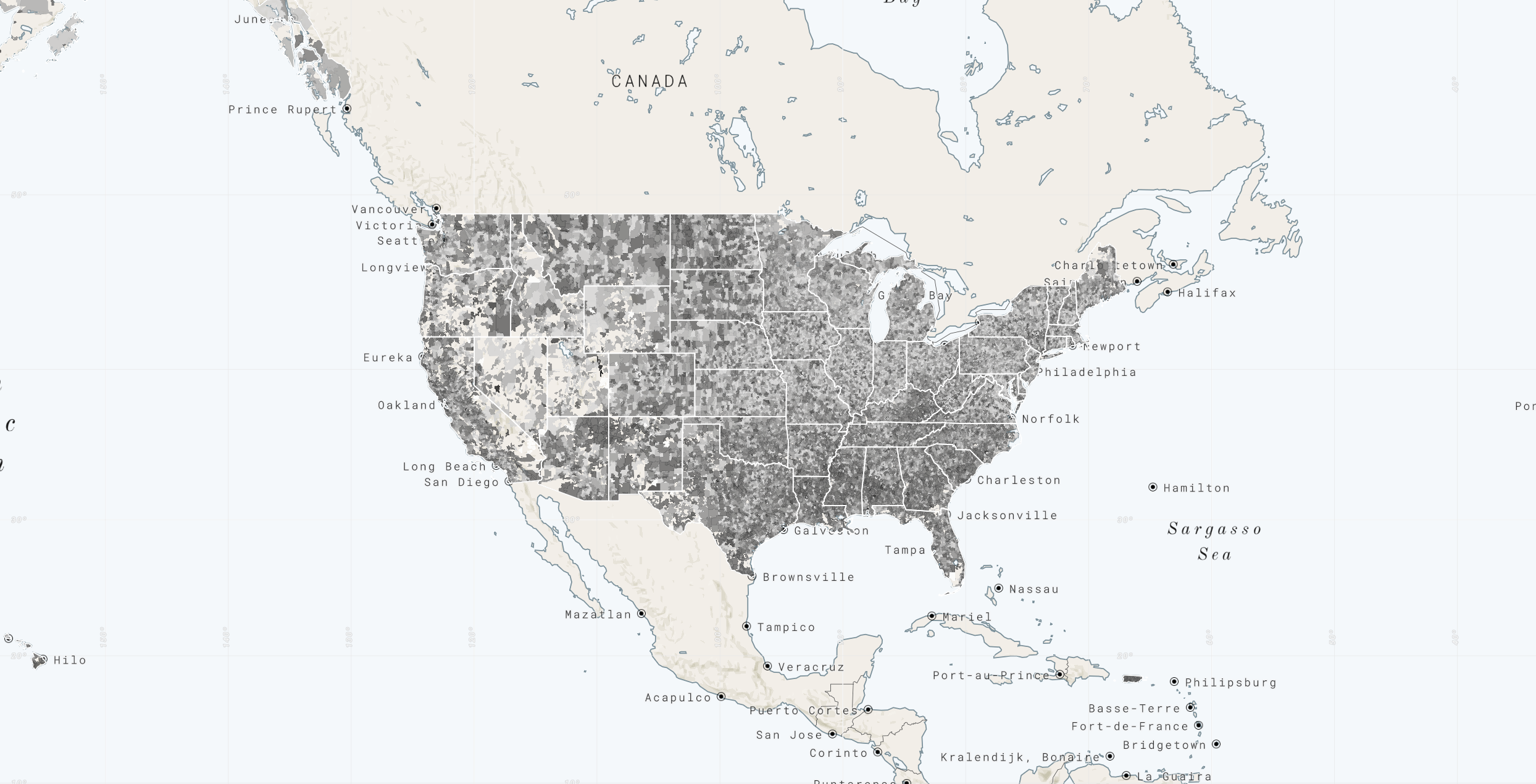](https://uscensusbureau.github.io/citysdk/assets/examples/mapbox/zip-code-tabulation-areas_static/index.html)
[source code](https://github.com/uscensusbureau/citysdk/tree/master/examples/mapbox/zip-code-tabulation-areas_static)
#### Other Argument Examples:
```js
// Call the WMS only
{
"vintage": 2014,
"geoHierarchy": { "state": { "lat": 28.2639, "lng": -80.7214 }, "county": '*' }
}
// Getting the stats for a single county filtering out any county with population under 100,000
{
"vintage": 2016,
"geoHierarchy": { "county": { "lat": 28.2639, "lng": -80.7214 } },
"sourcePath": [ "acs", "acs5" ],
"values": [ "B01001_001E" ]
"predicates": { "B00001_001E": "0:100000" },
}
// strings are valid as vintages as well
{
"vintage": "2015",
"geoHierarchy": { "county": { "lat": 28.2639, "lng": -80.7214 } },
"sourcePath": [ "cbp" ],
"values": [ "ESTAB" ]
}
// Just geojson for all the counties within a state located by a given coordinate
{
"vintage": 2014,
"geoHierarchy": { "state": { "lat": 28.2639, "lng": -80.7214 }, "county": "*" },
"geoResolution": "500k"
}
// For large request expect to have to increase `node --max-old-space-size=4096`
{
"vintage": 2016,
"sourcePath": [ "acs", "acs5" ],
"values": [ "B25001_001E" ],
"geoHierarchy": { "zip-code-tabulation-area": "*" },
"geoResolution": "500k"
}
```
# Census Cartography Files in GeoJSON Format
The Census Bureau publishes both high and low accuracy
geographic area files to accommodate the widest possible
variety of user needs (within feasibility). Cartography
Files are simplified representations of selected geographic
areas from the Census Bureau’s Master Address
File/Topologically Integrated Geographic Encoding and
Referencing (MAF/TIGER) system. _These boundary files are
specifically designed for small scale thematic mapping
(i.e., for visualizations)_.
For a while now, we have published our cartography files in
the [`.shp`] format. More recently, we expanded our
portfolio of available formats to [`.kml`]. It is with this
release that we follow suit with the community at large to
release these boundaries in `.json` (GeoJSON) format.
[`.shp`]: https://www.census.gov/geo/maps-data/data/tiger-cart-boundary.html
[`.kml`]: https://www.census.gov/geo/maps-data/data/tiger-kml.html
### Geographies Available by Vintage
The most comprehensive set of geographies and vintages can
be found within the [500k set]. Some vintages - [`103`
through `110`] - are references to sessions of Congress and
only contain a single geographic summary level:
`"congressional district"` The following tables represent
the availability of various geographic summary levels
through the remaining vintages:
[500k set]: https://github.com/uscensusbureau/citysdk/tree/master/v2/GeoJSON/500k
[`103` through `110`]: https://github.com/uscensusbureau/citysdk/tree/master/v2/GeoJSON/500k
| Geographic Area Type | 1990 | 2000 | 2010 | 2012 | 2013 - 2015 | 2016 - 2021 |
| --------------------------------------------------------------- | :--: | :--: | :--: | :--: | :---------: | :---------: |
| `"alaska native regional corporation"` | ✔ | ✔ | ✔ | | ✔ | ✔ |
| `"american indian-area/alaska native area/hawaiian home land"` | ✔ | ✔ | ✔ | | ✔ | ✔ |
| `"block group"` | ✔ | ✔ | ✔ | | ✔ | ✔ |
| `"combined new england city and town area"` | | | ✔ | | | ✔ |
| `"combined statistical area"` | | | ✔ | | ✔ | ✔ |
| `"congressional district"` | | | ✔ | ✔ | ✔ | ✔ |
| `"consolidated cities"` | | ✔ | ✔ | | ✔ | ✔ |
| `"county"` | ✔ | ✔ | ✔ | | ✔ | ✔ |
| `"county subdivision"` | ✔ | ✔ | ✔ | | ✔ | ✔ |
| `"division"` | | ✔ | ✔ | | ✔ | ✔ |
| `"metropolitan statistical area/micropolitan statistical area"` | | | ✔ | | ✔ | ✔ |
| `"new england city and town area"` | | | ✔ | | ✔ | ✔ |
| `"place"` | ✔ | ✔ | ✔ | | ✔ | ✔ |
| `"public use microdata area"` | | | | | ✔ | ✔ |
| `"region"` | | ✔ | ✔ | | ✔ | ✔ |
| `"school district (elementary)"` | | ✔ | ✔ | | | ✔ |
| `"school district (secondary)"` | | ✔ | ✔ | | | ✔ |
| `"school district (unified")` | | ✔ | ✔ | | | ✔ |
| `"state"` | ✔ | ✔ | ✔ | | ✔ | ✔ |
| `"state legislative district (lower chamber)"` | | ✔ | ✔ | ✔ | ✔ | ✔ |
| `"state legislative district (upper chamber)"` | | ✔ | ✔ | ✔ | ✔ | ✔ |
| `"tract"` | ✔ | ✔ | ✔ | | ✔ | ✔ |
| `"urban area"` | ✔ | ✔ | | ✔ | ✔ | ✔ |
| `"us"` | | | ✔ | | ✔ | ✔ |
| `"zip code tabulation area"` | | ✔ | | | ✔ | ✔\* |
```
* = not available until Dec 2020
```
## More Information about Cartography Files
- For more information about the files translated herein please visit the Census Bureau's
[Cartographic Boundary File Description Page](https://www.census.gov/geo/maps-data/data/cbf/cbf_description.html)
- For a comparison of the available formats of geographic area files, please visit the Census
Bureau's [TIGER Products page ](https://www.census.gov/geo/maps-data/data/tiger.html)
# Community
- Join us on
[Slack](https://join.slack.com/t/uscensusbureau/shared_invite/zt-optzh7xs-ApNgf5Yqbo_u2ANXQv67cQ)
- Send us an email: [cnmp.developers.list@census.gov](mailto:cnmp.developers.list@census.gov)