circular-menu
Version:
cool,highly interactive circular menu
82 lines (65 loc) • 3.5 kB
Markdown
# Circular-Menu
aka, circular menu, wheel menu, circular navigation, wheel navigation.
##Thanks for
[Circular Navigation With CSS Transforms](https://github.com/SaraSoueidan/circular-navigation) by [Sara Soueidan](https://github.com/SaraSoueidan)
## install
```npm install circular-menu```
## usage
Directly include dist/js/circular-menu.js and dist/css/circular-menu.css
It is wrapped as AMD module, meaning could use with RequireJS or commonJS, or just global varible "CMenu"
## Sample
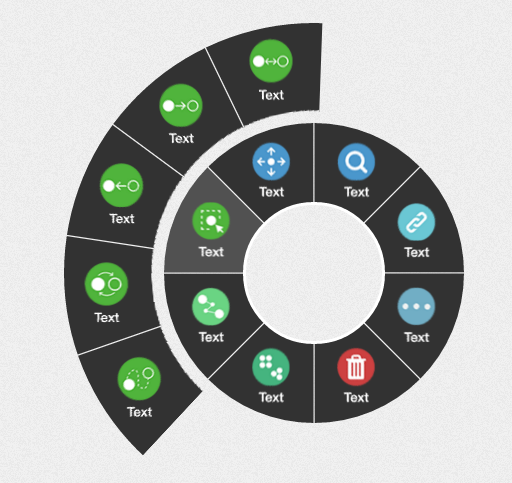
## Live Demo
[jsfiddle Demo](https://jsfiddle.net/yandongCoder/kL4j7xor/10/)
## Browser compatibility
I tested in newer chrome, firefox, and IE Edge.
## Config
### Options
- **totalAngle** ([demo](https://jsfiddle.net/yandongCoder/c00qb1kh/2/)):
- value: ```0-360``` (unit is unnecessary)
- default: ```360```deg (complete circle)
- **spaceDeg** ([demo](https://jsfiddle.net/yandongCoder/c00qb1kh/4/)):
- value: ```Int``` (0-5 is suitable)
- default: ```0``` (The default is good)
- **background**:
- value: Acceptable CSS color value
- default: ```#323232```
- **backgroundHover**:
- value: Acceptable CSS color value
- default: ```#515151```
- **pageBackground** (For antialiasing, [example explanation](https://raw.githubusercontent.com/yandongCoder/circular-menu/master/examples/images/CMenu-antialiasing.png)):
- value: Acceptable CSS color value ( You should pass the color of your page. )
- default: ```transparent```
- **diameter**(circular menu radius):
- value: Int (unit is unnecessary)
- default: ```300```px
- **position**([demo](https://jsfiddle.net/yandongCoder/c00qb1kh/7/)):
- value: "top" | "left" | "right" | "bottom"
- default: "top"
- **start**([demo](https://jsfiddle.net/yandongCoder/c00qb1kh/8/)):
- value: ```0-360``` (unit is unnecessary)
- default: ```0``` deg
- **horizontal** (Whether horizontal icon and text [demo](https://jsfiddle.net/yandongCoder/c00qb1kh/9/)):
- value: ```true | false```
- default: ```true```
- **hideAfterClick** (Whether hide menu after click):
- value: ```true | false```
- default: ```true```
- **menus**: (Array of objects, specifying menu items, **angle of each item mush < 90deg, it meaning "totalAngle / items number" must <= 90deg [wrong use demo](https://jsfiddle.net/yandongCoder/c00qb1kh/10/)** )
- title: String (Title is not too long, otherwise it will overflow container)
- icon: String (css class, e.g. "fa fa-facebook" "custom-icon icon1")
- href:
- String (like "http://google.com" or "#hash")
- Object (like ```{url: "..", blank: true}``` )
- url: String
- blank: ```true | false``` (True will open a new browser tab)
- click: Function (click callback function)
- disabled:
- String: ```true | false```
- Function: (Function must return boolean value)
### Method
- **styles(**properties**)**: add styles to menus
- properties: Acceptable css properties object ( like ```{ "background-color": "#ffe", "border-left": "5px solid #ccc" }```)
- **show (**[left, top]**)**:show menus
- [left, top] : Optional, set menu fixed position left and top, (like ```menus.show([e.pageX, e.pageY])```, unit is unnecessary)
- **hide()**: hide menus