cds-swagger-ui-express
Version:
Swagger UI for CAP Services
92 lines (65 loc) • 3.22 kB
Markdown
An CAP plugin to serve OpenAPI definitions for [CAP](https://cap.cloud.sap) services in Swagger UI.
Builds on top of [swagger-ui-express](https://www.npmjs.com/package/swagger-ui-express).
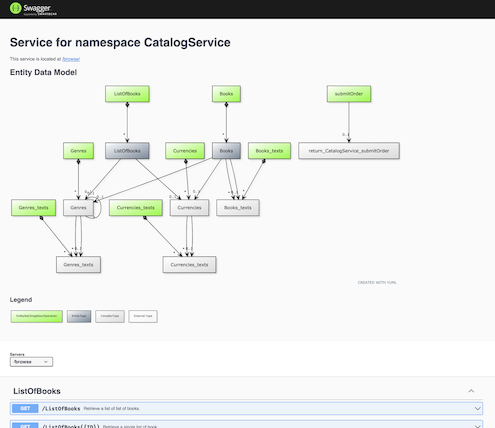
In your project, just add a dependency like so:
```sh
npm add --save-dev cds-swagger-ui-express
```
Once loaded by CAP, the package registers itself as a middleware with a default configuration.
After starting the app with `cds watch` or so, Swagger UI is served at `/$api-docs/<service-path>`, like http://localhost:4004/$api-docs/browse/
You can set the most prominent options in `package.json` or `.cdsrc.json`, as in other CAP apps:
```jsonc
"cds": {
"swagger": {
"basePath": "/$api-docs", // the root path to mount the middleware on
"apiPath": "/", // the root path for the services (useful if behind a reverse proxy)
"diagram": true, // whether to render the YUML diagram
"odataVersion": "4.0" // the OData Version to compile the OpenAPI specs. Defaults to 4.01
}
}
```
To disable the plugin, set this:
```jsonc
"cds": {
"swagger": false
}
```
Note that you can also set environment variables for each option, like `CDS_SWAGGER=false`. See the [`cds.env` docs](https://cap.cloud.sap/docs/node.js/cds-env#process-env) for more.
If you need to register the plugin programmatically, e.g. in certain conditions only, you can do so in your [`server.js`](https://cap.cloud.sap/docs/node.js/cds-server#custom-server-js):
```js
const cds = require ('@sap/cds')
const cds_swagger = require ('cds-swagger-ui-express')
cds.on ('bootstrap', app =>
app.use (cds_swagger ())
)
```
In this case, the default 'auto registration' as plugin is disabled automatically to avoid conflicts.
If the middleware is registered programmatically, you need to pass in the options through the API as well. No configuration from `package.json` is used here.
Call `cds_swagger ({...})` with the following object as first parameter:
```jsonc
{
"basePath": ...,
// see section above for more
}
```
Call `cds_swagger ({...}, {...})` with an additional object as <em>second</em> parameter. This object is passed to `swagger-ui-express` as [custom options](https://www.npmjs.com/package/swagger-ui-express#user-content-custom-swagger-options).
Example:
```jsonc
{
"customSiteTitle": "My Custom Title",
"swaggerOptions": {
"requestInterceptor": ...
}
}
```
See the [list of all options](https://github.com/swagger-api/swagger-ui/blob/master/docs/usage/configuration.md).
For questions to specific properties, contact the maintainers of [swagger-ui-express](https://www.npmjs.com/package/swagger-ui-express) or [swagger-ui](https://github.com/swagger-api/swagger-ui).
If you call [`cds.serve`](https://cap.cloud.sap/docs/node.js/cds-serve#cds-serve) on your own in your `server.js`, make sure to install this middleware _before_, as it relies on CDS' [`serving` events](https://cap.cloud.sap/docs/node.js/cds-server#cdson--serving-service).