cbt-wireshark
Version:
CANBus Triple to Pipe for use with Wireshark Network analyzer
36 lines (22 loc) • 1.01 kB
Markdown
# CANBus-Triple-Wireshark
Pipe for using the CANBus Triple with Wireshark
## Usage
clone the repo:
``git clone https://github.com/CANBus-Triple/CANBus-Triple-Wireshark.git``
install dependancies: ``npm install``
run: ``node index.js /dev/cu.usbmodem1421``
### Wireshark Setup
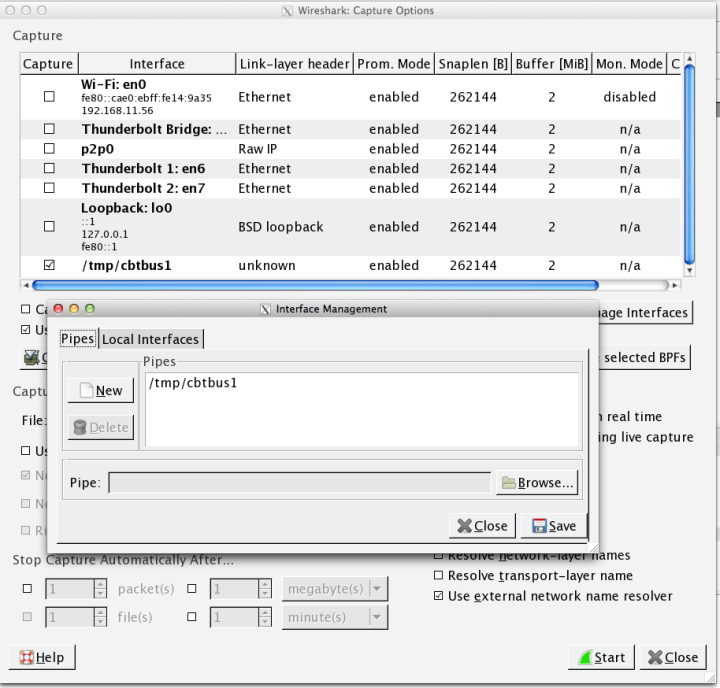
* Press **Control+K** to open 'Capture Settings'
* Click **Manage Interfaces** Button
* Select the **Pipes** Tab
* Click the **New** button
* Enter '/tmp/cbtbus1' for Linux/Unix/MacOS or '\\\\?\pipe\cbtbus1' for Windows
* Click **Save** then **Close**
Each CAN bus on the CANBus Triple will get its own pipe:
* /tmp/cbtbus1
* /tmp/cbtbus2
* /tmp/cbtbus3
### Get them packets
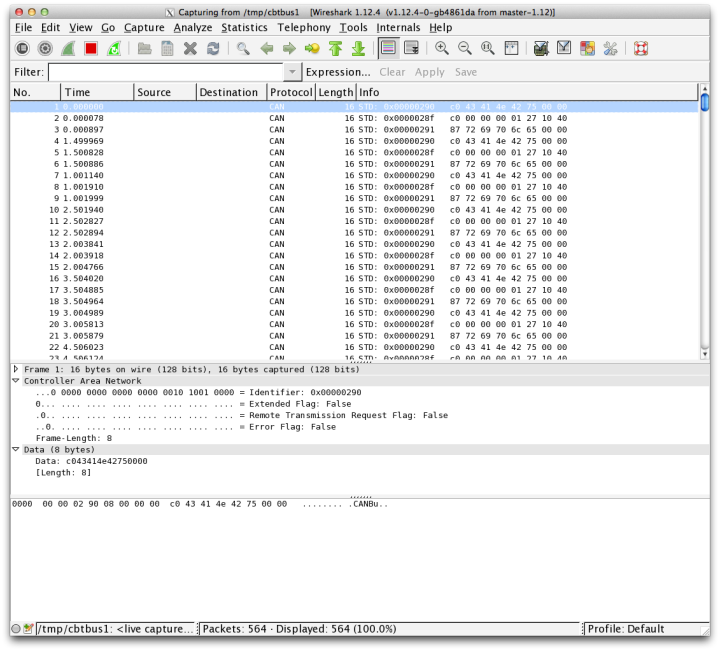
Now you can start a packet capture in Wireshark using the newly added Pipe interface to read from your CANBus Triple.