bunyan-remote
Version:
Remote logger for node-bunyan that logs to the browser via Bunyan DevTools
154 lines (112 loc) • 4.8 kB
Markdown
# bunyan-remote
[](https://travis-ci.org/guatedude2/bunyan-remote)
Remote logger for node-bunyan that logs to the browser via Bunyan DevTools

**Note: this modules is still in beta version**
## Installation
```
npm install bunyan-remote --save
```
## Usage
```javascript
var bunyan = require('bunyan');
var remoteBunyan = require('bunyan-remote');
var logger = bunyan.createLogger({
name: 'example-app'
});
logger.addStream(remoteBunyan());
logger.info('Start server...');
```
## Options
bunyan-remote can be used with the following optional properties:
* __`allowedIPs`__: An array of IP expressions where "*" signifys any (e.g 10.* - all IP's that start with 10.X.X.X)
* __`auth`__: One of the following options:
* __`remoteBunyan.AUTH_NONE`__: No authentication required by Bunyan Remote DevTool.
* __`remoteBunyan.AUTH_KEY`__: Prompt Bunyan Remote DevTool for a key.
* __`remoteBunyan.AUTH_USER`__: Prompt Bunyan Remote DevTool for a username and password.
* __`authenticate`__: A string, or a function which verifies the authentcation of the client.
## Authentication
When using `AUTH_KEY` or `AUTH_USER`, you can set the `authenticate` property to either a string or a function.
If `auth` is set to `AUTH_KEY` then the `authenticate` property will be compared to a regular token string.
If `auth` is set to `AUTH_USER` then the `authenticate` property will be compared to a combination of the username and password in the format `username:password`.
#### Examples
The following example uses a simple key for authentication:
```javascript
logger.addStream(remoteBunyan({
auth: remoteBunyan.AUTH_KEY,
authentication: 'MY-SECRET-KEY'
}));
```
You can also specify a function that returns a boolean wether to allow or deny the authentication request:
```javascript
var TOKENS = [ 'SECRET-KEY-1', 'SECRET-KEY-2' ];
logger.addStream(remoteBunyan({
auth: remoteBunyan.AUTH_KEY,
authentication: function (token) {
return TOKENS.indexOf(token) !== -1;
}
}));
```
If you're working with **asynchronous** operations you can do one of two things. One return `function (accept, reject)` where the parameters indicate to accept/reject the request:
```javascript
logger.addStream(remoteBunyan({
auth: remoteBunyan.AUTH_USER,
authentication: function (token) {
return function (accept, reject) {
fs.readFile('./credentials.txt', { encoding: 'utf8' }, function (data) {
var tokens = data.split('\n');
if (tokens.indexOf(token) >= 0) {
accept();
} else {
reject();
}
});
};
}
}));
```
or better yet return an **ES6 Promise**: *(recommended)*
```javascript
logger.addStream(remoteBunyan({
auth: remoteBunyan.AUTH_USER,
authentication: function (token) {
return new Promise(function (accept, reject) {
fs.readFile('./credentials.txt', { encoding: 'utf8' }, function (data) {
var tokens = data.split('\n');
if (tokens.indexOf(token) >= 0) {
accept();
} else {
reject();
}
});
};
}
}));
```
*credentials.txt*
```
bugsbunny:carrots48
elmerfudd:wabbits24
tweetybird:puttytat12
```
## Chrome Extension
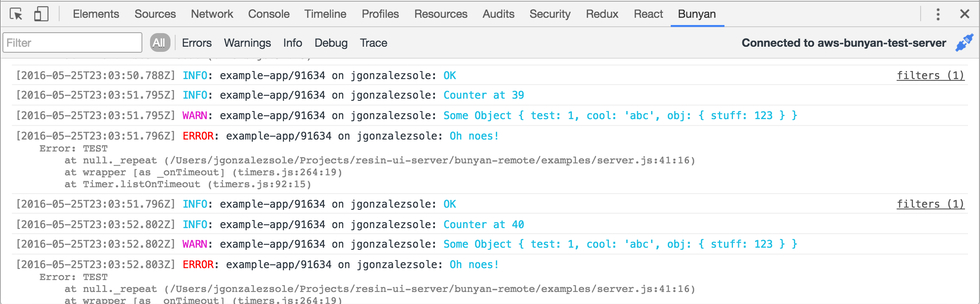
The *Bunyan Remote DevTool* Chrome Extension can be downloaded via the [Chrome Web Store](https://chrome.google.com/webstore/detail/bunyan-remote-devtool/njijbgiagjigbbdickepciiejglbcein)
## License
The MIT License (MIT)
Copyright (c) 2016 Alejandro Gonzalez Sole
Permission is hereby granted, free of charge, to any person obtaining a copy
of this software and associated documentation files (the "Software"), to deal
in the Software without restriction, including without limitation the rights
to use, copy, modify, merge, publish, distribute, sublicense, and/or sell
copies of the Software, and to permit persons to whom the Software is
furnished to do so, subject to the following conditions:
The above copyright notice and this permission notice shall be included in all
copies or substantial portions of the Software.
THE SOFTWARE IS PROVIDED "AS IS", WITHOUT WARRANTY OF ANY KIND, EXPRESS OR
IMPLIED, INCLUDING BUT NOT LIMITED TO THE WARRANTIES OF MERCHANTABILITY,
FITNESS FOR A PARTICULAR PURPOSE AND NONINFRINGEMENT. IN NO EVENT SHALL THE
AUTHORS OR COPYRIGHT HOLDERS BE LIABLE FOR ANY CLAIM, DAMAGES OR OTHER
LIABILITY, WHETHER IN AN ACTION OF CONTRACT, TORT OR OTHERWISE, ARISING FROM,
OUT OF OR IN CONNECTION WITH THE SOFTWARE OR THE USE OR OTHER DEALINGS IN THE
SOFTWARE.