bun-types
Version:
Type definitions and documentation for Bun, an incredibly fast JavaScript runtime
116 lines (80 loc) • 10 kB
text/mdx
---
title: "JSX"
description: "Built-in JSX and TSX support in Bun with configurable transpilation options"
---
Bun supports `.jsx` and `.tsx` files out of the box. Bun's internal transpiler converts JSX syntax into vanilla JavaScript before execution.
```ts react.tsx icon="/icons/typescript.svg"
function Component(props: {message: string}) {
return (
<body>
<h1 style={{color: 'red'}}>{props.message}</h1>
</body>
);
}
console.log(<Component message="Hello world!" />);
```
## Configuration
Bun reads your `tsconfig.json` or `jsconfig.json` configuration files to determines how to perform the JSX transform internally. To avoid using either of these, the following options can also be defined in [`bunfig.toml`](/docs/runtime/bunfig).
The following compiler options are respected.
### [`jsx`](https://www.typescriptlang.org/tsconfig#jsx)
How JSX constructs are transformed into vanilla JavaScript internally. The table below lists the possible values of `jsx`, along with their transpilation of the following simple JSX component:
```tsx
<Box width={5}>Hello</Box>
```
| Compiler options | Transpiled output |
| --------------------------------------------------- | ------------------------------------------------------------------------------------------------------------------------------------------------------------------------------------------------------------------------------------------------------------------------------------------------------------------------------------------------------------------------------------------------------------------------------------------------------------------------- |
| `json<br/>{<br/> "jsx": "react"<br/>}<br/>` | `tsx<br/>import { createElement } from "react";<br/>createElement("Box", { width: 5 }, "Hello");<br/>` |
| `json<br/>{<br/> "jsx": "react-jsx"<br/>}<br/>` | `tsx<br/>import { jsx } from "react/jsx-runtime";<br/>jsx("Box", { width: 5 }, "Hello");<br/>` |
| `json<br/>{<br/> "jsx": "react-jsxdev"<br/>}<br/>` | `tsx<br/>import { jsxDEV } from "react/jsx-dev-runtime";<br/>jsxDEV(<br/> "Box",<br/> { width: 5, children: "Hello" },<br/> undefined,<br/> false,<br/> undefined,<br/> this,<br/>);<br/>`<br/><br/>The `jsxDEV` variable name is a convention used by React. The `DEV` suffix is a visible way to indicate that the code is intended for use in development. The development version of React is slower and includes additional validity checks & debugging tools. |
| `json<br/>{<br/> "jsx": "preserve"<br/>}<br/>` | `tsx<br/>// JSX is not transpiled<br/>// "preserve" is not supported by Bun currently<br/><Box width={5}>Hello</Box><br/>` |
### [`jsxFactory`](https://www.typescriptlang.org/tsconfig#jsxFactory)
<Note>**Note** — Only applicable when `jsx` is `react`.</Note>
The function name used to represent JSX constructs. Default value is `"createElement"`. This is useful for libraries like [Preact](https://preactjs.com/) that use a different function name (`"h"`).
| Compiler options | Transpiled output |
| --------------------------------------------------------------------- | ------------------------------------------------------------------------------ |
| `json<br/>{<br/> "jsx": "react",<br/> "jsxFactory": "h"<br/>}<br/>` | `tsx<br/>import { h } from "react";<br/>h("Box", { width: 5 }, "Hello");<br/>` |
### [`jsxFragmentFactory`](https://www.typescriptlang.org/tsconfig#jsxFragmentFactory)
<Note>**Note** — Only applicable when `jsx` is `react`.</Note>
The function name used to represent [JSX fragments](https://react.dev/reference/react/Fragment) such as `<>Hello</>`; only applicable when `jsx` is `react`. Default value is `"Fragment"`.
| Compiler options | Transpiled output |
| ------------------------------------------------------------------------------------------------------------------- | ----------------------------------------------------------------------------------------------------------------------------------------------- |
| `json<br/>{<br/> "jsx": "react",<br/> "jsxFactory": "myjsx",<br/> "jsxFragmentFactory": "MyFragment"<br/>}<br/>` | `tsx<br/>// input<br/><>Hello</>;<br/><br/>// output<br/>import { myjsx, MyFragment } from "react";<br/>myjsx(MyFragment, null, "Hello");<br/>` |
### [`jsxImportSource`](https://www.typescriptlang.org/tsconfig#jsxImportSource)
<Note>**Note** — Only applicable when `jsx` is `react-jsx` or `react-jsxdev`.</Note>
The module from which the component factory function (`createElement`, `jsx`, `jsxDEV`, etc) will be imported. Default value is `"react"`. This will typically be necessary when using a component library like Preact.
| Compiler options | Transpiled output |
| ------------------------------------------------------------------------------------------------------------------ | ----------------------------------------------------------------------------------------------------------------------------------------------------------------------------------------------------------------------------------------------- |
| `jsonc<br/>{<br/> "jsx": "react",<br/> // jsxImportSource is not defined<br/> // default to "react"<br/>}<br/>` | `tsx<br/>import { jsx } from "react/jsx-runtime";<br/>jsx("Box", { width: 5, children: "Hello" });<br/>` |
| `jsonc<br/>{<br/> "jsx": "react-jsx",<br/> "jsxImportSource": "preact",<br/>}<br/>` | `tsx<br/>import { jsx } from "preact/jsx-runtime";<br/>jsx("Box", { width: 5, children: "Hello" });<br/>` |
| `jsonc<br/>{<br/> "jsx": "react-jsxdev",<br/> "jsxImportSource": "preact",<br/>}<br/>` | `tsx<br/>// /jsx-runtime is automatically appended<br/>import { jsxDEV } from "preact/jsx-dev-runtime";<br/>jsxDEV(<br/> "Box",<br/> { width: 5, children: "Hello" },<br/> undefined,<br/> false,<br/> undefined,<br/> this,<br/>);<br/>` |
### JSX pragma
All of these values can be set on a per-file basis using _pragmas_. A pragma is a special comment that sets a compiler option in a particular file.
| Pragma | Equivalent config |
| ---------------------------------------- | ------------------------------------------------------------------ |
| `ts<br/>// h<br/>` | `jsonc<br/>{<br/> "jsxFactory": "h",<br/>}<br/>` |
| `ts<br/>// MyFragment<br/>` | `jsonc<br/>{<br/> "jsxFragmentFactory": "MyFragment",<br/>}<br/>` |
| `ts<br/>// preact<br/>` | `jsonc<br/>{<br/> "jsxImportSource": "preact",<br/>}<br/>` |
## Logging
Bun implements special logging for JSX to make debugging easier. Given the following file:
```tsx index.tsx icon="/icons/typescript.svg"
import { Stack, UserCard } from "./components";
console.log(
<Stack>
<UserCard name="Dom" bio="Street racer and Corona lover" />
<UserCard name="Jakob" bio="Super spy and Dom's secret brother" />
</Stack>,
);
```
Bun will pretty-print the component tree when logged:
<Frame>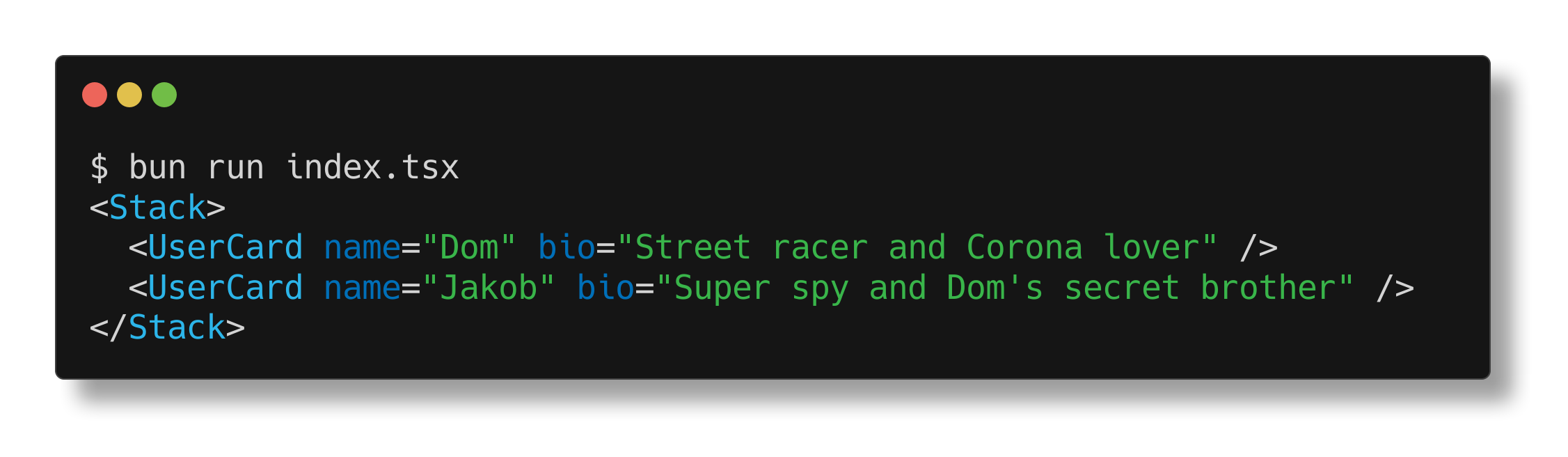</Frame>
## Prop punning
The Bun runtime also supports "prop punning" for JSX. This is a shorthand syntax useful for assigning a variable to a prop with the same name.
```tsx react.tsx icon="/icons/typescript.svg"
function Div(props: {className: string;}) {
const {className} = props;
// without punning
return <div className={className} />;
// with punning
return <div {className} />;
}
```