bun-types
Version:
Type definitions and documentation for Bun, an incredibly fast JavaScript runtime
644 lines (479 loc) • 15.6 kB
text/mdx
---
title: Server
description: Use `Bun.serve` to start a high-performance HTTP server in Bun
---
## Basic Setup
```ts title="index.ts" icon="/icons/typescript.svg"
const server = Bun.serve({
// `routes` requires Bun v1.2.3+
routes: {
// Static routes
"/api/status": new Response("OK"),
// Dynamic routes
"/users/:id": req => {
return new Response(`Hello User ${req.params.id}!`);
},
// Per-HTTP method handlers
"/api/posts": {
GET: () => new Response("List posts"),
POST: async req => {
const body = await req.json();
return Response.json({ created: true, ...body });
},
},
// Wildcard route for all routes that start with "/api/" and aren't otherwise matched
"/api/*": Response.json({ message: "Not found" }, { status: 404 }),
// Redirect from /blog/hello to /blog/hello/world
"/blog/hello": Response.redirect("/blog/hello/world"),
// Serve a file by lazily loading it into memory
"/favicon.ico": Bun.file("./favicon.ico"),
},
// (optional) fallback for unmatched routes:
// Required if Bun's version < 1.2.3
fetch(req) {
return new Response("Not Found", { status: 404 });
},
});
console.log(`Server running at ${server.url}`);
```
---
## HTML imports
Bun supports importing HTML files directly into your server code, enabling full-stack applications with both server-side and client-side code. HTML imports work in two modes:
**Development (`bun --hot`):** Assets are bundled on-demand at runtime, enabling hot module replacement (HMR) for a fast, iterative development experience. When you change your frontend code, the browser automatically updates without a full page reload.
**Production (`bun build`):** When building with `bun build --target=bun`, the `import index from "./index.html"` statement resolves to a pre-built manifest object containing all bundled client assets. `Bun.serve` consumes this manifest to serve optimized assets with zero runtime bundling overhead. This is ideal for deploying to production.
```ts
import myReactSinglePageApp from "./index.html";
Bun.serve({
routes: {
"/": myReactSinglePageApp,
},
});
```
HTML imports don't just serve HTML — it's a full-featured frontend bundler, transpiler, and toolkit built using Bun's [bundler](/docs/bundler), JavaScript transpiler and CSS parser. You can use this to build full-featured frontends with React, TypeScript, Tailwind CSS, and more.
For a complete guide on building full-stack applications with HTML imports, including detailed examples and best practices, see [/docs/bundler/fullstack](/docs/bundler/fullstack).
---
## Configuration
### Changing the `port` and `hostname`
To configure which port and hostname the server will listen on, set `port` and `hostname` in the options object.
```ts
Bun.serve({
port: 8080, // defaults to $BUN_PORT, $PORT, $NODE_PORT otherwise 3000 // [!code ++]
hostname: "mydomain.com", // defaults to "0.0.0.0" // [!code ++]
fetch(req) {
return new Response("404!");
},
});
```
To randomly select an available port, set `port` to `0`.
```ts
const server = Bun.serve({
port: 0, // random port // [!code ++]
fetch(req) {
return new Response("404!");
},
});
// server.port is the randomly selected port
console.log(server.port);
```
You can view the chosen port by accessing the `port` property on the server object, or by accessing the `url` property.
```ts
console.log(server.port); // 3000
console.log(server.url); // http://localhost:3000
```
### Configuring a default port
Bun supports several options and environment variables to configure the default port. The default port is used when the `port` option is not set.
- `--port` CLI flag
```sh
bun --port=4002 server.ts
```
- `BUN_PORT` environment variable
```sh
BUN_PORT=4002 bun server.ts
```
- `PORT` environment variable
```sh terminal icon="terminal"
PORT=4002 bun server.ts
```
- `NODE_PORT` environment variable
```sh terminal icon="terminal"
NODE_PORT=4002 bun server.ts
```
---
## Unix domain sockets
To listen on a [unix domain socket](https://en.wikipedia.org/wiki/Unix_domain_socket), pass the `unix` option with the path to the socket.
```ts
Bun.serve({
unix: "/tmp/my-socket.sock", // path to socket
fetch(req) {
return new Response(`404!`);
},
});
```
### Abstract namespace sockets
Bun supports Linux abstract namespace sockets. To use an abstract namespace socket, prefix the `unix` path with a null byte.
```ts
Bun.serve({
unix: "\0my-abstract-socket", // abstract namespace socket
fetch(req) {
return new Response(`404!`);
},
});
```
Unlike unix domain sockets, abstract namespace sockets are not bound to the filesystem and are automatically removed when the last reference to the socket is closed.
---
## idleTimeout
To configure the idle timeout, set the `idleTimeout` field in Bun.serve.
```ts
Bun.serve({
// 10 seconds:
idleTimeout: 10,
fetch(req) {
return new Response("Bun!");
},
});
```
This is the maximum amount of time a connection is allowed to be idle before the server closes it. A connection is idling if there is no data sent or received.
---
## export default syntax
Thus far, the examples on this page have used the explicit `Bun.serve` API. Bun also supports an alternate syntax.
```ts server.ts
import { type Serve } from "bun";
export default {
fetch(req) {
return new Response("Bun!");
},
} satisfies Serve;
```
Instead of passing the server options into `Bun.serve`, `export default` it. This file can be executed as-is; when Bun sees a file with a `default` export containing a `fetch` handler, it passes it into `Bun.serve` under the hood.
---
## Hot Route Reloading
Update routes without server restarts using `server.reload()`:
```ts
const server = Bun.serve({
routes: {
"/api/version": () => Response.json({ version: "1.0.0" }),
},
});
// Deploy new routes without downtime
server.reload({
routes: {
"/api/version": () => Response.json({ version: "2.0.0" }),
},
});
```
---
## Server Lifecycle Methods
### `server.stop()`
To stop the server from accepting new connections:
```ts
const server = Bun.serve({
fetch(req) {
return new Response("Hello!");
},
});
// Gracefully stop the server (waits for in-flight requests)
await server.stop();
// Force stop and close all active connections
await server.stop(true);
```
By default, `stop()` allows in-flight requests and WebSocket connections to complete. Pass `true` to immediately terminate all connections.
### `server.ref()` and `server.unref()`
Control whether the server keeps the Bun process alive:
```ts
// Don't keep process alive if server is the only thing running
server.unref();
// Restore default behavior - keep process alive
server.ref();
```
### `server.reload()`
Update the server's handlers without restarting:
```ts
const server = Bun.serve({
routes: {
"/api/version": Response.json({ version: "v1" }),
},
fetch(req) {
return new Response("v1");
},
});
// Update to new handler
server.reload({
routes: {
"/api/version": Response.json({ version: "v2" }),
},
fetch(req) {
return new Response("v2");
},
});
```
This is useful for development and hot reloading. Only `fetch`, `error`, and `routes` can be updated.
---
## Per-Request Controls
### `server.timeout(Request, seconds)`
Set a custom idle timeout for individual requests:
```ts
const server = Bun.serve({
async fetch(req, server) {
// Set 60 second timeout for this request
server.timeout(req, 60);
// If they take longer than 60 seconds to send the body, the request will be aborted
await req.text();
return new Response("Done!");
},
});
```
Pass `0` to disable the timeout for a request.
### `server.requestIP(Request)`
Get client IP and port information:
```ts
const server = Bun.serve({
fetch(req, server) {
const address = server.requestIP(req);
if (address) {
return new Response(`Client IP: ${address.address}, Port: ${address.port}`);
}
return new Response("Unknown client");
},
});
```
Returns `null` for closed requests or Unix domain sockets.
---
## Server Metrics
### `server.pendingRequests` and `server.pendingWebSockets`
Monitor server activity with built-in counters:
```ts
const server = Bun.serve({
fetch(req, server) {
return new Response(
`Active requests: ${server.pendingRequests}\n` + `Active WebSockets: ${server.pendingWebSockets}`,
);
},
});
```
### `server.subscriberCount(topic)`
Get count of subscribers for a WebSocket topic:
```ts
const server = Bun.serve({
fetch(req, server) {
const chatUsers = server.subscriberCount("chat");
return new Response(`${chatUsers} users in chat`);
},
websocket: {
message(ws) {
ws.subscribe("chat");
},
},
});
```
---
## Benchmarks
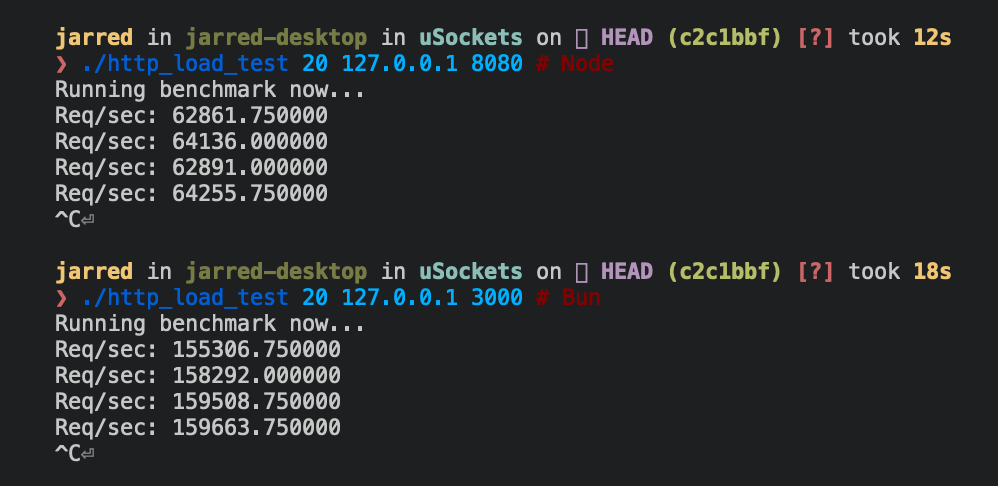
Below are Bun and Node.js implementations of a simple HTTP server that responds `Bun!` to each incoming `Request`.
```ts Bun
Bun.serve({
fetch(req: Request) {
return new Response("Bun!");
},
port: 3000,
});
```
```ts
require("http")
.createServer((req, res) => res.end("Bun!"))
.listen(8080);
```
The `Bun.serve` server can handle roughly 2.5x more requests per second than Node.js on Linux.
| Runtime | Requests per second |
| ------- | ------------------- |
| Node 16 | ~64,000 |
| Bun | ~160,000 |
<Frame>
</Frame>
---
## Practical example: REST API
Here's a basic database-backed REST API using Bun's router with zero dependencies:
<CodeGroup>
```ts server.ts expandable icon="file-code"
import type { Post } from "./types.ts";
import { Database } from "bun:sqlite";
const db = new Database("posts.db");
db.exec(`
CREATE TABLE IF NOT EXISTS posts (
id TEXT PRIMARY KEY,
title TEXT NOT NULL,
content TEXT NOT NULL,
created_at TEXT NOT NULL
)
`);
Bun.serve({
routes: {
// List posts
"/api/posts": {
GET: () => {
const posts = db.query("SELECT * FROM posts").all();
return Response.json(posts);
},
// Create post
POST: async req => {
const post: Omit<Post, "id" | "created_at"> = await req.json();
const id = crypto.randomUUID();
db.query(
`INSERT INTO posts (id, title, content, created_at)
VALUES (?, ?, ?, ?)`,
).run(id, post.title, post.content, new Date().toISOString());
return Response.json({ id, ...post }, { status: 201 });
},
},
// Get post by ID
"/api/posts/:id": req => {
const post = db.query("SELECT * FROM posts WHERE id = ?").get(req.params.id);
if (!post) {
return new Response("Not Found", { status: 404 });
}
return Response.json(post);
},
},
error(error) {
console.error(error);
return new Response("Internal Server Error", { status: 500 });
},
});
```
```ts types.ts icon="/icons/typescript.svg"
export interface Post {
id: string;
title: string;
content: string;
created_at: string;
}
```
</CodeGroup>
---
## Reference
```ts expandable See TypeScript Definitions
interface Server extends Disposable {
/**
* Stop the server from accepting new connections.
* @param closeActiveConnections If true, immediately terminates all connections
* @returns Promise that resolves when the server has stopped
*/
stop(closeActiveConnections?: boolean): Promise<void>;
/**
* Update handlers without restarting the server.
* Only fetch and error handlers can be updated.
*/
reload(options: Serve): void;
/**
* Make a request to the running server.
* Useful for testing or internal routing.
*/
fetch(request: Request | string): Response | Promise<Response>;
/**
* Upgrade an HTTP request to a WebSocket connection.
* @returns true if upgrade successful, false if failed
*/
upgrade<T = undefined>(
request: Request,
options?: {
headers?: Bun.HeadersInit;
data?: T;
},
): boolean;
/**
* Publish a message to all WebSocket clients subscribed to a topic.
* @returns Bytes sent, 0 if dropped, -1 if backpressure applied
*/
publish(
topic: string,
data: string | ArrayBufferView | ArrayBuffer | SharedArrayBuffer,
compress?: boolean,
): ServerWebSocketSendStatus;
/**
* Get count of WebSocket clients subscribed to a topic.
*/
subscriberCount(topic: string): number;
/**
* Get client IP address and port.
* @returns null for closed requests or Unix sockets
*/
requestIP(request: Request): SocketAddress | null;
/**
* Set custom idle timeout for a request.
* @param seconds Timeout in seconds, 0 to disable
*/
timeout(request: Request, seconds: number): void;
/**
* Keep process alive while server is running.
*/
ref(): void;
/**
* Allow process to exit if server is only thing running.
*/
unref(): void;
/** Number of in-flight HTTP requests */
readonly pendingRequests: number;
/** Number of active WebSocket connections */
readonly pendingWebSockets: number;
/** Server URL including protocol, hostname and port */
readonly url: URL;
/** Port server is listening on */
readonly port: number;
/** Hostname server is bound to */
readonly hostname: string;
/** Whether server is in development mode */
readonly development: boolean;
/** Server instance identifier */
readonly id: string;
}
interface WebSocketHandler<T = undefined> {
/** Maximum WebSocket message size in bytes */
maxPayloadLength?: number;
/** Bytes of queued messages before applying backpressure */
backpressureLimit?: number;
/** Whether to close connection when backpressure limit hit */
closeOnBackpressureLimit?: boolean;
/** Called when backpressure is relieved */
drain?(ws: ServerWebSocket<T>): void | Promise<void>;
/** Seconds before idle timeout */
idleTimeout?: number;
/** Enable per-message deflate compression */
perMessageDeflate?:
| boolean
| {
compress?: WebSocketCompressor | boolean;
decompress?: WebSocketCompressor | boolean;
};
/** Send ping frames to keep connection alive */
sendPings?: boolean;
/** Whether server receives its own published messages */
publishToSelf?: boolean;
/** Called when connection opened */
open?(ws: ServerWebSocket<T>): void | Promise<void>;
/** Called when message received */
message(ws: ServerWebSocket<T>, message: string | Buffer): void | Promise<void>;
/** Called when connection closed */
close?(ws: ServerWebSocket<T>, code: number, reason: string): void | Promise<void>;
/** Called when ping frame received */
ping?(ws: ServerWebSocket<T>, data: Buffer): void | Promise<void>;
/** Called when pong frame received */
pong?(ws: ServerWebSocket<T>, data: Buffer): void | Promise<void>;
}
interface TLSOptions {
/** Certificate authority chain */
ca?: string | Buffer | BunFile | Array<string | Buffer | BunFile>;
/** Server certificate */
cert?: string | Buffer | BunFile | Array<string | Buffer | BunFile>;
/** Path to DH parameters file */
dhParamsFile?: string;
/** Private key */
key?: string | Buffer | BunFile | Array<string | Buffer | BunFile>;
/** Reduce TLS memory usage */
lowMemoryMode?: boolean;
/** Private key passphrase */
passphrase?: string;
/** OpenSSL options flags */
secureOptions?: number;
/** Server name for SNI */
serverName?: string;
}
```