breakpointer
Version:
a lightweight React library for real-time breakpoint detection. supports custom and default tailwind breakpoints.
156 lines (116 loc) • 5.34 kB
Markdown
# Breakpointer
A lightweight React library for real-time breakpoint detection with support for custom and default Tailwind breakpoints.



<br/>

## Breakpointer in action:
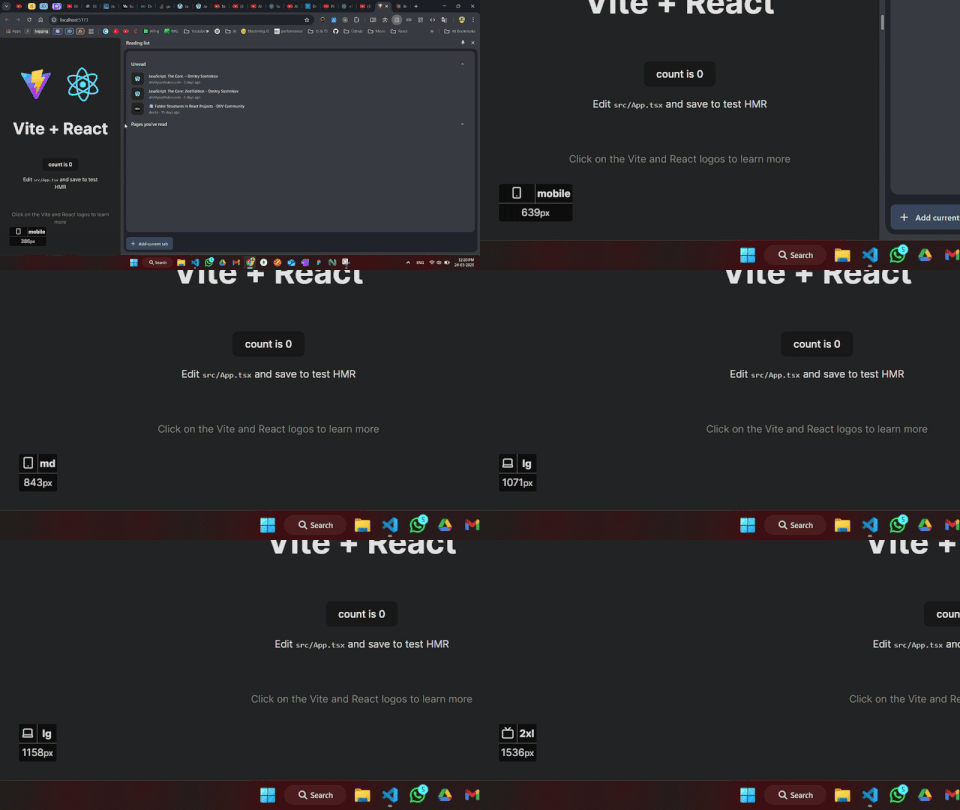
## Installation
```bash
npm install breakpointer
```
## Exports
| Export | Description |
|--------|-------------|
| `BreakpointerProvider` | A context provider to wrap your application |
| `useBreakpointer` | A hook to access the current breakpoint |
## Basic Usage
### Setup
Wrap your application with `BreakpointerProvider`:
```tsx
import React, { StrictMode } from 'react';
import { createRoot } from 'react-dom/client';
import App from './App';
import { BreakpointerProvider } from 'breakpointer';
/*
if mode !== "development", the BreakpointerIndicator will skip rendering
*/
const MODE = import.meta.env.MODE; // based on your chosen build tool
createRoot(document.getElementById('root')!).render(
<StrictMode>
<BreakpointerProvider mode={MODE}>
<App />
</BreakpointerProvider>
</StrictMode>,
)
```
### Using the Hook
Use the `useBreakpointer` hook to detect breakpoints in your components:
```tsx
import React from 'react';
import { useBreakpointer } from 'breakpointer';
const MyComponent = () => {
const {
screen, // ex: "md" if currentWidth is in the range from 768 - 1023
currentWidth // innerWidth/viewPort width
} = useBreakpointer();
return (
<div>
{screen === 'sm' && <p>Small screen (640px - 767px)</p>}
{screen === 'md' && <p>Medium screen (768px - 1023px)</p>}
{screen === 'lg' && <p>Large screen (1024px - 1279px)</p>}
<p>Current width: {currentWidth}px</p>
</div>
);
};
export default MyComponent;
```
## Default Breakpoints
Breakpointer comes with the following default breakpoints, which align with Tailwind CSS's default breakpoint system:
| Breakpoint | Min Width (px) | Description |
|------------|----------------|--------------------------------------|
| `sm` | 640 | Large phones & small tablets |
| `md` | 768 | Tablets |
| `lg` | 1024 | Laptops & large tablets |
| `xl` | 1280 | Desktop & large laptops |
| `2xl` | 1536 | Wide screen & large desktops |
## Usage with Tailwind v3
**Note:** `resolveConfig` is only applicable for Tailwind CSS version `3.x.x`.
To use custom Tailwind breakpoints, pass a `breakpointsObj` prop to `BreakpointerProvider`:
```tsx
import React from 'react';
import { createRoot } from 'react-dom/client';
import App from './App';
import { BreakpointerProvider } from 'breakpointer';
import resolveConfig from "tailwindcss/resolveConfig"; // resolver Function
import tailwindConfig from "../tailwind.config"; // js/ts tailwind config
const resolvedConfig = resolveConfig(tailwindConfig);
createRoot(document.getElementById('root')!).render(
<BreakpointerProvider breakpointsObj={resolvedConfig.theme.screens}>
<App />
</BreakpointerProvider>,
document.getElementById('root')
);
```
## BreakpointerIndicator
The `BreakpointerIndicator` component has been integrated into the `BreakpointerProvider`, so there is no need for manual invocation. You can now customize its appearance by passing a `classNames` object as a prop to the `BreakpointerProvider`.
### `classNames` Object
The `classNames` object allows you to style the internal elements of the `BreakpointerIndicator`. Below is a table describing the available properties:
| Property | Description |
|----------------|-----------------------------------------------------------------------------|
| `wrapper` | Styles the outer wrapper of the indicator. |
| `iconWrapper` | Styles the container for the breakpoint icon. |
| `screen` | Styles the text displaying the current breakpoint (e.g., `sm`, `md`). |
| `currentWidth` | Styles the text displaying the current viewport width in pixels. |
### Example Usage
```tsx
import { BreakpointerProvider } from 'breakpointer';
const App = () => {
return (
<BreakpointerProvider
mode="development"
classNames={{
wrapper: ["bg-gray-300", "text-red-800", "p-4", "rounded-lg"],
iconWrapper: ["content-start"],
screen: ["font-bold", "text-lg", "text-blue-500"],
currentWidth: ["text-sm", "text-gray-400"],
}}
>
<App />
</BreakpointerProvider>
);
};
```
This configuration will style the `BreakpointerIndicator` according to the provided class names.