botkit-rocketchat-connector
Version:
A external connector to integrates botkit with RocketChat
43 lines (22 loc) • 2.81 kB
Markdown
# botkit-rocketchat-connector
## Brief
A Botkit platform connector for Rocket.Chat
This is a work in progress for the two communities to collaborate on to achieve the integration proposed in [this issue](https://github.com/RocketChat/Rocket.Chat/issues/9937) on the main Rocket.Chat project.
We will follow the [guide here](https://botkit.ai/docs/howto/build_connector.html) to create a module that can be required by Botkit bots as a controller for Rocket.Chat. The outcome will be something like the current Slack integration, which is packaged with Botkit, [here](https://github.com/howdyai/botkit/blob/master/lib/SlackBot.js).
This work will pair with another project to provide a starter bot, implimenting this connector. The starter bot will provide most of the documentation. e.g Similar to [botkit-start-slack](https://github.com/howdyai/botkit-starter-slack), problably a [botkit middleware](https://github.com/howdyai/botkit/blob/master/docs/readme-middlewares.md) will be used to build it.
It may also end up being moved to be maintained under the [howdyai](https://github.com/howdyai) organisation, depending on what makes sense for the contributors doing most of the maintenance.
The code have some `console.log()` and **// TO DO: [...]** comments, this annotations will not remain when **version 1.0** is ready.
## botkit-starter-rocketchat
Do not forget to see the [botkit-starter-rocketchat](https://github.com/RocketChat/botkit-starter-rocketchat) there the connector is used and the needed configuration is made to make your botkit run in RocketChat.
## Organization
The RocketChat connector with Botkit it's mainly inside the `RocketChatBot.js` file. The image bellow exemply the configuration inside it:
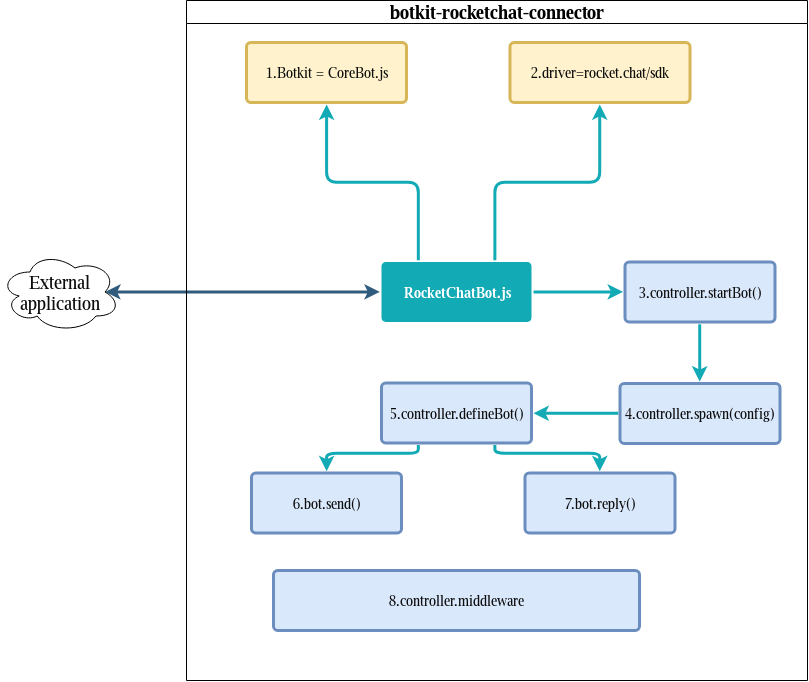
* `External application` it's the application that's make use of the connector to make the needed configuration, like the [botkit-starter-rocketchat](https://github.com/RocketChat/botkit-starter-rocketchat).
1. In yellow are the imports, Botkit `CoreBot.js`
2. Rocketchat `sdk driver`.
3. The function `controller.startBot()` make the connection with RocketChat using SDK and send a simple message to the channel.
4. After the connection is made, the function `controller.spawn(config)` call `controller.defineBot()` using some configurations.
5. `controller.defineBot()` Defines some importants functions like `bot.send()` and `bot.reply()`
6. Every message that's appers in the RocketChat side is sent using `bot.send()` function.
7. `bot.reply()` is used to reply messages.
8. To make all things work, it's needed pass throught some `middlewares`, this is a pipeline from `CoreBot.js` to configure the message and others things.