bitmart-api
Version:
Complete & robust Node.js SDK for BitMart's REST APIs and WebSockets, with TypeScript declarations.
252 lines (184 loc) • 9.77 kB
Markdown
# Node.js & JavaScript SDK for BitMart REST API & WebSockets
[][1]
[][1]
[][1]
[](https://github.com/tiagosiebler/bitmart-api/actions/workflows/e2etest.yml)
[][1]
[](https://www.codefactor.io/repository/github/tiagosiebler/bitmart-api)
[](https://t.me/nodetraders)
<p align="center">
<a href="https://www.npmjs.com/package/bitmart-api">
<picture>
<source media="(prefers-color-scheme: dark)" srcset="https://github.com/tiagosiebler/bitmart-api/blob/master/docs/images/logoDarkMode2.svg?raw=true#gh-dark-mode-only">
<img alt="SDK Logo" src="https://github.com/tiagosiebler/bitmart-api/blob/master/docs/images/logoBrightMode2.svg?raw=true#gh-light-mode-only">
</picture>
</a>
</p>
[1]: https://www.npmjs.com/package/bitmart-api
Complete JavaScript & Node.js SDK for BitMart REST APIs & WebSockets:
- Complete integration with all BitMart APIs. Full support for Futures V2 domain.
- TypeScript support (with type declarations for most API requests & responses)
- Robust WebSocket integration with configurable connection heartbeats & automatic reconnect then resubscribe workflows.
- Browser-friendly HMAC signature mechanism.
- Automatically supports both ESM and CJS projects.
## Installation
`npm install --save bitmart-api`
## Issues & Discussion
- Issues? Check the [issues tab](https://github.com/tiagosiebler/bitmart-api/issues).
- Discuss & collaborate with other node devs? Join our [Node.js Algo Traders](https://t.me/nodetraders) engineering community on telegram.
- Follow our announcement channel for real-time updates on [X/Twitter](https://x.com/QuantSDKs)
## Usage
Most methods pass values as-is into HTTP requests. These can be populated using parameters specified by BitMart's API documentation, or check the type definition in each class within this repository.
- [BitMart API | Spot](https://developer-pro.bitmart.com/en/spot/#change-log)
- [BitMart API | USD-M Futures](https://developer-pro.bitmart.com/en/spot/#change-log)
- [REST Endpoint Function List](./docs/endpointFunctionList.md)
### REST APIs
- Create API credentials within your account on BitMart's website, if you haven't done so already.
- Import/require the module
- Create an instance of the REST client
- Call the function corresponding to the API call and handle the returned promise.
```typescript
const { RestClient, FuturesClientV2 } = require('bitmart-api');
const client = new RestClient({
apiKey: 'yourAPIKeyHere',
apiSecret: 'yourAPISecretHere',
apiMemo: 'yourAPIMemoHere',
});
client
.getAccountBalancesV1()
.then((result) => {
console.log('getAccountBalancesV1 result: ', result);
})
.catch((err) => {
console.error('getAccountBalancesV1 error: ', err);
});
// For futures, use the FuturesClientV2 - it's mapped to the new V2 futures sub domain
const futuresV2Client = new FuturesClientV2({
apiKey: 'yourAPIKeyHere',
apiSecret: 'yourAPISecretHere',
apiMemo: 'yourAPIMemoHere',
});
const balances = await futuresV2Client.getFuturesAccountAssets();
console.log('Balances: ', JSON.stringify(balances, null, 2));
```
### WebSocket
- All available WebSockets can be used via a shared WebsocketClient
- Simple instructions are below, for more examples check [examples](./examples)
```typescript
// create websocket client
// If public client, doesn't need API keys
const client = new WebsocketClient();
// If private client, needs API keys
const client = new WebsocketClient({
apiKey: 'yourAPIKeyHere',
apiSecret: 'yourAPISecretHere',
apiMemo: 'yourAPIMemoHere',
});
client.on('open', (data) => {
console.log('connected ', data?.wsKey);
});
// Data received
client.on('update', (data) => {
console.info('data received: ', JSON.stringify(data));
});
// Something happened, attempting to reconenct
client.on('reconnect', (data) => {
console.log('reconnect: ', data);
});
// Reconnect successful
client.on('reconnected', (data) => {
console.log('reconnected: ', data);
});
// Connection closed. If unexpected, expect reconnect -> reconnected.
client.on('close', (data) => {
console.error('close: ', data);
});
// Reply to a request, e.g. "subscribe"/"unsubscribe"/"authenticate"
client.on('response', (data) => {
console.info('response: ', data);
});
client.on('exception', (data) => {
console.error('exception: ', data);
});
client.on('authenticated', (data) => {
console.error('authenticated: ', data);
});
// subscribing to topics
// Spot User Orders
client.subscribe('spot/user/order:BTC_USDT', 'spot');
// Ticker Channel
// client.subscribe('futures/ticker', 'futures');
// Depth Channel
// client.subscribe('futures/depth20:BTCUSDT', 'futures');
// Trade Channel
// client.subscribe('futures/trade:BTCUSDT', 'futures');
// KlineBin Channel
// client.subscribe('futures/klineBin1m:BTCUSDT', 'futures');
// Or have multiple topics in one array:
client.subscribe(
[
'futures/klineBin1m:BTCUSDT',
'futures/klineBin1m:ETHUSDT',
'futures/klineBin1m:XRPUSDT',
'futures/klineBin1m:BMXUSDT',
'futures/klineBin1m:SOLUSDT',
],
'futures',
);
```
### Recv Window
This can be set two levels:
- Per method: if provided in a method, will be used instead of the global default
- Global default: this will apply by default to any api call that supports recvWindow, if no recvWindow is provided in the method call.
### Custom Sign
Authentication involves HMAC signing on the request, using API credentials. Internally, this SDK uses the Web Crypto API. The REST client also supports injecting a custom sign function, should you wish to use an alternative (such as node's native & faster createHmac).
Refer to the [fasterHmacSign.ts](./examples/fasterHmacSign.ts) example for a demonstration.
---
<!-- template_related_projects -->
## Related projects
Check out my related JavaScript/TypeScript/Node.js projects:
- Try my REST API & WebSocket SDKs:
- [Bybit-api Node.js SDK](https://www.npmjs.com/package/bybit-api)
- [Okx-api Node.js SDK](https://www.npmjs.com/package/okx-api)
- [Binance Node.js SDK](https://www.npmjs.com/package/binance)
- [Gateio-api Node.js SDK](https://www.npmjs.com/package/gateio-api)
- [Bitget-api Node.js SDK](https://www.npmjs.com/package/bitget-api)
- [Kucoin-api Node.js SDK](https://www.npmjs.com/package/kucoin-api)
- [Coinbase-api Node.js SDK](https://www.npmjs.com/package/coinbase-api)
- [Bitmart-api Node.js SDK](https://www.npmjs.com/package/bitmart-api)
- Try my misc utilities:
- [OrderBooks Node.js](https://www.npmjs.com/package/orderbooks)
- [Crypto Exchange Account State Cache](https://www.npmjs.com/package/accountstate)
- Check out my examples:
- [awesome-crypto-examples Node.js](https://github.com/tiagosiebler/awesome-crypto-examples)
<!-- template_related_projects_end -->
## Structure
This connector is fully compatible with both TypeScript and pure JavaScript projects, while the connector is written in TypeScript. A pure JavaScript version can be built using `npm run build`, which is also the version published to [npm](https://www.npmjs.com/package/bitmart-api).
The version on npm is the output from the `build` command and can be used in projects without TypeScript (although TypeScript is definitely recommended).
Note: The build will output both ESM and CJS, although node should automatically import the correct entrypoint for your environment.
- [src](./src) - the whole SDK written in TypeScript
- [dist](./dist) - ESM & CJS builds of the SDK in JavaScript (this is published to npm)
- [examples](./examples) - some implementation examples & demonstrations.
---
<!-- template_contributions -->
### Contributions & Thanks
Have my projects helped you? Share the love, there are many ways you can show your thanks:
- Star & share my projects.
- Are my projects useful? Sponsor me on Github and support my effort to maintain & improve them: https://github.com/sponsors/tiagosiebler
- Have an interesting project? Get in touch & invite me to it.
- Or buy me all the coffee:
- ETH(ERC20): `0xA3Bda8BecaB4DCdA539Dc16F9C54a592553Be06C` <!-- metamask -->
<!---
old ones:
- BTC: `1C6GWZL1XW3jrjpPTS863XtZiXL1aTK7Jk`
- BTC(SegWit): `bc1ql64wr9z3khp2gy7dqlmqw7cp6h0lcusz0zjtls`
- ETH(ERC20): `0xe0bbbc805e0e83341fadc210d6202f4022e50992`
- USDT(TRC20): `TA18VUywcNEM9ahh3TTWF3sFpt9rkLnnQa
-->
<!-- template_contributions_end -->
### Contributions & Pull Requests
Contributions are encouraged, I will review any incoming pull requests. See the issues tab for todo items.
<!-- template_star_history -->
## Star History
[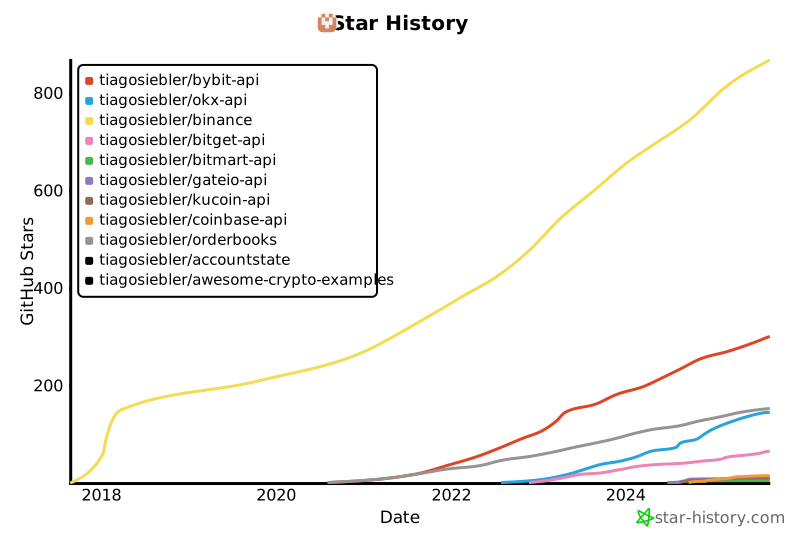](https://star-history.com/#tiagosiebler/bybit-api&tiagosiebler/okx-api&tiagosiebler/binance&tiagosiebler/bitget-api&tiagosiebler/bitmart-api&tiagosiebler/gateio-api&tiagosiebler/kucoin-api&tiagosiebler/coinbase-api&tiagosiebler/orderbooks&tiagosiebler/accountstate&tiagosiebler/awesome-crypto-examples&Date)
<!-- template_star_history_end -->