binance
Version:
Professional Node.js & JavaScript SDK for Binance REST APIs & WebSockets, with TypeScript & end-to-end tests.
657 lines (515 loc) • 24 kB
Markdown
# Node.js & JavaScript SDK for Binance REST APIs & WebSockets
[](https://github.com/tiagosiebler/binance/actions/workflows/test.yml)
[][1]
[][1]
[](https://dependents.info/tiagosiebler/binance)
[][1]
[][1]
[](https://www.codefactor.io/repository/github/tiagosiebler/binance)
[](https://t.me/nodetraders)
<p align="center">
<a href="https://www.npmjs.com/package/binance">
<picture>
<source media="(prefers-color-scheme: dark)" srcset="https://github.com/tiagosiebler/binance/blob/master/docs/images/logoDarkMode2.svg?raw=true#gh-dark-mode-only">
<img alt="SDK Logo" src="https://github.com/tiagosiebler/binance/blob/master/docs/images/logoBrightMode2.svg?raw=true#gh-light-mode-only">
</picture>
</a>
</p>
[1]: https://www.npmjs.com/package/binance
Updated & performant JavaScript & Node.js SDK for the Binance REST APIs and WebSockets:
- Professional, robust & performant Binance SDK with leading trading volume in production (livenet).
- Extensive integration with Binance REST APIs, WebSockets & WebSocket APIs.
- Complete TypeScript support (with type declarations for all API requests & responses).
- Supports Binance REST APIs for Binance Spot, Margin, Isolated Margin, Options, USDM & CoinM Futures.
- Strongly typed requests and responses.
- Automated end-to-end tests on most API calls, ensuring no breaking changes are released to npm.
- Actively maintained with a modern, promise-driven interface.
- Support for all authentication mechanisms available on Binance:
- HMAC
- RSA
- Ed25519 (required for WS API).
- Passing a private key as a secret will automatically detect whether to switch to RSA or Ed25519 authentication.
- Supports WebSockets for all available product groups on Binance including Spot, Margin, Isolated Margin, Portfolio, Options, USDM & CoinM Futures.
- Event driven messaging.
- Smart WebSocket persistence
- Automatically handle silent WebSocket disconnections through timed heartbeats, including the scheduled 24hr disconnect.
- Automatically handle listenKey persistence and expiration/refresh.
- Emit `reconnected` event when dropped connection is restored.
- Strongly typed on most WebSocket events, with typeguards available for TypeScript users.
- Optional:
- Automatic beautification of WebSocket events (from one-letter keys to descriptive words, and strings with floats to numbers).
- Automatic beautification of REST responses (parsing numbers in strings to numbers).
- Supports WebSocket API on all available product groups, including Spot & Futures:
- Use the WebsocketClient's event-driven `sendWSAPIRequest()` method, or;
- Use the WebsocketAPIClient for a REST-like experience. Use the WebSocket API like a REST API! See [examples/ws-api-client.ts](./examples/ws-api-client.ts) for a demonstration.
- Heavy automated end-to-end testing with real API calls.
- End-to-end testing before any release.
- Real API calls in e2e tests.
- Proxy support via axios integration.
- Active community support & collaboration in telegram: [Node.js Algo Traders](https://t.me/nodetraders).
## Table of Contents
- [Installation](#installation)
- [Examples](#examples)
- [REST API Examples](./examples/REST)
- [WebSocket Examples](./examples/WebSockets)
- [WebSocket Consumers](./examples/WebSockets/)
- [WebSocket API](./examples/WebSockets/ws-api-client.ts)
- [Issues & Discussion](#issues--discussion)
- [Related Projects](#related-projects)
- [Documentation Links](#documentation)
- [Usage](#usage)
- [REST API Clients](#rest-api-clients)
- [REST Main Client](#rest-main-client)
- [REST USD-M Futures](#rest-usd-m-futures)
- [REST COIN-M Futures](#rest-coin-m-futures)
- [WebSockets](#websockets)
- [WebSocket Consumers](#websocket-consumers)
- [WebSocket API](#websocket-api)
- [Event Driven API](#event-driven-api)
- [Promise Driven API](#async-await-api)
- [Customise Logging](#customise-logging)
- [Frontend Usage](#browserfrontend-usage)
- [Import](#import)
- [Webpack](#webpack)
- [LLMs & AI](#use-with-llms--ai)
- [Contributions & Thanks](#contributions--thanks)
## Installation
`npm install binance --save`
## Examples
Refer to the [examples](./examples) folder for implementation demos.
## Issues & Discussion
- Issues? Check the [issues tab](https://github.com/tiagosiebler/binance/issues).
- Discuss & collaborate with other node devs? Join our [Node.js Algo Traders](https://t.me/nodetraders) engineering community on telegram.
- Questions about Binance APIs & WebSockets? Ask in the official [Binance API](https://t.me/binance_api_english) group on telegram.
- Follow our announcement channel for real-time updates on [X/Twitter](https://x.com/sieblyio)
<!-- template_related_projects -->
## Related projects
Check out my related JavaScript/TypeScript/Node.js projects:
- Try my REST API & WebSocket SDKs:
- [Bybit-api Node.js SDK](https://www.npmjs.com/package/bybit-api)
- [Okx-api Node.js SDK](https://www.npmjs.com/package/okx-api)
- [Binance Node.js SDK](https://www.npmjs.com/package/binance)
- [Gateio-api Node.js SDK](https://www.npmjs.com/package/gateio-api)
- [Bitget-api Node.js SDK](https://www.npmjs.com/package/bitget-api)
- [Kucoin-api Node.js SDK](https://www.npmjs.com/package/kucoin-api)
- [Coinbase-api Node.js SDK](https://www.npmjs.com/package/coinbase-api)
- [Bitmart-api Node.js SDK](https://www.npmjs.com/package/bitmart-api)
- Try my misc utilities:
- [OrderBooks Node.js](https://www.npmjs.com/package/orderbooks)
- [Crypto Exchange Account State Cache](https://www.npmjs.com/package/accountstate)
- Check out my examples:
- [awesome-crypto-examples Node.js](https://github.com/tiagosiebler/awesome-crypto-examples)
<!-- template_related_projects_end -->
## Documentation
Most methods accept JS objects. These can be populated using parameters specified by Binance's API documentation.
- Binance API Documentation
- [ Spot ](https://developers.binance.com/docs/binance-spot-api-docs)
- [ Derivatives ](https://developers.binance.com/docs/derivatives)
- [ Margin ](https://developers.binance.com/docs/margin_trading)
- [ Wallet ](https://developers.binance.com/docs/wallet)
- [Find all products here](https://developers.binance.com/en)
- [REST Endpoint Function List](./docs/endpointFunctionList.md)
- [TSDoc Documentation (autogenerated using typedoc)](https://tsdocs.dev/docs/binance)
## Structure
This project uses typescript. Resources are stored in 3 key structures:
- [src](./src) - the whole connector written in typescript
- [lib](./lib) - the javascript version of the project (compiled from typescript). This should not be edited directly, as it will be overwritten with each release.
- [dist](./dist) - the packed bundle of the project for use in browser environments.
---
# Usage
Create API credentials at Binance
- [Livenet](https://www.binance.com/en/support/faq/360002502072?ref=IVRLUZJO)
- [Testnet](https://testnet.binance.vision/).
- [Testnet Futures](testnet.binancefuture.com).
## REST API Clients
There are several REST API modules as there are some differences in each API group.
1. `MainClient` for most APIs, including: spot, margin, isolated margin, mining, BLVT, BSwap, Fiat & sub-account management.
2. `USDMClient` for USD-M futures APIs.
3. `CoinMClient` for COIN-M futures APIs.
4. `PortfolioClient` for Portfolio Margin APIs.
Vanilla Options is not yet available. Please get in touch if you're looking for this.
### REST Main Client
The MainClient covers all endpoints under the main "api\*.binance.com" subdomains, including but not limited to endpoints in the following product groups:
- Spot
- Cross & isolated margin
- Convert
- Wallet
- Futures management (transfers & history)
- Sub account management
- Misc transfers
- Auto & dual invest
- Staking
- Mining
- Loans & VIP loans
- Simple Earn
- NFTs
- C2C
- Exchange Link
- Alpha trading
Refer to the following links for a complete list of available endpoints:
- [Binance Node.js & JavaScript SDK Endpoint Map](https://github.com/tiagosiebler/binance/blob/master/docs/endpointFunctionList.md)
- [Binance Spot API Docs](https://developers.binance.com/docs/binance-spot-api-docs/rest-api/general-endpoints)
Start by importing the `MainClient` class. API credentials are optional, unless you plan on making private API calls. More Node.js & JavaScript examples for Binance's REST APIs & WebSockets can be found in the [examples](./examples) folder on GitHub.
```javascript
import { MainClient } from 'binance';
// or, if you prefer `require()`:
// const { MainClient } = require('binance');
const API_KEY = 'xxx';
const API_SECRET = 'yyy';
const client = new MainClient({
api_key: API_KEY,
api_secret: API_SECRET,
// Connect to testnet environment
// testnet: true,
});
client
.getAccountTradeList({ symbol: 'BTCUSDT' })
.then((result) => {
console.log('getAccountTradeList result: ', result);
})
.catch((err) => {
console.error('getAccountTradeList error: ', err);
});
client
.getExchangeInfo()
.then((result) => {
console.log('getExchangeInfo inverse result: ', result);
})
.catch((err) => {
console.error('getExchangeInfo inverse error: ', err);
});
```
See [main-client.ts](./src/main-client.ts) for further information on the available REST API endpoints for spot/margin/etc.
### REST USD-M Futures
Start by importing the USDM client. API credentials are optional, unless you plan on making private API calls.
```javascript
import { USDMClient } from 'binance';
// or, if you prefer `require()`:
// const { USDMClient } = require('binance');
const API_KEY = 'xxx';
const API_SECRET = 'yyy';
const client = new USDMClient({
api_key: API_KEY,
api_secret: API_SECRET,
// Connect to testnet environment
// testnet: true,
});
client
.getBalance()
.then((result) => {
console.log('getBalance result: ', result);
})
.catch((err) => {
console.error('getBalance error: ', err);
});
client
.submitNewOrder({
side: 'SELL',
symbol: 'BTCUSDT',
type: 'MARKET',
quantity: 0.001,
})
.then((result) => {
console.log('submitNewOrder result: ', result);
})
.catch((err) => {
console.error('submitNewOrder error: ', err);
});
```
See [usdm-client.ts](./src/usdm-client.ts) for further information.
### REST COIN-M Futures
Start by importing the coin-m client. API credentials are optional, though an error is thrown when attempting any private API calls without credentials.
```javascript
import { CoinMClient } from 'binance';
// or, if you prefer `require()`:
// const { CoinMClient } = require('binance');
const API_KEY = 'xxx';
const API_SECRET = 'yyy';
const client = new CoinMClient({
api_key: API_KEY,
api_secret: API_SECRET,
// Connect to testnet environment
// testnet: true,
});
client
.getSymbolOrderBookTicker()
.then((result) => {
console.log('getSymbolOrderBookTicker result: ', result);
})
.catch((err) => {
console.error('getSymbolOrderBookTicker error: ', err);
});
```
See [coinm-client.ts](./src/coinm-client.ts) for further information.
## WebSockets
### WebSocket Consumers
All websockets are accessible via the shared `WebsocketClient`. As before, API credentials are optional unless the user data stream is required.
The below example demonstrates connecting as a consumer, to receive WebSocket events from Binance:
```javascript
import { WebsocketClient } from 'binance';
// or, if you prefer `require()`:
// const { WebsocketClient } = require('binance');
const API_KEY = 'xxx';
const API_SECRET = 'yyy';
/**
* The WebsocketClient will manage individual connections for you, under the hood.
* Just make an instance of the WS Client and subscribe to topics. It'll handle the rest.
*/
const wsClient = new WebsocketClient({
api_key: key,
api_secret: secret,
// Optional: when enabled, the SDK will try to format incoming data into more readable objects.
// Beautified data is emitted via the "formattedMessage" event
beautify: true,
// Disable ping/pong ws heartbeat mechanism (not recommended)
// disableHeartbeat: true,
// Connect to testnet environment
// testnet: true,
});
// receive raw events
wsClient.on('message', (data) => {
console.log('raw message received ', JSON.stringify(data, null, 2));
});
// notification when a connection is opened
wsClient.on('open', (data) => {
console.log('connection opened open:', data.wsKey, data.wsUrl);
});
// receive formatted events with beautified keys. Any "known" floats stored in strings as parsed as floats.
wsClient.on('formattedMessage', (data) => {
console.log('formattedMessage: ', data);
});
// read response to command sent via WS stream (e.g LIST_SUBSCRIPTIONS)
wsClient.on('response', (data) => {
console.log('log response: ', JSON.stringify(data, null, 2));
});
// receive notification when a ws connection is reconnecting automatically
wsClient.on('reconnecting', (data) => {
console.log('ws automatically reconnecting.... ', data?.wsKey);
});
// receive notification that a reconnection completed successfully (e.g use REST to check for missing data)
wsClient.on('reconnected', (data) => {
console.log('ws has reconnected ', data?.wsKey);
});
// Recommended: receive error events (e.g. first reconnection failed)
wsClient.on('exception', (data) => {
console.log('ws saw error ', data?.wsKey);
});
/**
* Subscribe to public topics either one at a time or many in an array
*/
// E.g. one at a time, routed to the coinm futures websockets:
wsClient.subscribe('btcusd@indexPrice', 'coinm');
wsClient.subscribe('btcusd@miniTicker', 'coinm');
// Or send many topics at once to a stream, e.g. the usdm futures stream:
wsClient.subscribe(
['btcusdt@aggTrade', 'btcusdt@markPrice', '!ticker@arr', '!miniTicker@arr'],
'usdm',
);
// spot & margin topics should go to "main"
// (similar how the MainClient is for REST APIs in that product group)
wsClient.subscribe(
[
// All Market Rolling Window Statistics Streams
// https://developers.binance.com/docs/binance-spot-api-docs/web-socket-streams#all-market-rolling-window-statistics-streams
'!ticker_1h@arr',
// Individual Symbol Book Ticker Streams
// https://developers.binance.com/docs/binance-spot-api-docs/web-socket-streams#individual-symbol-book-ticker-streams
'btcusdt@bookTicker',
// Average Price
// https://developers.binance.com/docs/binance-spot-api-docs/web-socket-streams#average-price
'btcusdt@avgPrice',
// Partial Book Depth Streams
// https://developers.binance.com/docs/binance-spot-api-docs/web-socket-streams#partial-book-depth-streams
'btcusdt@depth10@100ms',
// Diff. Depth Stream
// https://developers.binance.com/docs/binance-spot-api-docs/web-socket-streams#diff-depth-stream
'btcusdt@depth',
],
// Look at the `WS_KEY_URL_MAP` for a list of values here:
// https://github.com/tiagosiebler/binance/blob/master/src/util/websockets/websocket-util.ts
// "main" connects to wss://stream.binance.com:9443/stream
// https://developers.binance.com/docs/binance-spot-api-docs/web-socket-streams
'main',
);
/**
* For the user data stream, these convenient subscribe methods open a dedicated
* connection with the listen key workflow:
*/
wsClient.subscribeSpotUserDataStream();
wsClient.subscribeMarginUserDataStream();
wsClient.subscribeIsolatedMarginUserDataStream('BTCUSDT');
wsClient.subscribeUsdFuturesUserDataStream();
```
See [websocket-client.ts](./src/websocket-client.ts) for further information. Also see [ws-userdata.ts](./examples/ws-userdata.ts) for user data examples.
### WebSocket API
Some of the product groups available on Binance also support sending requests (commands) over an active WebSocket connection. This is called the WebSocket API.
Note: the WebSocket API requires the use of Ed25519 keys. HMAC & RSA keys are not supported by Binance for the WebSocket API (as of Apr 2025).
#### Event Driven API
The WebSocket API is available in the [WebsocketClient](./src/websocket-client.ts) via the `sendWSAPIRequest(wsKey, command, commandParameters)` method.
Each call to this method is wrapped in a promise, which you can async await for a response, or handle it in a raw event-driven design.
#### Async Await API
The WebSocket API is also available in a promise-wrapped REST-like format. Either, as above, await any calls to `sendWSAPIRequest(...)`, or directly use the convenient WebsocketAPIClient. This class is very similar to existing REST API classes (such as the MainClient or USDMClient).
It provides one function per endpoint, feels like a REST API and will automatically route your request via an automatically persisted, authenticated and health-checked WebSocket API connection.
Below is an example showing how easy it is to use the WebSocket API without any concern for the complexity of managing WebSockets.
```typescript
import { WebsocketAPIClient } from 'binance';
// or, if you prefer `require()`:
// const { WebsocketAPIClient } = require('binance');
/**
* The WS API only works with an Ed25519 API key.
*
* Check the rest-private-ed25519.md in this folder for more guidance
* on preparing this Ed25519 API key.
*/
const publicKey = `-----BEGIN PUBLIC KEY-----
MCexampleQTxwLU9o=
-----END PUBLIC KEY-----
`;
const privateKey = `-----BEGIN PRIVATE KEY-----
MC4CAQAexamplewqj5CzUuTy1
-----END PRIVATE KEY-----
`;
// API Key returned by binance, generated using the publicKey (above) via Binance's website
const apiKey = 'TQpJexamplerobdG';
// Make an instance of the WS API Client
const wsClient = new WebsocketAPIClient({
api_key: apiKey,
api_secret: privateKey,
beautify: true,
// Enforce testnet ws connections, regardless of supplied wsKey
// testnet: true,
});
// Optional, if you see RECV Window errors, you can use this to manage time issues. However, make sure you sync your system clock first!
// https://github.com/tiagosiebler/awesome-crypto-examples/wiki/Timestamp-for-this-request-is-outside-of-the-recvWindow
// wsClient.setTimeOffsetMs(-5000);
// Optional, see above. Can be used to prepare a connection before sending commands
// await wsClient.connectWSAPI(WS_KEY_MAP.mainWSAPI);
// Make WebSocket API calls, very similar to a REST API:
wsClient
.getFuturesAccountBalanceV2({
timestamp: Date.now(),
recvWindow: 5000,
})
.then((result) => {
console.log('getFuturesAccountBalanceV2 result: ', result);
})
.catch((err) => {
console.error('getFuturesAccountBalanceV2 error: ', err);
});
wsClient
.submitNewFuturesOrder('usdm', {
side: 'SELL',
symbol: 'BTCUSDT',
type: 'MARKET',
quantity: 0.001,
timestamp: Date.now(),
// recvWindow: 5000,
})
.then((result) => {
console.log('getFuturesAccountBalanceV2 result: ', result);
})
.catch((err) => {
console.error('getFuturesAccountBalanceV2 error: ', err);
});
```
---
## Customise Logging
Pass a custom logger which supports the log methods `trace`, `info` and `error`, or override methods from the default logger as desired.
```javascript
import { WebsocketClient, DefaultLogger } from 'binance';
// or, if you prefer `require()`:
// const { WebsocketClient, DefaultLogger } = require('binance');
// Enable all logging on the trace level (disabled by default)
DefaultLogger.trace = (...params) => {
console.trace('trace: ', params);
};
// Pass the updated logger as the 2nd parameter
const ws = new WebsocketClient(
{
api_key: key,
api_secret: secret,
beautify: true,
},
DefaultLogger
);
// Or, create a completely custom logger with the 3 available functions
const customLogger = {
trace: (...params: LogParams): void => {
console.trace(new Date(), params);
},
info: (...params: LogParams): void => {
console.info(new Date(), params);
},
error: (...params: LogParams): void => {
console.error(new Date(), params);
},
}
// Pass the custom logger as the 2nd parameter
const ws = new WebsocketClient(
{
api_key: key,
api_secret: secret,
beautify: true,
},
customLogger
);
```
## Browser/Frontend Usage
### Import
This is the "modern" way, allowing the package to be directly imported into frontend projects with full typescript support.
1. Install these dependencies
```sh
npm install crypto-browserify stream-browserify
```
2. Add this to your `tsconfig.json`
```json
{
"compilerOptions": {
"paths": {
"crypto": [
"./node_modules/crypto-browserify"
],
"stream": [
"./node_modules/stream-browserify"
]
}
```
3. Declare this in the global context of your application (ex: in polyfills for angular)
```js
(window as any).global = window;
```
### Webpack
This is the "old" way of using this package on webpages. This will build a minified js bundle that can be pulled in using a script tag on a website.
Build a bundle using webpack:
- `npm install`
- `npm build`
- `npm pack`
The bundle can be found in `dist/`. Altough usage should be largely consistent, smaller differences will exist. Documentation is still TODO.
## Use with LLMs & AI
This SDK includes a bundled `llms.txt` file in the root of the repository. If you're developing with LLMs, use the included `llms.txt` with your LLM - it will significantly improve the LLMs understanding of how to correctly use this SDK.
This file contains AI optimised structure of all the functions in this package, and their parameters for easier use with any learning models or artificial intelligence.
---
<!-- template_contributions -->
### Contributions & Thanks
Have my projects helped you? Share the love, there are many ways you can show your thanks:
- Star & share my projects.
- Are my projects useful? Sponsor me on Github and support my effort to maintain & improve them: https://github.com/sponsors/tiagosiebler
- Have an interesting project? Get in touch & invite me to it.
- Or buy me all the coffee:
- ETH(ERC20): `0xA3Bda8BecaB4DCdA539Dc16F9C54a592553Be06C` <!-- metamask -->
<!---
old ones:
- BTC: `1C6GWZL1XW3jrjpPTS863XtZiXL1aTK7Jk`
- BTC(SegWit): `bc1ql64wr9z3khp2gy7dqlmqw7cp6h0lcusz0zjtls`
- ETH(ERC20): `0xe0bbbc805e0e83341fadc210d6202f4022e50992`
- USDT(TRC20): `TA18VUywcNEM9ahh3TTWF3sFpt9rkLnnQa
-->
<!-- template_contributions_end -->
### Contributions & Pull Requests
Contributions are encouraged, I will review any incoming pull requests. See the issues tab for todo items.
## Used By
[](https://github.com/tiagosiebler/binance/network/dependents)
<!-- template_star_history -->
## Star History
[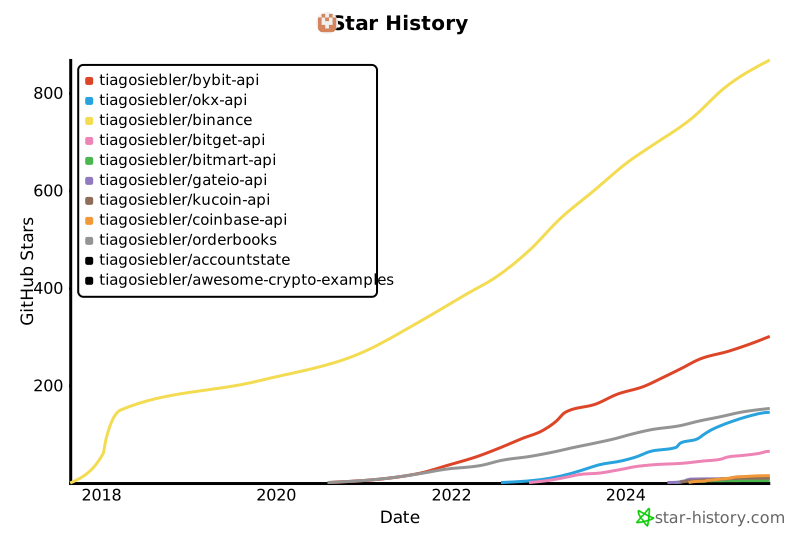](https://star-history.com/#tiagosiebler/bybit-api&tiagosiebler/okx-api&tiagosiebler/binance&tiagosiebler/bitget-api&tiagosiebler/bitmart-api&tiagosiebler/gateio-api&tiagosiebler/kucoin-api&tiagosiebler/coinbase-api&tiagosiebler/orderbooks&tiagosiebler/accountstate&tiagosiebler/awesome-crypto-examples&Date)
<!-- template_star_history_end -->