binance
Version:
Professional Node.js & JavaScript SDK for Binance REST APIs & WebSockets, with TypeScript & end-to-end tests.
650 lines (514 loc) • 23.3 kB
Markdown
# Node.js & JavaScript SDK for Binance REST APIs & WebSockets
[](https://github.com/tiagosiebler/binance/actions/workflows/test.yml)
[][1]
[][1]
[][1]
[][1]
[](https://www.codefactor.io/repository/github/tiagosiebler/binance)
[](https://t.me/nodetraders)
<p align="center">
<a href="https://www.npmjs.com/package/binance">
<picture>
<source media="(prefers-color-scheme: dark)" srcset="https://github.com/tiagosiebler/binance/blob/master/docs/images/logoDarkMode2.svg?raw=true#gh-dark-mode-only">
<img alt="SDK Logo" src="https://github.com/tiagosiebler/binance/blob/master/docs/images/logoBrightMode2.svg?raw=true#gh-light-mode-only">
</picture>
</a>
</p>
[1]: https://www.npmjs.com/package/binance
Updated & performant JavaScript & Node.js SDK for the Binance REST APIs and WebSockets:
- Professional, robust & performant Binance SDK with leading trading volume in production (livenet).
- Extensive integration with Binance REST APIs, WebSockets & WebSocket APIs.
- Complete TypeScript support (with type declarations for all API requests & responses).
- Supports Binance REST APIs for Binance Spot, Margin, Isolated Margin, Options, USDM & CoinM Futures.
- Strongly typed requests and responses.
- Automated end-to-end tests on most API calls, ensuring no breaking changes are released to npm.
- Actively maintained with a modern, promise-driven interface.
- Support for all authentication mechanisms available on Binance:
- HMAC
- RSA
- Ed25519 (required for WS API).
- Passing a private key as a secret will automatically detect whether to switch to RSA or Ed25519 authentication.
- Supports WebSockets for all available product groups on Binance including Spot, Margin, Isolated Margin, Portfolio, Options, USDM & CoinM Futures.
- Event driven messaging.
- Smart WebSocket persistence
- Automatically handle silent WebSocket disconnections through timed heartbeats, including the scheduled 24hr disconnect.
- Automatically handle listenKey persistence and expiration/refresh.
- Emit `reconnected` event when dropped connection is restored.
- Strongly typed on most WebSocket events, with typeguards available for TypeScript users.
- Optional:
- Automatic beautification of WebSocket events (from one-letter keys to descriptive words, and strings with floats to numbers).
- Automatic beautification of REST responses (parsing numbers in strings to numbers).
- Supports WebSocket API on all available product groups, including Spot & Futures:
- Use the WebsocketClient's event-driven `sendWSAPIRequest()` method, or;
- Use the WebsocketAPIClient for a REST-like experience. Use the WebSocket API like a REST API! See [examples/ws-api-client.ts](./examples/ws-api-client.ts) for a demonstration.
- Heavy automated end-to-end testing with real API calls.
- End-to-end testing before any release.
- Real API calls in e2e tests.
- Proxy support via axios integration.
- Active community support & collaboration in telegram: [Node.js Algo Traders](https://t.me/nodetraders).
## Table of Contents
- [Installation](#installation)
- [Examples](#examples)
- [REST API Examples](./examples/REST)
- [WebSocket Examples](./examples/WebSockets)
- [WebSocket Consumers](./examples/WebSockets/)
- [WebSocket API](./examples/WebSockets/ws-api-client.ts)
- [Issues & Discussion](#issues--discussion)
- [Related Projects](#related-projects)
- [Documentation Links](#documentation)
- [Usage](#usage)
- [REST API Clients](#rest-api-clients)
- [REST Main Client](#rest-main-client)
- [REST USD-M Futures](#rest-usd-m-futures)
- [REST COIN-M Futures](#rest-coin-m-futures)
- [WebSockets](#websockets)
- [WebSocket Consumers](#websocket-consumers)
- [WebSocket API](#websocket-api)
- [Event Driven API](#event-driven-api)
- [Promise Driven API](#async-await-api)
- [Customise Logging](#customise-logging)
- [Frontend Usage](#browserfrontend-usage)
- [Import](#import)
- [Webpack](#webpack)
- [Contributions & Thanks](#contributions--thanks)
## Installation
`npm install binance --save`
## Examples
Refer to the [examples](./examples) folder for implementation demos.
## Issues & Discussion
- Issues? Check the [issues tab](https://github.com/tiagosiebler/binance/issues).
- Discuss & collaborate with other node devs? Join our [Node.js Algo Traders](https://t.me/nodetraders) engineering community on telegram.
- Questions about Binance APIs & WebSockets? Ask in the official [Binance API](https://t.me/binance_api_english) group on telegram.
- Follow our announcement channel for real-time updates on [X/Twitter](https://x.com/sieblyio)
<!-- template_related_projects -->
## Related projects
Check out my related JavaScript/TypeScript/Node.js projects:
- Try my REST API & WebSocket SDKs:
- [Bybit-api Node.js SDK](https://www.npmjs.com/package/bybit-api)
- [Okx-api Node.js SDK](https://www.npmjs.com/package/okx-api)
- [Binance Node.js SDK](https://www.npmjs.com/package/binance)
- [Gateio-api Node.js SDK](https://www.npmjs.com/package/gateio-api)
- [Bitget-api Node.js SDK](https://www.npmjs.com/package/bitget-api)
- [Kucoin-api Node.js SDK](https://www.npmjs.com/package/kucoin-api)
- [Coinbase-api Node.js SDK](https://www.npmjs.com/package/coinbase-api)
- [Bitmart-api Node.js SDK](https://www.npmjs.com/package/bitmart-api)
- Try my misc utilities:
- [OrderBooks Node.js](https://www.npmjs.com/package/orderbooks)
- [Crypto Exchange Account State Cache](https://www.npmjs.com/package/accountstate)
- Check out my examples:
- [awesome-crypto-examples Node.js](https://github.com/tiagosiebler/awesome-crypto-examples)
<!-- template_related_projects_end -->
## Documentation
Most methods accept JS objects. These can be populated using parameters specified by Binance's API documentation.
- Binance API Documentation
- [ Spot ](https://developers.binance.com/docs/binance-spot-api-docs)
- [ Derivatives ](https://developers.binance.com/docs/derivatives)
- [ Margin ](https://developers.binance.com/docs/margin_trading)
- [ Wallet ](https://developers.binance.com/docs/wallet)
- [Find all products here](https://developers.binance.com/en)
- [REST Endpoint Function List](./docs/endpointFunctionList.md)
- [TSDoc Documentation (autogenerated using typedoc)](https://tsdocs.dev/docs/binance)
## Structure
This project uses typescript. Resources are stored in 3 key structures:
- [src](./src) - the whole connector written in typescript
- [lib](./lib) - the javascript version of the project (compiled from typescript). This should not be edited directly, as it will be overwritten with each release.
- [dist](./dist) - the packed bundle of the project for use in browser environments.
---
# Usage
Create API credentials at Binance
- [Livenet](https://www.binance.com/en/support/faq/360002502072?ref=IVRLUZJO)
- [Testnet](https://testnet.binance.vision/).
- [Testnet Futures](testnet.binancefuture.com).
## REST API Clients
There are several REST API modules as there are some differences in each API group.
1. `MainClient` for most APIs, including: spot, margin, isolated margin, mining, BLVT, BSwap, Fiat & sub-account management.
2. `USDMClient` for USD-M futures APIs.
3. `CoinMClient` for COIN-M futures APIs.
4. `PortfolioClient` for Portfolio Margin APIs.
Vanilla Options is not yet available. Please get in touch if you're looking for this.
### REST Main Client
The MainClient covers all endpoints under the main "api*.binance.com" subdomains, including but not limited to endpoints in the following product groups:
- Spot
- Cross & isolated margin
- Convert
- Wallet
- Futures management (transfers & history)
- Sub account management
- Misc transfers
- Auto & dual invest
- Staking
- Mining
- Loans & VIP loans
- Simple Earn
- NFTs
- C2C
- Exchange Link
Refer to the following links for a complete list of available endpoints:
- [Binance Node.js & JavaScript SDK Endpoint Map](https://github.com/tiagosiebler/binance/blob/master/docs/endpointFunctionList.md)
- [Binance Spot API Docs](https://developers.binance.com/docs/binance-spot-api-docs/rest-api/general-endpoints)
Start by importing the `MainClient` class. API credentials are optional, unless you plan on making private API calls. More Node.js & JavaScript examples for Binance's REST APIs & WebSockets can be found in the [examples](./examples) folder on GitHub.
```javascript
import { MainClient } from 'binance';
// or, if you prefer `require()`:
// const { MainClient } = require('binance');
const API_KEY = 'xxx';
const API_SECRET = 'yyy';
const client = new MainClient({
api_key: API_KEY,
api_secret: API_SECRET,
// Connect to testnet environment
// testnet: true,
});
client
.getAccountTradeList({ symbol: 'BTCUSDT' })
.then((result) => {
console.log('getAccountTradeList result: ', result);
})
.catch((err) => {
console.error('getAccountTradeList error: ', err);
});
client
.getExchangeInfo()
.then((result) => {
console.log('getExchangeInfo inverse result: ', result);
})
.catch((err) => {
console.error('getExchangeInfo inverse error: ', err);
});
```
See [main-client.ts](./src/main-client.ts) for further information on the available REST API endpoints for spot/margin/etc.
### REST USD-M Futures
Start by importing the USDM client. API credentials are optional, unless you plan on making private API calls.
```javascript
import { USDMClient } from 'binance';
// or, if you prefer `require()`:
// const { USDMClient } = require('binance');
const API_KEY = 'xxx';
const API_SECRET = 'yyy';
const client = new USDMClient({
api_key: API_KEY,
api_secret: API_SECRET,
// Connect to testnet environment
// testnet: true,
});
client
.getBalance()
.then((result) => {
console.log('getBalance result: ', result);
})
.catch((err) => {
console.error('getBalance error: ', err);
});
client
.submitNewOrder({
side: 'SELL',
symbol: 'BTCUSDT',
type: 'MARKET',
quantity: 0.001,
})
.then((result) => {
console.log('submitNewOrder result: ', result);
})
.catch((err) => {
console.error('submitNewOrder error: ', err);
});
```
See [usdm-client.ts](./src/usdm-client.ts) for further information.
### REST COIN-M Futures
Start by importing the coin-m client. API credentials are optional, though an error is thrown when attempting any private API calls without credentials.
```javascript
import { CoinMClient } from 'binance';
// or, if you prefer `require()`:
// const { CoinMClient } = require('binance');
const API_KEY = 'xxx';
const API_SECRET = 'yyy';
const client = new CoinMClient({
api_key: API_KEY,
api_secret: API_SECRET,
// Connect to testnet environment
// testnet: true,
});
client
.getSymbolOrderBookTicker()
.then((result) => {
console.log('getSymbolOrderBookTicker result: ', result);
})
.catch((err) => {
console.error('getSymbolOrderBookTicker error: ', err);
});
```
See [coinm-client.ts](./src/coinm-client.ts) for further information.
## WebSockets
### WebSocket Consumers
All websockets are accessible via the shared `WebsocketClient`. As before, API credentials are optional unless the user data stream is required.
The below example demonstrates connecting as a consumer, to receive WebSocket events from Binance:
```javascript
import { WebsocketClient } from 'binance';
// or, if you prefer `require()`:
// const { WebsocketClient } = require('binance');
const API_KEY = 'xxx';
const API_SECRET = 'yyy';
/**
* The WebsocketClient will manage individual connections for you, under the hood.
* Just make an instance of the WS Client and subscribe to topics. It'll handle the rest.
*/
const wsClient = new WebsocketClient(
{
api_key: key,
api_secret: secret,
// Optional: when enabled, the SDK will try to format incoming data into more readable objects.
// Beautified data is emitted via the "formattedMessage" event
beautify: true,
// Disable ping/pong ws heartbeat mechanism (not recommended)
// disableHeartbeat: true,
// Connect to testnet environment
// testnet: true,
},
);
// receive raw events
wsClient.on('message', (data) => {
console.log('raw message received ', JSON.stringify(data, null, 2));
});
// notification when a connection is opened
wsClient.on('open', (data) => {
console.log('connection opened open:', data.wsKey, data.wsUrl);
});
// receive formatted events with beautified keys. Any "known" floats stored in strings as parsed as floats.
wsClient.on('formattedMessage', (data) => {
console.log('formattedMessage: ', data);
});
// read response to command sent via WS stream (e.g LIST_SUBSCRIPTIONS)
wsClient.on('response', (data) => {
console.log('log response: ', JSON.stringify(data, null, 2));
});
// receive notification when a ws connection is reconnecting automatically
wsClient.on('reconnecting', (data) => {
console.log('ws automatically reconnecting.... ', data?.wsKey);
});
// receive notification that a reconnection completed successfully (e.g use REST to check for missing data)
wsClient.on('reconnected', (data) => {
console.log('ws has reconnected ', data?.wsKey);
});
// Recommended: receive error events (e.g. first reconnection failed)
wsClient.on('exception', (data) => {
console.log('ws saw error ', data?.wsKey);
});
/**
* Subscribe to public topics either one at a time or many in an array
*/
// E.g. one at a time, routed to the coinm futures websockets:
wsClient.subscribe('btcusd@indexPrice', 'coinm');
wsClient.subscribe('btcusd@miniTicker', 'coinm');
// Or send many topics at once to a stream, e.g. the usdm futures stream:
wsClient.subscribe(
[
'btcusdt@aggTrade',
'btcusdt@markPrice',
'!ticker@arr',
'!miniTicker@arr',
],
'usdm',
);
// spot & margin topics should go to "main"
// (similar how the MainClient is for REST APIs in that product group)
wsClient.subscribe(
[
// All Market Rolling Window Statistics Streams
// https://developers.binance.com/docs/binance-spot-api-docs/web-socket-streams#all-market-rolling-window-statistics-streams
'!ticker_1h@arr',
// Individual Symbol Book Ticker Streams
// https://developers.binance.com/docs/binance-spot-api-docs/web-socket-streams#individual-symbol-book-ticker-streams
'btcusdt@bookTicker',
// Average Price
// https://developers.binance.com/docs/binance-spot-api-docs/web-socket-streams#average-price
'btcusdt@avgPrice',
// Partial Book Depth Streams
// https://developers.binance.com/docs/binance-spot-api-docs/web-socket-streams#partial-book-depth-streams
'btcusdt@depth10@100ms',
// Diff. Depth Stream
// https://developers.binance.com/docs/binance-spot-api-docs/web-socket-streams#diff-depth-stream
'btcusdt@depth',
],
// Look at the `WS_KEY_URL_MAP` for a list of values here:
// https://github.com/tiagosiebler/binance/blob/master/src/util/websockets/websocket-util.ts
// "main" connects to wss://stream.binance.com:9443/stream
// https://developers.binance.com/docs/binance-spot-api-docs/web-socket-streams
'main',
);
/**
* For the user data stream, these convenient subscribe methods open a dedicated
* connection with the listen key workflow:
*/
wsClient.subscribeSpotUserDataStream();
wsClient.subscribeMarginUserDataStream();
wsClient.subscribeIsolatedMarginUserDataStream('BTCUSDT');
wsClient.subscribeUsdFuturesUserDataStream();
```
See [websocket-client.ts](./src/websocket-client.ts) for further information. Also see [ws-userdata.ts](./examples/ws-userdata.ts) for user data examples.
### WebSocket API
Some of the product groups available on Binance also support sending requests (commands) over an active WebSocket connection. This is called the WebSocket API.
Note: the WebSocket API requires the use of Ed25519 keys. HMAC & RSA keys are not supported by Binance for the WebSocket API (as of Apr 2025).
#### Event Driven API
The WebSocket API is available in the [WebsocketClient](./src/websocket-client.ts) via the `sendWSAPIRequest(wsKey, command, commandParameters)` method.
Each call to this method is wrapped in a promise, which you can async await for a response, or handle it in a raw event-driven design.
#### Async Await API
The WebSocket API is also available in a promise-wrapped REST-like format. Either, as above, await any calls to `sendWSAPIRequest(...)`, or directly use the convenient WebsocketAPIClient. This class is very similar to existing REST API classes (such as the MainClient or USDMClient).
It provides one function per endpoint, feels like a REST API and will automatically route your request via an automatically persisted, authenticated and health-checked WebSocket API connection.
Below is an example showing how easy it is to use the WebSocket API without any concern for the complexity of managing WebSockets.
```typescript
import { WebsocketAPIClient } from 'binance';
// or, if you prefer `require()`:
// const { WebsocketAPIClient } = require('binance');
/**
* The WS API only works with an Ed25519 API key.
*
* Check the rest-private-ed25519.md in this folder for more guidance
* on preparing this Ed25519 API key.
*/
const publicKey = `-----BEGIN PUBLIC KEY-----
MCexampleQTxwLU9o=
-----END PUBLIC KEY-----
`;
const privateKey = `-----BEGIN PRIVATE KEY-----
MC4CAQAexamplewqj5CzUuTy1
-----END PRIVATE KEY-----
`;
// API Key returned by binance, generated using the publicKey (above) via Binance's website
const apiKey = 'TQpJexamplerobdG';
// Make an instance of the WS API Client
const wsClient = new WebsocketAPIClient({
api_key: apiKey,
api_secret: privateKey,
beautify: true,
// Enforce testnet ws connections, regardless of supplied wsKey
// testnet: true,
});
// Optional, if you see RECV Window errors, you can use this to manage time issues. However, make sure you sync your system clock first!
// https://github.com/tiagosiebler/awesome-crypto-examples/wiki/Timestamp-for-this-request-is-outside-of-the-recvWindow
// wsClient.setTimeOffsetMs(-5000);
// Optional, see above. Can be used to prepare a connection before sending commands
// await wsClient.connectWSAPI(WS_KEY_MAP.mainWSAPI);
// Make WebSocket API calls, very similar to a REST API:
wsClient
.getFuturesAccountBalanceV2({
timestamp: Date.now(),
recvWindow: 5000,
})
.then((result) => {
console.log('getFuturesAccountBalanceV2 result: ', result);
})
.catch((err) => {
console.error('getFuturesAccountBalanceV2 error: ', err);
});
wsClient
.submitNewFuturesOrder('usdm', {
side: 'SELL',
symbol: 'BTCUSDT',
type: 'MARKET',
quantity: 0.001,
timestamp: Date.now(),
// recvWindow: 5000,
})
.then((result) => {
console.log('getFuturesAccountBalanceV2 result: ', result);
})
.catch((err) => {
console.error('getFuturesAccountBalanceV2 error: ', err);
});
```
---
## Customise Logging
Pass a custom logger which supports the log methods `trace`, `info` and `error`, or override methods from the default logger as desired.
```javascript
import { WebsocketClient, DefaultLogger } from 'binance';
// or, if you prefer `require()`:
// const { WebsocketClient, DefaultLogger } = require('binance');
// Enable all logging on the trace level (disabled by default)
DefaultLogger.trace = (...params) => {
console.trace('trace: ', params);
};
// Pass the updated logger as the 2nd parameter
const ws = new WebsocketClient(
{
api_key: key,
api_secret: secret,
beautify: true,
},
DefaultLogger
);
// Or, create a completely custom logger with the 3 available functions
const customLogger = {
trace: (...params: LogParams): void => {
console.trace(new Date(), params);
},
info: (...params: LogParams): void => {
console.info(new Date(), params);
},
error: (...params: LogParams): void => {
console.error(new Date(), params);
},
}
// Pass the custom logger as the 2nd parameter
const ws = new WebsocketClient(
{
api_key: key,
api_secret: secret,
beautify: true,
},
customLogger
);
```
## Browser/Frontend Usage
### Import
This is the "modern" way, allowing the package to be directly imported into frontend projects with full typescript support.
1. Install these dependencies
```sh
npm install crypto-browserify stream-browserify
```
2. Add this to your `tsconfig.json`
```json
{
"compilerOptions": {
"paths": {
"crypto": [
"./node_modules/crypto-browserify"
],
"stream": [
"./node_modules/stream-browserify"
]
}
```
3. Declare this in the global context of your application (ex: in polyfills for angular)
```js
(window as any).global = window;
```
### Webpack
This is the "old" way of using this package on webpages. This will build a minified js bundle that can be pulled in using a script tag on a website.
Build a bundle using webpack:
- `npm install`
- `npm build`
- `npm pack`
The bundle can be found in `dist/`. Altough usage should be largely consistent, smaller differences will exist. Documentation is still TODO.
---
<!-- template_contributions -->
### Contributions & Thanks
Have my projects helped you? Share the love, there are many ways you can show your thanks:
- Star & share my projects.
- Are my projects useful? Sponsor me on Github and support my effort to maintain & improve them: https://github.com/sponsors/tiagosiebler
- Have an interesting project? Get in touch & invite me to it.
- Or buy me all the coffee:
- ETH(ERC20): `0xA3Bda8BecaB4DCdA539Dc16F9C54a592553Be06C` <!-- metamask -->
<!---
old ones:
- BTC: `1C6GWZL1XW3jrjpPTS863XtZiXL1aTK7Jk`
- BTC(SegWit): `bc1ql64wr9z3khp2gy7dqlmqw7cp6h0lcusz0zjtls`
- ETH(ERC20): `0xe0bbbc805e0e83341fadc210d6202f4022e50992`
- USDT(TRC20): `TA18VUywcNEM9ahh3TTWF3sFpt9rkLnnQa
-->
<!-- template_contributions_end -->
### Contributions & Pull Requests
Contributions are encouraged, I will review any incoming pull requests. See the issues tab for todo items.
<!-- template_star_history -->
## Star History
[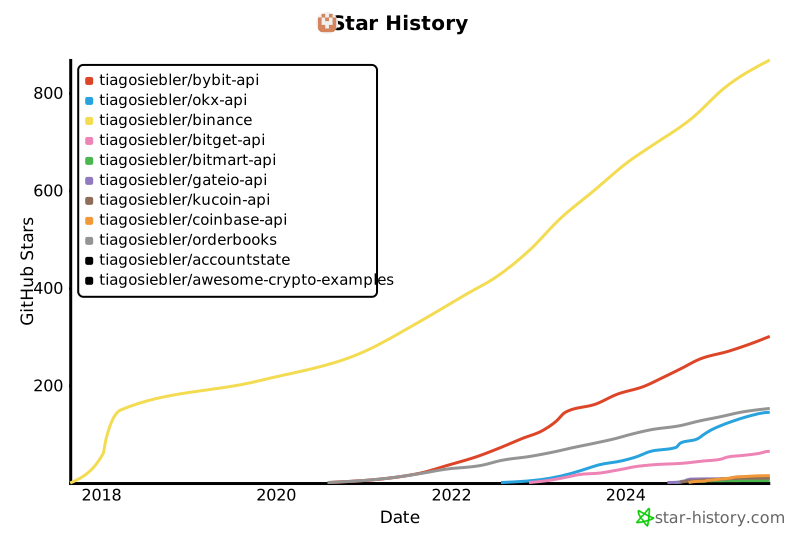](https://star-history.com/#tiagosiebler/bybit-api&tiagosiebler/okx-api&tiagosiebler/binance&tiagosiebler/bitget-api&tiagosiebler/bitmart-api&tiagosiebler/gateio-api&tiagosiebler/kucoin-api&tiagosiebler/coinbase-api&tiagosiebler/orderbooks&tiagosiebler/accountstate&tiagosiebler/awesome-crypto-examples&Date)
<!-- template_star_history_end -->