betach
Version:
Node.js Character.AI Unofficial API
167 lines (127 loc) • 4.63 kB
Markdown
[](https://www.npmjs.com/package/characterai.js)
[](https://github.com/Yizack/characterai.js/actions/workflows/tests.yml)
[](https://codecov.io/gh/Yizack/characterai.js)
# characterai.js
Node.js Character.AI Unofficial API
# Index
- [Installation](#installation)
- [Use](#use)
- [Get `AI_KEY` and `CHARACTER_ID`](#get-ai_key-and-character_id)
- [Examples](#examples)
- [Text a character via the command-line](#text-a-character-via-the-command-line)
- [Discord bot integration](#discord-bot-integration)
# Installation
Installation is done using the npm install command:
```sh
npm install characterai.js
```
# Use
```js
import CharacterAI from "characterai.js";
const message = "YOUR MESSAGE";
const characterAI = new CharacterAI(AI_KEY, CHARACTER_ID);
const chat = await characterAI.continueOrCreateChat();
const response = await chat.sendAndAwaitResponse({ message, singleReply: true });
console.log(response);
```
# Get `AI_KEY` and `CHARACTER_ID`
## `AI_KEY`
1. Open your browser and press `F12`.
2. Go to https://beta.character.ai/.
3. Click on the `Network` tab.
4. Click on `Fetch/XHR` filter.
5. Find and click on `auth0/`.
6. Go to the `Response` tab.
7. Copy the key.
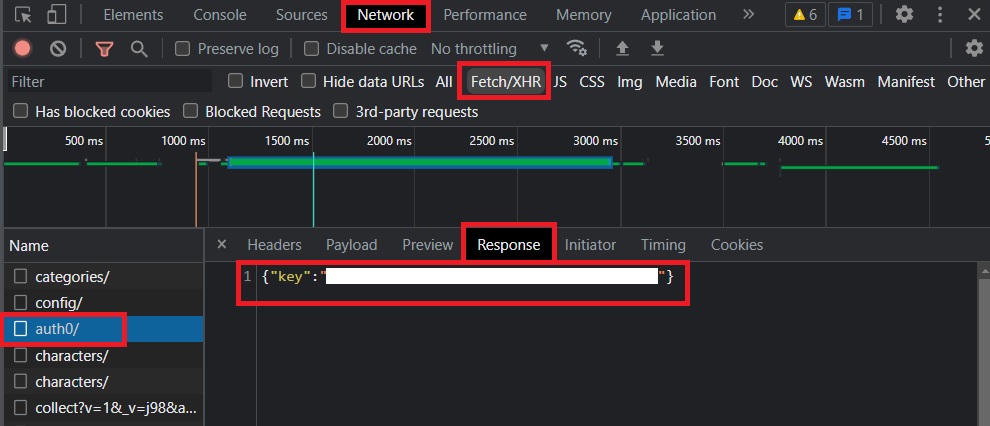
## `CHARACTER_ID`
1. Open your character link in your browser.
2. Copy the last part of the URL after `char=` that's your character ID.

# Examples
List of examples of ways to use this package.
## Text a character via the command-line
Text a character using a command prompt using the native `readline` node package.
1. Install the necessary packages.
```sh
npm install dotenv characterai.js
```
2. Create a `.env` file in your project's root folder and paste your credentials.
```env
CHARACTER_ID = ""
AI_KEY = ""
```
Code: [`cmd-chat.js`](/examples/cmd-chat.js)
```js
import CharacterAI from "characterai.js";
import { createInterface } from "readline";
import * as dotenv from "dotenv";
dotenv.config();
const getCharResponse = async (message) => {
const characterAI = new CharacterAI(process.env.AI_KEY, process.env.CHARACTER_ID);
const chat = await characterAI.continueOrCreateChat();
const response = await chat.sendAndAwaitResponse({ message, singleReply: true });
return response;
};
const readline = createInterface({
input: process.stdin,
output: process.stdout,
});
const chat = () => readline.question("Message: ", async (msg) => {
if (msg == "exit") {
return readline.close();
}
console.log("Response: ", await getCharResponse(msg), "\n");
chat();
});
chat();
```
## Discord bot integration
Text a character via Discord bot using the [`discord.js`](https://github.com/discordjs/discord.js) package. The bot looks for a message with an `!ai` prefix.
1. Install the necessary packages.
```sh
npm install discord.js dotenv characterai.js
```
2. Create a `.env` file in your project's root folder and paste your credentials.
```env
DISCORD_TOKEN = " "
CHARACTER_ID = ""
AI_KEY = ""
```
Code: [`discord-bot.js`](/examples/discord-bot.js)
```js
import { Client, GatewayIntentBits } from "discord.js";
import CharacterAI from "characterai.js";
import * as dotenv from "dotenv";
dotenv.config();
const getCharResponse = async (message) => {
const characterAI = new CharacterAI(process.env.AI_KEY, process.env.CHARACTER_ID);
const chat = await characterAI.continueOrCreateChat();
const response = await chat.sendAndAwaitResponse({ message, singleReply: true });
return response;
};
const client = new Client({ intents: [
GatewayIntentBits.Guilds,
GatewayIntentBits.MessageContent,
GatewayIntentBits.GuildMessages,
GatewayIntentBits.GuildIntegrations
] });
client.on("ready", () => {
console.log(`Logged in as ${client.user.tag}!`);
});
client.on("messageCreate", async message => {
if (message.content.startsWith("!ai")) {
await message.channel.sendTyping();
const mensaje = message.content.split("!ai ")[1];
const { username } = message.author;
try {
const response = await getCharResponse(`${username} says:\n${mensaje}`);
await message.reply(`${response}`);
}
catch (error) {
console.log(error);
}
}
});
client.login(process.env.DISCORD_TOKEN);
```