back-proxy
Version:
Reversing proxy to you gadgets or home http-server behind NAT with dynamic WAN ip. Needs two "servers": one in Internet for you connects for proxing and second in you home for serve proxy requests.
54 lines (37 loc) • 1.62 kB
Markdown
Reversing proxy to you gadgets or home http-server behind NAT with dynamic WAN ip.
Needs two "servers": one in Internet for you connects for proxing and second in you home for serve proxy requests.
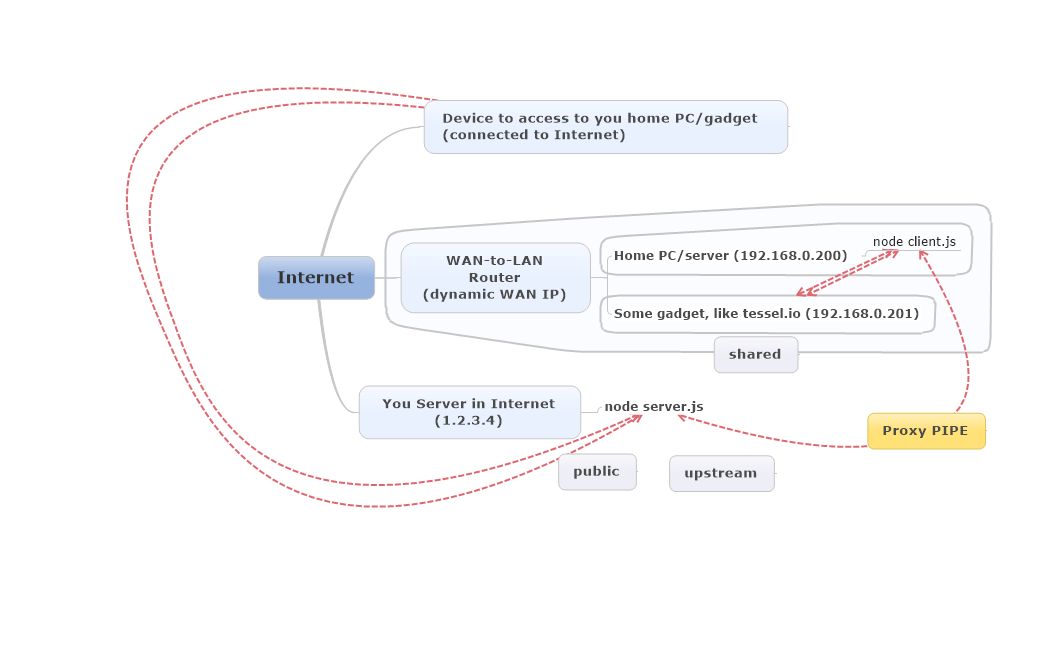
After starting, `client.js` make permanent `pipe` to `server.js`.
On new connection from any device to `public` - `server.js` send data to `pipe` and `client.js` opens same connection to `shared` (and so one on next connections).
When connection dropped by any side - on `server.js` or `client.js` - other end drop connection to.
You want to access to you gadget (like http://tessel.io who have own web server) in home LAN (ip: 192.168.0.201).
### Steps
#### Create config (used for client and server scripts)
Please copy `config.default.js` to `config.js` and modify to you needs:
```javascript
module.exports = {
// Public server config (where you connect to access LAN server)
public: {
host: '1.2.3.4',
port: '8080'
},
// Upstream server config (where proxy from LAN connect)
upstream: {
host: '1.2.3.4',
port: '8888'
},
// Shared server config (server in LAN)
shared: {
host: '192.168.0.201',
port: '8000'
}
};
```
For http-server - browse to http://1.2.3.4:8080/ and you will see page from you home http-server http://192.168.0.201:8000
*Note:* any protocol supported, not only http. This scripts only traverse data you send to socket.